[WIP][dashboard scoped filter] part 1: scope selector modal#8404
[WIP][dashboard scoped filter] part 1: scope selector modal#8404graceguo-supercat wants to merge 158 commits intofeature--dashboard-scoped-filterfrom
Conversation


 graceguo-supercat
changed the title
graceguo-supercat
changed the title
graceguo-supercat
changed the title
graceguo-supercat
changed the title

* [docs] New, document need for PG to use autocommit for CTAS


* [ci] Deprecate flake8

* Addressing @villebro's comments


|
|
||
| describe('dashboardFilters reducer', () => { | ||
| // disable broken unit tests by now, will fix it in another PR | ||
| xdescribe('dashboardFilters reducer', () => { |
There was a problem hiding this comment.
can we fix the unit tests in this pr since the behavior is being changed (and hopefully the unit tests confirm the proper change)?
There was a problem hiding this comment.
fixed. this is dashboardFilters reducer unit test. I have a lot more changes for dashboardFilters reducer in next PR, to merge filter scope logic into redux state.
I want to keep minimum change for redux change in this PR to avoid merge conflicts.
| */ | ||
| import React from 'react'; | ||
|
|
||
| export default function CheckboxUnchecked() { |
There was a problem hiding this comment.
same comment from CheckboxChecked
superset/assets/src/dashboard/components/filterscope/FilterScopeSelector.jsx
Outdated
Show resolved
Hide resolved
| dashboardFilters = {}, | ||
| isSingleEditMode = true, | ||
| }) { | ||
| if (Object.keys(dashboardFilters).length === 0) { |
There was a problem hiding this comment.
this is unneeded, Object.values({}).map(...) returns []
| let children = []; | ||
| if (currentNode.children && currentNode.children.length) { | ||
| currentNode.children.forEach(child => { | ||
| const cNode = traverse(components[child]); |
There was a problem hiding this comment.
what's a cNode? full variable names please
| } | ||
| }; | ||
|
|
||
| if (nodes && nodes.length) { |
Also fix isort issue on master

 kristw
left a comment
kristw
left a comment
kristw
left a comment
There was a problem hiding this comment.
I wonder if in the future we can break a PR like this into smaller chunks? It is difficult to review 1600 lines of code.
Perhaps small PRs for the individual UI components and util functions, before another PR for the integration.
|
|
||
| this.modal = null; | ||
| this.close = this.close.bind(this); | ||
| this.setModalRef = this.setModalRef.bind(this); |
There was a problem hiding this comment.
can use React.createRef() instead of manually setting ref
| expanded={expanded} | ||
| onCheck={onCheck} | ||
| onExpand={onExpand} | ||
| onClick={() => {}} |

 williaster
left a comment
williaster
left a comment
williaster
left a comment
There was a problem hiding this comment.
left some comments, will do another pass later
| componentId: component.id, | ||
| directPathToFilter, | ||
| scope: DASHBOARD_ROOT_ID, | ||
| scope: 'ROOT_ID', |
There was a problem hiding this comment.
why no constant anymore?
| */ | ||
| import React from 'react'; | ||
|
|
||
| export default function CheckboxUnchecked() { |
superset/assets/src/dashboard/components/filterscope/FilterFieldTree.jsx
Outdated
Show resolved
Hide resolved
| return `${chartId}_${column}`; | ||
| } | ||
|
|
||
| export function getDashboardFilterByKey(key) { |
There was a problem hiding this comment.
I don't understand why this function is called getDashboardFilterByKey, maybe getChartIdAndColumnFromFilterId?
There was a problem hiding this comment.
renamed to getChartIdAndColumnFromFilterKey
| * specific language governing permissions and limitations | ||
| * under the License. | ||
| */ | ||
| export function getDashboardFilterKey(chartId, column) { |
There was a problem hiding this comment.
can you change this to named arguments for better type safety + readability? (you use named arguments in many other places)
There was a problem hiding this comment.
fixed as much as i found.
superset/assets/src/dashboard/components/filterscope/renderFilterFieldTreeNodes.jsx
Show resolved
Hide resolved
|
|
||
| const FILTER_SCOPE_CONTAINER_TYPES = [TAB_TYPE, DASHBOARD_ROOT_TYPE]; | ||
|
|
||
| export default function getFilterScopeNodesTree({ |
There was a problem hiding this comment.
can you please add a description for what this function does?
There was a problem hiding this comment.
please see the Implementation section. This tree structure is used by react-checkbox-tree framework.

Codecov Report
@@                         Coverage Diff                         @@
##           feature--dashboard-scoped-filter    #8404     +/-   ##
===================================================================
- Coverage                             67.65%   65.95%   -1.7%
===================================================================
  Files                                   448      469     +21
  Lines                                 22498    23091    +593
  Branches                               2364     2468    +104
===================================================================
+ Hits                                  15220    15230     +10
- Misses                                 7140     7700    +560
- Partials                                138      161     +23
Continue to review full report at Codecov.
|


* Separate RC from VERSION

* Fix pypi_push.sh and refine instructions

* Add SUPERSET_ prefix to env variables

* Finalize release instructions

* Change one-off to First Time Only

* Add tagging of final version

* Convert some remaining env variables and add a check step to pypi deploy


* added user tutorial and rearranged docs hierarchy

* added license header, renamed admin tutorial file

* fixed image url issue

* Fix spelling

* Tweaks to text based on feedback

* guilabel and menu test

* added guilabel and upload csv section

* tidy up of rst formatting
* [cli] Fix, import datasources exported by UI
* Update CONTRIBUTING.md

* Update CONTRIBUTING.md


* Allow customization of documentation icon and text

* Set icon width to 100%

* Use double quotes for strings

* Add support for database engine SAP Hana

* Support hana services

Increase time, minute, and second

* Fix hana return string

* Fix formatting errors
* [docs] Update CHANGELOG with 0.35.0

* [docs] Fix, github md problem

* passing onClick prop to header with the existing onChange method.

* basic test checking that label click fires the onChange method.

* cleaning up stuff caught by linting.
* Encode feature flags to JSON pessimistically

* Add unit test

* Remove old imports

|
Hey @graceguo-supercat - this PR is getting impossible to review due to the size of the delta. Should we close this one and open something fresh that's rebased off of latest master? |

|
Please comment in #8553. Please note I plan to work on feature branch |
|
@willbarrett @etr2460 review it for a long time, he prefer to use this old PR. |
20 participants


CATEGORY
SUMMARY
This is part 1 for Dashboard Scoped Filter project. This PR is for a new UI module: filter scope selector modal. It covers the UI/UX that display/select scope (tabs and charts) for a filter field. Update dashboard redux state and persist filter scope settings to backend, will be covered in another PR.
Superset dashboard stores layout data in a tree structure. This layout structure always contains a root component. A root component will have a grid component (for dashboard without tabs) or a root-level tabs components as its children. In the dashboard, every UI component (tabs, row, column, and chart, etc) is a tree node. For example:
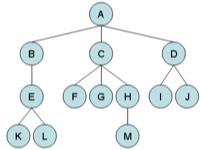
We can think A is root component, leaves(K,L, F, G, M, I, J) are chart components, and the rest can be container (like row, column or tabs) components.
With the growing size of the dashboard, user may want to apply one dashboard filter to some of charts in dashboard, and one filter apply to another set of charts. A very common use case is user groups similar charts in different tabs, and make a filter only applicable for this group. Currently the way to set filter's scope is not very easy to use:

This PR introduced a new UI component: filter scope selector.
When user clicks the
Savebutton at the bottom of the modal, we will aggregate the checked chart ids into scope object and update dashboard filters state. The algorithm for this aggregation will be covered in another PR.Features:
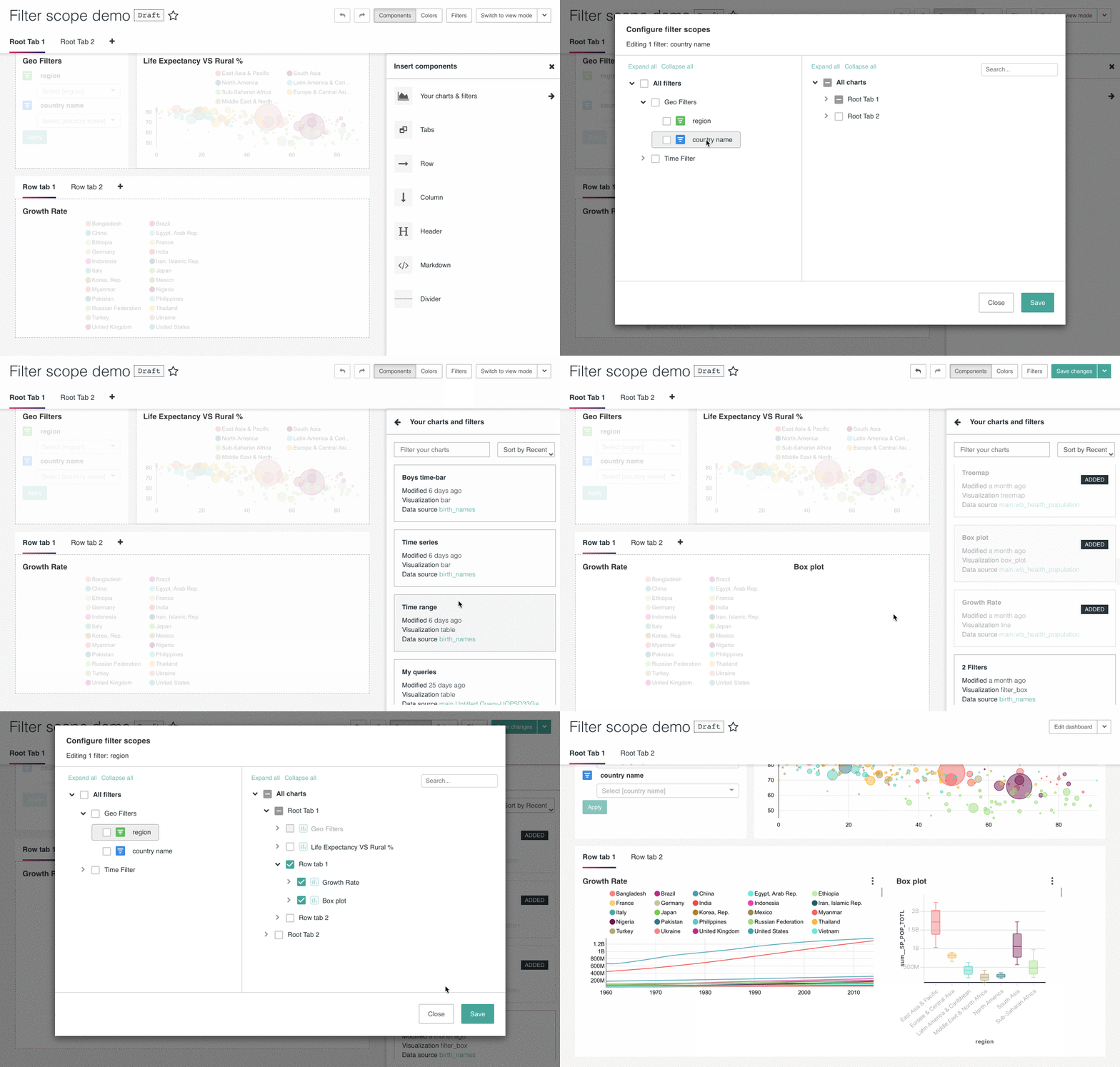
Start filter scope selector:
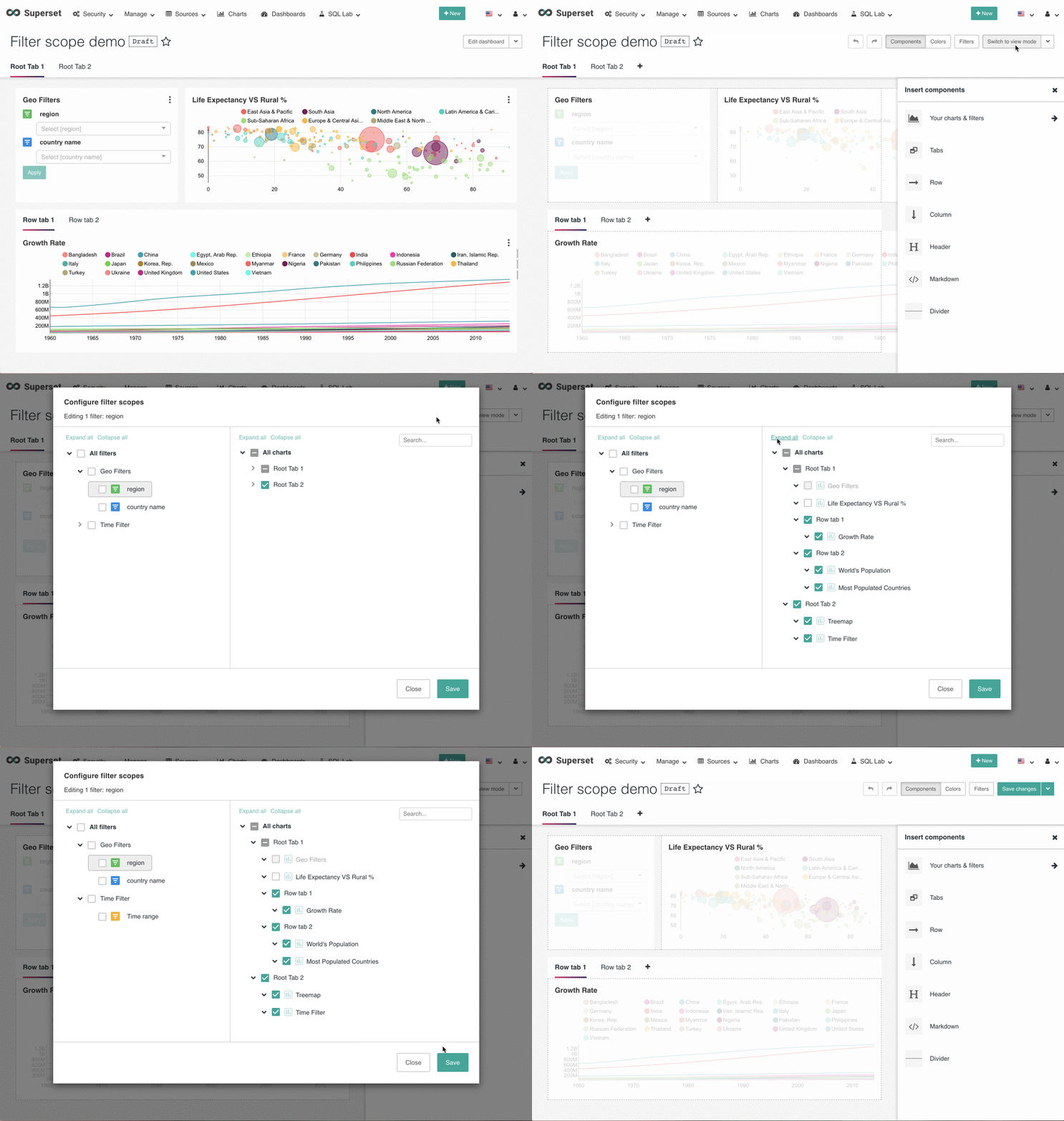
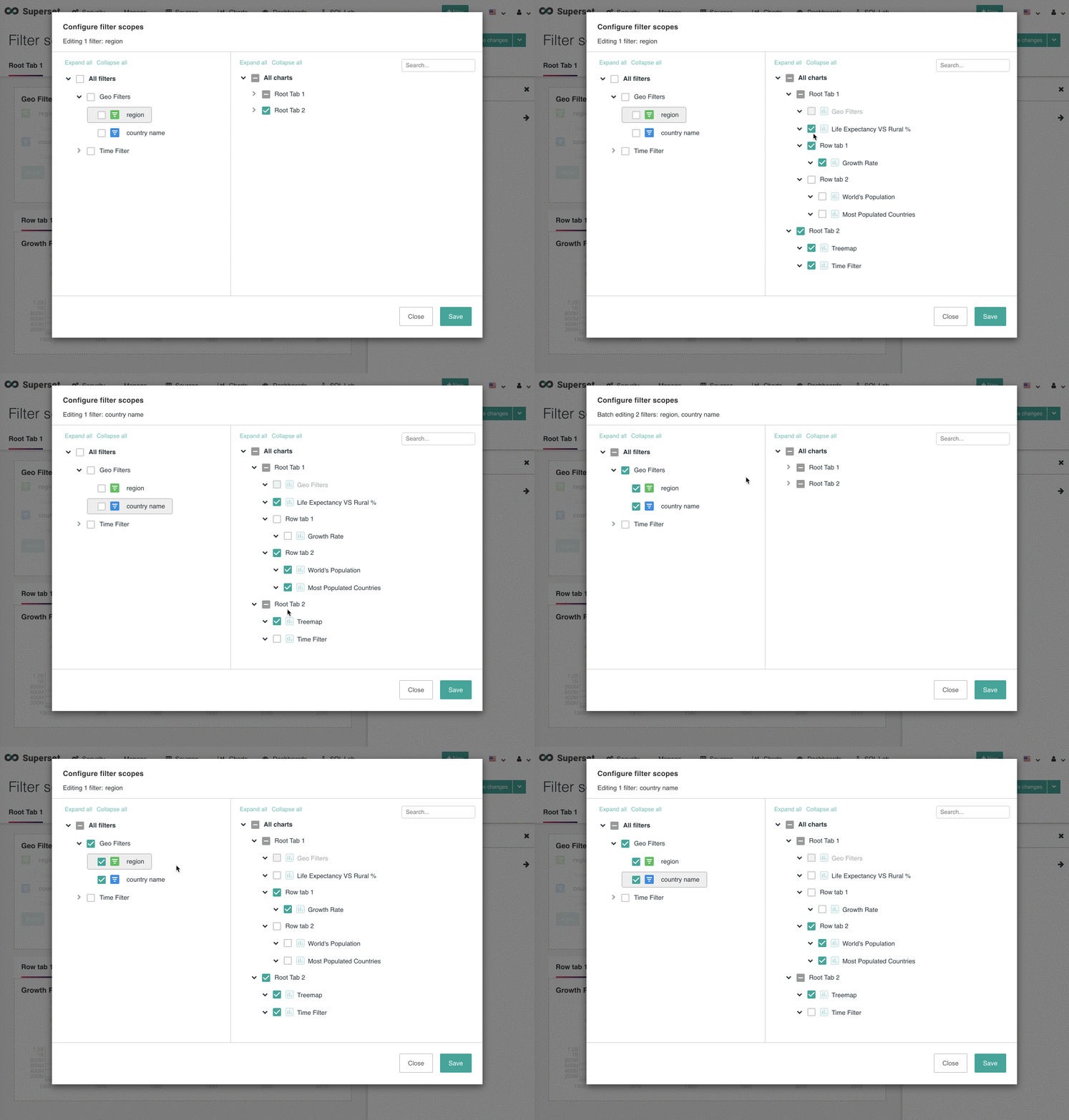
User can edit a single filter, or edit multiple filter fields all together. We also allow user toggle back to a single filter field in the multi-edit mode:
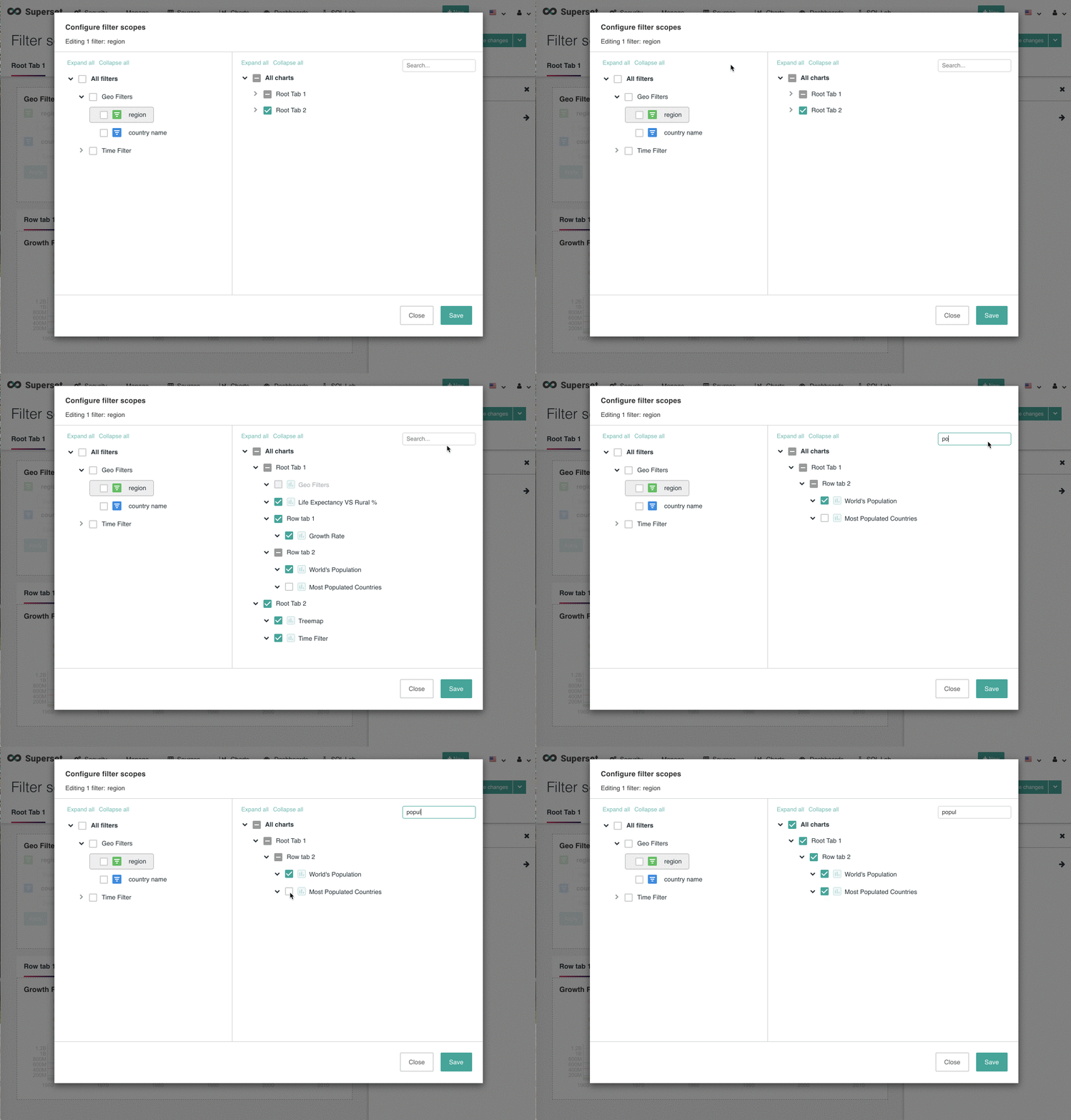
Search chart name:
When new chart is added to dashboard, based on its layout position, it will get filters that are applicable to its tab(s):
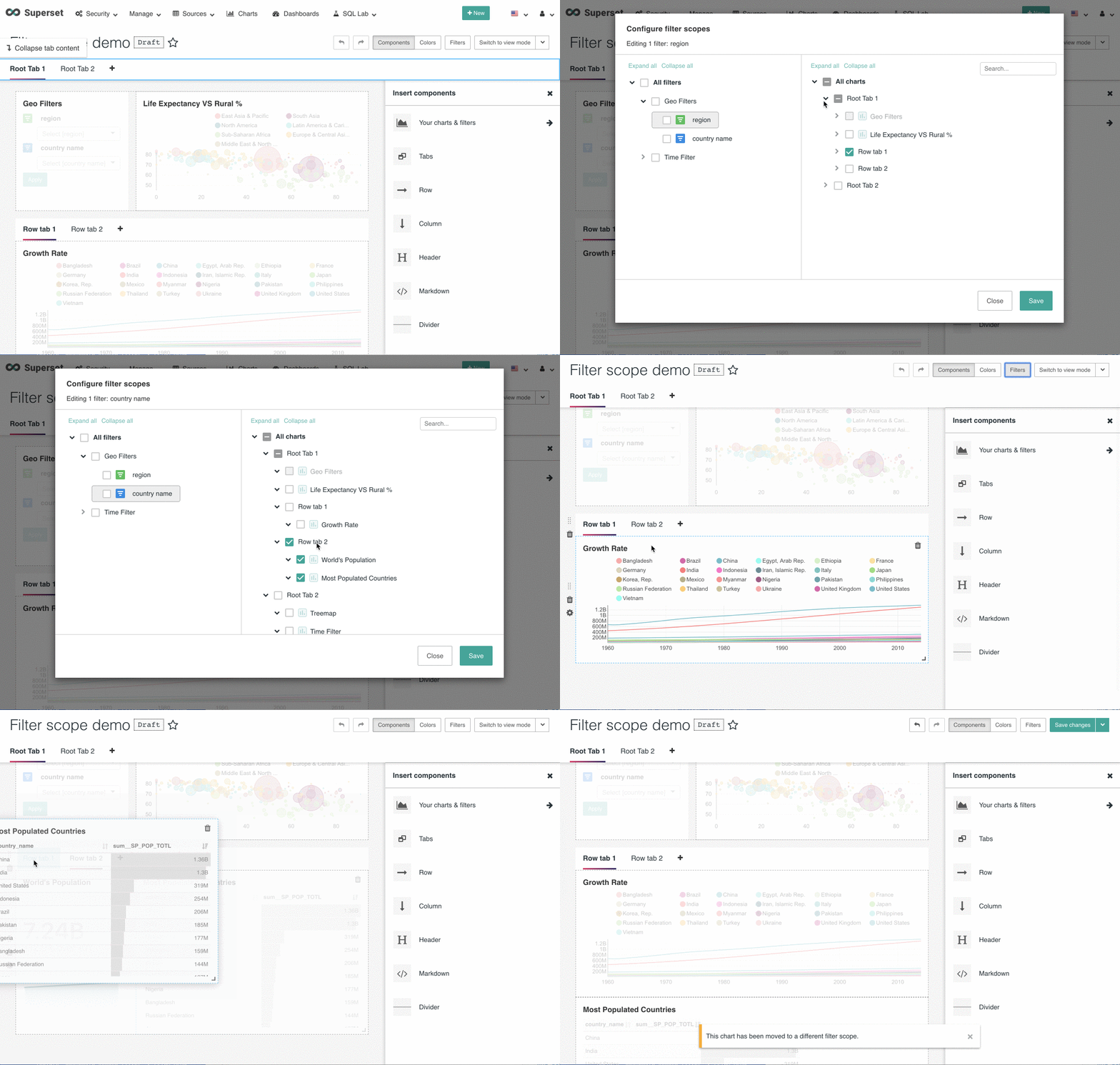
When user move charts between tabs, this may cause chart to be applicable to different filter(s). We will show a warning message when chart is moved to a different filter scope.
Implementation
Filter scope selector has following UI components:
Container component:
src/dashboard/containers/FilterScope.jsxmodal trigger:
src/dashboard/components/filterscope/FilterScopeModal.jsxcore function UI component:
src/dashboard/components/filterscope/FilterScopeSelector.jsxcheckbox tree component in left pane:
FilterFieldTree.jsxrecursive traversal renderer for each filter field tree node:
renderFilterFieldTreeNodes.jsxsimple UI component for filter filed item:
FilterFieldItem.jsxcheckbox tree component in right pane:
FilterScopeTree.jsxrecursive traversal renderer for each filter scope tree node:
renderFilterScopeTreeNodes.jsxutil functions:
getFilterFieldNodesTree: build filter field tree from dashboard filters redux state.getFilterScopeNodesTree: build filter scope tree from dashboard layout.Tree and tree nodes
We used a 3rd party component to render left panel filter field selector and right panel scope selector. It best matched our layout data structure, and offers very natural and convenient user experience like single selection, group selection, expand-on-click, etc.
According to this API, a
CheckboxTreecomponent needs following props:For filter field tree, the tree node data is:
For filter scope tree, the tree node data is:
Local state in the filter scope selector modal
For each filter filed, we construct a unique filter key which is composed of filter_box's chart id and filter's column name:
chartId_columnNameFilterScopeSelectorcomponent uses following data to maintain the current state in the modal:showSelector: as long as dashboard has one or more filter, we show filter scope selector UI. otherwise, show message says no filter in the dashboard.filterFieldNodes: filter fields tree object.filterScopeMap: a map for filter scope selections. in each entry, key is filter key, value is filter scope tree object for a filter field.checkedFilterFields: array of all chosen filter key(s) in the left pane.Based on the chosen filter keys from left pane, we show the filter scope tree in the right pane, which memorize the expanded tabs and selected charts. If all charts under the tab are selected, tab will show checked state in its checkbox. If some of the charts under the tab are selected, tab will show half checked state. And if none of the charts are selected, tab will show a empty state for its checkbox.
TEST PLAN
Manual test.
ADDITIONAL INFORMATION
REVIEWERS
@etr2460 @williaster @mistercrunch @kenchendesign