VIDEO-5734/blur background feature #550
Conversation


…ble at the same time, check for browser support
… front end bugs, updated jest config for image imports


 charliesantos
left a comment
charliesantos
left a comment
charliesantos
left a comment
There was a problem hiding this comment.
Nice one @gabriel-jt ! I did a first pass and left a few comments.
| .catch(onError) | ||
| .finally(() => setIspublishing(false)); | ||
| .finally(() => { | ||
| updateBackgroundSettings(backgroundSettings, false, true); |
There was a problem hiding this comment.
Not sure if this is the best place to re-apply background settings after toggling video back on. I only did this in the prototype for quick testing. @timmydoza thoughts on where is the best place to put this? That is, we need to re-apply the background settings after user toggles the video back on.
There was a problem hiding this comment.
I think this could be done in a useEffect hook inside of useBackgroundSettings.tsx.
|
|
||
| export default function useBackgroundSettings(room: Room | undefined | null) { | ||
| let currentSettings: BackgroundSettings; | ||
| const localStorageSetting = window.localStorage.getItem(BG_SETTINGS_KEY); |
There was a problem hiding this comment.
Same here, I only did this for quick prototype. Not sure if it's good to follow this pattern in our current codebase. @timmydoza what is our current pattern for saving things like this? I remember you did something similar for video settings.
There was a problem hiding this comment.
Yeah, we use localStorage in useLocalTracks.ts. I think it's fine, but the key could be moved to constants.ts with the rest of the keys.
| updateSettings({ type: 'none' }); | ||
| return; | ||
| } | ||
| currentRoom = currentRoom || newRoom; |
There was a problem hiding this comment.
I wonder if it's possible to get the current room without passing a room or newRoom param..
| return; | ||
| } | ||
|
|
||
| const videoTrackValue = Array.from(currentRoom.localParticipant.videoTracks.values())[0]; |
There was a problem hiding this comment.
Do we have hooks to get the local video track? I only did this for prototype, sorry not meant to be copied.
There was a problem hiding this comment.
We do, but these hooks can only be used by components that are children of the VideoProvider component. This hook is used by the VideoProvider itself.
However, the VideoProvider component does provide the localTracks array to the rest of the app, so we can just grab it directly. In VideoProvider.tsx:
const [backgroundSettings, updateBackgroundSettings] = useBackgroundSettings(room, localTracks);
| // TODO : Add video processing logic after backgroundSettings change | ||
| // useEffect hooks, etc ... | ||
| const bgLibSettings = { | ||
| assetsPath: '/virtualbackground', |
There was a problem hiding this comment.
Since there's only one property in this object, I think we can just set a constant value for assetsPath.
| } | ||
| const videoTrack = videoTrackValue.track; | ||
| const { type } = settings; | ||
| if (type !== backgroundSettings.type || force) { |
There was a problem hiding this comment.
Why do we need force again?
There was a problem hiding this comment.
There's also a lot of duplicated checks in this if block. I understand you are using my prototype as a reference 😅 . I think this block can be simplified.
Move the initialization outside of updateBackgroundSettings. You might need to wrap it in an useEffect.
if (!blurProcessor) {
  blurProcessor = new GaussianBlurBackgroundProcessor({ ...bgLibSettings });
  await blurProcessor.loadModel();
}
Then you can shrink your if block to something like this
if (type !== backgroundSettings.type || force) {
  if (videoTrack.processor) {
    videoTrack.removeProcessor(videoTrack.processor);
  }
  if (type === 'blur') {
    videoTrack.addProcessor(blurProcessor);
  }
}There was a problem hiding this comment.
I also think that there's some room to refactor this whole function. I find the code here is a little hard to read. There are a number of if statements (some that are nested if statements), and it's just a lot of logic branches to parse through in my head.
Sounds like this mostly came from prototype code, and I think it's fine to use prototype code as guidance. But I'd encourage you to own this section. You can really get creative with it if you want. You could even delete this function and start from scratch if that sounds fun to you 🙂.
Just keep in mind that this code is meant to be a reference to our customers. Maybe some of our customers will look at this code to learn how to implement virtual backgrounds in their own apps. So readability and simplicity are extra important here. Don't be afraid to employ the use of comments and vertical white-space to help with readability.
Let me know if you want to talk through any implementation ideas you have - I'm happy to help!
| if (!blurProcessor) { | ||
| blurProcessor = new GaussianBlurBackgroundProcessor({ ...bgLibSettings }); | ||
| await blurProcessor.loadModel(); | ||
| } |
There was a problem hiding this comment.
We should probably put this outside of this method.

 timmydoza
left a comment
timmydoza
left a comment
timmydoza
left a comment
There was a problem hiding this comment.
Nice work @gabriel-jt! It's fun to try out the blur feature in action. Feel free to ping me if you have any questions about my comments.
| "@twilio/conversations": "^1.1.0", | ||
| "@twilio-labs/plugin-rtc": "0.8.2", | ||
| "@twilio/conversations": "1.1.0", | ||
| "@twilio/video-processors": "1.0.0", |
There was a problem hiding this comment.
Looks like the addition of @twilio/videoprocessors has increased the bundle size of this app by about 45%.
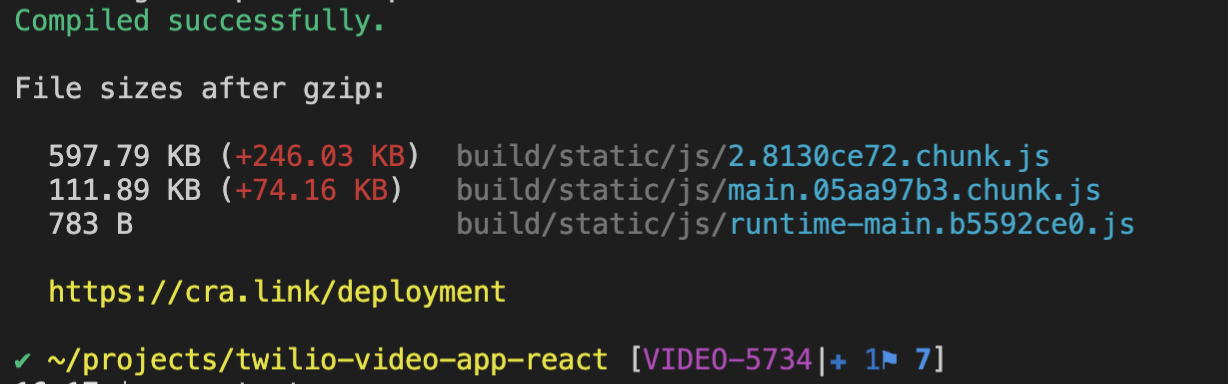
@charliesantos do you know if there's any way to reduce this? Or is all the tensorflow stuff just that large?
With a bundle size like this, I think it may be time to start considering React's code-splitting feature: https://reactjs.org/docs/code-splitting.html#code-splitting
Since the virtual background code isn't needed while the user is dealing with the 'Join Room' screens, we could use code-splitting to put all virtual background code in a separate file and defer its download. This way, the user could start using the app before the new ~320kb of code has finished downloading. This would help to keep the "Time to Interactive" and "First Contentful Paint" times down (these are metrics from Chrome's built-in tool Lighthouse).
Downloading 700kb of JS for an app isn't that huge compared to most large commercial sites out there, but keeping bundle size manageable is always a good thing to think about. One good test is to use the Chrome Devtools to throttle your internet connection, and to see how long the app takes to load under a variety of different simulated internet conditions. If it ever feels like it takes too long to load, then we should put some effort into reducing the bundle size.
If we choose to add code-splitting, we can do it in another PR after this one gets merged. Just something to think about for now.
There was a problem hiding this comment.
@timmydoza , that is correct. The increase in size is due to video processors dependencies. But we will shrink this down significantly in the upcoming release because we will be removing tfjs support. So I think we can leave this as is for now.
package.json
Outdated
| "@material-ui/icons": "^4.9.1", | ||
| "@twilio-labs/plugin-rtc": "^0.8.2", | ||
| "@twilio/conversations": "^1.1.0", | ||
| "@twilio-labs/plugin-rtc": "0.8.2", |
There was a problem hiding this comment.
Is there a reason why the carets were removed? I think they should stay there.
There was a problem hiding this comment.
The carats were removed since there were some breaking changes in the newer versions of @twilio-labs/plugin-rtc and @twilio/conversations that prevented the app from running
There was a problem hiding this comment.
Interesting. What errors were you seeing?
The version numbers of @twilio-labs/plugin-rtc and @twilio/conversations as specified in the package-lock.json file are 0.8.2 and 1.1.0, respectively. package-lock.json dictates the exact versions that should be installed. So I'm wondering if you ran into some other kind of issue, because
npm shouldn't have installed newer versions.
I consider it a best practice to leave the carets in (with exception of the react-scripts package). The version numbers listed in package.json describe the range of versions of a package that will be compatible with the app. Note that the package.json file does not dictate which specific version is installed (this is what package-lock.json is for). The caret means that this app can use any package version that has a minor or patch version number (but not major version number) higher than what's specified. The three numbers in a version all have a specific meaning, which is called semantic versioning. Generally speaking, any new package version that only increments the minor or patch version numbers should not introduce any breaking changes.
The package-lock.json file serves a different purpose. This file dictates the exact package versions that should be installed. This is to ensure that each time anybody runs npm install, the exact same set of packages is installed. This helps reduce weird issues where some users experience bugs that other users don't because they installed a slightly different set of packages.
So the caret won't introduce any breaking changes, and it also is meant to indicate that newer minor and patch versions can be installed. So let's keep the carets in (and also add it to rimraf, copyfiles, twilio, and @twilio/video-processors). Let me know if there are any issues that you run into. I'd be more than happy to take a look. 🙂
Also, this semver calculator is a fun way to learn about npm's version syntax.
There was a problem hiding this comment.
It's been a while since Charlie and I dealt with these issues, so I don't remember them off the top of my head. Thinking back, I think I got those errors after updating all my npm packages, which introduced the breaking changes from the newer versions. I was able to add back the carats with no issues though!
src/components/MenuBar/Menu/Menu.tsx
Outdated
| setIsChatWindowOpen(false); | ||
| setMenuOpen(false); | ||
| }} | ||
| disabled={!isVideoEnabled} |
There was a problem hiding this comment.
I don't think we should disable this button when the user disables their video. I think the user should be allowed to change their virtual background settings even while their video is turned off. The new settings can then be applied when the user turns their video back on.
Also, it's a little weird to disable this button while the background selection window is open. It prevents me from closing it from the menu.
|
|
||
| export default function useBackgroundSettings(room: Room | undefined | null) { | ||
| let currentSettings: BackgroundSettings; | ||
| const localStorageSetting = window.localStorage.getItem(BG_SETTINGS_KEY); |
There was a problem hiding this comment.
Yeah, we use localStorage in useLocalTracks.ts. I think it's fine, but the key could be moved to constants.ts with the rest of the keys.
| let currentSettings: BackgroundSettings; | ||
| const localStorageSetting = window.localStorage.getItem(BG_SETTINGS_KEY); | ||
| currentSettings = localStorageSetting ? JSON.parse(localStorageSetting!) : { type: 'none', index: 0 }; |
There was a problem hiding this comment.
With these lines where they are, they will be executed any time the parent VideoProvider component needs to rerender. Since these lines are only used to set the default value of backgroundSettings, they only need to run just once.
Luckily, React has a neat way to handle this. We can pass a function to useState, and its return value will be used as the default value. The function that is passed to useState will only be executed once, so this will help to get rid of some unnecessary code execution.
  const [backgroundSettings, setBackgroundSettings] = useState<BackgroundSettings>(() => {
    const localStorageSettings = window.localStorage.getItem(BG_SETTINGS_KEY);
    return localStorageSettings ? JSON.parse(localStorageSettings) : { type: 'none', index: 0 };
  });
| return; | ||
| } | ||
|
|
||
| const videoTrackValue = Array.from(currentRoom.localParticipant.videoTracks.values())[0]; |
There was a problem hiding this comment.
We do, but these hooks can only be used by components that are children of the VideoProvider component. This hook is used by the VideoProvider itself.
However, the VideoProvider component does provide the localTracks array to the rest of the app, so we can just grab it directly. In VideoProvider.tsx:
const [backgroundSettings, updateBackgroundSettings] = useBackgroundSettings(room, localTracks);
| } | ||
| const videoTrack = videoTrackValue.track; | ||
| const { type } = settings; | ||
| if (type !== backgroundSettings.type || force) { |
There was a problem hiding this comment.
I also think that there's some room to refactor this whole function. I find the code here is a little hard to read. There are a number of if statements (some that are nested if statements), and it's just a lot of logic branches to parse through in my head.
Sounds like this mostly came from prototype code, and I think it's fine to use prototype code as guidance. But I'd encourage you to own this section. You can really get creative with it if you want. You could even delete this function and start from scratch if that sounds fun to you 🙂.
Just keep in mind that this code is meant to be a reference to our customers. Maybe some of our customers will look at this code to learn how to implement virtual backgrounds in their own apps. So readability and simplicity are extra important here. Don't be afraid to employ the use of comments and vertical white-space to help with readability.
Let me know if you want to talk through any implementation ideas you have - I'm happy to help!
| .catch(onError) | ||
| .finally(() => setIspublishing(false)); | ||
| .finally(() => { | ||
| updateBackgroundSettings(backgroundSettings, false, true); |
There was a problem hiding this comment.
I think this could be done in a useEffect hook inside of useBackgroundSettings.tsx.
charliesantos
left a comment
charliesantos
left a comment
There was a problem hiding this comment.
Looking really great @gabriel-jt !
| const { room, updateBackgroundSettings } = useVideoContext(); | ||
|
|
||
| const handleDisconnect = () => { | ||
| updateBackgroundSettings({ type: 'none', index: 0 }); |
There was a problem hiding this comment.
I don't think we want to update the settings to 'none' after disconnecting. We want to keep what the user had set right?
src/constants.ts
Outdated
| export const SELECTED_VIDEO_INPUT_KEY = 'TwilioVideoApp-selectedVideoInput'; | ||
|
|
||
| // This is used to store the current background settings in localStorage | ||
| export const BG_SETTINGS_KEY = 'bgsettings5'; |
There was a problem hiding this comment.
Just use bgsettings instead of bgsettings5 😄
I put 5 in there in the prototype code because I wanted to bust the cache.
There was a problem hiding this comment.
What about export const SELECTED_BACKGROUND_SETTINGS_KEY = 'TwilioVideoApp-selectedBackgroundSettings'? Just to be more descriptive and to have some consistency with the other keys. With a more descriptive variable name, we won't need a comment to describe the variable.
| // check if new background settings have been selected | ||
| if (settings.type !== backgroundSettings.type) { | ||
| // remove processor | ||
| if (videoTrack.processor) { |
There was a problem hiding this comment.
Just tested and this throws an error if I disable my video. Maybe update this to if (videoTrack && videoTrack.processor)?
| if (parsedSettings.type === 'blur') { | ||
| videoTrack.addProcessor(blurProcessor); | ||
| } |
There was a problem hiding this comment.
Should we just call setBackgroundSettings here? That way, all properties are handled.
setBackgroundSettings(parsedSettings);
timmydoza
left a comment
timmydoza
left a comment
There was a problem hiding this comment.
Great job refactoring this! I think we can go a little further though. Let me know if you have any questions about anything.
package.json
Outdated
| "@material-ui/icons": "^4.9.1", | ||
| "@twilio-labs/plugin-rtc": "^0.8.2", | ||
| "@twilio/conversations": "^1.1.0", | ||
| "@twilio-labs/plugin-rtc": "0.8.2", |
There was a problem hiding this comment.
Interesting. What errors were you seeing?
The version numbers of @twilio-labs/plugin-rtc and @twilio/conversations as specified in the package-lock.json file are 0.8.2 and 1.1.0, respectively. package-lock.json dictates the exact versions that should be installed. So I'm wondering if you ran into some other kind of issue, because
npm shouldn't have installed newer versions.
I consider it a best practice to leave the carets in (with exception of the react-scripts package). The version numbers listed in package.json describe the range of versions of a package that will be compatible with the app. Note that the package.json file does not dictate which specific version is installed (this is what package-lock.json is for). The caret means that this app can use any package version that has a minor or patch version number (but not major version number) higher than what's specified. The three numbers in a version all have a specific meaning, which is called semantic versioning. Generally speaking, any new package version that only increments the minor or patch version numbers should not introduce any breaking changes.
The package-lock.json file serves a different purpose. This file dictates the exact package versions that should be installed. This is to ensure that each time anybody runs npm install, the exact same set of packages is installed. This helps reduce weird issues where some users experience bugs that other users don't because they installed a slightly different set of packages.
So the caret won't introduce any breaking changes, and it also is meant to indicate that newer minor and patch versions can be installed. So let's keep the carets in (and also add it to rimraf, copyfiles, twilio, and @twilio/video-processors). Let me know if there are any issues that you run into. I'd be more than happy to take a look. 🙂
Also, this semver calculator is a fun way to learn about npm's version syntax.
| "@twilio/conversations": "^1.1.0", | ||
| "@twilio-labs/plugin-rtc": "0.8.2", | ||
| "@twilio/conversations": "1.1.0", | ||
| "@twilio/video-processors": "1.0.0", |
| const updateBackgroundSettings = useCallback( | ||
| async (settings: BackgroundSettings) => { | ||
| // check if new background settings have been selected | ||
| if (settings.type !== backgroundSettings.type) { | ||
| // remove processor | ||
| if (videoTrack.processor) { | ||
| videoTrack.removeProcessor(videoTrack.processor); | ||
| } | ||
| if (settings.type === 'blur') { | ||
| videoTrack.addProcessor(blurProcessor); | ||
| } else if (settings.type === 'image') { | ||
| // TODO add image replacement logic | ||
| } | ||
| updateSettings(settings); | ||
| } | ||
| }, | ||
| [backgroundSettings, videoTrack] | ||
| ); |
There was a problem hiding this comment.
Really nice refactor here!! 🎉 This function is super easy to make sense of.
| }, [videoTrack]); | ||
|
|
||
| // update the backgroundSettings and save into localStorage | ||
| const updateSettings = (settings: BackgroundSettings): void => { |
There was a problem hiding this comment.
I think this function would be useful if it were used in many places, but it's only called from updateBackgroundSettings. I think we could get rid of it and just move its contents into updateBackgroundSettings.
| blurProcessor = new GaussianBlurBackgroundProcessor({ | ||
| assetsPath: virtualBackgroundAssets, | ||
| }); | ||
| blurProcessor.loadModel(); |
There was a problem hiding this comment.
I'm not sure that this needs to be in a useEffect hook. Would it work if we moved it outside of useBackgroundSettings?
src/constants.ts
Outdated
| export const SELECTED_VIDEO_INPUT_KEY = 'TwilioVideoApp-selectedVideoInput'; | ||
|
|
||
| // This is used to store the current background settings in localStorage | ||
| export const BG_SETTINGS_KEY = 'bgsettings5'; |
There was a problem hiding this comment.
What about export const SELECTED_BACKGROUND_SETTINGS_KEY = 'TwilioVideoApp-selectedBackgroundSettings'? Just to be more descriptive and to have some consistency with the other keys. With a more descriptive variable name, we won't need a comment to describe the variable.
| if (parsedSettings.type === 'blur') { | ||
| videoTrack.addProcessor(blurProcessor); |
There was a problem hiding this comment.
This seems duplicative of what is already in updateBackgroundSettings. Also, I don't think we need to read from local storage every time the user enables their video. We can just rely on the backgroundSettings variable, which gets its initial value from local storage.
After thinking about this hook some, it seems like we just need to run the logic in updateBackgroundSettings whenever the settings are updated, or whenever the video track changes. In my mind this calls for a useEffect hook. The only state here is the selected background settings, and the video track. The application of the processor, and saving the settings to local storage are just side-effects of the changes in state. So I think all the code inside of updateBackgroundSettings can go in a useEffect hook instead, which will be set up to react to any changes in backgroundSettings or videoTrack. Instead of passing updateBackgroundSettings to the videoProvider, we could just pass setBackgroundSettings instead.
What do you think about a hook like this (it incorporates changes from my other comments):
let blurProcessor = new GaussianBlurBackgroundProcessor({
  assetsPath: '/virtualbackground',
});
blurProcessor.loadModel();

export default function useBackgroundSettings(videoTrack: LocalVideoTrack) {
  const [backgroundSettings, setBackgroundSettings] = useState<BackgroundSettings>(() => {
    const localStorageSettings = window.localStorage.getItem(BG_SETTINGS_KEY);
    return localStorageSettings ? JSON.parse(localStorageSettings) : { type: 'none', index: 0 };
  });

  useEffect(() => {
    if (videoTrack) {
      if (videoTrack.processor) {
        videoTrack.removeProcessor(videoTrack.processor);
      }
      if (backgroundSettings.type === 'blur') {
        videoTrack.addProcessor(blurProcessor);
      } else if (backgroundSettings.type === 'image') {
        // TODO add image replacement logic
      }
    }
    window.localStorage.setItem(BG_SETTINGS_KEY, JSON.stringify(backgroundSettings));
  }, [videoTrack, backgroundSettings]);

  return [backgroundSettings, setBackgroundSettings] as const;
}
There was a problem hiding this comment.
Hi Tim, after thinking about how to simplify this hook, I managed to simplify its implementation down to something similar to this! After some testing, this also takes care of an important edge case (reapplying the previously selected background settings after a user turns off then turns on their camera)
|
|
||
| const [isBackgroundSelectionOpen, setIsBackgroundSelectionOpen] = useState(false); | ||
| const [backgroundSettings, setBackgroundSettings] = useBackgroundSettings(); | ||
| const videoTracks = localTracks.find(track => track.name.includes('camera')) as LocalVideoTrack; |
There was a problem hiding this comment.
Nice idea to grab the camera track from here! One small thing: it's possible that localTracks.find returns undefined, so I think the type of this variable needs to be adjusted.
const videoTracks = localTracks.find(track => track.name.includes('camera')) as LocalVideoTrack | undefined;
This type will also need to be updated in useBackgroundSettings.
| const videoTracks = localTracks.find(track => track.name.includes('camera')) as LocalVideoTrack | undefined; | ||
| const [backgroundSettings, setBackgroundSettings, removeProcessor] = useBackgroundSettings(videoTracks); |
There was a problem hiding this comment.
| const videoTracks = localTracks.find(track => track.name.includes('camera')) as LocalVideoTrack | undefined; | |
| const [backgroundSettings, setBackgroundSettings, removeProcessor] = useBackgroundSettings(videoTracks); | |
| const videoTrack = localTracks.find(track => track.name.includes('camera')) as LocalVideoTrack | undefined; | |
| const [backgroundSettings, setBackgroundSettings, removeProcessor] = useBackgroundSettings(videoTrack); |
| return localStorageSettings ? JSON.parse(localStorageSettings) : { type: 'none', index: 0 }; | ||
| }); | ||
|
|
||
| // Specifically used for handling room disconnection |
There was a problem hiding this comment.
You can remove this comment. You can reuse this function below.
| // Specifically used for handling room disconnection |
| if (videoTrack.processor) { | ||
| videoTrack.removeProcessor(videoTrack.processor); | ||
| } |
There was a problem hiding this comment.
You can reuse the method you created above
| if (videoTrack.processor) { | |
| videoTrack.removeProcessor(videoTrack.processor); | |
| } | |
| removeProcessor(); |
There was a problem hiding this comment.
Hey Charlie, I made it a separate function and didn't use it inside the useEffect hook since I was getting warnings about missing removeProcessor as a dependency, but when I include it, I get another warning about how removeProcessor is updated on every render. What would be the best step/approach to this?
There was a problem hiding this comment.
There's a way to make this work, but I wonder if we need to worry about removing the processor when we disconnect from a room? When we disconnect from a room, track.stop() is automatically called because of this hook here (this is to turn off the camera light on laptops when the user disconnects from a room). Then when the user goes back to the Join Room screens, new tracks are acquired.
@charliesantos Since we are stopping the tracks on disconnect, do we need to remove the processor as well?
If we do, I think we can just handle that in the removeVideoTrack function in the useLocalTracks hook here. Something like this maybe (but only if needed):
  const removeLocalVideoTrack = useCallback(() => {
    if (videoTrack) {
      if (videoTrack.processor) {
        videoTrack.removeProcessor(videoTrack.processor)
      }
      videoTrack.stop();
      setVideoTrack(undefined);
    }
  }, [videoTrack]);
There was a problem hiding this comment.
Yes we need to remove the processor that way it won't show in the join screen. On @timmydoza 's suggestion, it doesn't seem to save us anything 😄 . I was hoping we don't have to duplicate the code. I think I'm leaning more towards keeping our current implementation. We will probably remove this later if we decide to launch the virtual background settings UI in the join screen page.
| console.log('tracks: '); | ||
| console.log(localTracks); |
| type: 'blur', | ||
| }; | ||
|
|
||
| describe('The useBackgroundSettings hook ', () => { |
There was a problem hiding this comment.
Let's add test for the following use cases:
- removeProcessor
- should call videoTrack.removeProcessor if videoTrack and videoTrack.processor exists
- should not call videoTrack.removeProcessor if videoTrack.processor doesn't exists
- should not call videoTrack.removeProcessor if videoTrack doesn't exists
- setBackgroundSettings
- should call videoTrack.removeProcessor if videoTrack and videoTrack.processor exists
- should not call videoTrack.removeProcessor if videoTrack.processor doesn't exists
- should not call videoTrack.removeProcessor if videoTrack doesn't exists
- should not call videoTrack.addProcessor with a param of blurProcessor if backgroundSettings.type is not equal to 'blur'
- should not call videoTrack.addProcessor if backgroundSettings.type is 'blur' but videoTrack is missing
- should set localStorage item for each of the use cases above
| const { result } = renderHook(() => useBackgroundSettings(mockVideoTrack as any)); | ||
| await act(async () => { | ||
| result.current[1](blurSettings as BackgroundSettings); |
There was a problem hiding this comment.
Line 41 seems to be duplicated on all tests. I think this can be in the beforeEach hook.
Also, it's better to assign the results into variables for readability, instead of accessing them directly from the array. I think this can also live in a beforeEach hook. Something like below.
  let backgroundSettings: any;
  let setBackgroundSettings: any;
  let removeProcessor: any;
  let renderResult: any;

  beforeEach(() => {
    const { result } = renderHook(() => useBackgroundSettings(mockVideoTrack as any));
    renderResult = result;
    [backgroundSettings, setBackgroundSettings, removeProcessor] = renderResult.current;
  });
Then your tests would look something like
  it('should return the backgroundsettings and update function.', () => {
    expect(renderResult.current).toEqual([defaultSettings, expect.any(Function), expect.any(Function)]);
  });

  it('should set the background settings correctly and set the video processor when "blur" is selected', async () => {
    await act(async () => {
      setBackgroundSettings(blurSettings as BackgroundSettings);
    });
    expect(backgroundSettings.type).toEqual('blur');
    expect(mockVideoTrack.addProcessor).toHaveBeenCalled();
});| const { room, removeProcessor } = useVideoContext(); | ||
|
|
||
| const handleDisconnect = (): void => { | ||
| removeProcessor(); |
There was a problem hiding this comment.
I just realized the background is also applied in the prejoin screen when I refresh. I think instead of calling the remove processor here, maybe we should call it in the prejoin screen.
charliesantos
left a comment
charliesantos
left a comment
There was a problem hiding this comment.
Great work Gabe! 🎉
* Moved more menu to the center of the menu bar

* VIDEO-5731 | Added background option to More Menu, selection dialog, and unit tests (#6)

Added background option to More Menu, selection dialog, and unit tests
Co-authored-by: Gabe Espinosa <[email protected]>

* VIDEO-5733 | Added npm script to copy video processor sdk assets to public folder (#8)

* Added npm script to copy video processor sdk assets to public folder

* added postinstall npm script

Co-authored-by: Gabe Espinosa <[email protected]>

* added rimraf and copyfiles dependency to package.json

* VIDEO-5732 | Added background selection UI (#7)

Added background selection UI

Co-authored-by: Gabe Espinosa <[email protected]>
Co-authored-by: timmydoza <[email protected]>

* VIDEO-5734/blur background feature (#550)

Implemented blur background feature (useBackgroundSettings hook and tests)
Co-authored-by: Gabe Espinosa <[email protected]>

* VIDEO-5735/Add virtual background feature (#557)

Added virtual background feature and unit tests
Co-authored-by: Gabe Espinosa <[email protected]>

* VIDEO-5735 | Add isSupported check and unit test (#560)

add isSupported check and unit test
Co-authored-by: Gabe Espinosa <[email protected]>

* VIDEO-6368 | wait to load image before removing processor (#570)

* wait to load image before removing processor
Co-authored-by: Gabe Espinosa <[email protected]>

* updated twilio-video sdk

* fixed breaking tests

* update package.json version and changelog

* update change log, package.json, and revisions

* Update CHANGELOG.md

Co-authored-by: Gabe Espinosa <[email protected]>
Co-authored-by: timmydoza <[email protected]>


Contributing to Twilio
Pull Request Details
JIRA link(s):
Description
Added blur background feature with unit tests
Before review
npm testBefore merge