Allow users to Update API Keys#146237
Conversation


 kc13greiner
added
Team:Security
kc13greiner
added
Team:Security

| const doesMetadataExist = Object.keys(selectedApiKey.metadata).length > 0; | ||
| const doCustomPrivilegesExist = Object.keys(selectedApiKey.role_descriptors ?? 0).length > 0; | ||
| const daysUntilExpiration = moment(selectedApiKey.expiration).diff(moment(), 'days', true); | ||
| const roundedDaysUntilExpiration = |
There was a problem hiding this comment.
Question to reviewer: Do you think this is an appropriate expiration value to display?
There was a problem hiding this comment.
The expiration summary on the table page is certainly more natural to interpret (i.e. number of hours or mins). I noticed we're limited to days in the flyout (reason?), but I could see this being a more free-form input like we see in other duration/time-based controls (like in discover for example).
If we don't want to change the control to more than just days (e.g. weeks or months), I would suggest displaying either the originally configured lifetime OR the remaining number of whole days (if possible a special case of "<1" for less than 1 day but more than 0). And then always show the "expires in"/"expired" summary text underneath the control (same as what's in the table).
Right now it will also display negative days after a key has expired, which I am not sure was intended. Is it useful to know how long ago a key expired? If so, I would just leave the lifetime at zero and add a text summary (e.g. "expired 3 hours ago"). I think this would be more intuitive than negative floating-point days.

There was a problem hiding this comment.
Thank you for the suggestion on this - it looks so much cleaner now with the Status

|
Pinging @elastic/kibana-security (Team:Security) |


 jeramysoucy
left a comment
jeramysoucy
left a comment
jeramysoucy
left a comment
There was a problem hiding this comment.
Looks good! As discussed, let's ping Thom to get his thoughts on a couple of things.
| @@ -62,6 +71,3 @@ created by which user in which realm. | |||
| If you have only the `manage_own_api_key` permission, you see only a list of your own keys. | |||
There was a problem hiding this comment.
This seems to also be true if you have the 'read_sec' permission and access to the API key's screen (via kibana admin or viewer role)?
There was a problem hiding this comment.
Great catch! I've added a line in the docs to reference the readonly view. @gchaps Would you mind reviewing the new sentence I added?
|
|
||
| To update an API key, open the main menu, then click *Stack Management > API Keys*, then click on the name of an existing API key. | ||
|
|
||
| Only the `Restrict privileges` and `metadata` fields can be updated. |
There was a problem hiding this comment.
Just for my own knowledge, is it pretty typical (on other platforms/apis) that expiration dates are locked once an API key is created?
There was a problem hiding this comment.
The original ticket said only those fields could be updated (that appears to be all ES allows). I think the process if a key is expired is to invalidate it and re- create

There was a problem hiding this comment.
If Elasticsearch allows updating expiration time then we should support it in the UI as well
There was a problem hiding this comment.
Elasticsearch only allows those fields in the request body
| }); | ||
| }); | ||
|
|
||
| it('updateApiKey() calls correct endpoint', async () => { |
There was a problem hiding this comment.
Complete nit, but the rest of the tests use 'queries the correct endpoint' language.
| defaultValues?: ApiKeyFormValues; | ||
| onSuccess?: (apiKey: CreateApiKeyResponse) => void; | ||
| onSuccess?: ( | ||
| createdApiKeyResponse: CreateApiKeyResponse | undefined, |
There was a problem hiding this comment.
Consistency nit
| createdApiKeyResponse: CreateApiKeyResponse | undefined, | |
| createApiKeyResponse: CreateApiKeyResponse | undefined, |
| const doesMetadataExist = Object.keys(selectedApiKey.metadata).length > 0; | ||
| const doCustomPrivilegesExist = Object.keys(selectedApiKey.role_descriptors ?? 0).length > 0; | ||
| const daysUntilExpiration = moment(selectedApiKey.expiration).diff(moment(), 'days', true); | ||
| const roundedDaysUntilExpiration = |
There was a problem hiding this comment.
The expiration summary on the table page is certainly more natural to interpret (i.e. number of hours or mins). I noticed we're limited to days in the flyout (reason?), but I could see this being a more free-form input like we see in other duration/time-based controls (like in discover for example).
If we don't want to change the control to more than just days (e.g. weeks or months), I would suggest displaying either the originally configured lifetime OR the remaining number of whole days (if possible a special case of "<1" for less than 1 day but more than 0). And then always show the "expires in"/"expired" summary text underneath the control (same as what's in the table).
Right now it will also display negative days after a key has expired, which I am not sure was intended. Is it useful to know how long ago a key expired? If so, I would just leave the lifetime at zero and add a text summary (e.g. "expired 3 hours ago"). I think this would be more intuitive than negative floating-point days.
| expect(await findByText('You do not have permission to create API keys')).toBeInTheDocument(); | ||
| expect(queryByText('Create API key')).toBeNull(); | ||
| }); | ||
|
|
There was a problem hiding this comment.
Should we include cases to check for manage-own vs. manage all view? Test callouts?
There was a problem hiding this comment.
Since we are mocking the data from ES it will show whatever we put in the mock. Looking at the routes/api-keys/get.ts it passes an isAdmin value which I believe is the flag that determines if the user gets all the keys or just theirs.
| } | ||
|
|
||
| return result; | ||
| } |
There was a problem hiding this comment.
There's no api_key_flyout.test.tsx file. Should we add one that tests the flyout in readonly vs. create vs. edit mode?
EDIT: Looks like this is all tested by the functional tests in x-pack/test/functional/apps/api_keys/home_page.ts


|
Tagging @gchaps for the docs changes. |

 gchaps
left a comment
gchaps
left a comment
gchaps
left a comment
There was a problem hiding this comment.
LGTM with a few minor comments
| 'xpack.security.accountManagement.createApiKey.customExpirationInputLabel', | ||
| 'xpack.security.accountManagement.apiKeyFlyout.customExpirationInputLabel', | ||
| { | ||
| defaultMessage: 'Lifetime (days)', |
There was a problem hiding this comment.
Can we remove (days) here as the word "days" is included in the field?
There was a problem hiding this comment.
@gchaps Just the days in the label? or on the input box as well?
There was a problem hiding this comment.
Just the days in the label.
There was a problem hiding this comment.
(days) removed in latest commit!

Co-authored-by: gchaps <33642766+gchaps@users.noreply.github.com>
Co-authored-by: gchaps <33642766+gchaps@users.noreply.github.com>

There was a problem hiding this comment.
All working well, a few comments below.
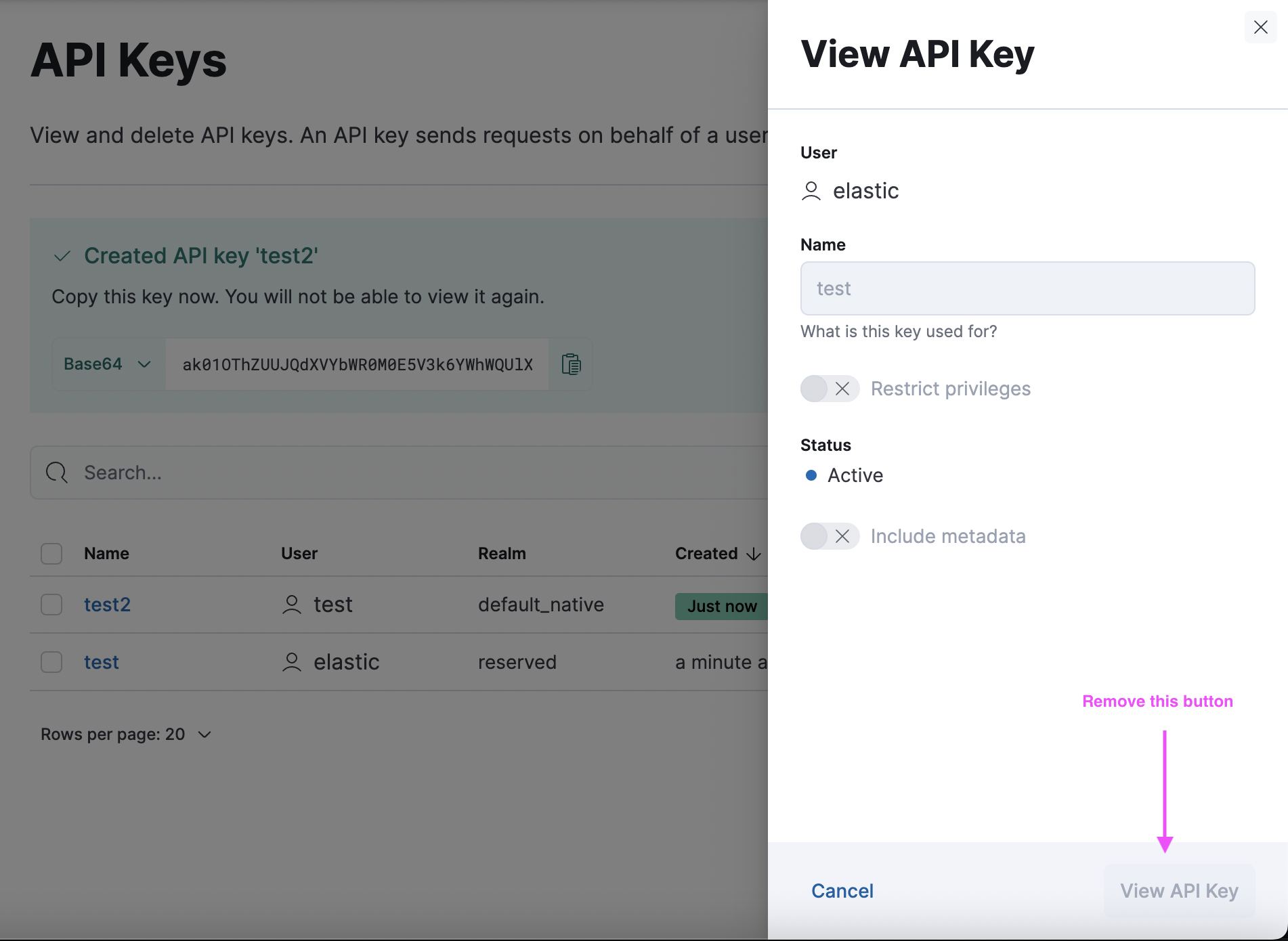
The "View API key" button doesn't make any sense (what would it do if it was enabled?) - I would change it to "Close":
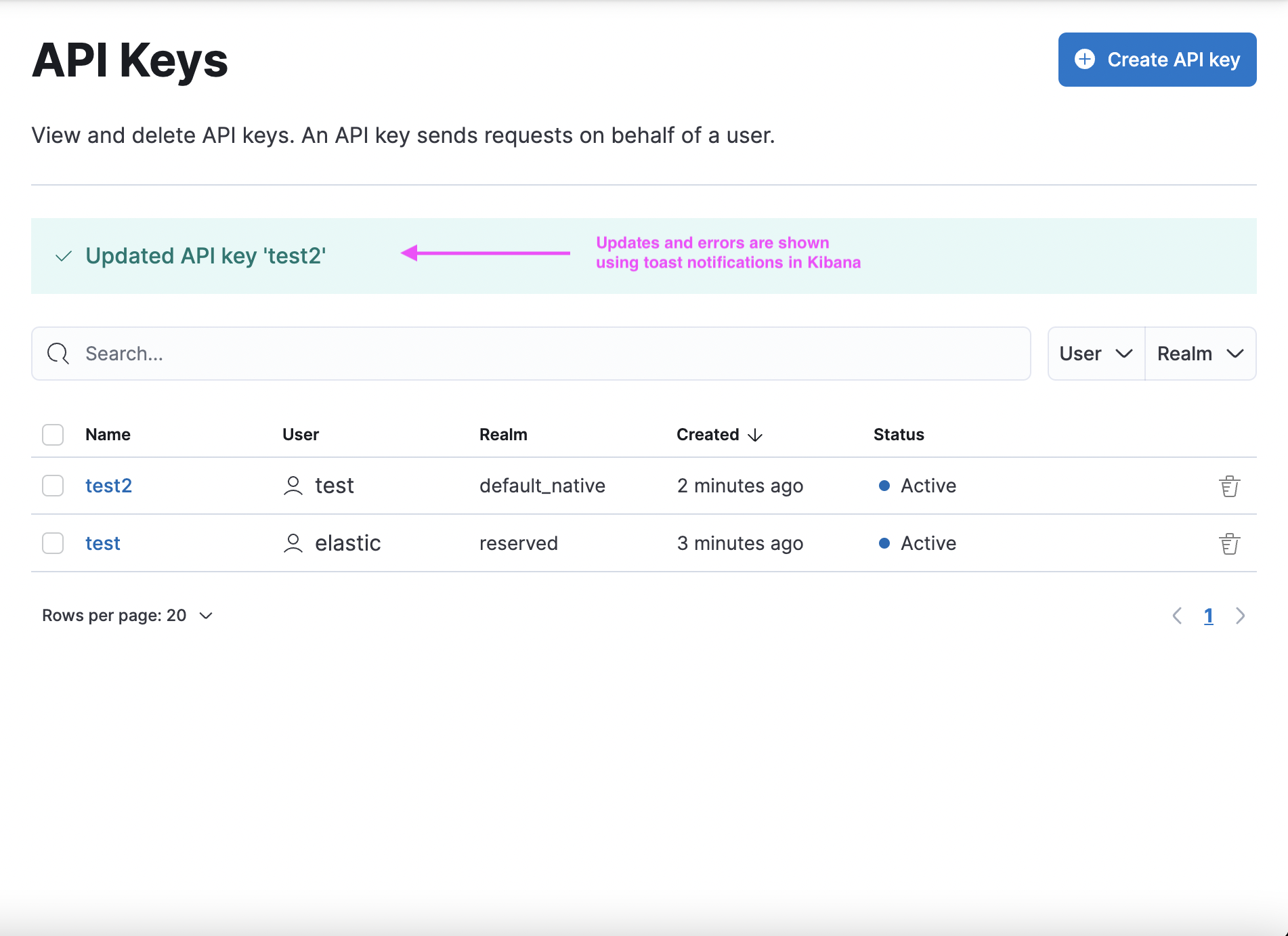
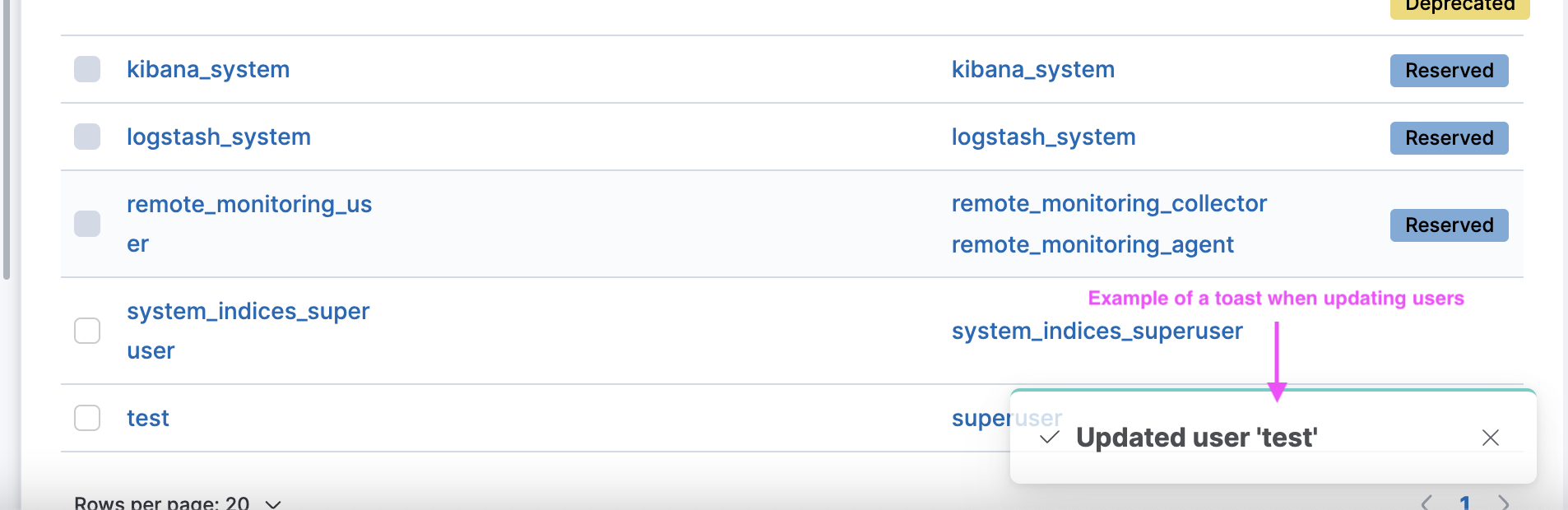
I appreciate that you tried to be consistent with the Create API key flow here but that flow is an exception since we need to show the token of the generated API key. Normal updates and errors should be shown using toast notifications so the behaviour is consistent with the rest of Kibana:
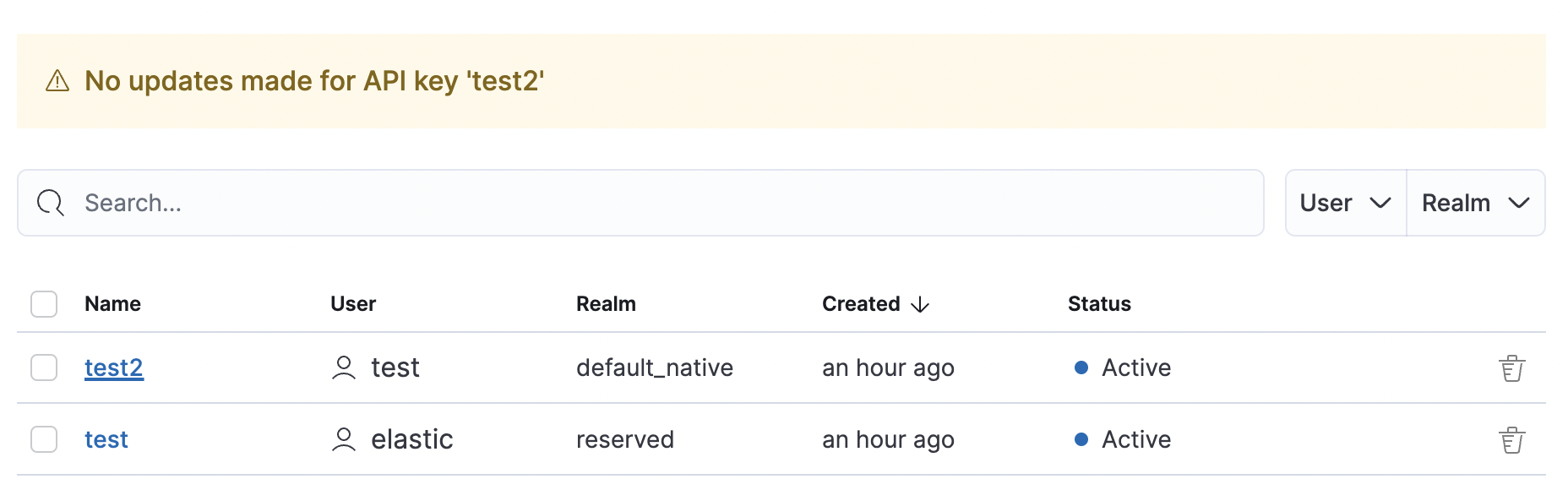
The "no update has been made" warning is an unnecessary detail. I would either disable the submit button until a change has been made (similar to user profile form) or show a success toast irregardless of whether the API key actually changed or not:
x-pack/plugins/security/public/management/api_keys/api_keys_grid/api_key_flyout.tsx
Outdated
Show resolved
Hide resolved
x-pack/plugins/security/public/management/api_keys/api_keys_grid/api_key_flyout.tsx
Outdated
Show resolved
Hide resolved
x-pack/plugins/security/public/management/api_keys/api_keys_grid/api_keys_grid_page.tsx
Outdated
Show resolved
Hide resolved

|
Forgot to mention, can we move the "Status" field before or after the two checkboxes so the UI looks a bit neater?
|
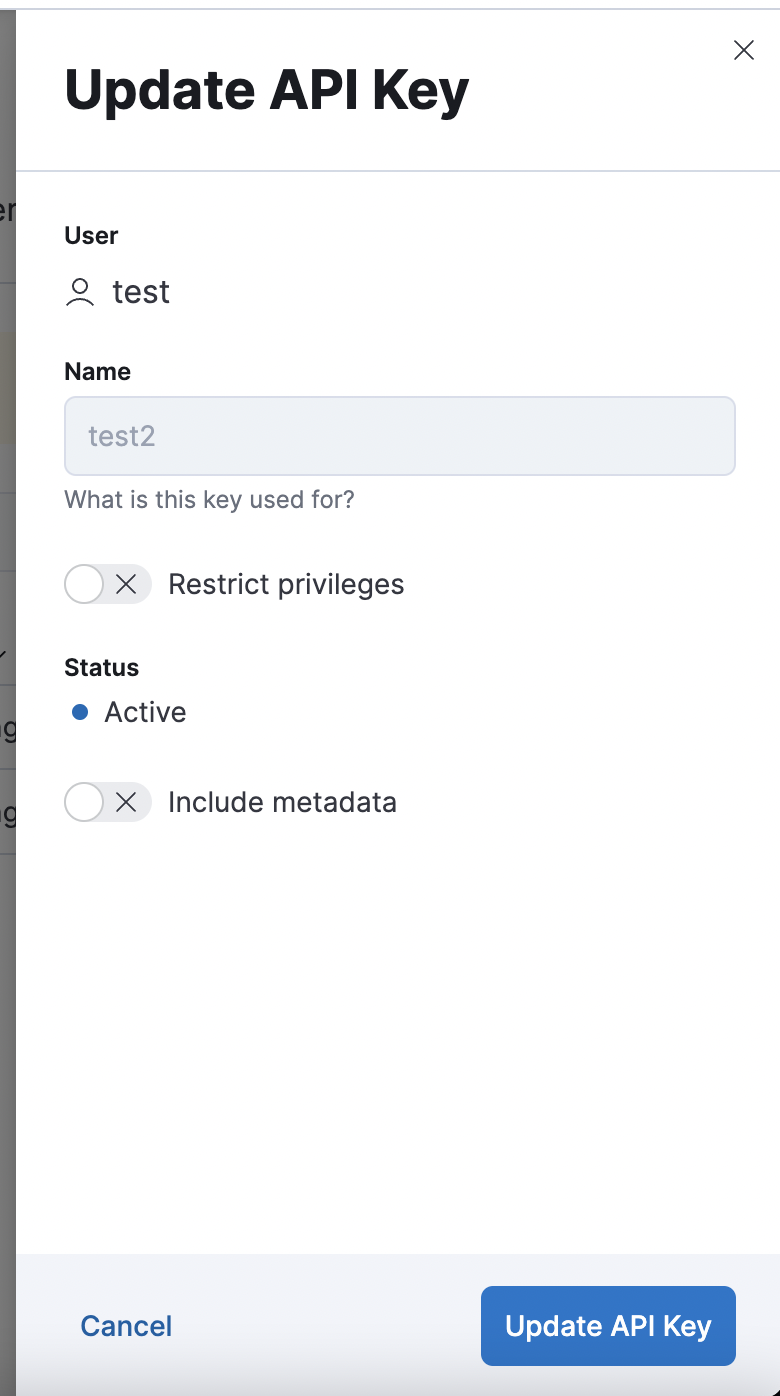

|
Some comments on copy. Can we eliminate the back-to-back "API keys" text in the intro? Maybe something like
Open to suggestions for the second half of the sentence. Also, instead of "View API key" for the title of the flyout, how about "API key details"? |

All fixed in latest commit! I chose to leave the 'Update' button clickable and have it return 'Success' even when no updates were made; the Users and Roles screens appear to follow that pattern. |
Fixed in latest commit! |
Fixed in latest commit! |
|
@elasticmachine merge upstream |


💚 Build Succeeded
Metrics [docs]Public APIs missing comments
Async chunks
Unknown metric groupsAPI count
ESLint disabled in files
ESLint disabled line counts
Total ESLint disabled count
History
To update your PR or re-run it, just comment with: |


* main: (21 commits)
  [Profiling] Remove link to 'Other' bucket (elastic#147523)
  [Synthetics UI] Add missing configuration options to the add/edit monitor forms (elastic#147265)
  [DOCS] Updates what's new pages (elastic#147483)
  [Fleet][Endpoint][RBAC V2] Update fleet router and config to allow API access via RBAC controls (elastic#145361)
  [Guided onboarding] Update guide IDs (elastic#147348)
  [Synthetics] Add synthetics settings alerting default (elastic#147339)
  [Security Solution][Endpoint] Fix Policy form being displayed as Read Only when displayed in Fleet pages (elastic#147212)
  [Cases] Save draft user comment (elastic#146327)
  [API Docs] Fix `--plugin` filter (elastic#147500)
  [Fleet] added a logic to use `destinationId` when tagging imported SOs (elastic#147439)
  Do not skip UPDATE_TARGET_MAPPINGS if upgrading to a newer stack version (elastic#147503)
  [Discover] Validate if Data View time field exists on Alert creation / editing (elastic#146324)
  [Discover] Fix Discover navigation from Lens embeddable (elastic#147000)
  Allow users to Update API Keys (elastic#146237)
  Update dependency xstate to ^4.35.0 (main) (elastic#147463)
  [Behavioral Analytics] Remove feature flag to hide functionality (elastic#147429)
  [Fleet] Add agent policy `inactivity_timeout`experimental setting (elastic#147432)
  [APM] Switching service groups from grid to flex layout (elastic#147448)
  [Fleet] Add missing endpoints to openApi specs (elastic#147452)
  [AO] Allow providing custom time range for Alert Summary Widget (elastic#147253)
  ...

## Summary

API keys can now be updated via the API Keys Management screen

## Release Note

API Keys can now be updated with new Role Descriptors and Metadata via
the API Keys Management screen.

## Testing Instructions

Login as `elastic`

Navigate to Roles and create a new role with the `read_security` cluster
privilege:
<img width="962" alt="Screen Shot 2022-11-30 at 9 42 31 AM"
src="https://user-images.githubusercontent.com/21210601/204826868-a8f6bf03-acf8-404c-90c8-e2b9ab62dc11.png">


Create a new user and assign that new role, `viewer`, and
`kibana_admin`:
<img width="936" alt="Screen Shot 2022-11-30 at 9 43 10 AM"
src="https://user-images.githubusercontent.com/21210601/204827030-e5f97f8e-6676-4c18-8a46-f6afee87ba12.png">


Navigate to Dev Tools and run the following:

```json
POST /_security/api_key/grant
{
  "grant_type": "password",
  "username" : "elastic",
  "password" : "changeme",
  "run_as": "elastic",
  "api_key" : {
    "name": "test-expired-key",
    "expiration": "1ms"
  }
}

POST /_security/api_key/grant
{
  "grant_type": "password",
  "username" : "elastic",
  "password" : "changeme",
  "run_as": "test_user",
  "api_key" : {
    "name": "test-user-key",
    "expiration": "1d"
  }
}
```

The first command will create an API key for the `elastic` user that
expires immediately.

The second command will create an API key for `test_user`.

Navigate to the API Key page, click the name column links to see a
readonly view for the 2 previously created keys as users cannot update
an API key that belongs to another user nor an API key that is expired.

Create a new API key:
<img width="632" alt="Screen Shot 2022-11-30 at 9 44 52 AM"
src="https://user-images.githubusercontent.com/21210601/204829114-672c6583-8801-4af0-bfa8-64ae1072ef46.png">

Click the name link for the newly created API key to see the Update API
key flyout.

Update the fields and click submit:
<img width="642" alt="Screen Shot 2022-11-30 at 9 45 59 AM"
src="https://user-images.githubusercontent.com/21210601/204829914-9fb1f8e6-8b3f-4acc-b63f-d7e4a0906727.png">

If the update was successful:
<img width="904" alt="Screen Shot 2022-11-30 at 9 46 42 AM"
src="https://user-images.githubusercontent.com/21210601/204830133-1dcb083b-f945-4980-9e91-19081c224b55.png">

Now click the name link again for the updated key and click submit
without making changes. You should see a warning:
<img width="895" alt="Screen Shot 2022-11-30 at 9 46 52 AM"
src="https://user-images.githubusercontent.com/21210601/204830570-2ca5e2e0-19b6-43ce-b7e4-ae594be6a86b.png">

Logout the `elastic` user and login as `test_user`

Navigate to API Keys and click the existing API Key to see a readonly
view flyout:
<img width="639" alt="Screen Shot 2022-11-30 at 9 58 25 AM"
src="https://user-images.githubusercontent.com/21210601/204832019-640ecd2e-4bcb-402b-a164-e8b8eb9f8848.png">


Thanks for reviewing!

Co-authored-by: gchaps <33642766+gchaps@users.noreply.github.com>
Co-authored-by: Kibana Machine <42973632+kibanamachine@users.noreply.github.com>


8 participants


Summary
API keys can now be updated via the API Keys Management screen
Release Note
API Keys can now be updated with new Role Descriptors and Metadata via the API Keys Management screen.
Testing Instructions
Login as
elasticNavigate to Roles and create a new role with the

read_securitycluster privilege:Create a new user and assign that new role,

viewer, andkibana_admin:Navigate to Dev Tools and run the following:
The first command will create an API key for the
elasticuser that expires immediately.The second command will create an API key for
test_user.Navigate to the API Key page, click the name column links to see a readonly view for the 2 previously created keys as users cannot update an API key that belongs to another user nor an API key that is expired.
Create a new API key:

Click the name link for the newly created API key to see the Update API key flyout.
Update the fields and click submit:

If the update was successful:

Now click the name link again for the updated key and click submit without making changes. You should see a warning:

Logout the
elasticuser and login astest_userNavigate to API Keys and click the existing API Key to see a readonly view flyout:

Thanks for reviewing!