Support alibaba cloud manual mode #412
Conversation


 DahuK
changed the title
DahuK
changed the title

|
Hi @DahuK. Thanks for your PR. I'm waiting for a openshift member to verify that this patch is reasonable to test. If it is, they should reply with Once the patch is verified, the new status will be reflected by the I understand the commands that are listed here. DetailsInstructions for interacting with me using PR comments are available here. If you have questions or suggestions related to my behavior, please file an issue against the kubernetes/test-infra repository. |
 openshift-ci
bot
added
the
needs-ok-to-test
openshift-ci
bot
added
the
needs-ok-to-test


Yes, this is a separate pr and #411 should be closed, cc @dongchen126 |

|
Have refined vendor commit and removed the interface in v1 api type_alibaba.go @joelddiaz |

|
@joelddiaz Thanks a lot for your careful review!I have refined this based on your comments, pls review them when you free |

|
@DahuK Please rebase PR. Thanks! |
openshift-ci
bot
added
the
needs-rebase
openshift-ci
bot
removed
the
needs-rebase
done, thx |
|
@DahuK I reviewed the recent changes, and things are looking good. Still a couple of bits of feedback around the required CLI parameters, and the naming of some constants. |
@joelddiaz sorry for some missing comments, I have submit a new commit for removing the component user's input parms such as ak/sk and username, please check it again when you free, thanks! |
 joelddiaz
left a comment
joelddiaz
left a comment
joelddiaz
left a comment
There was a problem hiding this comment.
this looks good to me
@akhil-rane you want to take a look at this?

docs/mode-manual-alibaba-cloud.md
Outdated
| ```bash | ||
| $ ccoctl alibabacloud attach-ram-policy --name <name> --region=<region> --credentials-requests-dir=<path_to_directory_with_list_of_credentials_requests>/credrequests --root-access-key=xxxxx --root-access-key-secret=xxxxx --user-name=testuser --component-access-key=xxxxxx --component-access-secret=xxxxxx --output-dir=xxxxxx | ||
| ``` | ||
|
|
||
| where: | ||
|
|
||
| - `name` is the name used to tag any cloud resources that are created for tracking. | ||
| - `region` is the Alibaba Cloud region in which cloud resources will be created. | ||
| - `credentials-requests-dir` is the directory containing files of component CredentialsRequests. | ||
| - `output-dir`/manifests is the directory containing files of component credentials secret. |

There was a problem hiding this comment.
The following parameter definitions are missing:
- root-access-key
- root-access-key-secret
- user-name
- component-access-key
- component-access-secret
There was a problem hiding this comment.
have removed these deprecated parms
docs/mode-manual-alibaba-cloud.md
Outdated
| d. Copy the generated credential files to the target manifests directory: | ||
|
|
||
| ```bash | ||
| $ cp <output_dir>/manifests/*credentials.yaml ./path/to/installation/dir/manifests/ |
There was a problem hiding this comment.
We also maintain a separate doc for ccoctl where we include all the command info for different cloud providers. It will help if we can add alibaba cloud there.
There was a problem hiding this comment.
I have moved the doc to ccoctl.md
| //call sts GetCallerIdentity for the username of given component ak/sk | ||
| stsClient, err := sts.NewClientWithAccessKey(AttachRAMPolicyOpts.Region, componentAk, componentSk) | ||
| if err != nil { | ||
| log.Fatalf("Failed to init sts fro ram username: %++v", err) |
There was a problem hiding this comment.
| log.Fatalf("Failed to init sts fro ram username: %++v", err) | |
| log.Fatalf("Failed to init sts client from ram username: %++v", err) |
|
@DahuK Have you had a chance to test this? Did I miss a parameter or an option? I created a blank user and attempted to assign the policies to this user. |
openshift-ci
bot
added
the
needs-rebase
openshift-ci
bot
removed
the
needs-rebase
sorry for this panic, I have fixed the issue cause by init the ram request, actually I have no env and I cloud only run the mock test in local, so please help to try it again, thanks so much! |
|
@akhil-rane thanks for your comments! I have fixed them, please review it again, thx! |
openshift-ci
bot
added
the
approved

|
/assign @jianping-shu |

 jeana-redhat
left a comment
jeana-redhat
left a comment
jeana-redhat
left a comment
There was a problem hiding this comment.
Overall, docs look good. I just had a few questions I would want to know the answer to so we can commit to OCP product docs.
|
|
||
| 1. Extract and prepare the ccoctl binary from the release image. | ||
|
|
||
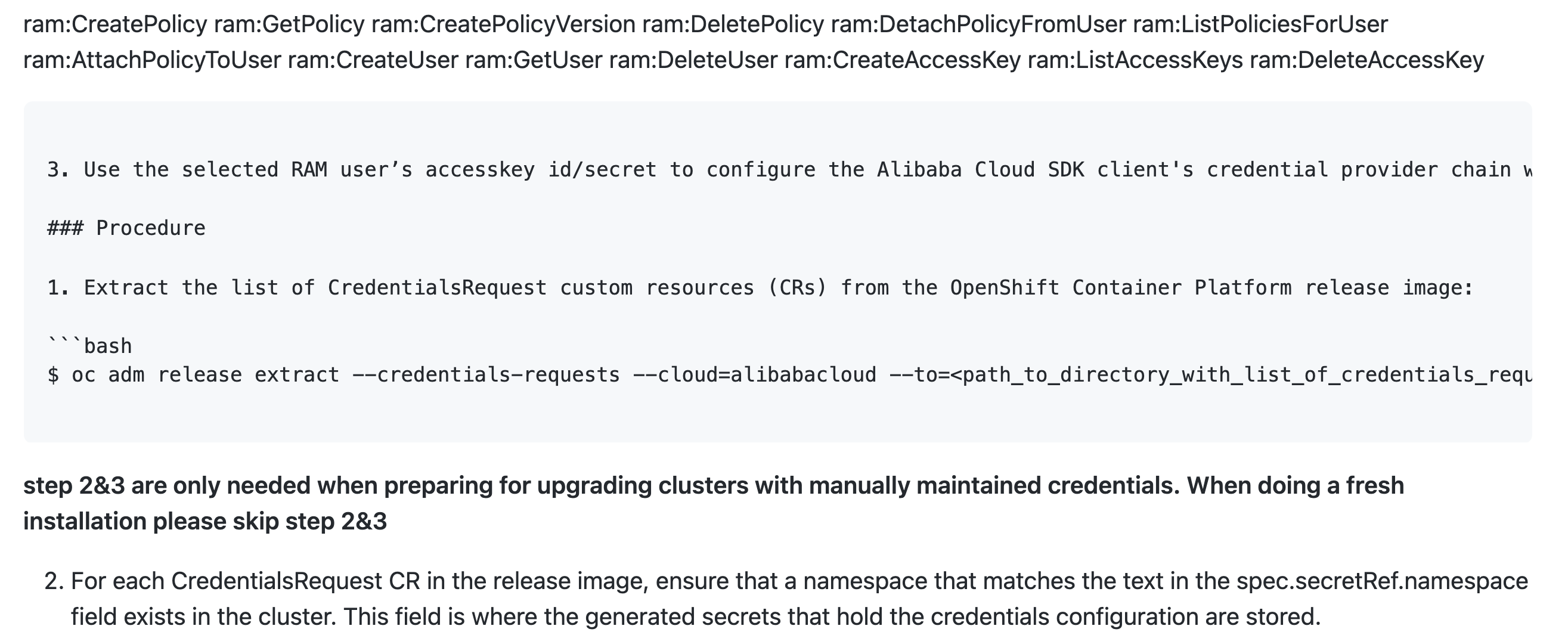
| 2. Choose an existing RAM user who has the below permissions, and get this user's accesskey id/secret for creating the RAM users and policies for each in-cluster component. |
There was a problem hiding this comment.
Do we need to tell the user where/how to get the accesskey id/secret for the user account they will use?

There was a problem hiding this comment.
Generally these are given to a user when they are assigned an account. Users can manage their keys with their RAM (resource access management console). This document explains a littl emore about getting AccessKeys https://www.alibabacloud.com/help/doc-detail/53045.htm
There was a problem hiding this comment.
Excellent - that documentation is very helpful.
| ram:DeleteAccessKey | ||
| ``` | ||
|
|
||
| 3. Use the selected RAM user’s accesskey id/secret to configure the Alibaba Cloud SDK client's credential provider chain with [Envionment Creadentials](https://github.com/aliyun/alibaba-cloud-sdk-go/blob/master/docs/2-Client-EN.md#1-environment-credentials) mode or through [Credentials File](https://github.com/aliyun/alibaba-cloud-sdk-go/blob/master/docs/2-Client-EN.md#2-credentials-file) mode |
There was a problem hiding this comment.
Are these links official Alibaba Cloud documentation intended for end user consumption?
There was a problem hiding this comment.
Yes, this sdk is our official supported, and these docs are also for end user consumption.
There was a problem hiding this comment.
@DahuK is there something more official? When we downstream these docs; we don't want to link to github; if at all possible.
| - `name` is the name used to tag any cloud resources that are created for tracking. | ||
| - `region` is the Alibaba Cloud region in which cloud resources will be created. | ||
| - `credentials-requests-dir` is the directory containing files of component CredentialsRequests. | ||
| - `output-dir`/manifests is the directory containing files of component credentials secret. |
There was a problem hiding this comment.
What does /manifests on this line mean?
There was a problem hiding this comment.
This /manifests means that results from the ccoctl binary will be placed in a directory on the system located at /manifests.
There was a problem hiding this comment.
I'm interpreting that to mean <output-dir>/manifests then - let me know if that's incorrect

There was a problem hiding this comment.
@jeana-redhat your interpretation is correct, the manifests will be placed inside <output-dir>/manifests. Let me share some examples:
If I run:
ccoctl alibabacloud create-ram-users \
  --region ${ALIBABA_REGION_ID} \
  --name <cluster_name> \
  --credentials-requests-dir ${PWD}/cco-credrequests \
  --output-dir ${PWD}/cco-manifests
I will get that structure:
$ tree cco-manifests/
cco-manifests/
└── manifests
    ├── openshift-cluster-csi-drivers-alibaba-disk-credentials-credentials.yaml
    ├── openshift-image-registry-installer-cloud-credentials-credentials.yaml
    ├── openshift-ingress-operator-cloud-credentials-credentials.yaml
    └── openshift-machine-api-alibabacloud-credentials-credentials.yaml
| ```bash | ||
| $ cp <output_dir>/manifests/*credentials.yaml ./path/to/installation/dir/manifests/ | ||
| ``` | ||
| 6. To delete resources created by ccoctl, run |
There was a problem hiding this comment.
Should the user always delete after installing? Or is this a cleanup step for uninstalling (I am asking based on other provider docs)?
There was a problem hiding this comment.
These keys will most likely live until the cluster is uninstalled. The keys are being used by the cluster's internal components that require API access. They MUST not be deleted after installation or the cluster will not continue to function properly.
There was a problem hiding this comment.
Ok, so a cleanup after uninstall step similar to other platforms then. Thanks!

|
@joelddiaz @akhil-rane @lwan-wanglin @DahuK My comments after testing:
|
 openshift-ci
bot
added
the
docs-approved
openshift-ci
bot
added
the
docs-approved

 sferich888
left a comment
sferich888
left a comment
sferich888
left a comment
There was a problem hiding this comment.
/label px-approved
Looks good just a few comments/nits about the docs. All things I think @jeana-redhat can take care of when we move to downstream this work.
|
|
||
| ## Alibaba Cloud | ||
|
|
||
| This is a guide for using manual mode on alibaba cloud, for more info about manual mode, please refer to [cco-mode-manual](https://github.com/openshift/cloud-credential-operator/blob/master/docs/mode-manual-creds.md). |
There was a problem hiding this comment.
@jeana-redhat while this is fine for 'upstream docs' when we downstream these docs we need to remove / redirect this to docs we have that don't reside on github.
There was a problem hiding this comment.
Yep, would def be pointing to the product docs version of this content 👍
| ram:DeleteAccessKey | ||
| ``` | ||
|
|
||
| 3. Use the selected RAM user’s accesskey id/secret to configure the Alibaba Cloud SDK client's credential provider chain with [Envionment Creadentials](https://github.com/aliyun/alibaba-cloud-sdk-go/blob/master/docs/2-Client-EN.md#1-environment-credentials) mode or through [Credentials File](https://github.com/aliyun/alibaba-cloud-sdk-go/blob/master/docs/2-Client-EN.md#2-credentials-file) mode |
There was a problem hiding this comment.
@DahuK is there something more official? When we downstream these docs; we don't want to link to github; if at all possible.
|
|
||
| ### Prerequisite | ||
|
|
||
| 1. Extract and prepare the ccoctl binary from the release image. |
There was a problem hiding this comment.
Show a command for how to do this; don't assume you users know how to do this.
There was a problem hiding this comment.
Agreed, we show this for the AWS version and I will be modelling the structure for new platform support on what we have for AWS
There was a problem hiding this comment.
@sferich888 thanks for the review! I could only found a Chinese doc for these on https://help.aliyun.com/document_detail/311677.html, and I will check if there is an English version with my colleague
openshift-ci
bot
added
the
px-approved
IMO, this should be fixed before GA. |
|
@joelddiaz @jianping-shu Would you like it completed in this PR or in a follow up PR? Please let @DahuK know so that we can address this feedback. |
|
@jianping-shu @joelddiaz @kwoodson thanks for the review! I have added a new commit for refine the doc, pls review again |
I'm okay with a followup PR. |

Codecov Report
@@            Coverage Diff             @@
##           master     #412      +/-   ##
==========================================
- Coverage   46.64%   46.39%   -0.26%
==========================================
  Files          88       94       +6
  Lines        9160     9688     +528
==========================================
+ Hits         4273     4495     +222
- Misses       4337     4612     +275
- Partials      550      581      +31
|

|
@DahuK It appears the @jianping-shu Would it be acceptable to apply the approval label on this PR and address your feedback in a follow up PR? Also, please open another PR to address the feedback found by @jianping-shu in this comment #412 (comment). We would like to merge this current PR and address the comments in a follow up. This is now blocking our CI and I would like to get this moving forward so that we can test. Thanks |
|
I checked 5f45a79, my two comments were already addressed. The ccoctl.md looks good to me now. /label qe-approved |
openshift-ci
bot
added
the
qe-approved

|
@kwoodson CI testing is pass now, and I have addressed the comment from @jianping-shu , thanks! |

|
[APPROVALNOTIFIER] This PR is APPROVED This pull-request has been approved by: DahuK, joelddiaz, sferich888 The full list of commands accepted by this bot can be found here. The pull request process is described here DetailsNeeds approval from an approver in each of these files:
Approvers can indicate their approval by writing |

Support alibaba cloud manual mode
10 participants


support alibaba cloud manual mode
cause we have not released the feature of fine-grained RAM roles for service account, in current we temp using one ram user accesskey id/secret to attach all of the components permission, and we will provide STS mode when RAM new feature release.