Conversation

Only did this for the top section so far. The rest will be split into a
new Decks pane.
so that Apply button must be pressed for changed setting to take effect

TODO: do this for the rest of the preferences in DlgPrefDeck
until Apply button is pressed
to prevent recurrence of bugs like
https://bugs.launchpad.net/mixxx/+bug/1631393 when rateRange was 0
 Be-ing
force-pushed
the
preferences_cleanup
branch
from
Be-ing
force-pushed
the
preferences_cleanup
branch
from
5f9a243 to
29ef9d1
Compare
…alue

until Apply button is pressed
until Apply button is pressed
until Apply button is pressed
until Apply button is pressed
until Apply button is pressed

|
Yikes there were a lot of dusty cobwebs in that code! I didn't take care of all of them, but it should be more manageable now. Please test and make sure nothing broke. Copying @ywwg's checklist for testing preference changes:
This whole checklist should be tested for every option in both the Interface and Decks panes. |

| m_pControlsButton->setFlags(Qt::ItemIsSelectable | Qt::ItemIsEnabled); | ||
|
|
||
| m_pDecksButton = new QTreeWidgetItem(contentsTreeWidget, QTreeWidgetItem::Type); | ||
| m_pDecksButton->setIcon(0, QIcon(":/images/preferences/ic_preferences_decks.png")); |


There was a problem hiding this comment.
Something like a Play icon should do.


There was a problem hiding this comment.
What's your preference? I like the boxed Play more because I asscociate it with a container rather than behaviour
There was a problem hiding this comment.
You can take them from the comment, they are not altered/compressed.

| @@ -0,0 +1,623 @@ | |||
| /*************************************************************************** | |||
| dlgprefcontrols.cpp - description | |||
There was a problem hiding this comment.
Good catch, thanks. That comment could be removed entirely.


|
If you change to auto scaling the default skin is loaded and not the configured skin. How about moving the waveform options into root? |
I'll look into this.
Yep, I am planning on it. |

|
Can you please provide before/after screenshots in UI related PRs? this way, one doesn't have to compile/install a version including this PR to see what changed. |

|
Bug 1731774 could be fixed here as well. |

|
I second the inclusion of before & after screen shots. |
|
Not much has changed with the GUI. I'm mostly looking for people to test to make sure nothing broke. Before: After: |
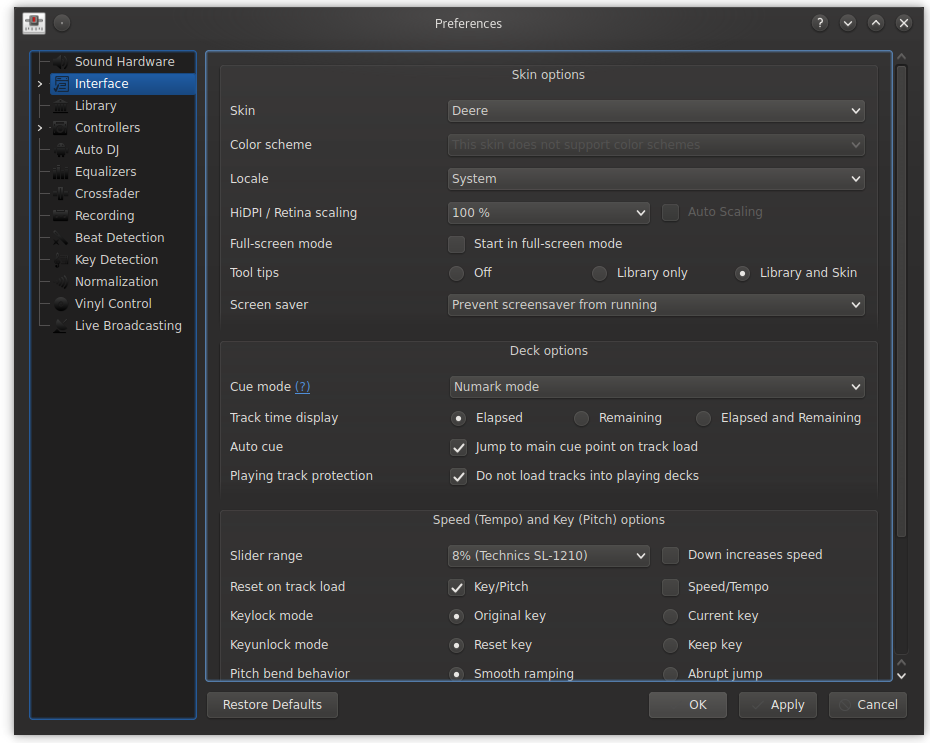
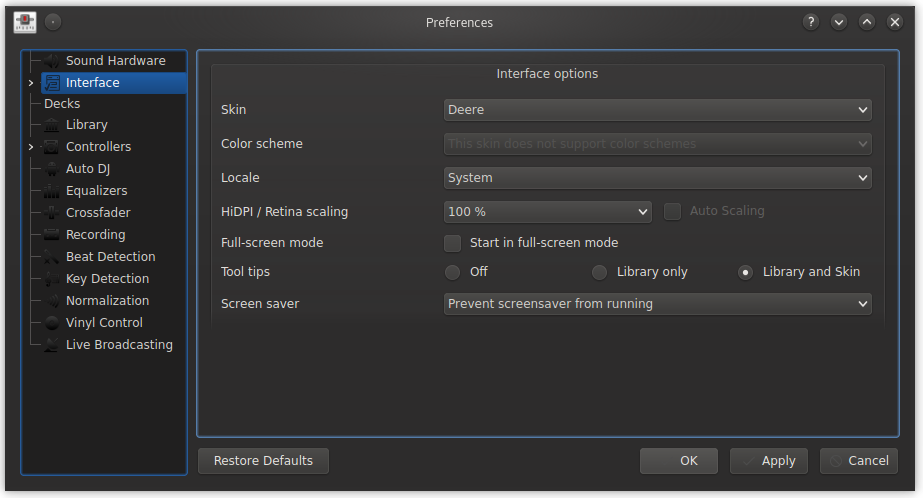
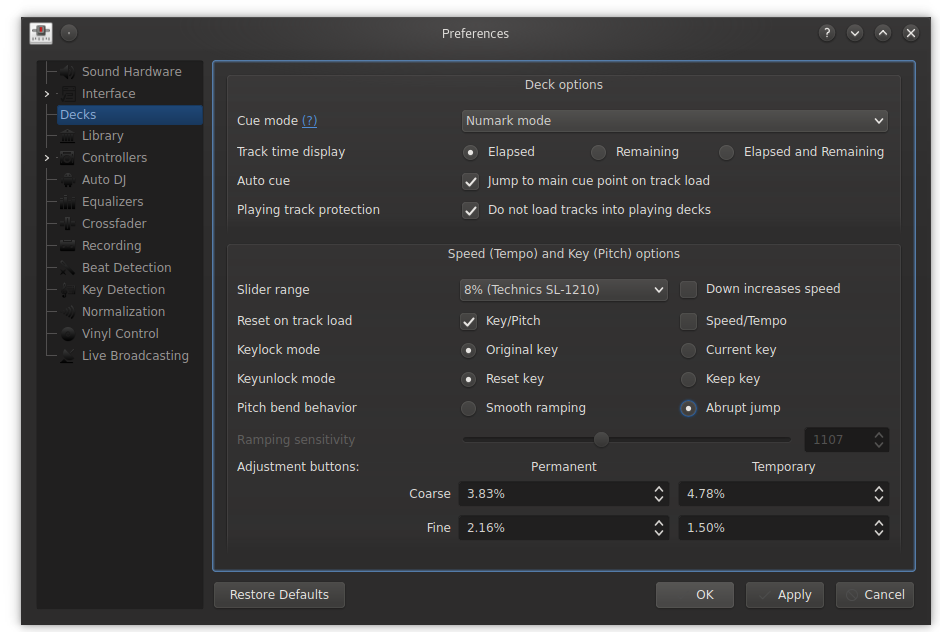
|
Looks nice! Now that the Interface section is cleaned up, what about displaying the skin |
…ng Apply

somehow DlgPrefInterface::slotApply is shown when closing the
Preferences window even if the Interface pane is never shown and the
Okay button is used to close the window.

Also, configuration values should never be set outside of the
preferences code!
| configSkin = getDefaultSkinName(); | ||
| } | ||
| m_pConfig->set(ConfigKey("[Config]", "ResizableSkin"), | ||
| ConfigValue(configSkin)); |
There was a problem hiding this comment.
It should not be possible to set configuration values outside of the preferences code! The whole preferences system could really use a thorough cleanup. It's very brittle.
This order is somewhat arbitrary. I am trying to put it in order
of what I think is most important for users to configure first.
Thanks @ronso0 !
|
The numeric value of the ramping pitch band slider is somehow meaningless. |
|
In 50% scaling is the Deere parallel waveforms are too high |
|
Okay, I think this is done. Please test. |
|
Ping. The rate range bug must be fixed for the beta release. |
|
Anything specific to test? |
|
Refer to the checklist above |
|
I started without a config file. Sound Hardware: works Library: works Controllers: enabled mapping for USB mouse, setting persists. Restore Defaults won't uncheck it though AutoDJ: works Decks: Restore Defaults doesn't work, they appear to be applied in Preferences but aren't in skin. When going back to Preferences all my individual settings are back. Same after restart. Interface: same issue Waveforms: initially waveform zoom was set to 33% (started with Shade). Restore Defaults sets this to 20%, but individual setting Synchronize Zoom is always re-checked when opening Prefs again Equalizer: deck-specific EQ/QuickEffect settings don't persist a restart, instead this is reset and individual settings from deck1 are applied Crossfader: works Live Broadcasting: don't now if it's intended, "Turn on Live..." is reset to Off after disconnecting Broadcast in the menu. No further testing Normalization: Apply ReplayGain is re-checked after restart, replay gain mode persists Recording: defaults don't persist after resetting from individual settings Beat Detection: works Key Detection: works |
|
Regarding restoring defaults, I was under the impression that clicking that button should not immediately apply the defaults and the Apply button should need to be pressed to get them to apply. @ronso0 are you saying that is not intuitive? Should Restore to Defaults also apply immediately? |
|
No, Restore Defaults sets all options and Apply ..well applies them unless one hits Cancel. |
|
So should we merge this as-is or should I make the Reset to Defaults buttons in the Interface and Decks panes immediately apply the defaults? |
|
Reset do defaults should not imply Apply. A user may whish to just check the default value for a few items without applying all. How is the state of my findings? I think we need a Launchpad bugs if they are not addressed here. |
I cannot reproduce this.
With what? "Low" and "High"? Which label belongs on which side?
I'm not sure what you mean, but that doesn't sound like a bug with the preferences. It sounds like a bug in the waveforms or skin. All other notes addressed. |
|
Ah okay, so the PR related things are done. |

6 participants


Uh oh!
There was an error while loading. Please reload this page.