[4.0] Replace chosen.js to choice.js#22263
Conversation


 Conflicts:
	administrator/components/com_modules/tmpl/module/edit_positions.php


|
ooh getting excited - on my to do list for tomorrow |

| type="moduleposition" | ||
| <field | ||
| name="position" | ||
| type="ModulesPosition" |

There was a problem hiding this comment.
didnt we have an issue with case in the xml files before?
There was a problem hiding this comment.
it because class autoloader,
if I keep modulesposition it will try to search for ModulespositionField.php but actual file name is ModulesPositionField.php
There was a problem hiding this comment.
yes, there was an issue about it, but cannot find
build/build-modules-js/settings.json
Outdated
| "licenseFilename": "LICENSE" | ||
| }, | ||
| "choices.js": { | ||
| "name": "choices.js", |
There was a problem hiding this comment.
This need to be changed to just choices otherwise you get this error in the build
Error: ENOENT: no such file or directory, open 'C:\htdocs\40\media\vendor\choices.min.js\css\choices.css'
There was a problem hiding this comment.
That what I am had afraid of. Currently I am working with "dev" mode and on on Linux, so all works fine.
The problem that the package name is choices.js https://github.com/jshjohnson/Choices/blob/master/package.json
This will be need to find a solution.
There was a problem hiding this comment.
So the problem is with our build scripts and need to be solved there or it will happen again with another package (I'm still new to npm)

There was a problem hiding this comment.
You should be ok changing the name on this line to choices. The key on line 124 is the path to the node_modules dir
There was a problem hiding this comment.
The key on line 124 is the path to the node_modules dir
@wilsonge well, no, I thought the same, I tried, and that not work.
but I think it is fine not keep an original name,
just have to find out why an Install task fail on Windows
I think I have fixed Error: ENOENT: no such file or directory,, there was incorrect replacing of the file extension.
But @brianteeman said there now some empty CSS file, after build, and I do not have a windows to check in details.
I have looked in my windows but there only a trees 😄
There was a problem hiding this comment.
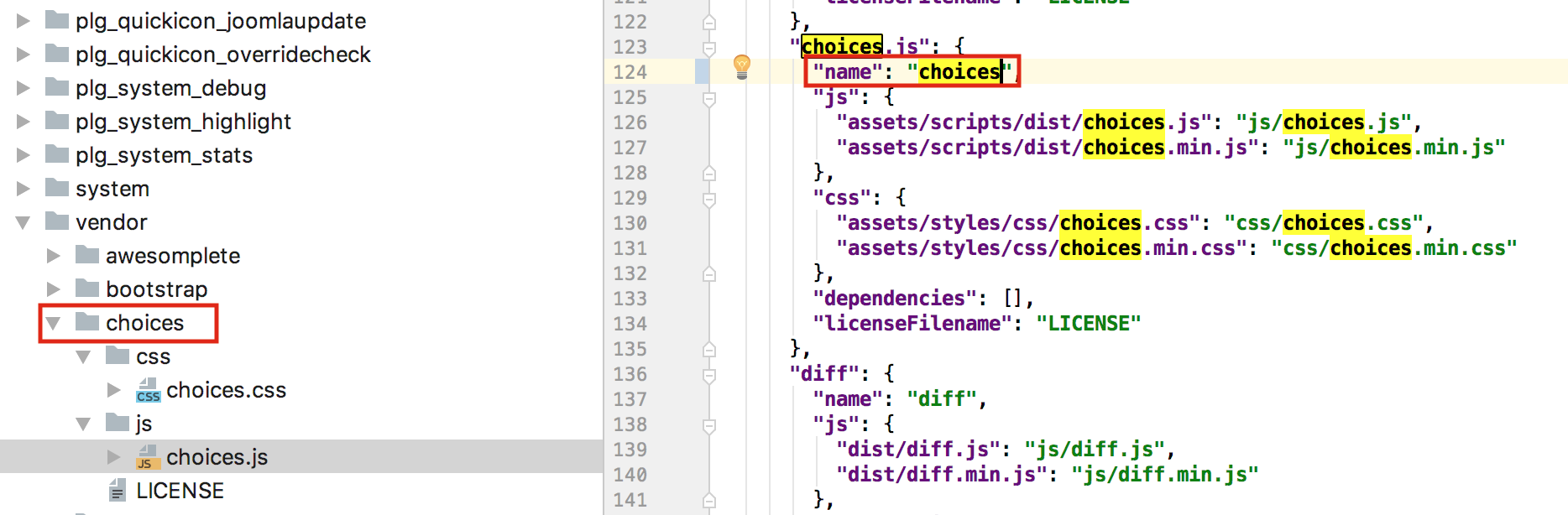
Well that definitely still builds ok and drops the .js in the folder path. I don't have windows either and Rowan who's my go to is on holiday at the moment. @brianteeman can I try sorting out a screenshare with you at some point this week after work?
There was a problem hiding this comment.
hm, okay, then I missed something 😃

There was a problem hiding this comment.
@wilsonge @Fedik the name part in the json is supposed to set a custom name for the vendor. IIRC there are couple of crappy names in the dependencies with @ or other strange .something parts in the names. If the code is not doing what is supposed to do just blame it on me but fwiw it was implemented based on some specific cases...
There was a problem hiding this comment.
I have renamed to choicesjs

| $attr .= $required ? ' required' : ''; | ||
| $attr .= $autofocus ? ' autofocus' : ''; | ||
|
|
||
| // To avoid user's confusion, readonly="true" should imply disabled="true". |

There was a problem hiding this comment.
Change to disabled="disabled"?
| ?> | ||
|
|
||
| <joomla-field-categoryedit><?php | ||
| echo implode($html); |
There was a problem hiding this comment.
Make it one line <?php echo implode($html); ?>
There was a problem hiding this comment.
you are looking in wrong commit 😃
|
|
||
| Text::script('JGLOBAL_SELECT_NO_RESULTS_MATCH'); | ||
| Text::script('JGLOBAL_SELECT_PRESS_TO_SELECT'); | ||
| //Text::script('JGLOBAL_TYPE_OR_SELECT_SOME_OPTIONS'); |
There was a problem hiding this comment.
it not finished, anything can happen 

### The problem
when running the scripts with joomla#22263 they were trying to process the choices css files as if they were js.
this was only present on windows

### The solution??
hopefully this is correct. It works for me but anything with regex and js and I am stabbing in the dark
|
see #22706 for the corrected(?) build script |

### The problem
when running the scripts with #22263 they were trying to process the choices css files as if they were js.
this was only present on windows

### The solution??
hopefully this is correct. It works for me but anything with regex and js and I am stabbing in the dark

|
I will check this weekend, also the conflicts |
|
I "think" the error is related to the calendar field |
 Conflicts:
	administrator/components/com_categories/Field/CategoryeditField.php
	administrator/components/com_modules/tmpl/module/edit_positions.php
	build/build-modules-js/update.js
@brianteeman please tell me which field types do you have in that article? |
|
@laoneo do you remember what this thing is doing? joomla-cms/administrator/components/com_fields/Helper/FieldsHelper.php Lines 314 to 316 in 0e641a3 the warning because DOMDocument not know about a custom tags, hm |
|
There were two fields. Calendar and text |
|
@brianteeman should work now |

| // Choose the first category available | ||
| $xml = new \DOMDocument; | ||
| libxml_use_internal_errors(true); | ||
| $xml->loadHTML($formField->__get('input')); |

There was a problem hiding this comment.
Sry if its already answered but what happens here that this hack is needed?
There was a problem hiding this comment.
see #22263 (comment)
DOMDocument shows a warning on unknown elements such as html5 and custom elements
|
@Fedik yes that problem has been resolved - thanks |

|
So just to be clear is this PR now working (with a bit of a grim hack to the DomDocument stuff?) |
|
for me, working :) |
|
Thankyou for this! |


|
As stated in #23289, choices.css is loaded after template.css, therefore overriding specific overrides in template.css |


10 participants


Summary of Changes
This a try to to replace chosen.js to choice.js.
@wilsonge is any else field is missed in the list?
Testing:
Module editing: create custom position, search existing positions
Article editing: test Tag field, test category field
Articles filter: test the filter by multiple category, Tag, etc,
Everything should work as before the patch.
Documentation Changes Required
maybe