Skip to content

Add support for Roomba 980 discovery#47696

Merged
bdraco merged 12 commits into
home-assistant:devfrom
scyto:patch-1
Mar 24, 2021
Merged

Add support for Roomba 980 discovery#47696
bdraco merged 12 commits into
home-assistant:devfrom
scyto:patch-1

Conversation

@scyto
Copy link
Copy Markdown
Contributor

@scyto scyto commented Mar 9, 2021

Proposed change

Add Roomba 980 models host name and mac to dhcp discovery in manifest.json for the roomba integration

Type of change

  • Dependency upgrade
  • Bugfix (non-breaking change which fixes an issue)
  • New integration (thank you!)
  • New feature (which adds functionality to an existing integration)
  • Breaking change (fix/feature causing existing functionality to break)
  • Code quality improvements to existing code or addition of tests

Example entry for configuration.yaml:

none

Additional information

Checklist

  • The code change is tested and works locally.
  • Local tests pass. Your PR cannot be merged unless tests pass
  • There is no commented out code in this PR.
  • I have followed the development checklist
  • The code has been formatted using Black (black --fast homeassistant tests)
  • Tests have been added to verify that the new code works.

If user exposed functionality or configuration variables are added/changed:

If the code communicates with devices, web services, or third-party tools:

  • The manifest file has all fields filled out correctly.
    Updated and included derived files by running: python3 -m script.hassfest.
  • New or updated dependencies have been added to requirements_all.txt.
    Updated by running python3 -m script.gen_requirements_all.
  • Untested files have been added to .coveragerc.

The integration reached or maintains the following Integration Quality Scale:

  • No score or internal
  • 🥈 Silver
  • 🥇 Gold
  • 🏆 Platinum

To help with the load of incoming pull requests:

@probot-home-assistant probot-home-assistant Bot added integration: roomba new-feature small-pr PRs with less than 30 lines. dependency-bump Pull requests that update a dependency file labels Mar 9, 2021
@scyto
Copy link
Copy Markdown
Contributor Author

scyto commented Mar 9, 2021

--edit--
local testing underway, found how to exec into the homeassistant container and find the file to modify :-)

@scyto
Copy link
Copy Markdown
Contributor Author

scyto commented Mar 9, 2021

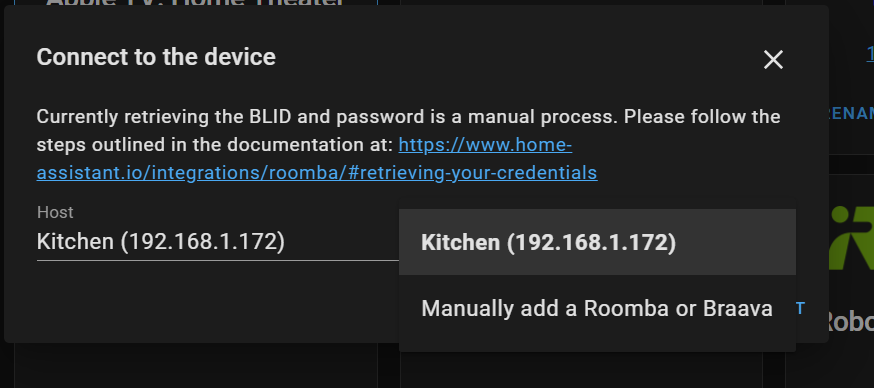
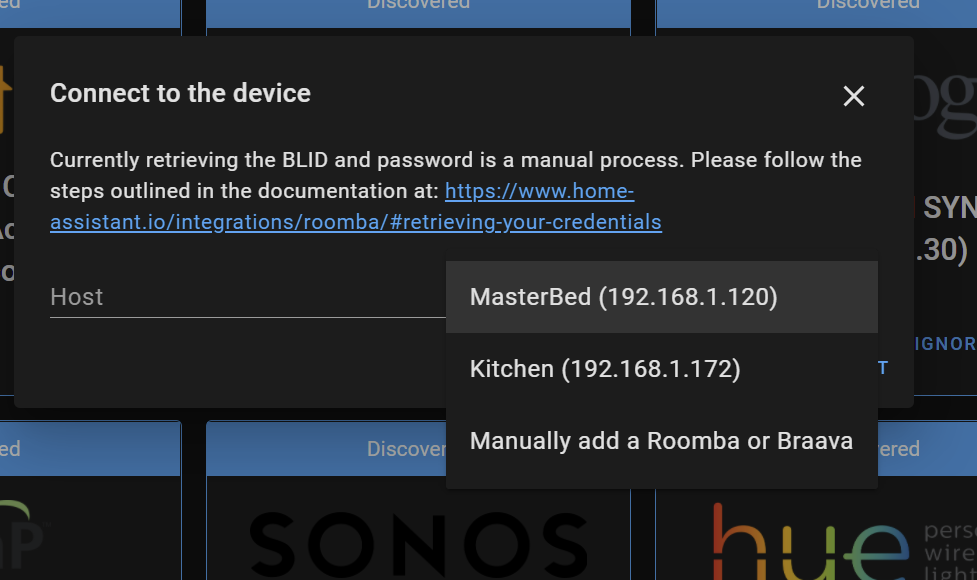
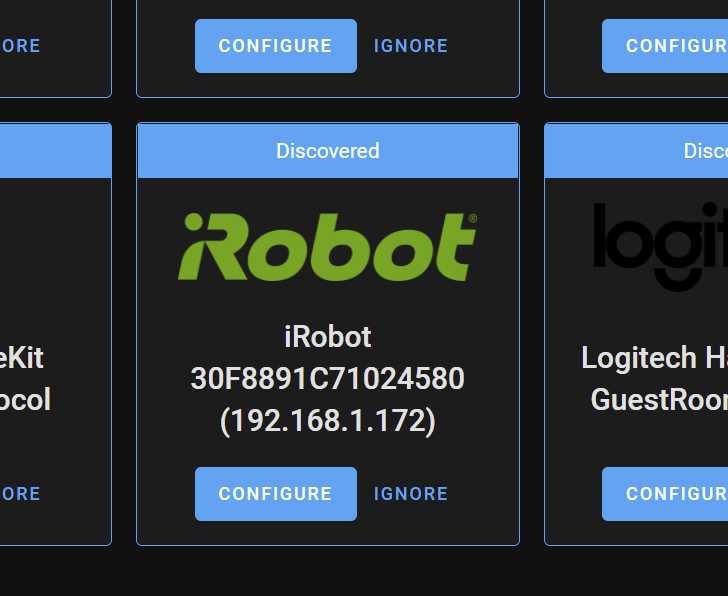
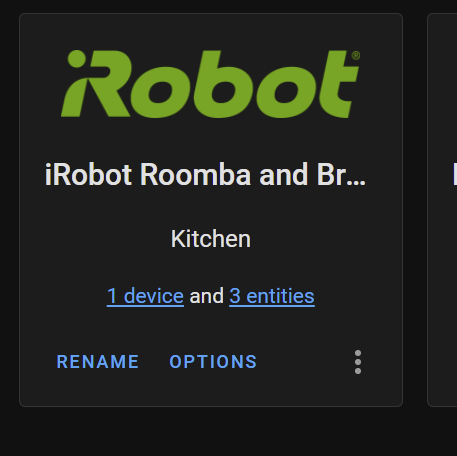
Proof it worked?

The integration tile didn't appear after i did a roomba reboot, however when i went through adding integration it had populate the roomba in the drop down, i selected that and just had to go press the button and submit.

image

Not sure why it shows R98---- as the model name
image

@MartinHjelmare MartinHjelmare changed the title [FEAT] add support for Roomba 980 discovery Add support for Roomba 980 discovery Mar 9, 2021
@scyto
Copy link
Copy Markdown
Contributor Author

scyto commented Mar 9, 2021

there a couple more combos of names and different mac address formats in this https://github.com/NickWaterton/Roomba980-Python/blob/master/roomba/config_example.ini, unclear if these are madeup or real... but the details look real...

are they worth adding?
roomba-* & F0031C*
irobot-* & 50747A*
irobot-* & 508479*

--update--
these mac prefix's don't turn up any results in mac lookup services, no way to validate they are real, suggest we don't add and leave PR as is

i wonder how many mac / name combos there are?
seems a better long term solution might be to discover vacuums by udp packet?
something like this? https://github.com/NickWaterton/Roomba980-Python/blob/02321f31d7a23216ac36a7aa5b10289fd3093a44/roomba/password.py#L57

anyhoo I think PR is ready to at least broaden discovery...

@bdraco
Copy link
Copy Markdown
Member

bdraco commented Mar 10, 2021

You will need to modify this line as well https://github.com/home-assistant/core/blob/dev/homeassistant/components/roomba/config_flow.py#L83 to allow hostnames to start with Roomba-

Copy link
Copy Markdown
Member

@bdraco bdraco left a comment

Choose a reason for hiding this comment

The reason will be displayed to describe this comment to others. Learn more.

We will also need a test for a hostname that starts with roomba-

You can setup a dev env using these steps
https://developers.home-assistant.io/docs/development_environment/

Comment thread homeassistant/components/roomba/manifest.json Outdated
Comment thread .devcontainer/devcontainer.json Outdated
Comment thread homeassistant/components/roomba/config_flow.py Outdated
@bdraco
Copy link
Copy Markdown
Member

bdraco commented Mar 16, 2021

Please add a test for this.

@bdraco
Copy link
Copy Markdown
Member

bdraco commented Mar 22, 2021

You'll also need to run python3 -m script.hassfest

@scyto
Copy link
Copy Markdown
Contributor Author

scyto commented Mar 22, 2021

You'll also need to run python3 -m script.hassfest

yes already done that in my private instance, i am still trying to debug why the discovery tile never seems to fire
my next step is to roll back to production code, test with the Roomba supported by production code and then re-add changes.

Also I don't have the skills to add a test for this, there is no test for the existing dhcp auto-discovery of roombas with the name iRobot for me to extend.

I am thinking i should close this PR and come back around later?

@bdraco
Copy link
Copy Markdown
Member

bdraco commented Mar 22, 2021

You'll also need to run python3 -m script.hassfest

yes already done that in my private instance, i am still trying to debug why the discovery tile never seems to fire
my next step is to roll back to production code, test with the Roomba supported by production code and then re-add changes.

Also I don't have the skills to add a test for this, there is no test for the existing dhcp auto-discovery of roombas with the name iRobot for me to extend.

I am thinking i should close this PR and come back around later?

Turn on debug for dhcp in configuration.yaml

logger:
  default: warning
  logs:
    homeassistant.components.dhcp: debug

Unplug and replug the roomba and watch for the dhcp discovery to make sure the OUI and hostname are correct

@bdraco
Copy link
Copy Markdown
Member

bdraco commented Mar 22, 2021

You'll also need to run python3 -m script.hassfest

yes already done that in my private instance, i am still trying to debug why the discovery tile never seems to fire
my next step is to roll back to production code, test with the Roomba supported by production code and then re-add changes.

Also I don't have the skills to add a test for this, there is no test for the existing dhcp auto-discovery of roombas with the name iRobot for me to extend.

I took care of adding the test for you.

@bdraco
Copy link
Copy Markdown
Member

bdraco commented Mar 22, 2021

You'll also need to run python3 -m script.hassfest

yes already done that in my private instance, i am still trying to debug why the discovery tile never seems to fire
my next step is to roll back to production code, test with the Roomba supported by production code and then re-add changes.

If you haven't updated your test environment after running hassfest, the new oui and hostname won't be taken into account.

@scyto
Copy link
Copy Markdown
Contributor Author

scyto commented Mar 22, 2021

@bdraco thanks for the tips and hand holding, appreciate it.

I had the DHCP debugging turned on last week, plus another terminal to my DHCP server logs to see when packet gets issued to either roomba (about once every 2.5 hours).

Whats weird is the DHCP home assistant debugging never once threw an entry for either roomba's IP (saw ones for my netatmo and other devices)

Even weirder is if I manually initiate adding of the integration it has the IP of both the roomba- and irobot roomba - so i know it found the IP's at some point.

This is why i plan to strip back, re-clone my patch branch as is, revert all edits (without syncing back to github) see if can get the tile to kick in for the iRobot- in the orginal production code. Once i have that working in debug, will then intro my changes again and see if I can get it all to work.

@bdraco
Copy link
Copy Markdown
Member

bdraco commented Mar 22, 2021

Can you post what you are seeing from the log?

2021-03-22 22:32:02 DEBUG (Thread-7) [homeassistant.components.dhcp] Processing updated address data for 192.168.107.122: mac=D86162E8B90A hostname=connect
2021-03-22 22:32:02 DEBUG (Thread-7) [homeassistant.components.dhcp] Matched {'macaddress': 'd86162e8b90a', 'hostname': 'connect'} against {'domain': 'august', 'hostname': 'connect', 'macaddress': 'D86162*'}

For august it looks like this.

@scyto
Copy link
Copy Markdown
Contributor Author

scyto commented Mar 23, 2021

thanks, will do, need to wait for this fresh env to see an iRobot named DHCP packet, i reckon only about 60 to 80 mins based on my DHCP server logs (also shortened lease time to 30 mins for next time round)

for netatmo i get this one line (so i know my DHCP debug is working)
2021-03-22 16:55:42 DEBUG (Thread-6) [homeassistant.components.dhcp] Processing updated address data for 192.168.1.184: mac=70EE5006A490 hostname=netatmo-personal-weather-station

i backed out all my changes but i am still in my branch, waiting to see if the iRobot packet triggers anything
if that doesn't work, rather than use my patch branch in my fork i might just clone main core repo itself and try that and see if i can get a working baseline before I intro any changes

@scyto
Copy link
Copy Markdown
Contributor Author

scyto commented Mar 23, 2021

Ok, so on a fresh clone using git clone https://github.com/home-assistant/core i get several dhcp addresses recognized but not the iRobot one (that worked a couple of weeks ago). I don't discount me doing something stupid but i can't get DHCP discovery to a)recognize the iRobot variant roomba or b)kick off a tile for any of these.

I get these DHCP debug events, but not once do i see an auto discovery tile for any of these.

2021-03-22 19:06:45 DEBUG (Thread-6) [homeassistant.components.dhcp] Processing updated address data for 192.168.1.184: mac=70EE5006A490 hostname=netatmo-personal-weather-station
2021-03-22 19:07:02 DEBUG (Thread-6) [homeassistant.components.dhcp] Processing updated address data for 192.168.1.128: mac=0A4F6B30D7EE hostname=alexipadpro
2021-03-22 19:09:37 DEBUG (Thread-6) [homeassistant.components.dhcp] Processing updated address data for 192.168.1.156: mac=060755D03189 hostname=alexbiphone
2021-03-22 19:11:06 DEBUG (Thread-6) [homeassistant.components.dhcp] Processing updated address data for 192.168.1.124: mac=7E844679BE37 hostname=sarahsaplewatch
2021-03-22 19:11:18 DEBUG (Thread-6) [homeassistant.components.dhcp] Processing updated address data for 192.168.1.158: mac=0018DD5307B2 hostname=hdhr-15307b29
2021-03-22 19:11:37 DEBUG (Thread-6) [homeassistant.components.dhcp] Processing updated address data for 192.168.1.101: mac=0018DD080ECA hostname=hdhr-1080eca6

this is from this set of dhcp events

11,03/22/21,19:06:45,Renew,192.168.1.184,Netatmo-Personal-Weather-Station.mydomain.com,70EE5006A490,,2989939631,0,,,,,,,,,0
11,03/22/21,19:07:01,Renew,192.168.1.128,alexiPadPro.mydomain.com,0A4F6B30D7EE,,4080056011,0,,,,,,,,,0
11,03/22/21,19:07:13,Renew,192.168.1.178,Healthy Home Coach.mydomain.com,70EE50674788,,4001123530,0,,,,,,,,,0
11,03/22/21,19:07:29,Renew,192.168.1.125,tasmota_5E2BE5-3045.mydomain.com,840D8E5E2BE5,,2442058600,0,,,,,,,,,0
11,03/22/21,19:07:32,Renew,192.168.1.129,debiandevhost.mydomain.com,5D0180020001000127E406BC00155D018002,,1236534961,0,,,,,,,,,0
11,03/22/21,19:07:32,Renew,192.168.1.132,Healthy Home Coach.mydomain.com,70EE506739D0,,1135459430,0,,,,,,,,,0
11,03/22/21,19:07:36,Renew,192.168.1.215,amazon-58670eb3c.mydomain.com,F08173196716,,2622447913,0,,,,0x6468637063642D352E352E36,dhcpcd-5.5.6,,,,0
11,03/22/21,19:07:40,Renew,192.168.1.122,pi-zwave01.mydomain.com,DCA6320F6BFF,,1029995540,0,,,,0x6468637063642D382E312E323A4C696E75782D352E31302E31312D76376C2B3A61726D76376C3A42434D32373131,dhcpcd-8.1.2:Linux-5.10.11-v7l+:armv7l:BCM2711,,,,0
11,03/22/21,19:07:45,Renew,192.168.1.160,AFi-R-HD-A0B9CE.mydomain.com,F09FC2A0B9CE,,1208605221,0,,,,0x756468637020312E32342E31,udhcp 1.24.1,,,,0
11,03/22/21,19:07:54,Renew,192.168.1.166,DSC-TL2603G.mydomain.com,00034F07E661,,3943511074,0,,,,,,,,,0
11,03/22/21,19:08:02,Renew,192.168.1.156,AlexBiPhone.mydomain.com,060755D03189,,742816474,0,,,,,,,,,0
11,03/22/21,19:08:07,Renew,192.168.1.195,TIVO-84920019040CDE1.,0011D9946971,,256430471,0,,,,,,,,,0
11,03/22/21,19:08:08,Renew,192.168.1.167,Portal-E6C5C59064CC.mydomain.com,A40E2B18646E,,1917636948,0,,,,0x616E64726F69642D646863702D39,android-dhcp-9,,,,0
11,03/22/21,19:08:11,Renew,192.168.1.183,HarmonyHub.mydomain.com,000420EDCFC5,,2204318054,0,,,,0x756468637020312E31332E34,udhcp 1.13.4,,,,0
11,03/22/21,19:08:18,Renew,192.168.1.116,amazon-40fc5adaa.mydomain.com,FCA66790EC4A,,1068373623,0,,,,0x6468637063642D352E352E36,dhcpcd-5.5.6,,,,0
11,03/22/21,19:08:38,Renew,192.168.1.232,,18B430AA4CA9,,610332969,0,,,,,,,,,0
11,03/22/21,19:08:50,Renew,192.168.1.165,HarmonyHub.mydomain.com,000420ECA18F,,264176760,0,,,,0x756468637020312E31332E34,udhcp 1.13.4,,,,0
11,03/22/21,19:09:02,Renew,192.168.1.100,Home-Theater.mydomain.com,0005CDE3789E,,735312843,0,,,,0x756468637020312E32392E33,udhcp 1.29.3,,,,0
11,03/22/21,19:09:08,Renew,192.168.1.133,amazon-9df812fdd.mydomain.com,08849DDEA3C9,,1720460563,0,,,,0x616E64726F69642D646863702D372E312E32,android-dhcp-7.1.2,,,,0
11,03/22/21,19:09:08,Renew,192.168.1.109,,00BB3AE9E5C0,,115252456,0,,,,0x756468637020312E31392E34,udhcp 1.19.4,,,,0
11,03/22/21,19:09:29,Renew,192.168.1.190,5065831FEC90-mysimplelink.mydomain.com,5065831FEC90,,3760354421,0,,,,,,,,,0
11,03/22/21,19:09:30,Renew,192.168.1.123,tasmota_60FD5C-7516.mydomain.com,840D8E60FD5C,,1455537622,0,,,,,,,,,0
11,03/22/21,19:09:30,Renew,192.168.1.192,5065831FEE78-mysimplelink.mydomain.com,5065831FEE78,,491672044,0,,,,,,,,,0
11,03/22/21,19:09:31,Renew,192.168.1.102,tasmota_610A4F-2639.mydomain.com,840D8E610A4F,,1239598051,0,,,,,,,,,0
11,03/22/21,19:09:31,Renew,192.168.1.126,tasmota_610BEF-3055.mydomain.com,840D8E610BEF,,4195342002,0,,,,,,,,,0
11,03/22/21,19:09:37,Renew,192.168.1.156,AlexBiPhone.mydomain.com,060755D03189,,759593690,0,,,,,,,,,0
11,03/22/21,19:09:44,Renew,192.168.1.149,amazon-87740894a.mydomain.com,40A2DB72C801,,1797070982,0,,,,0x616E64726F69642D646863702D372E312E32,android-dhcp-7.1.2,,,,0
11,03/22/21,19:09:45,Renew,192.168.1.111,StairsCam.mydomain.com,E063DA01FC95,,1096219845,0,,,,0x756468637020312E33312E31,udhcp 1.31.1,,,,0
11,03/22/21,19:09:51,Renew,192.168.1.127,BRW5413791714B0.mydomain.com,5413791714B0,,2908225536,0,,,,,,,,,0
11,03/22/21,19:09:52,Renew,192.168.1.173,,1C4D660F5A87,,1590519754,0,,,,0x6468637063642D362E382E323A4C696E75782D342E342E32322B3A61726D76376C3A4D543831363742,dhcpcd-6.8.2:Linux-4.4.22+:armv7l:MT8167B,,,,0
11,03/22/21,19:10:02,Renew,192.168.1.181,Home-Theater.mydomain.com,50DE068C9FC7,,3861512220,0,,,,,,,,,0
11,03/22/21,19:10:06,Renew,192.168.1.124,SarahsApleWatch.mydomain.com,7E844679BE37,,356679909,0,,,,,,,,,0
11,03/22/21,19:10:17,Renew,192.168.1.75,RainMachine.mydomain.com,A8803820E064,,4070127136,0,,,,0x756468637020312E31392E34,udhcp 1.19.4,,,,0
11,03/22/21,19:10:21,Renew,192.168.1.170,Chromecast-Ultra.mydomain.com,F4F5D86FB06E,,234832969,0,,,,,,,,,0
11,03/22/21,19:10:56,Renew,192.168.1.112,ALEXB-DELL-LAPTOP.mydomain.com,3448EDCE511B,,4221512287,0,,,,0x4D53465420352E30,MSFT 5.0,,,,0
11,03/22/21,19:11:06,Renew,192.168.1.124,SarahsApleWatch.mydomain.com,7E844679BE37,,373457125,0,,,,,,,,,0
11,03/22/21,19:11:11,Renew,192.168.1.176,Sarahs-iPhone.mydomain.com,FA35BD6AAA8A,,1028417072,0,,,,,,,,,0
11,03/22/21,19:11:18,Renew,192.168.1.158,HDHR-15307B29.mydomain.com,0018DD5307B2,,3828012343,0,,,,,,,,,0
11,03/22/21,19:11:23,Renew,192.168.1.66,EnvisaLink.mydomain.com,001C2A008A5B,,2369998145,0,,,,,,,,,0
11,03/22/21,19:11:26,Renew,192.168.1.189,SqueezeboxRadio.mydomain.com,0004202A9E6C,,1595374931,0,,,,0x756468637020312E31382E32,udhcp 1.18.2,,,,0
11,03/22/21,19:11:37,Renew,192.168.1.101,HDHR-1080ECA6.mydomain.com,0018DD080ECA,,1508068868,0,,,,,,,,,0
11,03/22/21,19:11:46,Renew,192.168.1.105,,74C24617DA62,,1067557087,0,,,,0x756468637020312E31392E34,udhcp 1.19.4,,,,0
11,03/22/21,19:11:50,Renew,192.168.1.186,STUDY.mydomain.com,80615F047E58,,751269827,0,,,,0x4D53465420352E30,MSFT 5.0,,,,0
11,03/22/21,19:12:17,Renew,192.168.1.120,iRobot-AE9EC12DD3B04885BCBFA36AFB01E1CC.mydomain.com,50147903852C,,3231343572,0,,,,0x6468637063642D352E322E31303A4C696E75782D332E31382E37313A61726D76376C3A5175616C636F6D6D20546563686E6F6C6F676965732C20496E632041505
138303039,dhcpcd-5.2.10:Linux-3.18.71:armv7l:Qualcomm Technologies, Inc APQ8009,,,,0
11,03/22/21,19:12:28,Renew,192.168.1.161,ATTBackupLink.mydomain.com,18E8296C1BD7,,3143906902,0,,,,0x75626E74,ubnt,,,,0
11,03/22/21,19:12:28,Renew,192.168.1.243,HarmonyHub.mydomain.com,C8DB2603CCF1,,207172719,0,,,,0x756468637020312E31332E34,udhcp 1.13.4,,,,0
11,03/22/21,19:12:33,Renew,192.168.1.188,TIVO-A930001910729DF.,0011D98F5D13,,2031469684,0,,,,,,,,,0
11,03/22/21,19:12:43,Renew,192.168.1.119,Living-Room.mydomain.com,6C4A8501B1D0,,374399854,0,,,,,,,,,0
11,03/22/21,19:12:50,Renew,192.168.1.179,CasaServer.mydomain.com,D050999B417E,,2496907805,0,,,,0x4D53465420352E30,MSFT 5.0,,,,0

---edit---
i can confirm that DHCP discovery worked for squeezebox

2021-03-22 19:45:31 DEBUG (Thread-6) [homeassistant.components.dhcp] Processing updated address data for 192.168.1.189: mac=0004202A9E6C hostname=squeezeboxradio
2021-03-22 19:45:31 DEBUG (Thread-6) [homeassistant.components.dhcp] Matched {'macaddress': '0004202a9e6c', 'hostname': 'SqueezeboxRadio'} against {'domain': 'squeezebox', 'hostname': 'squeezebox*', 'macaddress': '000420*'}
2021-03-22 19:45:31 INFO (SyncWorker_1) [homeassistant.util.package] Attempting install of pysqueezebox==0.5.5```

@scyto
Copy link
Copy Markdown
Contributor Author

scyto commented Mar 23, 2021

what interesting is that the integration when added manually finds the two roombas automatically.

I assume because the latest roombapy is being used which now has discovery builtin? 2021-03-22 19:39:52 INFO (SyncWorker_2) [roombapy.discovery] Socket timeout (this was generated when i generated the screen shot below).

image

@scyto
Copy link
Copy Markdown
Contributor Author

scyto commented Mar 23, 2021

adding Wireshark capture of the DHCP packets, incase there is something weird about them

iRobot DHCP.zip

@bdraco
Copy link
Copy Markdown
Member

bdraco commented Mar 23, 2021

11,03/22/21,19:12:17,Renew,192.168.1.120,iRobot-AE9EC12DD3B04885BCBFA36AFB01E1CC.mydomain.com,50147903852C,,3231343572,0,,,,0x6468637063642D352E322E31303A4C696E75782D332E31382E37313A61726D76376C3A5175616C636F6D6D20546563686E6F6C6F676965732C20496E632041505

@bdraco
Copy link
Copy Markdown
Member

bdraco commented Mar 23, 2021

I think the problem is that its a renewal and not a first request

>>> a = rdpcap("iRobot DHCP.pcapng")
>>> a[0]
<Ether  dst=00:15:5d:8e:ed:02 src=50:14:79:03:85:2c type=IPv4 |<IP  version=4 ihl=5 tos=0x0 len=398 id=20946 flags=DF frag=0 ttl=64 proto=udp chksum=0x63a1 src=192.168.1.120 dst=192.168.1.35 |<UDP  sport=bootpc dport=bootps len=378 chksum=0x1209 |<BOOTP  op=BOOTREQUEST htype=1 hlen=6 hops=0 xid=3572151037 secs=65535 flags= ciaddr=192.168.1.120 yiaddr=0.0.0.0 siaddr=0.0.0.0 giaddr=0.0.0.0 chaddr=b'P\x14y\x03\x85,\x00\x00\x00\x00\x00\x00\x00\x00\x00\x00' sname=b'\x00\x00\x00\x00\x00\x00\x00\x00\x00\x00\x00\x00\x00\x00\x00\x00\x00\x00\x00\x00\x00\x00\x00\x00\x00\x00\x00\x00\x00\x00\x00\x00\x00\x00\x00\x00\x00\x00\x00\x00\x00\x00\x00\x00\x00\x00\x00\x00\x00\x00\x00\x00\x00\x00\x00\x00\x00\x00\x00\x00\x00\x00\x00\x00' file=b'\x00\x00\x00\x00\x00\x00\x00\x00\x00\x00\x00\x00\x00\x00\x00\x00\x00\x00\x00\x00\x00\x00\x00\x00\x00\x00\x00\x00\x00\x00\x00\x00\x00\x00\x00\x00\x00\x00\x00\x00\x00\x00\x00\x00\x00\x00\x00\x00\x00\x00\x00\x00\x00\x00\x00\x00\x00\x00\x00\x00\x00\x00\x00\x00\x00\x00\x00\x00\x00\x00\x00\x00\x00\x00\x00\x00\x00\x00\x00\x00\x00\x00\x00\x00\x00\x00\x00\x00\x00\x00\x00\x00\x00\x00\x00\x00\x00\x00\x00\x00\x00\x00\x00\x00\x00\x00\x00\x00\x00\x00\x00\x00\x00\x00\x00\x00\x00\x00\x00\x00\x00\x00\x00\x00\x00\x00\x00\x00' options='c\x82Sc' |<DHCP  options=[message-type=request max_dhcp_size=1500 vendor_class_id='dhcpcd-5.2.10:Linux-3.18.71:armv7l:Qualcomm Technologies, Inc APQ8009' hostname=b'iRobot-AE9EC12DD3B04885BCBFA36AFB01E1CC' param_req_list=[1, 33, 3, 6, 28, 51, 58, 59] end] |>>>>>
>>> a[0][DHCP].options
[('message-type', 3), ('max_dhcp_size', 1500), ('vendor_class_id', b'dhcpcd-5.2.10:Linux-3.18.71:armv7l:Qualcomm Technologies, Inc APQ8009'), ('hostname', b'iRobot-AE9EC12DD3B04885BCBFA36AFB01E1CC'), ('param_req_list', [1, 33, 3, 6, 28, 51, 58, 59]), 'end']
>>> a[0][IP].src
'192.168.1.120'
>>> 

@scyto
Copy link
Copy Markdown
Contributor Author

scyto commented Mar 23, 2021

in a well maintained environment there will not be many new

I just tried running this on the same node https://jcutrer.com/python/scapy-dhcp-listener and I note it doesn't pick up many of the ACKs from many of my devices either.

tcpdump next to see if the packets are even making it up the stack....

@bdraco
Copy link
Copy Markdown
Member

bdraco commented Mar 23, 2021

in a well maintained environment there will not be many new

Absolutely, thats why I just opened #48242

@scyto
Copy link
Copy Markdown
Contributor Author

scyto commented Mar 23, 2021

in a well maintained environment there will not be many new

Absolutely, thats why I just opened #48242

phew, I am glad it is not my uselessness, you have been super patient with me, thanks!
What is odd is it was working in some builds a couple of weeks or so ago ¯(°_o)/¯

@scyto
Copy link
Copy Markdown
Contributor Author

scyto commented Mar 23, 2021

Oh I see the issue (its late and i am slow) these ACKs are directed UDP packets, not broadcasts.

Makes me wonder how the node will ever see it...

just a note, I am seeing the same issue even with tcpdump, some DHCP packets make it to my debian VM and some don't.

Possibilities:
1. somewhere a switch might be suppressing dhcp packets - i don't think it the virtual switch of hyper-v as some packets are making it up to the
2. bad network driver somewhere discarding packets - i will need to install wire shark on the hyper-v node to see WTF is going on

I see this issue on both a debianVM on one hyperV node and a home assistant VM on another node.

@scyto
Copy link
Copy Markdown
Contributor Author

scyto commented Mar 23, 2021

Ok, getting somewhere. I now know that we can generate a DHCP broadcast on the roombas (i7 and 980) on demand by pressing the clean button for 20 seconds and then releasing. (i will make sure to document this in the integrations docs once PR is closed)

Here is the proof (finally) that my 980 code worked.

2021-03-23 15:55:10 DEBUG (Thread-6) [homeassistant.components.dhcp] Processing updated address data for 192.168.1.172: mac=80A589AAC2E7 hostname=roomba-30f8891c71024580
2021-03-23 15:55:10 DEBUG (Thread-6) [homeassistant.components.dhcp] Matched {'macaddress': '80a589aac2e7', 'hostname': 'Roomba-30F8891C71024580'} against {'domain': 'roomba', 'hostname': 'roomba-*', 'macaddress': '80A589*'}
2021-03-23 15:55:16 INFO (SyncWorker_2) [roombapy.discovery] Socket timeout

I am concerned that the first time i ran it I hit the bug below, but the second time I ran it (after restarting hass) it worked ok - thats the shot above. I assume this is an issue with the bootstrap of roombapy rather than anything I did?

2021-03-23 15:40:24 DEBUG (Thread-6) [homeassistant.components.dhcp] Processing updated address data for 192.168.1.172: mac=80A589AAC2E7 hostname=roomba-30f8891c71024580
2021-03-23 15:40:24 DEBUG (Thread-6) [homeassistant.components.dhcp] Matched {'macaddress': '80a589aac2e7', 'hostname': 'Roomba-30F8891C71024580'} against {'domain': 'roomba', 'hostname': 'roomba-*', 'macaddress': '80A589*'}
2021-03-23 15:40:24 INFO (SyncWorker_2) [homeassistant.util.package] Attempting install of roombapy==1.6.2
2021-03-23 15:40:29 ERROR (MainThread) [homeassistant] Error doing job: Task exception was never retrieved
Traceback (most recent call last):
  File "/home/alexb/core/homeassistant/data_entry_flow.py", line 133, in async_init
    result = await self._async_handle_step(
  File "/home/alexb/core/homeassistant/data_entry_flow.py", line 216, in _async_handle_step
    result: Dict = await getattr(flow, method)(user_input)
  File "/home/alexb/core/homeassistant/components/roomba/config_flow.py", line 95, in async_step_dhcp
    return await self.async_step_user()
  File "/home/alexb/core/homeassistant/components/roomba/config_flow.py", line 124, in async_step_user
    devices = await self.hass.async_add_executor_job(discovery.get_all)
  File "/usr/local/lib/python3.8/concurrent/futures/thread.py", line 57, in run
    result = self.fn(*self.args, **self.kwargs)
  File "/home/alexb/core/venv/lib/python3.8/site-packages/roombapy/discovery.py", line 31, in get_all
    response = self._get_response()
  File "/home/alexb/core/venv/lib/python3.8/site-packages/roombapy/discovery.py", line 52, in _get_response
    data = raw_response.decode()
UnicodeDecodeError: 'utf-8' codec can't decode byte 0xa1 in position 0: invalid start byte

If folks agree i will check in the last change from running hassfest and then after that i think this is done? (and thanks to @bdraco for holding my hand and making the test case code!)

@bdraco
Copy link
Copy Markdown
Member

bdraco commented Mar 23, 2021

UnicodeDecodeError: 'utf-8' codec can't decode byte 0xa1 in position 0: invalid start byte

Looks like a bug in roombapy. This should be good to go once you push the change with hassfest run

scyto and others added 10 commits March 23, 2021 18:21
i think i got this right, i looked at https://developers.home-assistant.io/docs/creating_integration_manifest/#dhcp
not sure if linting will like my format
and i am clueless how to test locally (i am using the hyper-v vm hass os image)
used a tuple to check for either name, need to prove it works in test env
fix black formatting
 On branch patch-1
 Your branch is ahead of 'origin/patch-1' by 1 commit.
   (use "git push" to publish your local commits)

 Changes to be committed:
	modified:   homeassistant/components/roomba/manifest.json
	modified:   homeassistant/generated/dhcp.py
@bdraco
Copy link
Copy Markdown
Member

bdraco commented Mar 24, 2021

Needs to be rebased

  604  git checkout dev
  605  git pull upstream dev
  606  gh pr checkout 47696
  607  git rebase upstream/dev
  608  git checkout upstream/dev --  homeassistant/generated/dhcp.py
  609  git add  homeassistant/generated/dhcp.py
  610  git rebase --continue
...
  613  python3 -m script.hassfest
  615  git commit -a -m'Merge dhcp.py'
  616  git push scyto +patch-1

I took care of restoring the json file to the previous and adding back in your change

  629  git checkout upstream/dev -- homeassistant/components/roomba/manifest.json 
  630  vim homeassistant/components/roomba/manifest.json
  632  jsonlint homeassistant/components/roomba/manifest.json
  635  git commit -a -m'restore formatting'

@scyto
Copy link
Copy Markdown
Contributor Author

scyto commented Mar 24, 2021

I have never done a rebase on a live fork/branch + PR
Is it just:

git clone https://github.com/scyto/core.git
cd core
git remote add upstream https://github.com/home-assistant/core.git
git checkout patch-1
git rebase

@bdraco
Copy link
Copy Markdown
Member

bdraco commented Mar 24, 2021

I have never done a rebase on a live fork/branch + PR
Is it just:

git clone https://github.com/scyto/core.git
cd core
git remote add upstream https://github.com/home-assistant/core.git
git checkout patch-1
git rebase

I've taken care of it for you, but in the future, there is a guide here:

https://developers.home-assistant.io/docs/development_catching_up/

@bdraco
Copy link
Copy Markdown
Member

bdraco commented Mar 24, 2021

For now you could pull by doing

git fetch origin
git checkout -t origin/patch-1
git reset --hard origin/patch-1

This assumes origin is configured to be https://github.com/scyto/core.git

You can check with

git remote -v

@scyto
Copy link
Copy Markdown
Contributor Author

scyto commented Mar 24, 2021

@bdraco thanks for taking the time teaching me to fish, appreciate it.

@bdraco bdraco added new-feature and removed dependency-bump Pull requests that update a dependency file new-feature labels Mar 24, 2021
@bdraco bdraco merged commit a9ccba4 into home-assistant:dev Mar 24, 2021
@scyto scyto deleted the patch-1 branch March 24, 2021 22:42
@github-actions github-actions Bot locked and limited conversation to collaborators Mar 25, 2021
Sign up for free to subscribe to this conversation on GitHub. Already have an account? Sign in.

Projects

None yet

Development

Successfully merging this pull request may close these issues.

4 participants