Added Time based SMA to Filter Sensor#13104
Conversation


| FILTER_NAME_LOWPASS = 'lowpass' | ||
| FILTER_NAME_OUTLIER = 'outlier' | ||
| FILTER_NAME_THROTTLE = 'throttle' | ||
| FILTER_NAME_TIME_SMA = 'time_sma' |

There was a problem hiding this comment.
I'm not sure about this name, it's not very descriptive. Maybe time_weighted_average instead?
There was a problem hiding this comment.
That name is too long :(
The actual name would be SMA_last as per the paper the filter is based upon:
http://www.eckner.com/papers/Algorithms%20for%20Unevenly%20Spaced%20Time%20Series.pdf
There was a problem hiding this comment.
I don't really think it's too long. I mean yes it's longer than most other filter names but time_sma is just incredibly hard to understand and the more descriptive name outweighs how long it is for me. And we shouldn't force our users to read scientific papers, ideally the filter would just work.
There was a problem hiding this comment.
Furthermore it's not a weighted average. Just refer to wikipedia for the differences:
https://en.wikipedia.org/wiki/Moving_average
I agree users should not need to read scientific papers to profit from filters, but that was another PR ;)
There was a problem hiding this comment.
From another comment on this PR I understand that the "last" part of the official name is actually an important implementation detail of this algorithm. I would expect that to be part of the name unless we plan on making it first/last etc configurable for this filter later on.
There was a problem hiding this comment.
I think putting the last/first/average part into a type: option very clean. If we add separate filters for each filter type we would eventually just pollute the filter list.
And since these filters are so similar it would also make sense semantically. Can of course also go into a follow-up PR.
There was a problem hiding this comment.
As described in the other comment, a second PR with the "linear" implementation is possible, although I have other filters in the priority list first. Maybe someone else can have a go 😄
I propose to link the paper in the documentation and code "type: last" as the default for the time being.
There was a problem hiding this comment.
I like adding a type: last to the options for this filter 👍
There was a problem hiding this comment.
type is reserved word, can I use variant :) ?
There was a problem hiding this comment.
What do you mean with reserved? We're talking about the config format right? I think that this makes sense:
  - platform: filter
    name: "Filtered power"
    entity_id: sensor.power_smart_meter
    filters:
      - filter: time_simple_moving_average
        window_size: 00:01
        precision: 2
        type: last
I am a bit confused why a name can be too long? Assume your users, like me, have no clue about filters. I would prefer less abbreviations or having to read papers to get what I want. time_simple_moving_average sounds about right?
| self.last_leak = self.queue.popleft() | ||
| else: | ||
| break | ||
| return now |
There was a problem hiding this comment.
I would instead create now in _filter_state and pass down the value to _leak.
def _leak(self, now):
    while self.queue:
        timestamp, _ = self.queue[0]
        if timestamp + self._time_window > now:
            return
        self.last_leak = self.queue.popleft()
After all, it's not the _leaks responsibility to track time.
| _, prev_val = self.last_leak or (0, float(new_state)) | ||
|
|
||
| for timestamp, val in self.queue: | ||
| moving_sum += (timestamp-start)*prev_val |
There was a problem hiding this comment.
What you're doing here is a lower bound of the moving average:
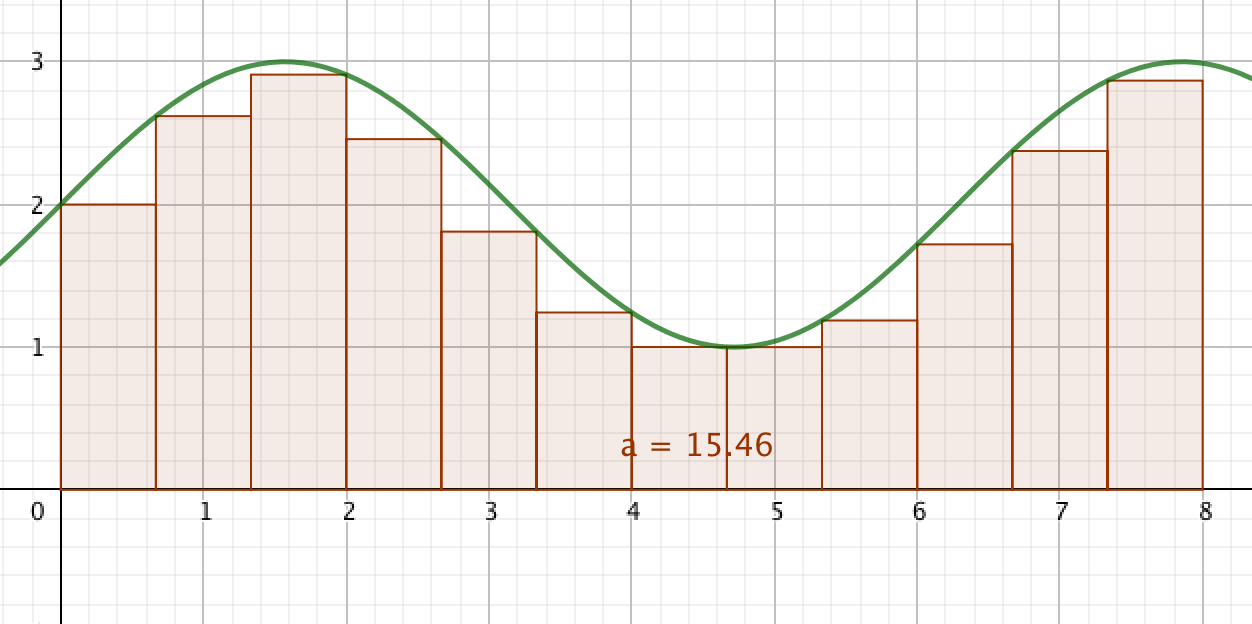
(Edit: This picture is not entirely true; Your code always takes the previous values for the "integral" approximation, not the lower of the two)
Ideally we would instead be using the mean of prev and val:
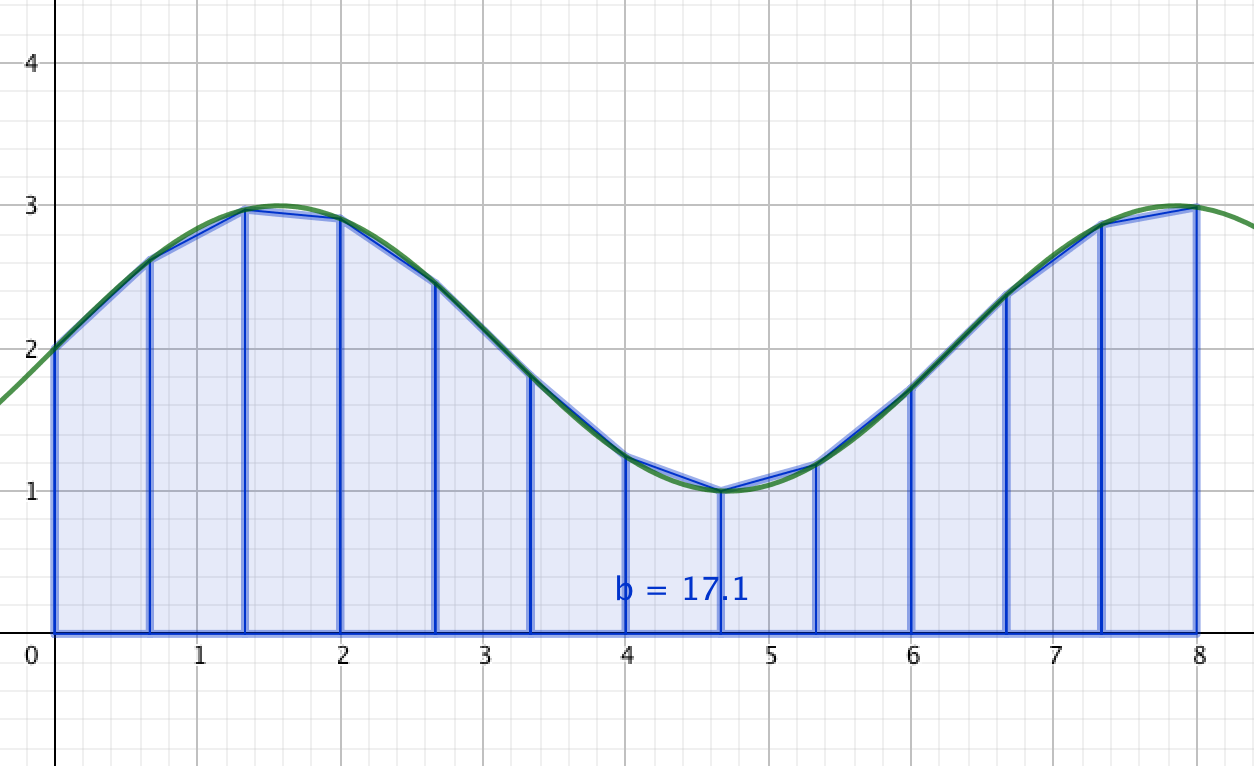
There was a problem hiding this comment.
I based the implementation in this paper:
http://www.eckner.com/papers/Algorithms%20for%20Unevenly%20Spaced%20Time%20Series.pdf
My implementation is that of SMA_last, what you propose is SMA_linear. Both are acceptable filters, yet different ones.
There was a problem hiding this comment.
Ok that is true; I don't see much value in this SMA_last method over the trapezoids though. The latter just seems quite a bit more accurate in most cases.
There was a problem hiding this comment.
I will probably PR a second filter based on SMA_linear, but the use cases are different:
SMA_last: "discrete observation values"
- sensors that are event based
- binary_sensors in HA
SMA_linear: "discretely-observed continuous-time stochastic processes"
- sensors which are polled
| start, prev_val = timestamp, val | ||
| moving_sum += (now-start)*prev_val | ||
|
|
||
| return moving_sum/self._time_window |
There was a problem hiding this comment.
What if we don't receive any value within self._time_window? I think we should be reporting an unknown state then. For example if my time window is 1 minute but I haven't received any state updates for 2 minutes, the output of this sensor should automatically be set to unknown (and not just repeat the same old state indefinitely).
I know this might be a bit of work to do but it's what I'd expect as a user. See usages of async_track_point_in_utc_time for ways how to do this.
There was a problem hiding this comment.
I disagree, If I don't get any values it just means that it hasn't changed.
There was a problem hiding this comment.
The problem here is that the time has changed and time is also an input into this filter. Imagine that our current value is based off 2 states that happened during the window. If we wait long enough that 1 state drops out of our window, wouldn't you expect to base the value off just the other state?
There was a problem hiding this comment.
@balloob that is exactly what it will happen.
Even if no points are left in the time window, the filter will report based on the last value that exited the windows (_, prev_val = self.last_leak )
There was a problem hiding this comment.
@dgomes I think you're misunderstanding Paulus' comment (or I'm not understanding it...)
If there's only one point within the time window, as a user I wouldn't expect it to use the last value outside the time window for any computation. It should just discard anything that's outside the time window.
In other words: only every consider the data points that are inside the time frame for computation. See this gif for an example (the blue points are the data points, the blue area is our time window and red line is the output):
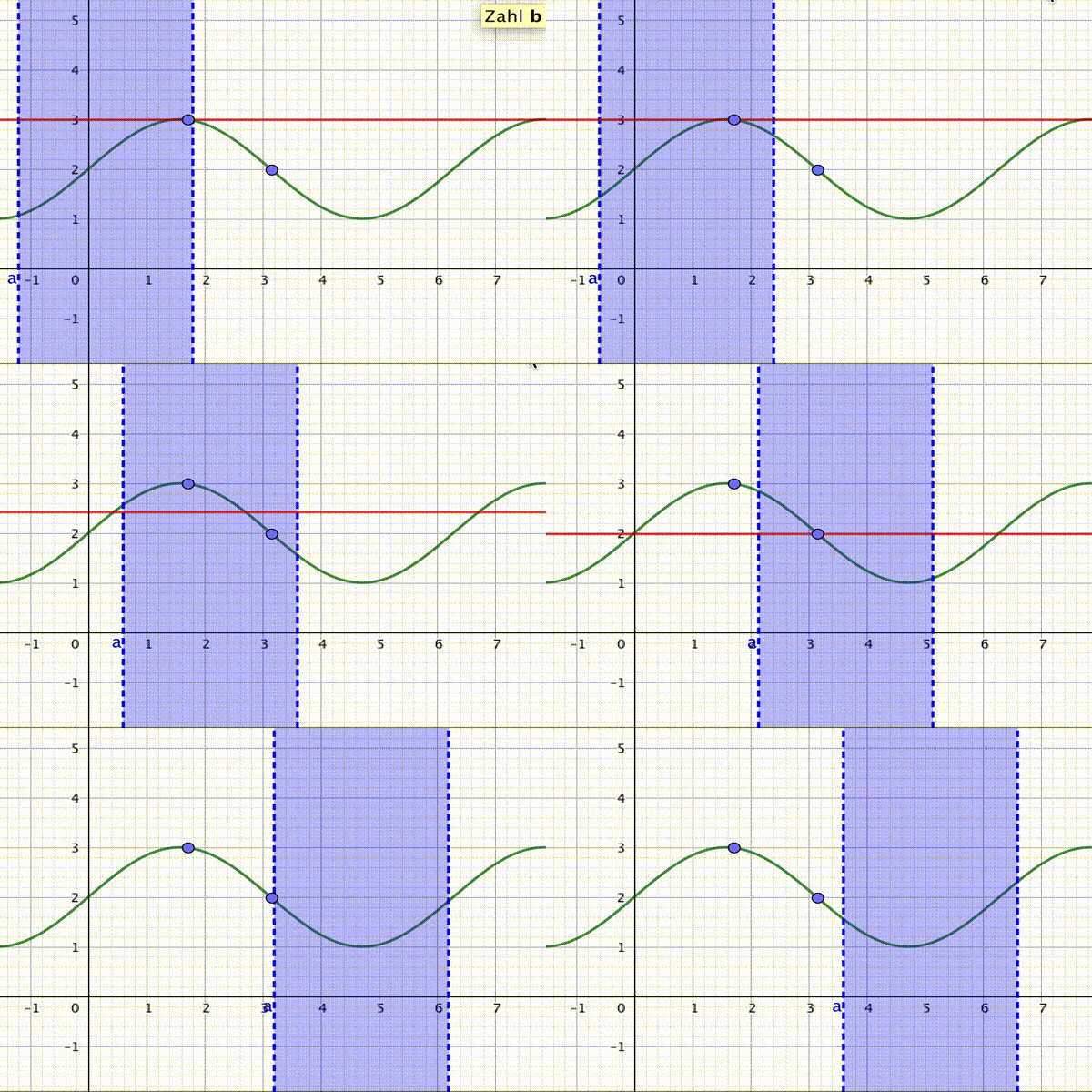
Couple of things going on here:
- First we only "see" the first value, so of course we should only report that value.
- Then we start to see the next value. We should then take the weighted average (or whatever it's called in your paper) of the two.
- If the first value exits the window, we should not use it for any computation anymore. In your current code that is however happening, not what I would expect.
- Optional: In my opinion if there's no data points inside our window left, as I said we should report an unknown state. This might differ from the definition in the paper you mentioned, but IMHO our user base is not made up of scientists nor developers.
(The computation of the values while both data points are inside the time window is probably not right in my gif, but that's not the focus of this comment.)
There was a problem hiding this comment.
@OttoWinter that is not the filter I'm implementing here.
Sure, that filter can be implemented, but it's not the one in this PR.
Please share how you are creating those graphs 😄
There was a problem hiding this comment.
@dgomes I see that you report only on the last value but you only update the filter value when a new state comes in right?
There was a problem hiding this comment.
@dgomes Ok, sorry I will shut up about other filters 😅
Yeah those graphics were done with (ab)using GeoGebra, but I would describe it as the single most user-unfriendly maths tools ever written IMHO (but it's sadly what's taught here in Austria 🇦🇹). Seriously, it's incredibly hard to use if you're starting out. (incidentally, because of its poor usability the rest of my class will probably also have to re-take a recent maths exam 😥)
btw, if for some reason you're looking for a nice tool (in python, yay) for creating nice presentations, have a look at manim. For example, it has allowed me to create these fancy visualizations about graph theory: https://youtu.be/t2Gb1YA-HcU 😺
There was a problem hiding this comment.
@balloob right, this filter always lags 1 state behind. The concept is that the raw sensor has maintained the previous status until the new state has arrived.
E.g.: Think about a water pump that publishes its rate (1 to 5). If the pump is at speed 5 and comes down to speed 4 (new state) the SMA is calculated with the period of time in which the pump was at 5 (we weight in the time the pump was at 5), 4 is of no use in the SMA since the period of time is 0 (it just got to 4).
@OttoWinter please contribute more filters :) It's just that I'm prioritising filters I can use in my setup. There are plenty of important filters missing which I hope some else can contribute 😄
There was a problem hiding this comment.
Okay I'm going to shut up talking about filters as I have clearly not a clue what I am talking about 👍

| return | ||
|
|
||
| def _filter_state(self, new_state): | ||
| now = int(datetime.now().timestamp()) |
There was a problem hiding this comment.
Use our date util package and UTC timestamps:
from homeassistant.util import date as dt_util

dt_util.utcnow()
That way you won't get hit by daylight savings etc.
Any reason you're using timestamps instead of datetime objects?
window size is already given to you in a timedelta. So you can do things like dt_util.utcnow() - self._time_window to calculate points in time.
There was a problem hiding this comment.
Time needs to be multiplied with an unknown type value, so I preferred to keep safe and make sure time is an int.
| while self.queue: | ||
| timestamp, _ = self.queue[0] | ||
| if timestamp + self._time_window <= now: | ||
| self.last_leak = self.queue.popleft() |
There was a problem hiding this comment.
Is there any reason this is assigned to an instance variable instead of a local variable and returned at the end of the while loop ?
There was a problem hiding this comment.
Please look at the previous comment #13104 (comment)
Keeping this value assures me I always have some value to work with in the _filter_state()
The filter always lags 1 state behind, so using the new state in these cases (when there are no previous states in the windows) would make the behaviour erratic.

| FILTER_TIME_SMA_SCHEMA = FILTER_SCHEMA.extend({ | ||
| vol.Required(CONF_FILTER_NAME): FILTER_NAME_TIME_SMA, | ||
| vol.Optional(CONF_TIME_SMA_TYPE, | ||
| default=TIME_SMA_LAST): vol.All(cv.ensure_list, [vol.Any(TIME_SMA_LAST)]), |

There was a problem hiding this comment.
line too long (91 > 79 characters)
 balloob
left a comment
balloob
left a comment
balloob
left a comment
There was a problem hiding this comment.
Ok to merge when a test has been added for this filter
| vol.Required(CONF_FILTER_NAME): FILTER_NAME_TIME_SMA, | ||
| vol.Optional(CONF_TIME_SMA_TYPE, | ||
| default=TIME_SMA_LAST): vol.In( | ||
| [None, TIME_SMA_LAST]), |
There was a problem hiding this comment.
Why is None required here? I mean we have a default. The only configuration that I believe would spit out None here would be the following:
- platform: filter
  # ...
  filters:
    - filter: time_simple_moving_average
      type:
And I think we should break when the user writes that.
There was a problem hiding this comment.
You are absolutely right! Just created a new PR #13326


|
🎉 🎉 🎉 🎉 🎉 |


 ghost
added
ghost
added
5 participants


Description:
This adds a Simple Moving Average (SMA) Filter that works with a time based window.
A time based window can handle unevenly spaced time series.
Pull request in home-assistant.github.io with documentation (if applicable): home-assistant/home-assistant.io#4926
Example entry for
configuration.yaml(if applicable):Checklist:
tox. Your PR cannot be merged unless tests pass