[EuiDataGrid] Toolbar UI layout reorganization #5334
Conversation


- naming was incorrect in the case of the style selector popover
- Columns & Sort on left, with additionalControls to the right of those (+ update prop types to indicate that)

- Style (TBD naming) and Fullscreen to the right
+ tweak grid styles icon to match Caroline's mock + popover location
…ocks

- refactor densityOptions to const outside hook

|
NB: I'm 50/50 on this, but I opted not to include any potential breaking API changes/renames (see #5080 (comment) and the next few comments) as part of this PR, although I certainly could if folks think it would be smarter to do so now instead of later 🤔 |

|
Preview documentation changes for this PR: https://eui.elastic.co/pr_5334/ |

 cchaos
left a comment
cchaos
left a comment
cchaos
left a comment
There was a problem hiding this comment.
Columns & Sort on left, with additionalControls to the right of those (+ update prop types to indicate that)
Oh shoot, sorry about this but, when I commented about the custom controls being on the right side of the built-in ones, I was under the impression this was already how it was. I'd worry about this change for consumers without a way to customize the placement. additionalControls is already used a bunch in Kibana.
Not related to this PR, but would be a nice fix:
I noticed on the docs page:https://eui.elastic.co/pr_5334/#/tabular-content/data-grid-styling-and-control that the Show sort selector option is not doing anything. Can we fix that?
NB: sorting functionality won't actually work/isn't hooked up, but this should at least allow the show/hide UI toggle to work as expected
For sure, that totally makes sense! I reverted the position change and opted to correct the props docs: 7b1158a
This should be fixed now! 07ea746 I just did the first example on the page that has the toggle options and not every single example on the page as a heads up |
|
Preview documentation changes for this PR: https://eui.elastic.co/pr_5334/ |
|
Preview documentation changes for this PR: https://eui.elastic.co/pr_5334/ |

|
Just a note to make sure you all communicate with the Security and Observability UI teams (@andrew-goldstein and @weltenwort would be a start). I have a feeling the new positioning will break some of their overwrites (specifically I know they abs position some items into that top right corner). This should give them better guidance for how to position those controls (by using the additional props) they need to add. Not a breaking change the way I see it delivered in EUI, but it will break in Kibana based upon some of their usage. |

|
Good call, thanks for the ping. The shared alerts table has indeed customized the content. cc @elastic/observability-rac, because responsibilities are being rearranged at the moment |
|
If you want your own totally custom toolbar content that's absolutely positioned to the right, you can likely still override this flex positioning as needed by targeting: .euiDataGrid__controls {
justify-content: flex-start !important;
}or similar - it may look a little odd though because the right items are now icons only 🙈 @cchaos may have a better holistic solution! |

|
The ideal solution is just making the |
|
@cchaos Would you be fine with this PR proceeding without that behavior for now? I checked with Chandler this morning and technically since custom CSS with EuiDataGrid isn't officially supported, he mentioned we shouldn't let that hold up our current work - and it gives us time to more fully implement |
|
Preview documentation changes for this PR: https://eui.elastic.co/pr_5334/ |
Since we are already aware that this will break a specific implementation, and we know the fix, I'd rather get the fix in so it doesn't become a backlog issue. |

* Update some props comments and fix popover’s responsiveness

* [Design] Remove a few extraneous style overrides to control buttons

And lower left padding

* Fixed add/remove of fullscreen body class

* Added tooltips around icon buttons with long delay

* Updated examples and snippets with “real world” examples

Removed all the unnecessary manual additions of `className="euiDataGrid__controlBtn”`

* More responsive fixes

* Change class name
- It isn't necessary for popovers without drag & drop, name becomes verbose but it's hopefully worth it for clearer usage
Cool - that will likely be me since I appear to be primarily on datagrid 😅 Not sure if we should open #5346 back up to discuss updating the current API (e.g., If we were to add a brand new API, maybe something like |
cchaos
left a comment
cchaos
left a comment
There was a problem hiding this comment.
🎉 LGTM! It'd be great to get @chandlerprall 's eyes to do a quick scan in case there were any edge cases missed.
|
Preview documentation changes for this PR: https://eui.elastic.co/pr_5334/ |
|
Preview documentation changes for this PR: https://eui.elastic.co/pr_5334/ |

 chandlerprall
left a comment
chandlerprall
left a comment
chandlerprall
left a comment
There was a problem hiding this comment.
Tooltip delays
The tooltip delay on the default controls feels really long, and is mismatched with the delay on the example custom controls; while we can't control the delay on any real custom control, our examples should provide a solid, recommended template for copy&pasting.
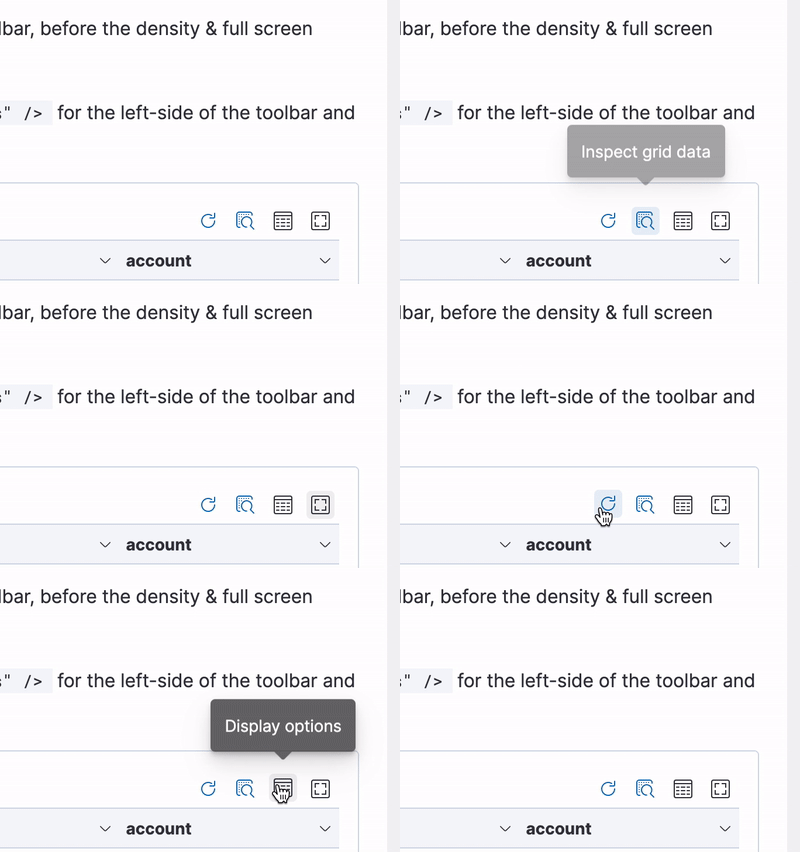
Fullscreen gap
Not sure if this PR introduced it, but I don't see this in the most recent release; when in fullscreen mode there is a big gap between the header & first row.
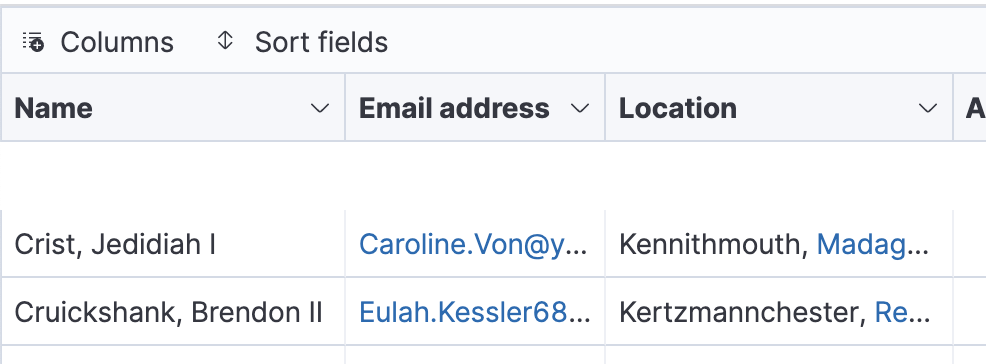
|
Those tooltip delays were specifically designed as-is for the following reasons:
|
|
@chandlerprall re:
It looks like this is happening in latest EDIT: Separate PR with fix: #5369 |
|
Preview documentation changes for this PR: https://eui.elastic.co/pr_5334/ |
- Class was removed in a previous commit by Caroline
|
Preview documentation changes for this PR: https://eui.elastic.co/pr_5334/ |
 cee-chen
merged commit
cee-chen
merged commit 7ca1bc8
into
elastic:feat/datagrid/toolbar-reorg-and-row-height-switcher


…5415)

* [EuiDataGrid] Toolbar UI layout reorganization (#5334)

* [EuiDataGrid] Add extra left prepend position to the `additionalControls` API (#5394)

* [EuiDataGrid] Add rowHeightSwitcher logic + API change (#5372)

* [EuiDataGrid] Add `onChange` callbacks for display selector changes (#5424)

* [EuiDataGrid] Row height switcher should override `rowHeights` + add reset button (#5428)

* [EuiDataGrid] improve height calculation (#5447)

Co-authored-by: Caroline Horn <549577+cchaos@users.noreply.github.com>
Co-authored-by: Chandler Prall <chandler.prall@gmail.com>


This PR fixes an issue reported in <elastic#122231> where the alerts table's `Full screen` button, recently [moved to the right side of `EuiDataGrid`](elastic/eui#5334) in [EUI 43.0.0](https://elastic.github.io/eui/#/package/changelog), overlapped the existing view selector. ### Details In the `8.0` release of the Security Solution, the alerts table `Full screen` button appears above the table on the **left**, per the screenshot below:  _Above: The alerts table `Full screen` button in `8.0`_ Starting with `8.1` (via [EUI 43.0.0](https://elastic.github.io/eui/#/package/changelog)), `EuiDataGrid`'s `Full screen` button has been [moved to the right side of `EuiDataGrid`](elastic/eui#5334), per the screenshot below:  _Above: `EuiDataGrid`'s full screen icon has moved from left to right_ The new location of the `Full screen` button overlapped the existing alerts table view selector, per the `Before` screenshot below: #### Before  _Above: Overlapping icons reported in <https://github.com/elastic/kibana/issues/122231>_ This PR fixes the overlap, per the `After` screenshots below: #### After Chrome `97.0.4692.71`:  Firefox `96.0`:  Safari `15.2`: 


…122901) ## [Security Solution] Fixes alerts table `Full screen` button overlap This PR fixes an issue reported in <#122231> where the alerts table's `Full screen` button, recently [moved to the right side of `EuiDataGrid`](elastic/eui#5334) in [EUI 43.0.0](https://elastic.github.io/eui/#/package/changelog), overlapped the existing view selector. ### Details In the `8.0` release of the Security Solution, the alerts table `Full screen` button appears above the table on the **left**, per the screenshot below:  _Above: The alerts table `Full screen` button in `8.0`_ Starting with `8.1` (via [EUI 43.0.0](https://elastic.github.io/eui/#/package/changelog)), `EuiDataGrid`'s `Full screen` button has been [moved to the right side of `EuiDataGrid`](elastic/eui#5334), per the screenshot below:  _Above: `EuiDataGrid`'s full screen icon has moved from left to right_ The new location of the `Full screen` button overlapped the existing alerts table view selector, per the `Before` screenshot below: #### Before  _Above: Overlapping icons reported in <https://github.com/elastic/kibana/issues/122231>_ This PR fixes the overlap, per the `After` screenshots below: #### After Chrome `97.0.4692.71`:  Firefox `96.0`:  Safari `15.2`: 
6 participants


Summary
This PR starts the process for updating our data grid toolbar layout to the mock in @cchaos's comment here: #5080 (comment)
I recommend following along by commit!
Before
After
Checklist
- [ ] Props have proper autodocs and playground toggles- [ ] Added documentation- [ ] Checked Code Sandbox works for any docs examples- [ ] Checked for breaking changes and labeled appropriately