Feat: email notifications aggregation#2027
Conversation


…om/ONEARMY/community-platform into feat/email-notifications-backend
…om/ONEARMY/community-platform into feat/email-notifications-backend


1 flaky tests on run #2907 ↗︎
Details:
|
|||||||||||||||||||||


| Test | ||
|---|---|---|
| [Common] > [User Menu] > [By Authenticated] |
Screenshot
|
|
This comment has been generated by cypress-bot as a result of this project's GitHub integration settings.

|
Looks cool @chrismclarke ! |
 davehakkens
added
the
Review allow-preview ✅
davehakkens
added
the
Review allow-preview ✅

|
Interesting, could you try run that one command as standalone and see if there's any more info output, i.e. I don't think the preview will do much unfortunately as that's not configured to work with the docker emulators (instead uses its firebase online). There's also a chance some of the related packages aren't quite updating correctly, one other thing you could try is to see whether it will actually build If the build succeeds then likely the full command should work afterwards. If not might have the same or different log messages |
 chrismclarke
removed
the
Review allow-preview ✅
chrismclarke
removed
the
Review allow-preview ✅

|
If I run If I run |
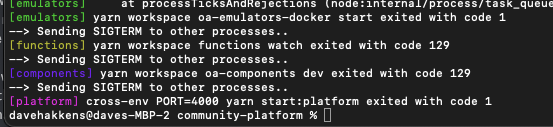
|
sorry, should have made that first command |
|
oh, and actually just realised there are a few more lines above in the original error that would be useful to see, could you screenshot to include the output from the With the way it needs to run 5 different commands, if any 1 fails it stops all the others. So quite possible that the final error message you shared is actually triggered by an earlier error |
|
|
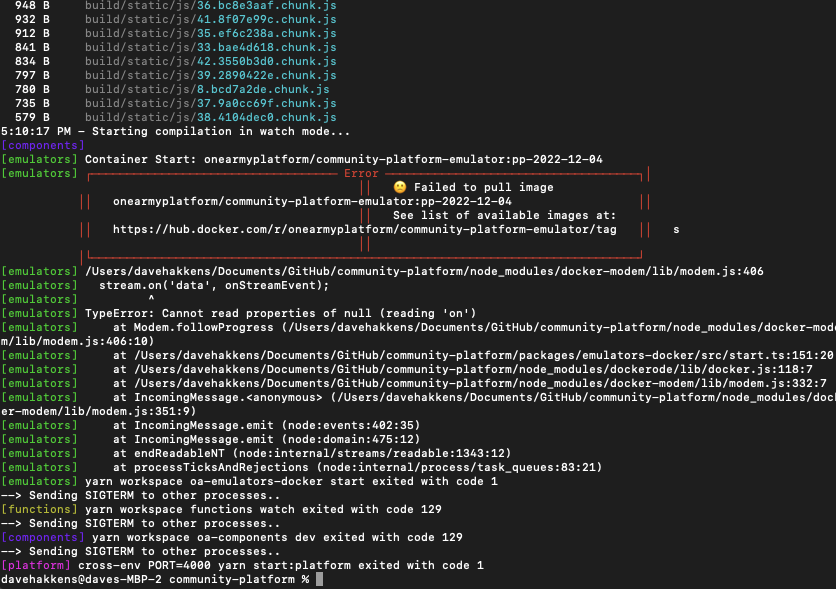
|
ah, ok - looks like there's an issue with the docker image itself. Sorry about that, I'll take a quick look |
|
Docker image issue now resolved, was super simple, barely an inconvenience. So hopefully testing will work for you this time :D |
|
haha yes, works now! All how you described above :) And these messages would dissapear when the email is send? |
That would be the plan. We could try wait for confirmation of delivery before removing, but could get a little complicated (probably easier to have some sort of retry system independent of the notification list, so that we don't check the list again when we retry but just try send the exact same message) Otherwise it would be possible if we want to keep it as unread on the web page but not turn up in the email list anymore (there's two separate fields for |
|
Just to double check if I get it correct. How it would work: New Notification comes in
Follow up question: Adrian talked about this topic, but not sure what he ended up making 😅 Happy both ways, just want to make sure I understand the flow |
Definitely points 1 and 2 is what we've been working towards, I think point 3 is a question for how we want things to work. According to the google doc draft notifications are notified either in site or via email - I think currently whenever the user clicks the notifications icon that marks all as notified, and then on dismiss marks all as read. If we keep the proposed logic to mark all as notified when sending an email I think that should mean they stay in the list, but the icon will not be lit as there are no new notifications. This seems pretty sensible to me, although I would have to re-check whether that's how things are working currently or not.
Pretty sure its all or nothing, there's no methods in the code to mark a single notification as read/notified, just all in bulk |
I dont think notifications currently work like that. Thats mainly because we currently dont use two states, only now we introduce |
|
@evakill would you be able to take a pass at reviewing this by any chance? It updates backend code so will need to be run with the emulator setup. It also uses an intermediate aggregations system, which is a set of utilities to intercept firestore db changes and trigger functions only if specific fields have changed. This is because firestore doesn't allow for fine-grained change detection and want to avoid having too many listeners for something like a user profile update. Feel free to drop a comment in the code if you think anything could do with better commenting/clarity, or any other issues you come across. |
|
Just checking how this one is going.. |

ah yes - let me look at this tonight |

| process: ({ dbChange }) => { | ||
| const user: IUserDB = dbChange.after.data() as any | ||
| const { _id, _authID, notification_settings, notifications } = user | ||
| const emailFrequency = notification_settings?.emailFrequency || null |

There was a problem hiding this comment.
should we be using the notification_settings.enabled field here instead/also to filter on type of notif?
There was a problem hiding this comment.
Thanks @evakill , I hadn't thought about how it relates to filtering the specific types of notifications users are subscribed to or not. I'm assuming it might be a future PR anyway that handles filtering, so for now I'd say probably better to keep this simple and let all notifications pass through, and then filter out at a later stage (likely before hitting the user profile notifications, so that they don't receive on web and before we reach this aggregation step)
|
one q but otherwise tested locally and is working well! |
|
thanks @evakill! |


|
🎉 This PR is included in version 1.37.0 🎉 The release is available on GitHub release Your semantic-release bot 📦🚀 |


4 participants


PR Checklist
PR Type
Description
As a prerequisite for delivering email summaries of user notifications we need an aggregated list of users who have opted in to receive email notifications, and their current list of unread notifications. This PR does the following:
Not done (next steps)
The email list is not yet formatted as HTML nor are configured to actually send (just showing a list for testing purposes). So roughly next steps in the process would be
Testing Notes
Run platform with latest emulators backend (note, image recently updated so might take a couple minutes to pull and make ready)
Once the docker emulators are running you will want to sign in as the demo_admin user, and then trigger a notification, prompting the email summary list to populate for the first time.
The easiest way is to either vote useful or add a comment to any howto not owned by the demo_admin user (see video below)
username:
demo_admin@example.compassword:
demo_adminA list of notifications marked for future send will be displayed in the admin panel. As there is currently no frontend UI for enabling notifications for a user, the demo_admin and demo_beta_tester users both have been preconfigured to receive weekly notifications
Git Issues
Closes #
Screenshots/Videos
Seeding initial list of user email notifications, watching list respond when notifications read
Note - by default both demo_admin and demo_beta_tester have one pending unread message, however the aggregation list will only populate after a new notification is triggered (hence why first empty, then has 3 items). They are also the only users that will appear in the list, because they have their email frequency hardcoded into the database (need frontend for other users)
How-to.webm
What happens next?
Thanks for the contribution! We try to make sure all PRs are reviewed ahead of a monthly dev call (first Monday of the month, open to all!).
If the PR is working as intended it'll be merged and included in the next platform release, if not changes will be requested and re-reviewed once updated.
If you need more immediate feedback you can try reaching out on Discord in the Community Platform
developmentchannel.