Make timerow persistent (WhatsApp like implementation).#3496
Make timerow persistent (WhatsApp like implementation).#3496ishammahajan wants to merge 5 commits intozulip:mainfrom
Conversation


| justify-content: space-between; | ||
| margin-bottom: 0.25em; | ||
| } | ||
| #timerow-persistent { |

There was a problem hiding this comment.
I would have called this 'sticky' instead of 'persistent'

|
Awesome, thanks @ishammahajan ! This looked like a tricky CSS problem -- glad you were able to make it work. 🎉 Comments from playing with the UI:
|
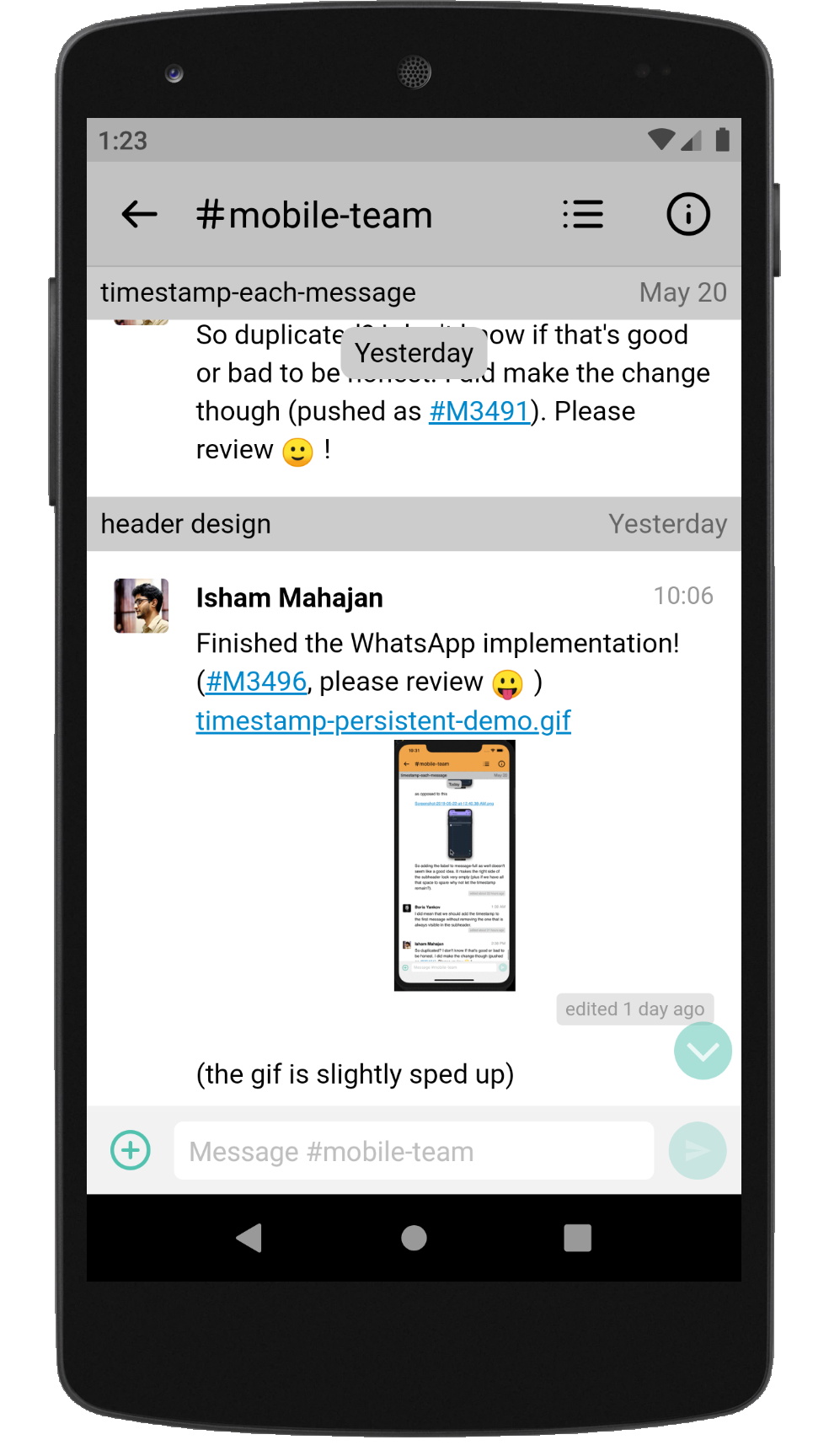
|
And comments on the code: bbbd107 timerow: Change design to pill type.Looks good! 0ff5ed6 timerow: Add persistent timerow element.
e7a9b2b timerow: Add functionality to react to scroll events.
That way it's the short "nothing interesting here" cases that get indented, while the main narrative flow of the function is all aligned at constant indentation. Same thing on the
|
|
Oh, another small UI issue I just noticed:
|
|
Oh, an important bit of workflow:
Together those make sure (a) the previous discussion is easy to find from the PR thread, (b) the PR is easy to find from the issue thread, (c) the issue gets properly closed when we merge the fix. |

 ishammahajan
force-pushed
the
timerow-persistent_v2
branch
from
ishammahajan
force-pushed
the
timerow-persistent_v2
branch
from
e7a9b2b to
f24de25
Compare

|
Thanks for the detailed review!
That makes sense! What do you feel about adding a
Sure, that sounds good! (FWIW, b49c49d solves the problem of non replacing dates, and that solution is basically the same as this one! -- get the first visible message and replace it's date with the date present in the recipient header)
I agree, but again the issue comes because of the stickiness situation. I'll try to fix it though, have some ideas.
I agree. Checked WhatsApps time right now, seems like it's about a second.
Hmm. Didn't notice that, I thought the pill would completely disappear since it has no contents. Appears as if padding takes its own space even without content. Fixed though.
I originally hadn't marked this because this was only a potential solution and not definitely going to be implemented. I didn't want to flood the given issue with lots of references (which I have done before due to multiple fixes and solution of issues, see #3385). My original plan was to only add that fixes line in the final push, so as to keep things clean. As for the comments on the code, I have fixed most of them, but changes to the code now (based on mentioned changes) make it so that combining both |
ishammahajan
force-pushed
the
timerow-persistent_v2
branch
from
f24de25 to
cfe4ebb
Compare
ishammahajan
force-pushed
the
timerow-persistent_v2
branch
from
cfe4ebb to
79b7cba
Compare
|
@gnprice I think now that #3491 has been implemented, this might be the next thing to focus on! :) In the revision made today I just changed the design of the date-pill-sticky to match the same one we used for the timestamp in #3491. The normal date-pills also have the same design, except that they don't have the box-shadow. It looked too janky if so (in the case of Without the shadow With the shadow Let me know what you think about this. Also, as you might have noticed in the previous screenshot (second one) the shadow of the date-pill has been 'aimed' straight down as opposed to the timestamp where the shadow has been aimed slightly to the left. |
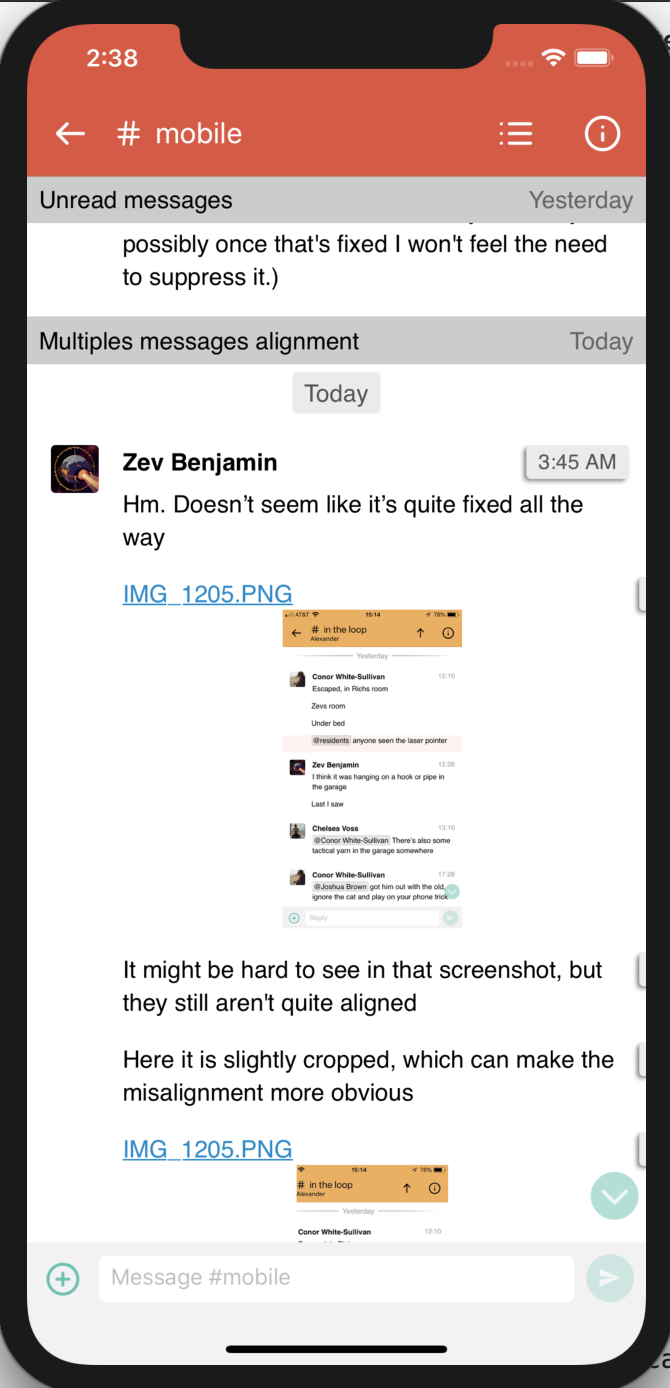
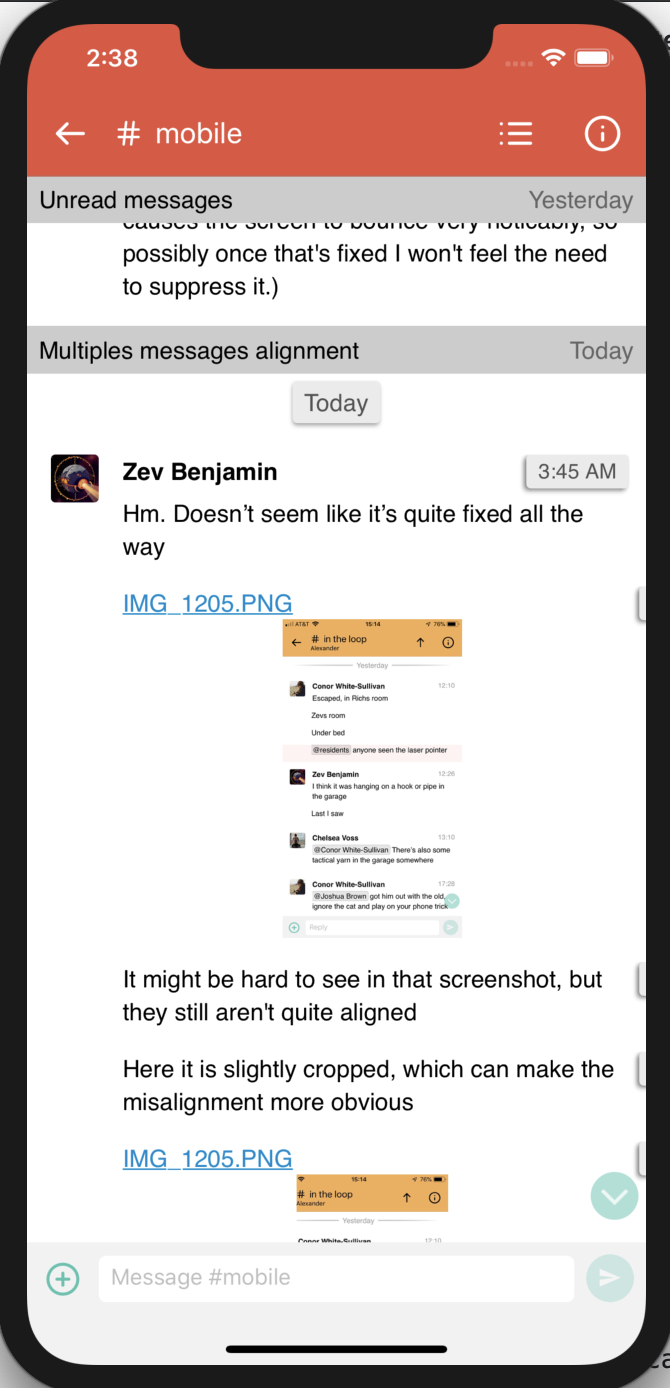
|
Thanks @ishammahajan ! Things seen in the UI from playing with it:
|
|
And comments on the code:
Yeah, it's kind of an awkward UI bug in GitHub that making such references can flood an issue thread like that (though #3385 is a pretty mild example 😉, with only 5 in a row in the longest spot.) I find the references extremely helpful when reading the Git log, though -- and it's really easy to forget a last-minute change like that when it isn't in the actual draft branch. So despite that GitHub UI issue, please do include the reference in your draft commits; we'll just live with a little noise on the issue threads. 🙂 (You could also try out a circumlocution like "Fixes issue 3385" -- that'll ensure the information is there even if you forget to edit it to the afcf160 timerow: Change design to pill type.
b3de5af timerow: Add persistent timerow element.
164c657 timerow: Refactor - Change inaccurate names.
4fd047a timerow: Add functionality to react to scroll events.
79b7cba js: Consolidate
|
Done! The first commit converted all |
The thing is, we always send a scroll message to the webview whenever we open a narrow, so this is unavoidable, the most I can do in this case is perhaps add a flag which checks for first load. Will that be acceptable?
Wait, I don't understand. I did figure it out, and as I mentioned in chat, that change is in another branch of mine,
Again, this seems to be the outdated version of the branch, since this issue has since been fixed. It transitions smoothly on my device/emulator -- at the precise moment when sticky date pill crosses the static pills.
Perhaps the branch timerow-persistent_v3 will amend things? In that case there will appear to be less of a transition since the sticky date pill will go under the recipient headers.
...It already does on my machine. Just like the 'sync' with static date pills feature, you seem to have a different behaviour from what I observe. Perhaps there is a bug at play here? |
Hmm! This was based on commit 79b7cba -- here's what I have on my machine (as set by using (That And that commit is what's currently on the PR branch. (You can see that in the thread, above -- search for "pushed".) Perhaps you're looking at a version on your machine that you intended to push here but haven't? |
|
Also to double-check I just went back to this PR's code (at 79b7cba), and restarted the Metro server (the one from I still get this behavior just as I described yesterday:
For this one, though:
I find that it varies! Sometimes it's perfectly in sync -- sometimes it's off by more than the height of a pill. There seems to be a pattern where when scrolled near the very bottom, it's in sync, and at some point as I scroll up it suddenly becomes out of sync. Not sure if that's real or a red herring from random variation. That's from browsing a stream narrow; some things that happen in between where it's in and out of sync include an image, and an emoji reaction. Could be that one of those is somehow involved? Other variables to consider when trying to repro/debug would be whether the scrolling pill comes just after a recipient header, or a message (of various kinds), etc. |
OK, went and tried that branch. Specifically at 3cd7c72 . (Workflow note: I recommend sending a PR for any branch you'd like me to try out. Makes it slightly easier to get the code, with I think I now understand the confusion on this bit:
The difference I see in your "v3" branch is that the sticky date pill is (effectively) covered by the sticky recipient header -- whereas in this PR, the sticky date pill "floats over" the sticky recipient header. Rereading my comments above, I think I didn't express a view on which of those two should occlude the other; though there were a lot of moving parts there to talk about. In any case, good to have prototypes to play with for both possibilities! I agree, this helps with making the transition less eye-catching. There's one gotcha in it which is a bit subtle, and which I don't have a solution for off the top of my head:
Like I said, this effect is subtle -- it's only visible for a few frames, and only within fairly narrow windows of how things happen to be aligned by the scroll position. So, could be acceptable. |
Ah, just noticed this question in here. This is something where the code is a bit confusing -- we might perhaps give a better name to At first load, we call a function of ours named But that function's job isn't really about scrolling. What it does is send a message from the webview (all of The reason we might call that function on narrow is to mark the messages that are visible as read; it doesn't actually do any scrolling. (We call it a "scroll" message because the most common reason we send one is that the user scrolled.) So, for this new logic we don't need to put it in |
The code I call ( For the issue, I think the browser itself sends a scroll message when a user opens up the webview. To confirm this theory I inserted the
That's plausible (I cannot confirm since I have rebased since I pushed).
I can't get it to vary for whatever reason. Here's the video, maybe you're doing something different to get it to reproduce? Would be interesting to see.
The video above also contains a group chat where it's visible that the date pill is closer to the app bar than it would be in a stream.
Ah, my bad. In the git client I use it's easy to get confused/make the wrong click v1, v2 and v3 are adjacent. I've made that mistake once or twice, which is why I said that 😄 . |
Ah indeed. Sorry, I must have not been looking at your actual code when I added that reply, and just pattern-matched a guess.
Hmm, so -- I see, in the PR itself you don't have and the CSS is set up so that without I'm confused about why an error happened. The function normally works fine if the pill is hidden, right? That's the normal case when you start scrolling after nothing's happened for a couple of seconds. On the main point: It doesn't make a lot of sense to me that the browser would just routinely issue a scroll event at startup. But! We do have a number of calls to If you search for
So the We'll want to avoid the date-pill spontaneously showing up in all three of the above cases, though (and possibly others if there are others.) Hmmm. I'm not actually sure what's a great way to do that. Options include
You might look around at docs, the web, etc., and play around to see if you can find a good solution. I think the flag-plus-timer solution I described should be acceptable, if you don't find a better one. |
|
Rereading this thread, and trying to summarize the status:
I think this is getting close to merging! Looking forward to seeing the next version when I'm back from my upcoming vacation. |
ishammahajan
force-pushed
the
timerow-persistent_v2
branch
from
79b7cba to
fe1e0b6
Compare
Ahh, that makes a lot of sense. Thanks for the investigation!
|

The aim of this and the child commits is to change the behavior of
the timerow to be persistent. The design has to be changed to make
the new behavior viable. The pill design seems to be the perfect
choice for our usecase, which is supported by the fact that it is
what the other popular messaging applications use.

To make this possible the decorations on the left and the right of
the timerow were removed and a central element was added to make the
timerow. A span was introduced to seperate the timerow container
from the content of the timerow itself, and for ensuring that the
margins and the background colors worked properly (only for the
text, rather than for the whole container). The existing design for
timestamps has been used again for the timerows.
On a recent discussion on chat.zulip.org it was determined that a
good way to go about showing the date consistently in the WebView
was to just copy the sticky timerow element from WhatsApp. That
implementation keeps a timerow, which from now will be called
`date-pill` because of its true nature, is always on top of the
screen, and as the other date-pills whiz by it, its content gets
updated.

This commit just adds that sticky date-pill element to the
screen. It gets its `top` property set by the `hasRecipientHeaders`
property, which is sent to the `css.js` default export. Since it is
currently empty it will not show because of :empty pseudoelement
added to `css.js`. The persistent date-pill is very slightly raised
in order to not appear janky, and it's `z-index` has been raised to
above the headers.

NOTE: The timerow/date-pill now appears below a header instead of
above it when they appear together. The tests have been amended with
respect to that, and an additional line is added to each test which
tests for a header object.
(references parent commit)
The name `timerow` was not very correct, and its child introduced in
the parent commit isn't very compliant either. This is because even
if the name was a befitting the function before, since timerows were
a divider of sorts (they still are), the design has changed to the
`pill` type, and that description is more accurate now.

This commit refactors the names of `timerow-content` and
`timerow-persistent` to more appropriate names.
This commit completes the functionality addition started by its
parent commit.

`js.js`: Every time a scroll event fires, the algorithm finds the
first visible message in the viewport at that point of time, and
walks up the list until it finds the previous timerow and extracts
the date present in the `date-pill` inside it, which gets inserted
into the sticky date-pill's innerHtml if it differs from the current
innerHtml value.
This commit is a pure refactor to combine two functions which are
structured in a similar fashion and follow the same algorithm. The
algorithm itself looks finniky on the outside which is why this
refactor is necessary in order for one change in the algorithm to
affect both functions.
ishammahajan
force-pushed
the
timerow-persistent_v2
branch
from
fe1e0b6 to
89e43ea
Compare
I've written the key points here a few times ad hoc, including:
  #3496 (comment)
  #3554 (comment)
(plus some useful Q&A in subsequent comments on the former), and
others I don't have on hand.

So, write it up a bit more fully in a place that's easy to find
and to point people at.

Also describe the `Fixes: #1234` syntax.  We've often also said
`Fixes #1234.`; but I've shifted to preferring the other form as
we've started writing kernel-style `Frobbed-by:` lines, because
it fits so naturally as one more of those.


3 participants


On a recent discussion on chat.zulip.org it was determined that a
good way to go about showing the date consistently in the WebView
was to just copy the sticky timerow element from WhatsApp. That
implementation keeps a timerow which is always on top of the screen,
and as the other timerows whiz by it, its content gets updated.
I think this is the way to go, since it is easily understandable, is a good design, and make it harder to make errors on modification of code (if we require to do it at a later point in time).
(this gif is slightly sped up)