repl: Show add-cell controls in empty notebooks - #61329
Conversation


 cla-bot
Bot
added
the
cla-signed
cla-bot
Bot
added
the
cla-signed
 zed-community-bot
Bot
added
the
first contribution
zed-community-bot
Bot
added
the
first contribution

 MrSubidubi
left a comment
MrSubidubi
left a comment
MrSubidubi
left a comment
There was a problem hiding this comment.
Thanks for this - can you please add some screenshots comparisons as requested by the PR template and our repository contribution guidelines?

|
Added a before/after showcase to the description — the empty notebook now shows "Add code cell" / "Add markdown cell" controls instead of a blank pane. Thanks! |
|
@MrSubidubi this is ready for another look whenever you have a moment — the before/after showcase has been added to the description as requested. Thanks! |

|
No need to ping me/anyone here, but all good, just an FYI. With that out of the way, overall looks good! Two things come to mind:
|


When a notebook has no cells, the editor rendered a blank pane with no
visible way to add one. Render an empty-state with add code cell and add
markdown cell buttons in the editor body, each with an icon and its
keybinding, matching the affordance VSCode provides.

This is the follow-up direction suggested in zed-industries#61296.

Co-Authored-By: Claude Fable 5 <noreply@anthropic.com>

f531b5b to
fe36d6f
Compare
|
Added icons to both buttons and surfaced their keybindings, so they now show cmd-m and cmd-shift-m. Also refreshed the showcase screenshot in the description. |

|
Hey. I've added the changes requested. |

MrSubidubi
left a comment
MrSubidubi
left a comment
There was a problem hiding this comment.
Nope, looks good now. Thank you!

|
Thanks! |

Upstream changes (zed-industries/zed main, 27 commits):
- agent: Add agent.compaction_model setting for context compaction (zed-industries#60012)
- agent: Show effort selector for anthropic compatible providers (zed-industries#61579)
- acp: Update agent-client-protocol SDK to 2.0.0 (zed-industries#61570)
- client: Extract proxy handshakes into new proxy_handshake crate (zed-industries#61427)
- collab: Fix multiworkspace location out of sync bugs (zed-industries#61598)
- editor: Fix sticky header drag cancels autoscroll (zed-industries#53592)
- editor: Fix crash when copying and pasting using multiple cursors (zed-industries#61545)
- editor: Skip untitled buffers when saving a multi-buffer (zed-industries#61380)
- gpui: Fix images not being drawn with rounded corners with ObjectFit::Cover (zed-industries#61383)
- gpui: Fix deadlock in performance profiler and reenable it (zed-industries#61584)
- git_ui: Prevent Git panel bindings in repository selector (zed-industries#61282)
- language_model: Add explicit OpenAI conversation compaction and fix Anthropic compaction (zed-industries#61370)
- markdown: Fix squashed Mermaid diagrams in markdown preview (zed-industries#61260)
- Opus 5 BYOK Support (zed-industries#61596)
- repl: Show add-cell controls in empty notebooks (zed-industries#61329)
- search: Escape seeded buffer search query in regex mode (zed-industries#57748)
- settings: Fix VS Code import appending duplicate file associations (zed-industries#61355)
- settings: Split VSCode and Zed keymap files (zed-industries#61532)
- Treat blank spawn_agent session IDs as absent (zed-industries#60893)
- worktree: Reload git state when a watcher rescan covers a repository (zed-industries#61541)
- Plus 7 more minor fixes.

Merge fixes:
- crates/agent/src/thread.rs: replay_tool_call used 'message_ix' (undefined)
  after auto-merge; renamed to 'owning_message_ix' (the parameter name).
- Cargo.toml: Removed stale workspace members hkask-wallet and hkask-git-cas
  (both directories deleted in prior commits but workspace entries remained).
- kask/crates/hkask-regulation/src/wallet_manager.rs: Stubbed consume() and
  settle_rjoules() on WalletBudgetPort — these were API-key encumbrance
  operations from the deleted hkask-wallet crate; regulation tracks per-agent
  gas balances, not per-key encumbrances.
- kask/crates/hkask-regulation/src/wallet_gas_calibrator.rs: Fixed test to
  use crate::agent_wallet_store::WalletStore instead of hkask_storage::WalletStore.
- kask/crates/hkask-regulation/Cargo.toml: Added tokio macros feature to
  dev-dependencies for #[tokio::test].
- kask/crates/kask_bridge/Cargo.toml: Added futures dependency (needed by
  context_injector.rs for futures::executor::block_on).
- kask/crates/kask_bridge/src/context_injector.rs: Fixed futures_util::executor
  to futures::executor (futures-util doesn't include executor module).

Release Notes:

- N/A

上游 zed-industries#61329 新增笔记本空状态提示与两个按钮,补 en/zh-CN
翻译并替换硬编码字符串为 t! 调用。


## Objective When a notebook has no cells, the editor renders a blank pane with no visible way to add one. Cells can only be added via the toolbar icons or keybindings, which aren't discoverable from an empty editor — so a newly created `.ipynb` looks broken. This is the follow-up direction suggested in zed-industries#61296. ## Solution Render an empty-state in the editor body when the notebook has no cells, with "Add code cell" / "Add markdown cell" buttons (dispatching the existing `add_code_block` / `add_markdown_block` handlers), matching the affordance VSCode provides. ## Testing Tested locally on macOS with the notebook feature enabled (`LOCAL_NOTEBOOK_DEV=1`): - Opening an empty `.ipynb` shows the empty-state instead of a blank pane. - Clicking "Add code cell" inserts an editable code cell and marks the tab dirty. ## Showcase **Before** — empty notebook renders a blank pane: 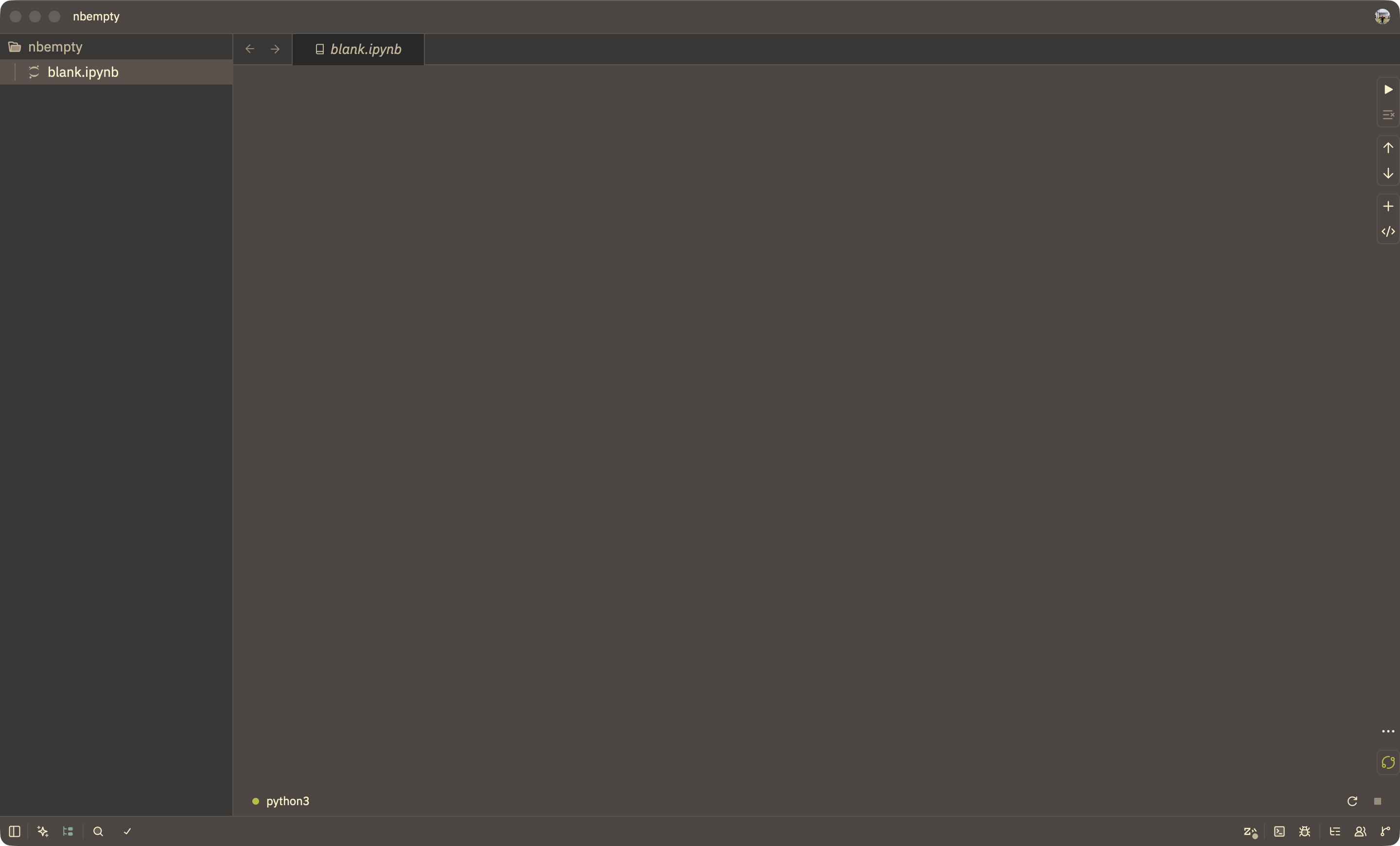 **After** — empty notebook shows add-cell controls: 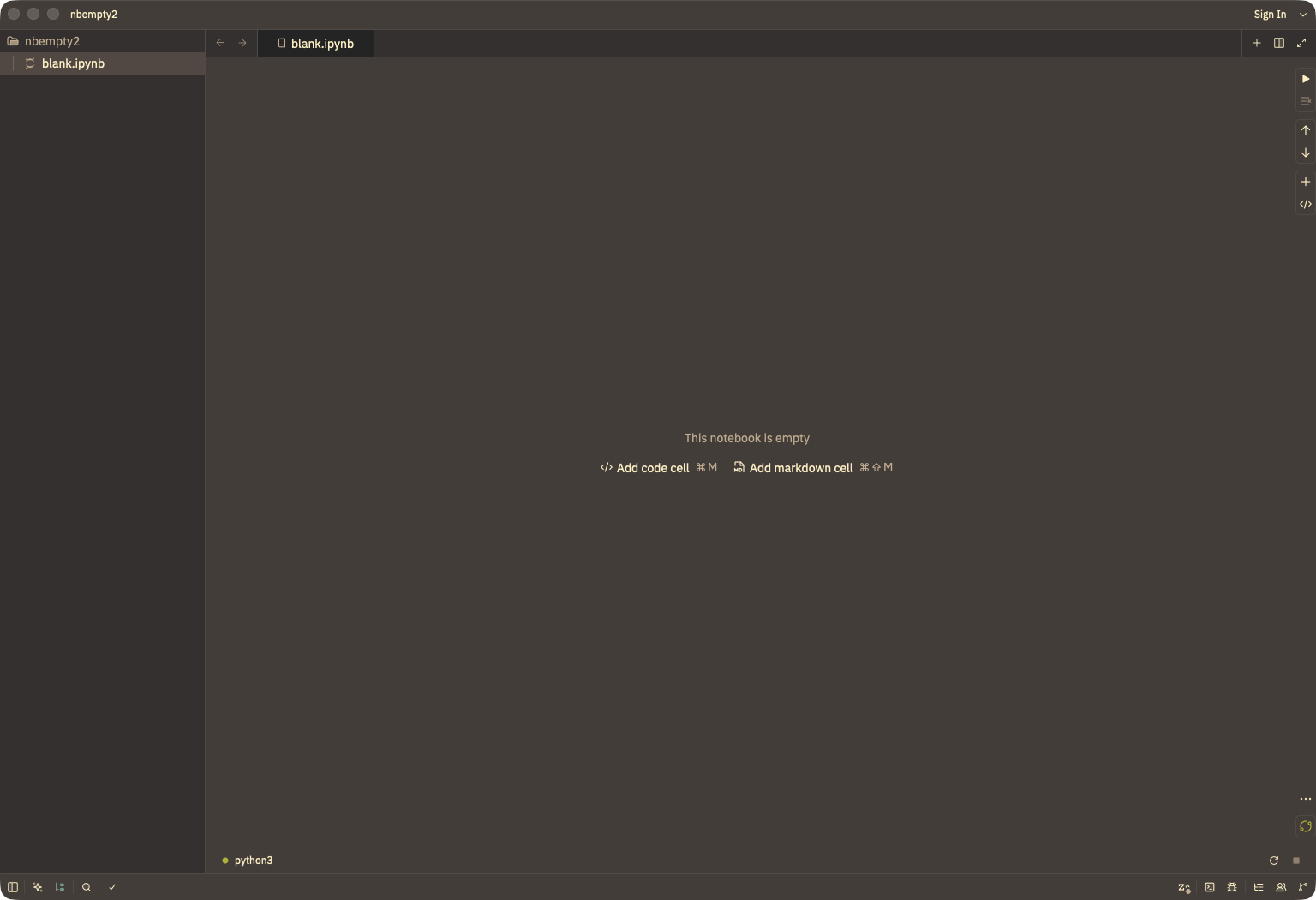 Clicking "Add code cell" inserts a cell: 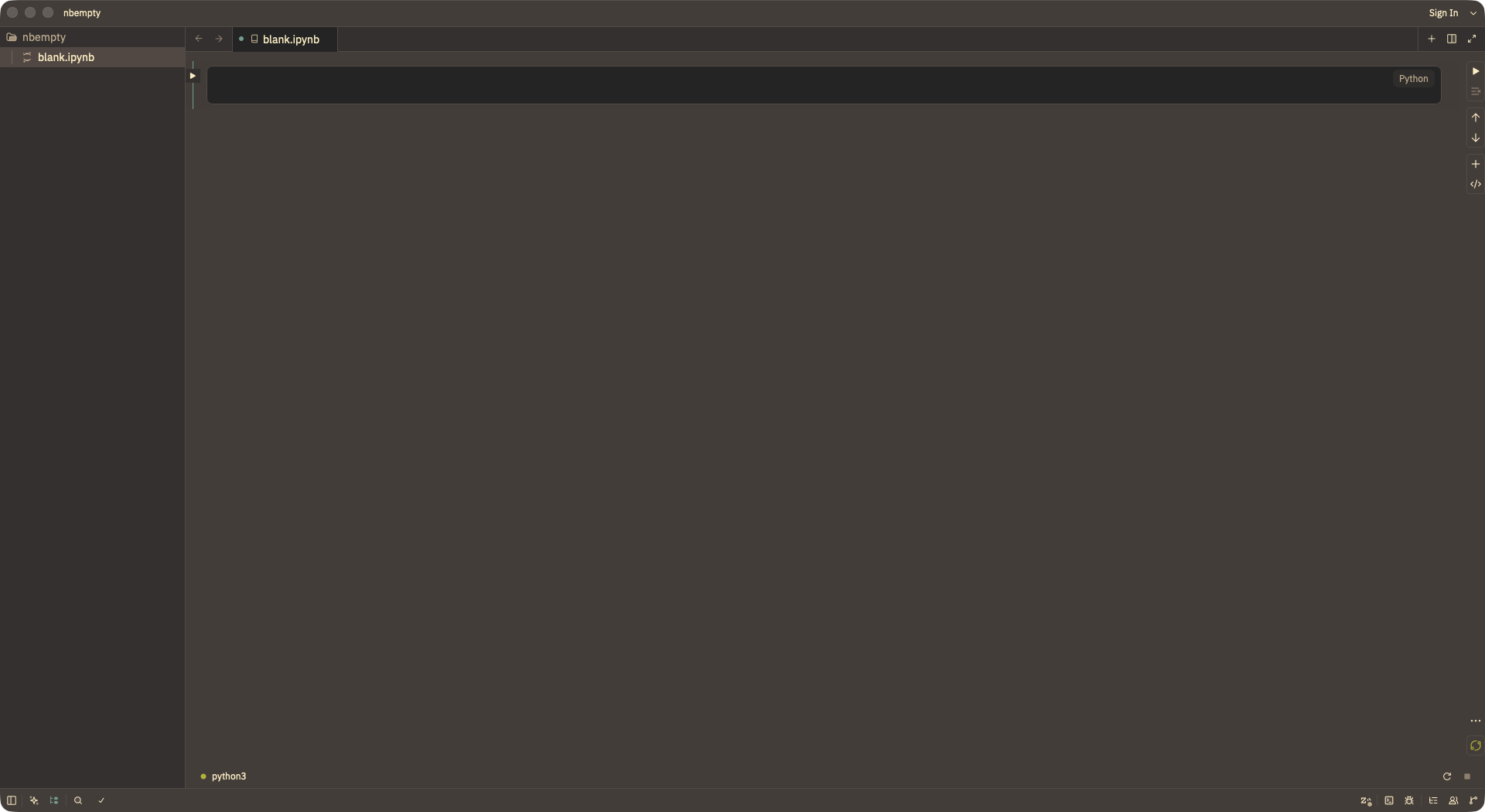 Release Notes: - N/A --------- Co-authored-by: Claude Fable 5 <noreply@anthropic.com> Co-authored-by: Finn Evers <finn.evers@outlook.de>




## Objective When a notebook has no cells, the editor renders a blank pane with no visible way to add one. Cells can only be added via the toolbar icons or keybindings, which aren't discoverable from an empty editor — so a newly created `.ipynb` looks broken. This is the follow-up direction suggested in zed-industries#61296. ## Solution Render an empty-state in the editor body when the notebook has no cells, with "Add code cell" / "Add markdown cell" buttons (dispatching the existing `add_code_block` / `add_markdown_block` handlers), matching the affordance VSCode provides. ## Testing Tested locally on macOS with the notebook feature enabled (`LOCAL_NOTEBOOK_DEV=1`): - Opening an empty `.ipynb` shows the empty-state instead of a blank pane. - Clicking "Add code cell" inserts an editable code cell and marks the tab dirty. ## Showcase **Before** — empty notebook renders a blank pane:  **After** — empty notebook shows add-cell controls:  Clicking "Add code cell" inserts a cell:  Release Notes: - N/A --------- Co-authored-by: Claude Fable 5 <noreply@anthropic.com> Co-authored-by: Finn Evers <finn.evers@outlook.de>
3 participants


Objective
When a notebook has no cells, the editor renders a blank pane with no visible way to add one. Cells can only be added via the toolbar icons or keybindings, which aren't discoverable from an empty editor — so a newly created
.ipynblooks broken.This is the follow-up direction suggested in #61296.
Solution
Render an empty-state in the editor body when the notebook has no cells, with "Add code cell" / "Add markdown cell" buttons (dispatching the existing
add_code_block/add_markdown_blockhandlers), matching the affordance VSCode provides.Testing
Tested locally on macOS with the notebook feature enabled (
LOCAL_NOTEBOOK_DEV=1):.ipynbshows the empty-state instead of a blank pane.Showcase
Before — empty notebook renders a blank pane:
After — empty notebook shows add-cell controls:
Clicking "Add code cell" inserts a cell:
Release Notes: