Post genesis claim #431
There are no files selected for viewing
This file contains hidden or bidirectional Unicode text that may be interpreted or compiled differently than what appears below. To review, open the file in an editor that reveals hidden Unicode characters.
Learn more about bidirectional Unicode characters
| Original file line number | Diff line number | Diff line change |
|---|---|---|
|
|
@@ -66,3 +66,4 @@ typings/ | |
| build | ||
| build-script* | ||
| **/mirror*.md | ||
| .DS_Store | ||
Loading
Sorry, something went wrong. Reload?
Sorry, we cannot display this file.
Sorry, this file is invalid so it cannot be displayed.
Loading
Sorry, something went wrong. Reload?
Sorry, we cannot display this file.
Sorry, this file is invalid so it cannot be displayed.
Loading
Sorry, something went wrong. Reload?
Sorry, we cannot display this file.
Sorry, this file is invalid so it cannot be displayed.
Loading
Sorry, something went wrong. Reload?
Sorry, we cannot display this file.
Sorry, this file is invalid so it cannot be displayed.
Loading
Sorry, something went wrong. Reload?
Sorry, we cannot display this file.
Sorry, this file is invalid so it cannot be displayed.
Loading
Sorry, something went wrong. Reload?
Sorry, we cannot display this file.
Sorry, this file is invalid so it cannot be displayed.
Loading
Sorry, something went wrong. Reload?
Sorry, we cannot display this file.
Sorry, this file is invalid so it cannot be displayed.
Loading
Sorry, something went wrong. Reload?
Sorry, we cannot display this file.
Sorry, this file is invalid so it cannot be displayed.
Loading
Sorry, something went wrong. Reload?
Sorry, we cannot display this file.
Sorry, this file is invalid so it cannot be displayed.
Loading
Sorry, something went wrong. Reload?
Sorry, we cannot display this file.
Sorry, this file is invalid so it cannot be displayed.
Loading
Sorry, something went wrong. Reload?
Sorry, we cannot display this file.
Sorry, this file is invalid so it cannot be displayed.
Loading
Sorry, something went wrong. Reload?
Sorry, we cannot display this file.
Sorry, this file is invalid so it cannot be displayed.
Loading
Sorry, something went wrong. Reload?
Sorry, we cannot display this file.
Sorry, this file is invalid so it cannot be displayed.
Loading
Sorry, something went wrong. Reload?
Sorry, we cannot display this file.
Sorry, this file is invalid so it cannot be displayed.
Loading
Sorry, something went wrong. Reload?
Sorry, we cannot display this file.
Sorry, this file is invalid so it cannot be displayed.
Loading
Sorry, something went wrong. Reload?
Sorry, we cannot display this file.
Sorry, this file is invalid so it cannot be displayed.
Loading
Sorry, something went wrong. Reload?
Sorry, we cannot display this file.
Sorry, this file is invalid so it cannot be displayed.
Loading
Sorry, something went wrong. Reload?
Sorry, we cannot display this file.
Sorry, this file is invalid so it cannot be displayed.
Loading
Sorry, something went wrong. Reload?
Sorry, we cannot display this file.
Sorry, this file is invalid so it cannot be displayed.
Loading
Sorry, something went wrong. Reload?
Sorry, we cannot display this file.
Sorry, this file is invalid so it cannot be displayed.
Loading
Sorry, something went wrong. Reload?
Sorry, we cannot display this file.
Sorry, this file is invalid so it cannot be displayed.
Loading
Sorry, something went wrong. Reload?
Sorry, we cannot display this file.
Sorry, this file is invalid so it cannot be displayed.
Loading
Sorry, something went wrong. Reload?
Sorry, we cannot display this file.
Sorry, this file is invalid so it cannot be displayed.
Loading
Sorry, something went wrong. Reload?
Sorry, we cannot display this file.
Sorry, this file is invalid so it cannot be displayed.
This file contains hidden or bidirectional Unicode text that may be interpreted or compiled differently than what appears below. To review, open the file in an editor that reveals hidden Unicode characters.
Learn more about bidirectional Unicode characters
| Original file line number | Diff line number | Diff line change |
|---|---|---|
| @@ -0,0 +1,194 @@ | ||
| --- | ||
| id: claims | ||
| title: Polkadot Claims | ||
| sidebar_label: Claims | ||
| --- | ||
|
|
||
| If you made a DOT purchase in one of the pre-launch sales, then you will need to claim your DOT | ||
| tokens. For those who made a pre-genesis claim by sending a claim transaction to the Claims Contract | ||
| on Ethereum, you will still need to send a free _attest_ transaction that will agree to the terms | ||
| and conditions of your allocation. If you did not make a pre-genesis claim, then you will claim and | ||
| attest in a single transaction. | ||
|
|
||
| This guide will walk you through the steps for either making a claim or attesting to the statement. | ||
|
|
||
| If you are making a claim on Polkadot for the first time, please read on below in the | ||
| [making a claim](#making-a-claim) section. If you've already claimed during the pre-genesis claims | ||
| period, please proceed to the [attesting to a statement](#attesting-to-a-statement) section instead. | ||
|
|
||
| ## Making a Claim | ||
|
|
||
| If you did not make a claim in the pre-genesis claims period, then you are able to claim your DOT | ||
| tokens after genesis. There is no time limit for making your claim so feel free to do this whenever | ||
| you are most comfortable. | ||
|
|
||
| > Note: When you make a claim, you will also attest to the agreement that corresponds to your DOT | ||
| > allocation. The two actions "claim" and "attest" are done in a single transaction, but for the | ||
| > most part this is simplified from the perspective of the user. | ||
|
|
||
| ### What You Will Need | ||
|
|
||
| - The Ethereum account that holds the DOT indicator tokens | ||
| - The MyCrypto wallet | ||
| - A Polkadot account | ||
|
|
||
| You should already have your Ethereum account that holds the DOT indicator tokens from Polkadot's | ||
| prior sales. You will need to have access to this account in order to make a signature. | ||
|
|
||
| [MyCrypto][] is a versatile wallet that supports a variety of storage methods for your Ethereum | ||
|
lsaether marked this conversation as resolved.
|
||
| account. Go to their downloads page and ensure that you download the latest version for your | ||
|
Contributor
There was a problem hiding this comment. Should we include a link to their downloads page here? Or say that it was linked previously?
Collaborator
There was a problem hiding this comment. It is linked in the MyCrypto right there. But could just move that to "downloads page" in the text.
Contributor
There was a problem hiding this comment. Yeah, it was linked in the previous sentence, but to me this just looks awkward saying "go to their downloads page" without a link or reference. My preference would be to move the link to here. |
||
| operating system. This is important because the latest version will always have the latest security | ||
| patches. | ||
|
|
||
| > **NOTICE**: It is much more secure to download and use the MyCrypto app locally. You can always | ||
| > find the most up-to-date releases of the desktop app on their [releases page][mycrypto]. | ||
|
|
||
| You will need a Polkadot account to claim your DOTs. Please follow the instructions | ||
| on the [account generation][] page for generating a new Polkadot account. | ||
|
|
||
| #### Claiming your DOT with MyCrypto | ||
|
|
||
| The Polkadot JS [Claims app][] helps you sign a message from MyCrypto. MyCrypto is a good choice in | ||
| case you have stored the key to the Ethereum account holding your DOT indicator tokens on a hardware | ||
| device like a Ledger Nano S or a Trezor. It also supports raw private keys, mnemonics, and Parity | ||
|
Contributor
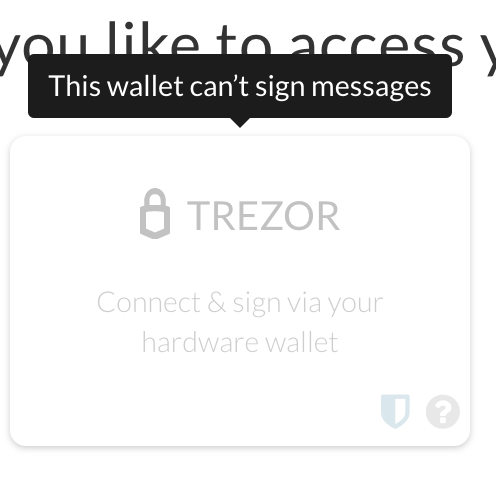
There was a problem hiding this comment. MyCrypto with Trezor can't sign, apparently. Not sure why.
Contributor
There was a problem hiding this comment. I wonder if this is a new change? |
||
| signer. | ||
|
|
||
| Once you've downloaded MyCrypto and have it running locally (we recommend an air-gapped computer for | ||
| maximum security), you can start by navigating to the Claims app on Polkadot-JS Apps. Select the | ||
| account you would like to claim the DOTs into and click the blue "Continue" button to proceed. Your | ||
| screen should look something like this: | ||
|
|
||
|  | ||
|
|
||
| Now you will need to provide the Ethereum address that is associated with the DOT indicator tokens | ||
| that you will claim. Enter the Ethereum address into the box and click "Continue". | ||
|
|
||
|  | ||
|
lsaether marked this conversation as resolved.
|
||
|
|
||
| Next your screen should look the image below. | ||
|
|
||
|  | ||
|
|
||
| The hex-encoded string that follows the sentence: "Pay DOTs to the Polkadot account:" is the | ||
| hex-encoded public key of your Polkadot account, minus the `0x` prefix. | ||
|
|
||
| The next step is to go to the MyCrypto application and click on "Sign & Verify Message" tab. | ||
|
|
||
|  | ||
|
|
||
| This will prompt you to select a method for unlocking your wallet. | ||
|
|
||
|  | ||
|
|
||
| After unlocking your wallet, paste the message from Polkadot JS into the "Message" box. | ||
|
|
||
|  | ||
|
laboon marked this conversation as resolved.
|
||
|
|
||
| When you click "Sign Message" you will get a JSON output like the one below: | ||
|
|
||
|  | ||
|
|
||
| Copy and paste the JSON output of the signed message from MyCrypto into the input box on the | ||
| Polkadot JS UI and click "Confirm Claim." | ||
|
|
||
|   | ||
|
|
||
| A green box will appear telling you the amount to claim with a "Claim" button to make the claim. | ||
| Click on the "Claim" button and click "Submit (no signature)" to complete the claim. | ||
|
|
||
|  | ||
|
|
||
| If this claim succeeded, then you will see a success message and your DOTs will be in the account | ||
| that you claimed to. | ||
|
|
||
| #### Verifying your Claim | ||
|
|
||
| After you make an on-chain claim for DOTs, your balance should be updated on the Polkadot UI | ||
| immediately. | ||
|
|
||
| Having trouble? Get support in the DOT [Claims Support][] channel. | ||
|
|
||
|  | ||
|
|
||
| Congratulations, you have now completed the process for claiming and signing for your DOTs. | ||
|
|
||
| ### Third Party Claims Processes | ||
|
|
||
| #### Coinbase Custody | ||
|
|
||
| > Please note that using Coinbase Custody for the claims process requires your account to contain at | ||
| > least 1,000 DOTs. There are also fees associated with Coinbase Custody. | ||
|
|
||
| 1. To open an account please contact Coinbase Custody directly at sales@coinbase.com | ||
| 1. Once you’ve opened an account, Coinbase Custody will generate a DOT address for you to use in the | ||
| claims process and send it to you. | ||
| 1. You may then claim your tokens using your Coinbase Custody DOT address and your tokens will | ||
| appear in your Coinbase Custody account. | ||
|
|
||
| For questions about claiming with Coinbase Custody, please contact sales@coinbase.com. | ||
|
|
||
| #### Other Third Party Processes | ||
|
|
||
| **We do not recommend using other third-party apps or processes to perform your claim or acquire | ||
| DOT.** | ||
|
|
||
| Claiming using other third-party processes can lead to the loss of your allocation; therefore we | ||
| cannot recommend using any third party apps to do so. Manually specifying your transaction data, as | ||
| specified in our claims process, or by using Coinbase Custody, is the only way to be certain that | ||
| you will receive your allocation. | ||
|
|
||
| ## Attesting to a Statement | ||
|
|
||
| If you've already made a pre-genesis claim, you still have to agree to a statement using your | ||
| Polkadot account. | ||
|
|
||
| ### What you will need | ||
|
|
||
| - Your Polkadot account unlocked on Polkadot-JS Apps UI. | ||
|
|
||
| You will be sending a free transaction from your Polkadot account on the Polkadot-JS Apps UI. Once | ||
| you make this transaction you will have the tokens available in your account. | ||
|
|
||
| ### Go to Polkadot-JS Apps | ||
|
|
||
| Proceed to [polkadot-js Apps][claims app]. You will need to grant Apps access to your account in | ||
| some way. One way would be to go to the Accounts page and "create" a new account, replacing the | ||
| generated seed or mnemonic with the one belonging to your account. The other way is by using the | ||
| Polkadot-JS extension and entering your seed or mnemonic there, which is generally safer than | ||
| entering it directly to the Apps page. | ||
|
|
||
| ### Make the Attestation | ||
|
|
||
| After entering your account, you should see a red counter appear on the "Claim Tokens" tab on the | ||
| left navigation drawer. | ||
|
|
||
|  | ||
|
|
||
| Click on the "Claim Tokens" tab and you will see a large notification at the top of the page that | ||
| tells you that you need to sign an attestation. | ||
|
|
||
|  | ||
|
|
||
| The notification will display one or more Polkadot addresses that you have loaded in Polkadot-JS | ||
| that you need to sign. Select a Polkadot account with a claim using the drop down selection. If you | ||
| don't see a notification or don't see the selector, please double check that the account has been | ||
| loaded into Polkadot-JS and that it has already claimed during the preclaim period. As always, feel | ||
| free to reach out for help in the [Claims Support][] channel. | ||
|
|
||
| Click "Continue" and you will see a green box appear on the right. | ||
|
|
||
|  | ||
|
|
||
|  | ||
|
|
||
| Click on "Attest" and then "Sign and Submit" to make your free attest transaction. When the | ||
| transaction is included in the block, you will see a green success box appear in the upper right | ||
| corner and the DOTs will be in your account. | ||
|
|
||
|  | ||
|
|
||
| [mycrypto]: https://download.mycrypto.com/ | ||
| [account generation]: learn-account-generation | ||
| [claims app]: https://polkadot.js.org/apps/#/claims | ||
| [claims support]: | ||
| https://riot.im/app/#/room/!kwIkVteRpPRjjTyvTe:web3.foundation?via=web3.foundation&via=matrix.org&via=matrix.parity.io | ||




This file contains hidden or bidirectional Unicode text that may be interpreted or compiled differently than what appears below. To review, open the file in an editor that reveals hidden Unicode characters.
Learn more about bidirectional Unicode characters
This file contains hidden or bidirectional Unicode text that may be interpreted or compiled differently than what appears below. To review, open the file in an editor that reveals hidden Unicode characters.
Learn more about bidirectional Unicode characters
| Original file line number | Diff line number | Diff line change |
|---|---|---|
|
|
@@ -7,7 +7,8 @@ | |
| "glossary", | ||
| "news", | ||
| "research", | ||
| "grants", | ||
| "claims" | ||
| ], | ||
| "Build": [ | ||
| "build-index", | ||
|
|
||

Loading
Sorry, something went wrong. Reload?
Sorry, we cannot display this file.
Sorry, this file is invalid so it cannot be displayed.

Oops, something went wrong.

Oops, something went wrong.
Add this suggestion to a batch that can be applied as a single commit.
This suggestion is invalid because no changes were made to the code.
Suggestions cannot be applied while the pull request is closed.
Suggestions cannot be applied while viewing a subset of changes.
Only one suggestion per line can be applied in a batch.
Add this suggestion to a batch that can be applied as a single commit.
Applying suggestions on deleted lines is not supported.
You must change the existing code in this line in order to create a valid suggestion.
Outdated suggestions cannot be applied.
This suggestion has been applied or marked resolved.
Suggestions cannot be applied from pending reviews.
Suggestions cannot be applied on multi-line comments.
Suggestions cannot be applied while the pull request is queued to merge.
Suggestion cannot be applied right now. Please check back later.
Uh oh!
There was an error while loading. Please reload this page.