VM details #200
There are no files selected for viewing
| Original file line number | Diff line number | Diff line change |
|---|---|---|
| @@ -0,0 +1,117 @@ | ||
| # VM Details | ||
|
|
||
|
|
||
|
|
||
| ## Overview Tab | ||
|
|
||
|  | ||
| The user clicks a VM’s name from the list view and is taken to that VM’s Overview tab. | ||
| The user sees detailed information about the VM’s configuration. | ||
|  | ||
| Editing field will be aligned to the rest of the system. For now, only 'Description' and Flavor' have a pencil icon next to the field name to indicate it is editable. Hitting that pencil will open up a modal. | ||
|
|
||
|
|
||
| ## YAML | ||
|
|
||
| Should be inline with the rest of Openshift. Can be seen [here](http://openshift.github.io/openshift-origin-design/web-console/future-openshift/code-editor-updates/code-editor-updates) | ||
|
|
||
|
|
||
| ## Network Interfaces | ||
|
|
||
|  | ||
|
Contributor
There was a problem hiding this comment. I'm noticing that the filters area have a few ? rather than values. I'm not sure we originally put too much thought into having filters here and IMO we can drop them altogether since I don't think the list of NICs for a VM will grow much past 5.
Contributor
Author
There was a problem hiding this comment. Removing filters from NIC. Do the same for Disks?
Contributor
There was a problem hiding this comment. Good question on Disks...I think we could make a case to go either way. For now I'm happy with the simplicity of removing it.
Ranelim marked this conversation as resolved.
Show resolved
Hide resolved
|
||
| This is Network Interfaces tab. | ||
|
|
||
|
|
||
|  | ||
|
Contributor
There was a problem hiding this comment. I think the "restart" in the button name should be uppercase R so that it reads "Add NIC and Restart VM".
Contributor
Author
There was a problem hiding this comment. So for now, stick to title case in buttons rather the sentence case for PF4, got it.
Contributor
There was a problem hiding this comment. 3 nits:
The two Save buttons should be disabled until the next screen where all required fields have been filled. I believe OpenShift italicizes default dropdown options like "Select modal" or "Select network" to visually distinguish them slightly from fields that have been selected. Here's an example (ignore the capitalization):
Contributor
There was a problem hiding this comment. follow up on Andy's comment about MAC being captilized, in the text "select mac address" it should be "Select MAC Address" |
||
| Default modal. The user is notified that activating this upcoming NIC requires a VM restart. | ||
|
|
||
|  | ||
| User can choose between adding NIC only, or add NIC and restart VM to make it active. | ||
|
|
||
|  | ||
Ranelim marked this conversation as resolved.
Show resolved
Hide resolved
|
||
| The new NIC should always appear at the top of the list until the user restarts it. The new nic will have a'Pending VM restart' Link state (as a status). | ||
|
|
||
|  | ||
Ranelim marked this conversation as resolved.
Show resolved
Hide resolved
|
||
| Hover on that link state (status) will display more details with a 'Restart VM action in a popover. | ||
|
|
||
|  | ||
| Whenever a NIC has been added or modified in a way that requires the VM to be restarted, an inline alert should appear below the tab area reminding the user to do so. This notification should persist across all tab views, including the Overview (shown previously). | ||
|
|
||
|  | ||
Ranelim marked this conversation as resolved.
Show resolved
Hide resolved
|
||
| Changes pending VM restart can be viewed in a dedicated modal. | ||
|
|
||
| ### Edit NIC | ||
Ranelim marked this conversation as resolved.
Show resolved
Hide resolved
|
||
| Editing NIC is equivalent to creating one, with Modal label and actions label changed accordingly. | ||
|
|
||
|  | ||
Ranelim marked this conversation as resolved.
Show resolved
Hide resolved
|
||
| Edit NIC available in the kebab menu of each NIC list item | ||
|  | ||
| "Save changes" is equivalent to "Add NIC" on creation modal. The VM must be restarted in order for these changes to be applied. | ||
|  | ||
Ranelim marked this conversation as resolved.
Show resolved
Hide resolved
|
||
| Same notification to restart VM if the user selected to save changes only. | ||
|
|
||
| ## Disks | ||
|
|
||
|  | ||
| The flow for disks is similar to NICs, but adding or editing a disk does not require a VM restart. | ||
|
|
||
|
|
||
|  | ||
Ranelim marked this conversation as resolved.
Show resolved
Hide resolved
|
||
| The user clicks “Add Disk”, and is led to an 'Add Disk' modal. | ||
|
|
||
|  | ||
| The user edits each input and clicks the confirm button to finish. The new disk is added to the list and is sorted alphabetically. | ||
|
|
||
| The user can edit or delete a list item from its kebab menu for each list item. | ||
|
|
||
|
|
||
|
|
||
| ## Snapshots | ||
|
|
||
| Snapshot designs can be seen [here](https://github.com/openshift/openshift-origin-design/pull/183) | ||
|
|
||
|
|
||
| ## Events | ||
|
|
||
| TBD | ||
|
|
||
| ## Consoles | ||
|
|
||
|  | ||
| The Consoles tab allows the user to connect to the virtual machine via an in-browser or desktop-based Graphical and/or Serial console. | ||
|  | ||
| The user can change the console type using the dropdown selector. 'Graphical (VNC)' is selected by default. Any currently selected option is disabled in the dropdown. | ||
|
|
||
| Two actions are available on the right-hand side. The “Open in new window” action opens a separate browser window dedicated to the console view. The “Expand” action makes the console viewport fill the current window’s full width and height similar to elsewhere in OKD. The “Send Key” dropdown is disabled when disconnected from the console. | ||
|
|
||
| The user can start a console session using either the primary 'Connect' action button in the content area or the secondary 'Connect' button next to the console dropdown selector. | ||
|
|
||
|
|
||
| ### Connecting from a powered off state | ||
|
|
||
|  | ||
| If the virtual machine is powered off, the primary action button will allow the user to both start and connect to the virtual machine with one click. If the user wants to power the virtual machine on without connecting a console (an unlikely use case while in this view) they can use the actions dropdown in the top-right as usual. | ||
|
|
||
|
|
||
|  | ||
Ranelim marked this conversation as resolved.
Show resolved
Hide resolved
|
||
| While the virtual machine is powering on, the console selector dropdown should be disabled to “lock in” the intended console. When the virtual machine finishes powering on, the console will be connected. | ||
|
|
||
|
|
||
| ### Sending keys | ||
|
|
||
|  | ||
|
|
||
|
|
||
| The “Send Key” dropdown helps the user send keyboard shortcuts that would ordinarily be captured by the user’s client operating system. The options available will depend on the VM that is running. | ||
|
|
||
|
|
||
|
|
||
|
|
||
| ### Remote connection settings | ||
|
|
||
|  | ||
|
|
||
| If the user prefers to connect to a VM using their own desktop client or Remote Desktop Viewer, they can find the port and configuration information they need by clicking the “Remote Connection settings” link to reveal a modal. | ||
|
|
||
|
|
||
|  | ||





There was a problem hiding this comment.
Choose a reason for hiding this comment
The reason will be displayed to describe this comment to others. Learn more.
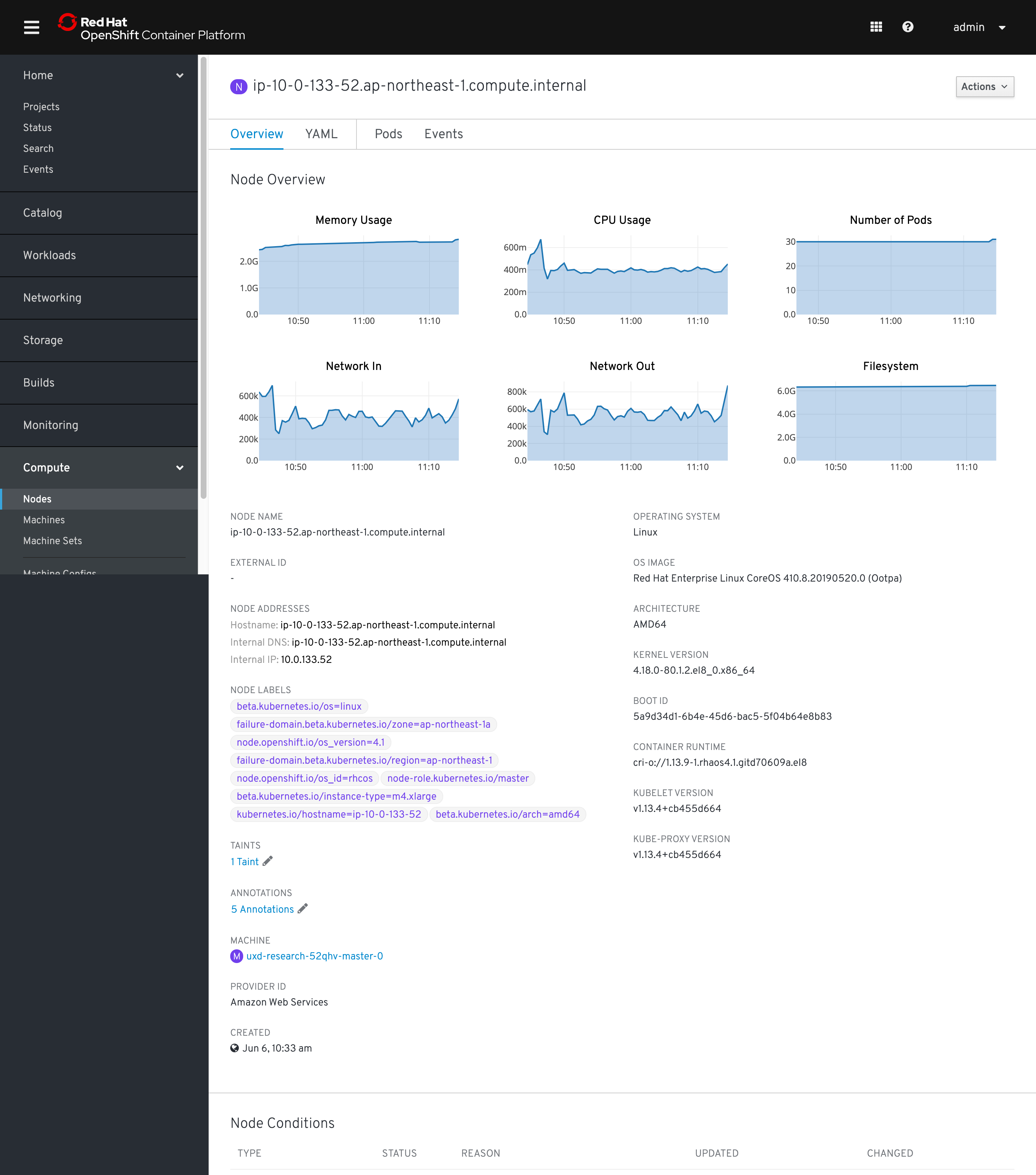
@cshinn Can you take a look at these charts? I believe these are using PF3 and we have updated charts in OpenShift to PF4. Also wondering if they belong above the standard detail info similar to how Nodes and Pods display charts at the top of the detail pages.
Separate nit...should we swap status and namespace in the detail fields? Probably not important but figured it would match other resources more closely. Also we should change the project label to say namespace with the green NS badge :)
There was a problem hiding this comment.
Choose a reason for hiding this comment
The reason will be displayed to describe this comment to others. Learn more.
Status field
@lizsurette This is an oldie, but do you think the % uptime popover, accessed by clicking the info icon next to Status label, is necessary? I lean toward removing it along with the info icon entirely for discoverability, utility, and ambiguity reasons.
IP Addresses
Unfortunately I don't remember why there are two IPs included in this design. It might be worth checking with devs if these IPs are different in any way. If not then this is fine, but if they are we could probably add sub-labels like Node Details pages do:
Template
Should we use
Noneinstead ofBlank. @matthewcarleton?Project
As Colleen said, it looks like nearly every other workload object (Pod, Deployment, etc.) includes a field for Namespace instead of Project. We should probably do the same for VMs, with a green badge and no spaces within the Namespace title. Here's an example:
Flavor
CPU should be vCPU (which aligns with Matt's Create VM flow). @matthewcarleton I guess we can stick with GB for Memory for now, since IIRC that's what every other VM software vendor uses.
Node
Badge should be purple 🙂
There was a problem hiding this comment.
Choose a reason for hiding this comment
The reason will be displayed to describe this comment to others. Learn more.
Are you suggesting we use the link here instead like we do on the table view? I like it, if so :)
VMs can have multiple IPs (I think there would be one per NIC?) In any case we could probably organize them better and maybe sub-label them.
Uh oh!
There was an error while loading. Please reload this page.
There was a problem hiding this comment.
Choose a reason for hiding this comment
The reason will be displayed to describe this comment to others. Learn more.
@beanh66, I chatted with @andybraren a bit and it seems like those specific chart visuals were intended mostly as a placeholder. I expect that they would end up using the pf4 line graph like we do on the nodes pages etc. For consistency's sake, they should probably go at the top of the page as well as they are on the other pages
There was a problem hiding this comment.
Choose a reason for hiding this comment
The reason will be displayed to describe this comment to others. Learn more.
@lizsurette I was suggesting removing it entirely, but I suppose the Status Popover pattern would be a natural place to include how long the VM has been running for, and when it was last powered on/off (if that's possible and we agree worth doing).
I'm just not sure what "uptime" means in a VM context and my googling isn't very fruitful. Is our "uptime" calculation how long the VM has been "Running" for? What would take it down from 100% to 97% in this example?
There was a problem hiding this comment.
Choose a reason for hiding this comment
The reason will be displayed to describe this comment to others. Learn more.
Yeah I would assume we should be consistent with what we do in the table for this value.
I think two values would be how long it's been running for and then how long it's been running in the last 7 days (%). I can't remember exactly where the original requirement came from though...it might be an oVirt carry over :)
There was a problem hiding this comment.
Choose a reason for hiding this comment
The reason will be displayed to describe this comment to others. Learn more.
Here's an example of what those charts would look like (sorry for the delay. my cluster crashed on me yesterday)