Skip to content

Help menu: use north-east arrow as hyperlink suffix#3708

Merged
daschuer merged 3 commits intomixxxdj:2.3from
ronso0:help-hyperlink
Mar 20, 2021
Merged

Help menu: use north-east arrow as hyperlink suffix#3708
daschuer merged 3 commits intomixxxdj:2.3from
ronso0:help-hyperlink

Conversation

@ronso0
Copy link
Copy Markdown
Member

@ronso0 ronso0 commented Mar 15, 2021

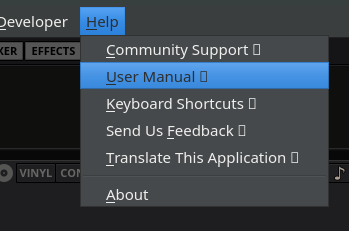
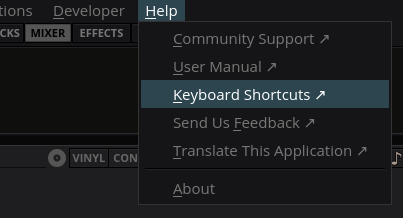
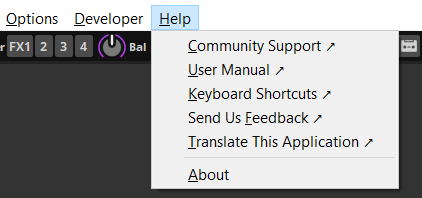
Restore the north-east arrow for external links.

*ubuntu with xfce
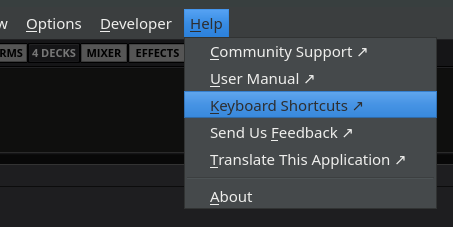
image

Windows10
image

I also considered 🌐
image
but it may look really sh*#ty on various OS, also it's colored and distracting.

I think the arrow is fine, and much better than current =>
Looks fine on

  • *ubuntu
  • Windows
  • macOS excluded

@github-actions github-actions Bot added the ui label Mar 15, 2021
@ronso0 ronso0 added this to the 2.3.0 milestone Mar 15, 2021
@JoergAtGithub
Copy link
Copy Markdown
Member

A chain symbol is common for links, like here in GitHub

@ronso0
Copy link
Copy Markdown
Member Author

ronso0 commented Mar 15, 2021

Sure, if you refer to https://unicode-table.com/en/1F517/

But it's a large icon. Here in the comment box it looks like this
image
and it's rendered like this
"Community Support 🔗"
On my system it looks like this
image

That's why I want to include a standard char from the Dingbats set which is included in the font we will use for the main menu #3704

@ronso0
Copy link
Copy Markdown
Member Author

ronso0 commented Mar 15, 2021

with #3704
image

@foss-
Copy link
Copy Markdown
Contributor

foss- commented Mar 15, 2021

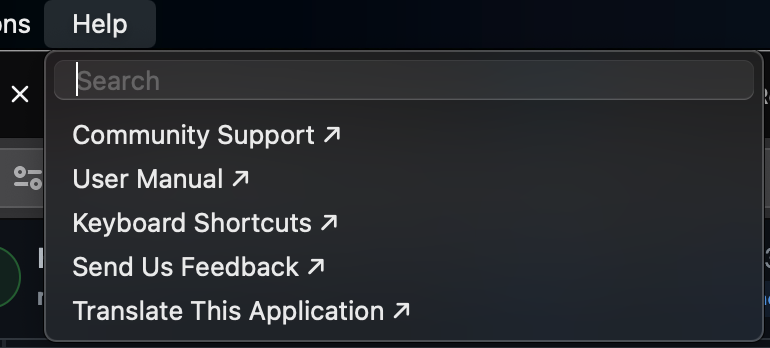
macOS 11.2.3
2.3.0-beta (build HEAD r8079)
If possible, remove arrow for macOS only as it is not used in menus.

help menu

@ronso0
Copy link
Copy Markdown
Member Author

ronso0 commented Mar 15, 2021

but the => was shown in macOS previously, wasn't it?

@Holzhaus
Copy link
Copy Markdown
Member

Holzhaus commented Mar 15, 2021

Maybe we could use this icon? https://www.fileformat.info/info/unicode/char/1f310/index.htm

@ronso0
Copy link
Copy Markdown
Member Author

ronso0 commented Mar 15, 2021

(getting a server error)
my point here is just to get rid of those ugly characters which were introduced back then because windows couldn't display a hyperlink character.
I do not really want to invest work to append an SVG and test if that is displayed properly on all os.
the char added here is working on all os, and I can hide it on macOS.

@foss-
Copy link
Copy Markdown
Contributor

foss- commented Mar 15, 2021

but the => was shown in macOS previously, wasn't it?

Yes, but that was just as false for macOS.

@ronso0
Copy link
Copy Markdown
Member Author

ronso0 commented Mar 15, 2021

@Holzhaus 0x1F310 is the globe I mentioned in the first post. It's in https://unicode-table.com/de/blocks/miscellaneous-symbols-and-pictographs/ and not guaranteed to work in most standard fonts, for example it's not in Open Sans.
image
btw that's the hyperlink char ; )

get rid of those ugly characters which were introduced back then because windows couldn't display a hyperlink character.

@Holzhaus
Copy link
Copy Markdown
Member

Holzhaus commented Mar 15, 2021

This works for me. But for me it's non-obvious that the northeast arrow denotes a website.

Have you considered setting an SVG icon for the actions instead? E.g. a globe? it would be displayed on the left, but I think it would be more clear. Then you also have full control over the color.

@ronso0
Copy link
Copy Markdown
Member Author

ronso0 commented Mar 18, 2021

This works for me. But for me it's non-obvious that the northeast arrow denotes a website.

square + north-east arrow is the default for external links for on wikipedia fr example, that's why I picked it.

Have you considered setting an SVG icon for the actions instead? E.g. a globe? it would be displayed on the left, but I think it would be more clear. Then you also have full control over the color.

nope, because IMO a globe at this size doesn't make much sense. If I look at other menu icons, in file managers for example, I find the combination of icon size and level of detail not very helpful tbh. On screens with regular dpi (96?) I find those icons rather blurry and the only thing that helps me to navigate is mostly the color, maybe the rough shape, but the details are useless IMO.
Firefox bookmark menu:
image

@ronso0
Copy link
Copy Markdown
Member Author

ronso0 commented Mar 18, 2021

Are there any obejctions to merge this, even if it's just a quick fix to get rid of => ?

@daschuer
Copy link
Copy Markdown
Member

As far as I remember it was originally the ↗
We have removed it because of windows XP.
Nice that we are back now.

Comment thread src/widget/wmainmenubar.cpp Outdated

QString externalLinkSuffix = " =>";
QString externalLinkSuffix;
#ifndef __APPLE__ // external links don't have icons on macOS
Copy link
Copy Markdown
Member

@daschuer daschuer Mar 18, 2021

Choose a reason for hiding this comment

The reason will be displayed to describe this comment to others. Learn more.

accoring to ....

Please extend the comment.

Copy link
Copy Markdown
Member Author

Choose a reason for hiding this comment

The reason will be displayed to describe this comment to others. Learn more.

acording to screenshots from @foss- and web search for 'macos help menu'

Comment thread src/widget/wmainmenubar.cpp Outdated
@daschuer
Copy link
Copy Markdown
Member

Did we have confirmation that this works on Windows?

@ronso0
Copy link
Copy Markdown
Member Author

ronso0 commented Mar 18, 2021

not yet. will test it tonight myself on Win10

@daschuer
Copy link
Copy Markdown
Member

I have found the apple user interface guidelines.
They defin a small set of symbols. Our north west icon is not one of them.

They also want "Title Style Capitalization"
This matter for "Translate this Application"
When at all, a 2.4 topic to not break translations.

@foss-
Copy link
Copy Markdown
Contributor

foss- commented Mar 18, 2021

Not sure we should overcomplicate this. @daschuer why are we discussing icon design for macOS? There will not be any icon shown on macOS for Menubar > Help items. So there really is nothing to discuss in that regard.

Mixxx uses Title Style Capitalization so nothing to change in that regard or am I missing something? Besides not the scope of this specific PR.

For reference here's the Apple Human Interface Guidelines.

@daschuer
Copy link
Copy Markdown
Member

I am fine with the look here. It is just a matter of documentation the special case code.

The this in "Translate this Application" needs to be lower case to be fully complaint.

@esbrandt
Copy link
Copy Markdown
Contributor

As far as I remember it was originally the ↗
We have removed it because of windows XP.
Nice that we are back now.

The cycle is completed.
86689e3
👍

@ronso0 ronso0 marked this pull request as draft March 19, 2021 01:33
@ronso0 ronso0 closed this Mar 19, 2021
@ronso0 ronso0 reopened this Mar 19, 2021
@ronso0
Copy link
Copy Markdown
Member Author

ronso0 commented Mar 19, 2021

To wrap up the macOS topic:
@daschuer I assume you refer to 'Using Symbols in Menus' in https://developer.apple.com/design/human-interface-guidelines/macos/menus/menu-anatomy/
Indeed the arrow is not mentioned, also they encourage to "Avoid using custom symbols in menus"
Otoh we can't compare the Mixxx Help menu with other macOS apps as appearantly the Help item there is usually meant to search the app's help book.
So special case here, let's just leave not show it on macOS to not confuse anyone ; \

@ronso0 ronso0 marked this pull request as ready for review March 19, 2021 02:09
@ronso0
Copy link
Copy Markdown
Member Author

ronso0 commented Mar 19, 2021

Ready for merge..

@ronso0
Copy link
Copy Markdown
Member Author

ronso0 commented Mar 19, 2021

okay, so we try to have a local manual.
let's also have a local cheat sheet for keyboard shortcuts then, right?

the PNG from the manual will do.
actually a PDF created from /res/images/templates/ic_template_keyboard_mapping_sheet.svg could be really small but unfortunately all key labels are already converted to paths :\

@esbrandt
Copy link
Copy Markdown
Contributor

actually a PDF created from /res/images/templates/ic_template_keyboard_mapping_sheet.svg could be really small but unfortunately all key labels are already converted to paths :\

A pdf generated from the template is about 300 kb in size. Too big?

I find it rather problematic that the keyboard's labeling is En-US, which does not apply to a lot of our users. Perhaps we should simply omit the labels (except for the function keys).

@ronso0
Copy link
Copy Markdown
Member Author

ronso0 commented Mar 19, 2021

hmkay, when I exported it was 1.6mb.
yes, omitting the labels would work for me

@Holzhaus
Copy link
Copy Markdown
Member

Perhaps we should simply omit the labels (except for the function keys).

Maybe I'm nitpicking but there are more differences between ANSI keyboards and ISO keyboards than just the labels (notably size of the return key). But I'm fine with whatever you decide here :D

@ronso0
Copy link
Copy Markdown
Member Author

ronso0 commented Mar 20, 2021

Alright, let's add the keyboard cheat sheet in another PR. I'll have to learn about including it in the packing process first.
@esbrandt Can you describe your PDF export process and settings? I tried with the default settings in Inkscape which resulted in the aforementioned 1.6mb

@ronso0
Copy link
Copy Markdown
Member Author

ronso0 commented Mar 20, 2021

So this here is ready to be merged, right?
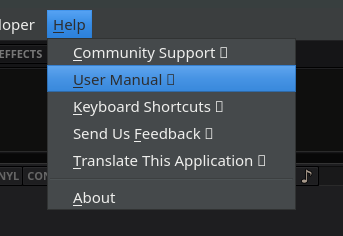
This is how it looks like on Windows10
image

@daschuer
Copy link
Copy Markdown
Member

Yes thank you.

@daschuer daschuer merged commit 780a209 into mixxxdj:2.3 Mar 20, 2021
@ronso0 ronso0 deleted the help-hyperlink branch March 20, 2021 18:44
@esbrandt
Copy link
Copy Markdown
Contributor

@esbrandt Can you describe your PDF export process and settings? I tried with the default settings in Inkscape which resulted in the aforementioned 1.6mb

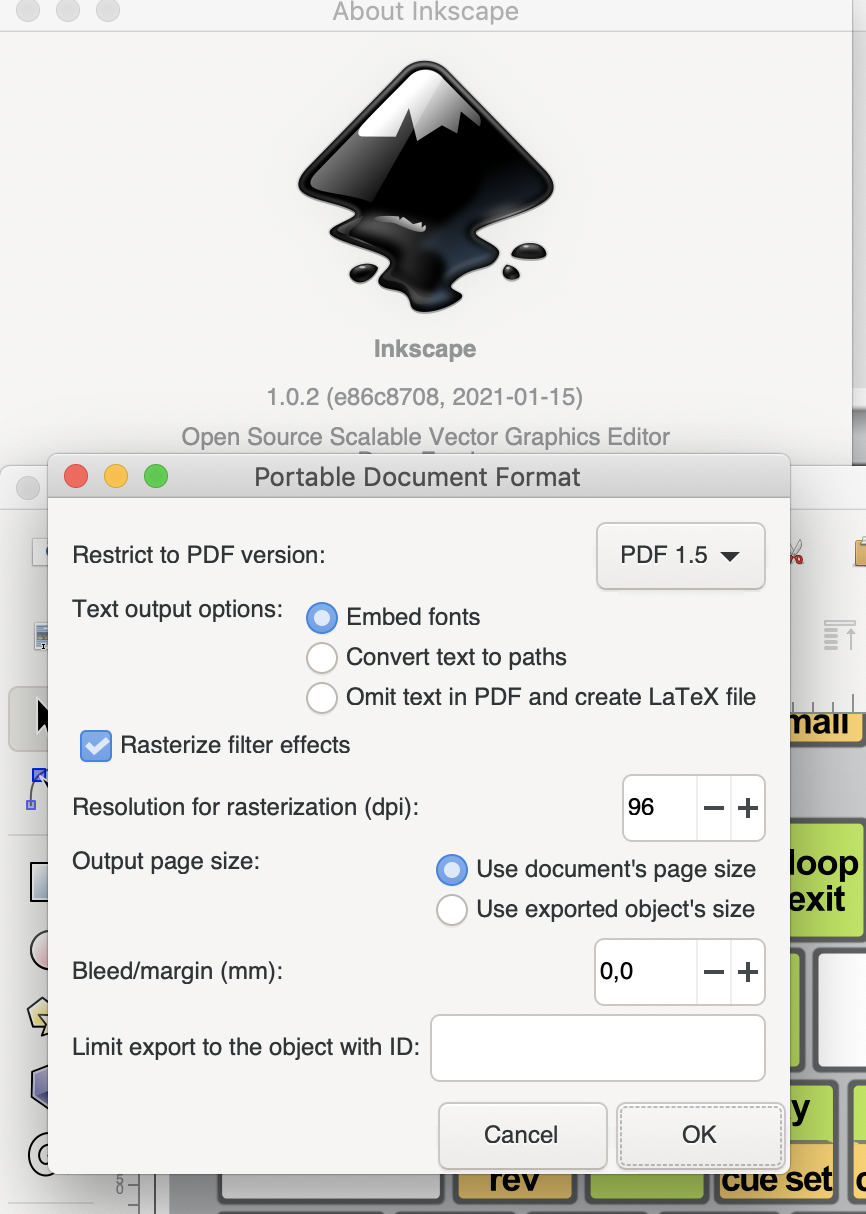
Exporting with Inkscape results in 300 kb pdf
ic_template_keyboard_mapping_sheet.pdf

Setting used:
Capto_Capture 2021-03-20_08-18-13_PM

Sign up for free to join this conversation on GitHub. Already have an account? Sign in to comment

Labels

Projects

None yet

Development

Successfully merging this pull request may close these issues.

6 participants