Skip to content

Latenight: fx, sampler and mic also in maximize_library mode visible#2413

Closed
nopeppermint wants to merge 2 commits intomixxxdj:masterfrom
nopeppermint:test_latenight
Closed

Latenight: fx, sampler and mic also in maximize_library mode visible#2413
nopeppermint wants to merge 2 commits intomixxxdj:masterfrom
nopeppermint:test_latenight

Conversation

@nopeppermint
Copy link
Copy Markdown
Contributor

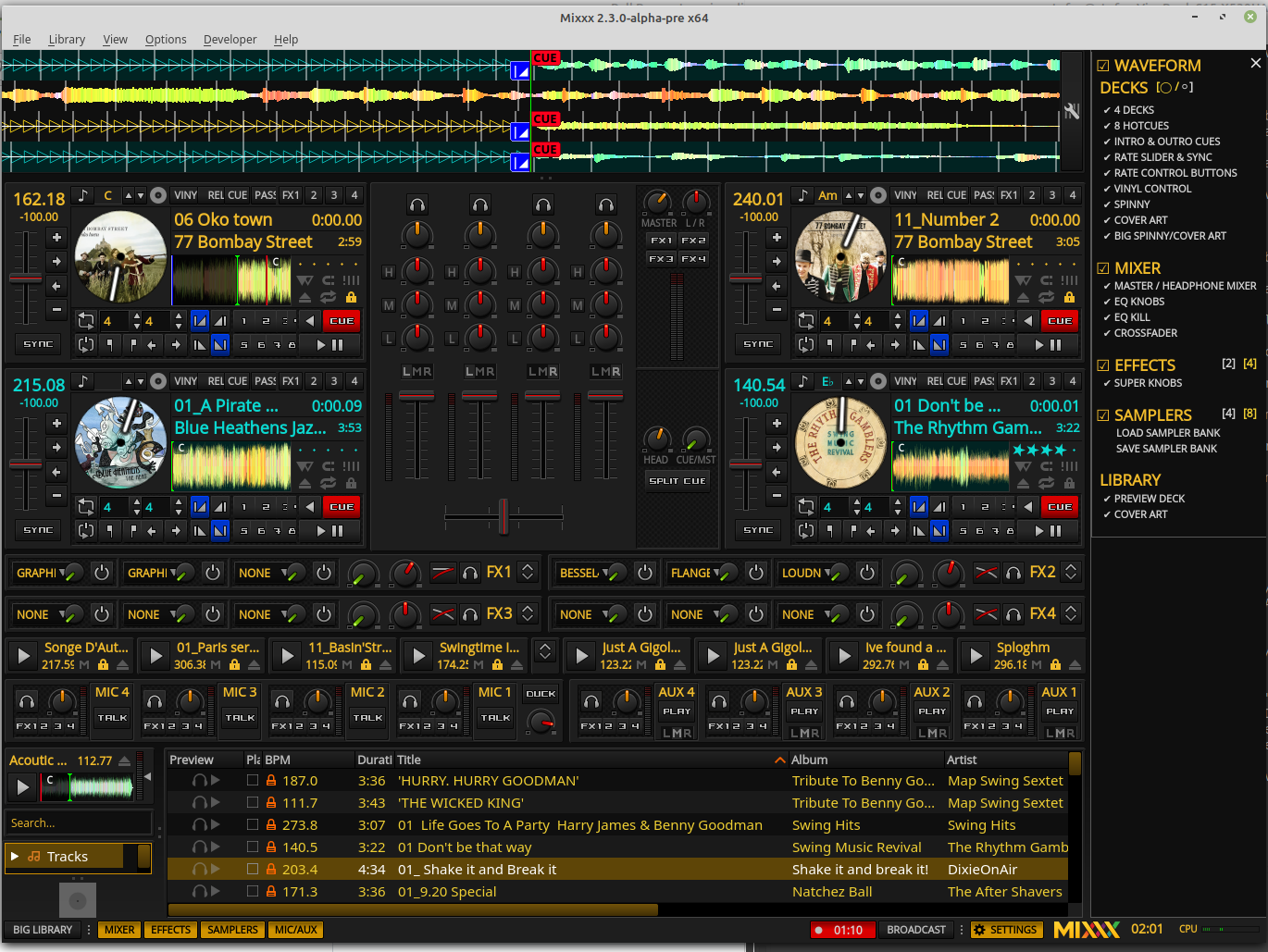
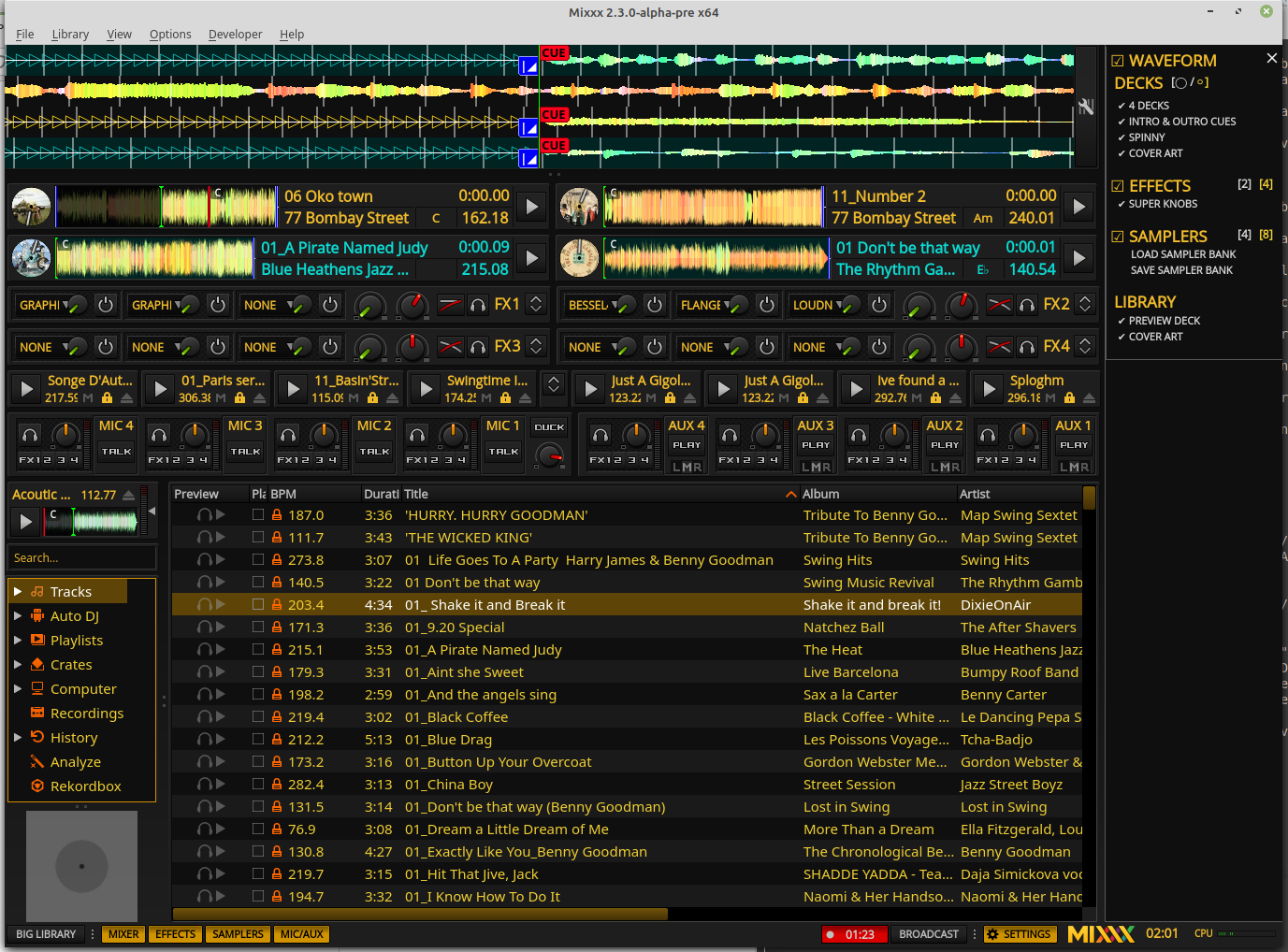
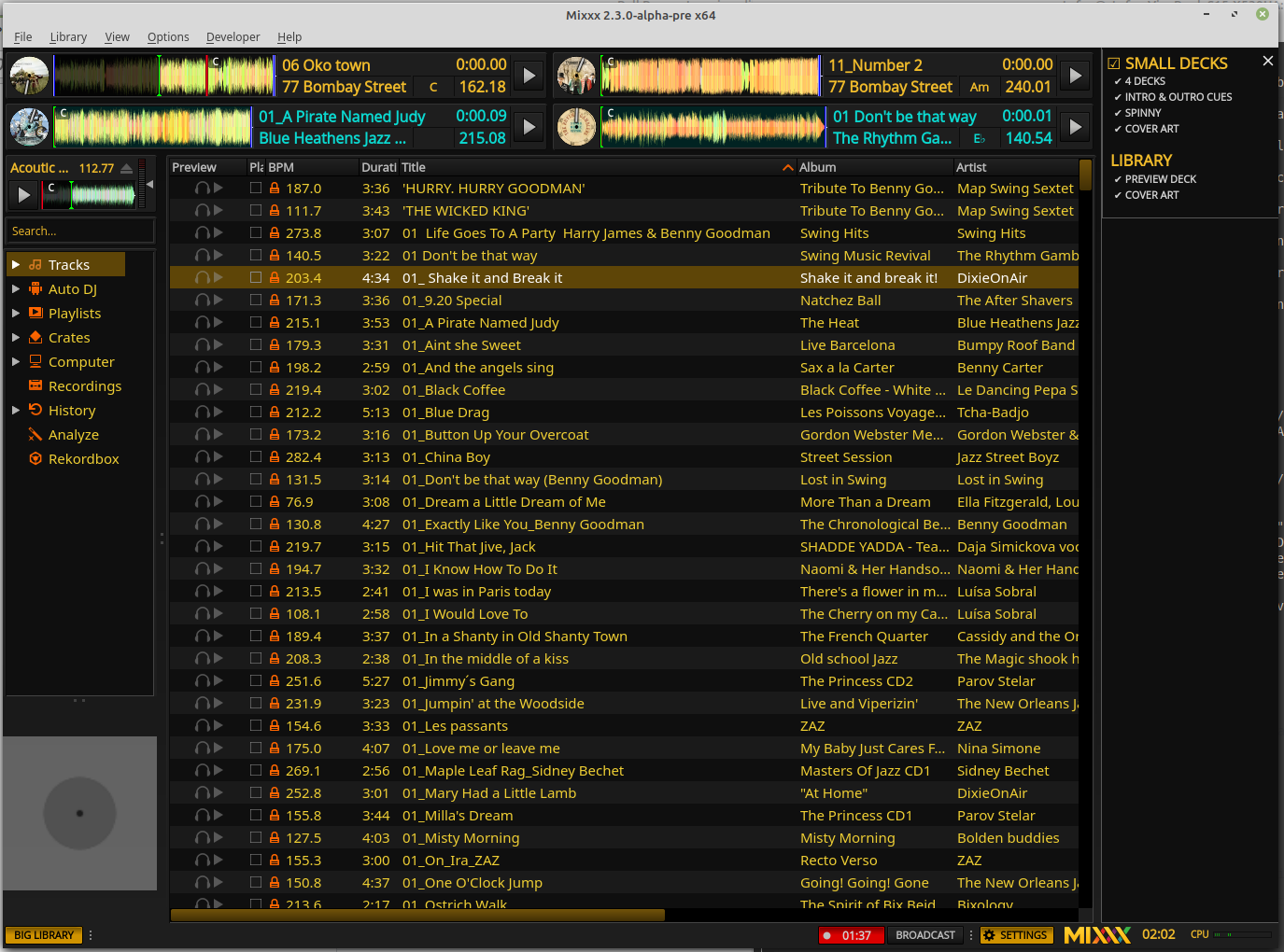
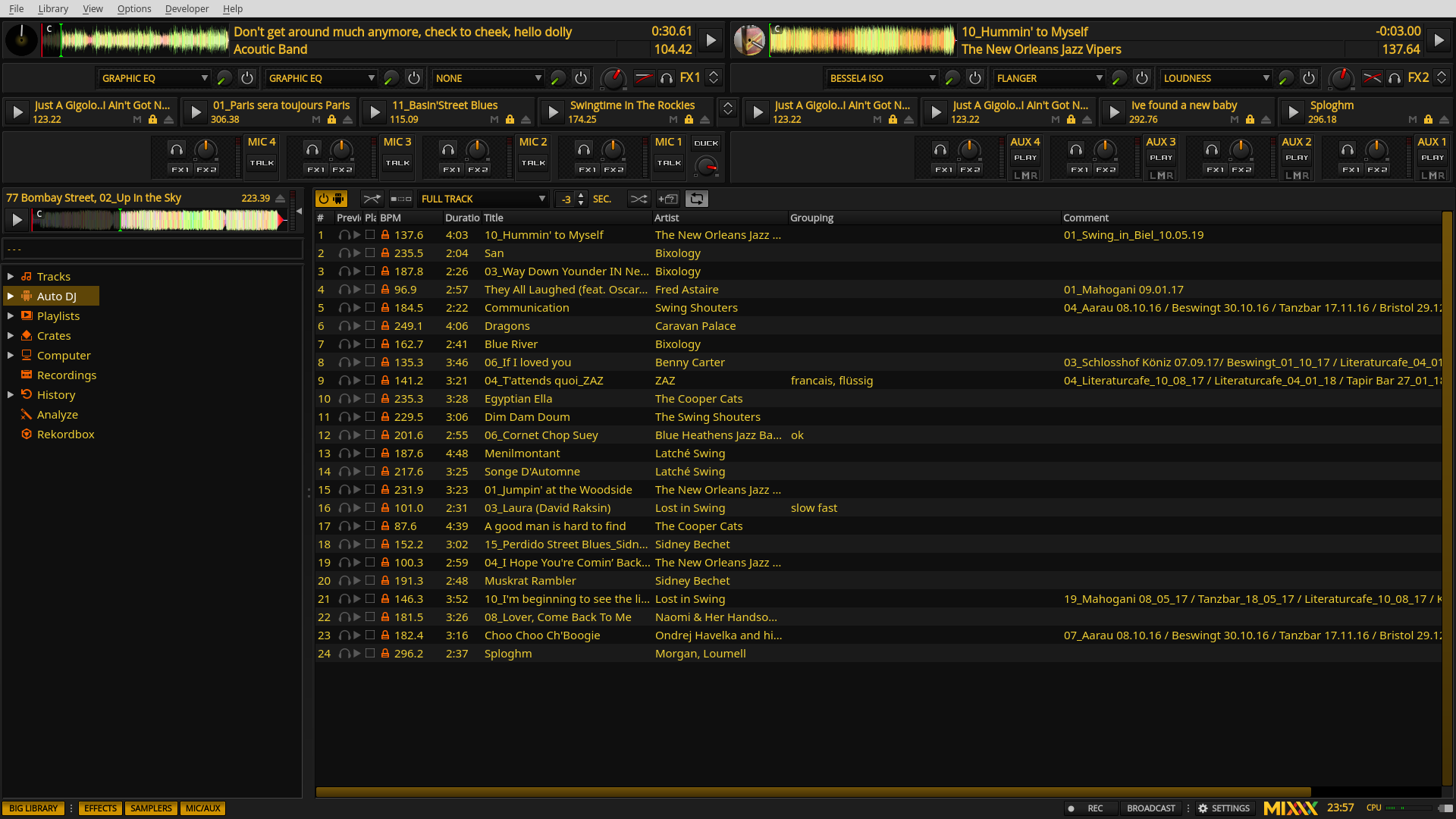
This PR adds fx, sample and mic also in maximize library mode to skin Latenight

Bildschirmfoto vom 2019-12-28 23-57-03

maximized library new:
Bildschirmfoto vom 2019-12-28 23-57-10

@ronso0
Copy link
Copy Markdown
Member

ronso0 commented Dec 29, 2019

I've also been thinking about this again lately.
I'm sure users would appreciate that option (also in Deere & tango), but I also think we cannot simply put the Fx, Mic and Samplers Singeltons in the maximized view and use the same skin controls there ([EffectRack1],show, [Sampler], show etc.) because IMO it's mandatory to always have the spacebar as a master toggle to expand the library and hide everything but the mini decks.

One solution would be to have a second set of controls like [Skin],show_mini_effects, [Skin],show_mini_samplers etc. that allows users to configure both the regular and the maximized view independently. For those secondary skin toggles we could add a secondary toolbar section that replaces the regular GUI toggles when the library is maximized.
Things start to get a bit more complex when we remember that the GUI toggles are also in the skin settings menu.


No matter how the final implementation will look like we should use SingletonContainers for each feature (Fx, Samplers, Mics).
Simply adding the feature templates like <Template src="skin:fx_rack.xml"/> to the maximized view increases the memory impact and also the skin loading time, especially whith intensive widgets like waveform overviews.

@nopeppermint
Copy link
Copy Markdown
Contributor Author

One solution would be to have a second set of controls like [Skin],show_mini_effects, [Skin],show_mini_samplers etc. that allows users to configure both the regular and the maximized view independently. For those secondary skin toggles we could add a secondary toolbar section that replaces the regular GUI toggles when the library is maximized.

I like this idea

Things start to get a bit more complex when we remember that the GUI toggles are also in the skin settings menu.

then we might add a second settings menu which is only accessible in maximized library mode

@nopeppermint
Copy link
Copy Markdown
Contributor Author

Normal Deck:
big_deck

Small Deck:
smal_deck

Big Library:
big_library

@nopeppermint
Copy link
Copy Markdown
Contributor Author

One solution would be to have a second set of controls like [Skin],show_mini_effects, [Skin],show_mini_samplers etc. that allows users to configure both the regular and the maximized view independently.

I do not think it is necessary to configure all views independently, therefore I use the same controls for all 3 views, but only show the controls in the settings menu which change something in the currently visible view

@nopeppermint
Copy link
Copy Markdown
Contributor Author

@ronso0
I also added your "waveform" disable/enable button which you used somewhere else

@ronso0
Copy link
Copy Markdown
Member

ronso0 commented Jan 7, 2020

... because IMO it's mandatory to always have the spacebar as a master toggle to expand the library and hide everything but the mini decks.

When I wrote this (and my comments on #2011 ) I thought about different use cases and I think we should clarify those before we continue. Instead of adapting a skin to specific needs which affects all users, my goal is to allow users to configure two views that can quickly be toggled with the Spacebar (thus abusing the [Master],maximize_library control) in order to address as many individual use cases as possible.
For this it's sufficient -IMO- to have two toolbars (maybe different GUI toggle colors for distinction) and two skin settings menus. (to complement this concept we could use collapse/expand toggles for the decks, like those we already have Fx and samplers)
Futhermore, with every change introduced here we should remember thinking about how we can add this feature also to Deere and Tango, to not increase the functional gaps in between different skins even more (thinking of a minimal mixer for example).
I exclude Shade from the process until now, but it would be nice to come up with a solution for it, as well.

These are the use cases I see, I bet there are more.

1 Regular view: decks, waveforms, Fx, samplers, mics
The regular view we assume most regular Mixxxers use and the view new users should see when starting Mixxx for the first time. Every Mixxx control is within reach, unneeded sections can be hidden.

2 Preparation view: decks, waveforms, large library, Fx, samplers, mics
Prepare tracks, manage crates, playlists etc.

3 Condensed view: mini decks, mini Fx
View suitable for DJs with full-featured controllers or turntables with external (USB) mixer, maybe with Fx controls and waveforms.

4 Condesed view with waveforms

5 Decks-only view: mini decks, large sampler grid, mics
Radio DJs, podcasters

What do you and others think?

@Holzhaus
Copy link
Copy Markdown
Member

Holzhaus commented Feb 4, 2020

@ronso0 Sounds good to me, although I worry about the complexity that might be introduced due to that. I have no idea if this would massively complicate the Skin code, so I can't really comment on that.

@ronso0
Copy link
Copy Markdown
Member

ronso0 commented Feb 4, 2020

Sounds good to me, although I worry about the complexity that might be introduced

If we don't introduce more options in each skin section, the added complexity is manageable and the increase in memory is quite low:
each skin section (decks row, fx row, samplers row, ...) would be

  • instantiated as Singleton
  • added to the maximized_library widget group
  • get a visibility connection attached like [Skin],show_fx_with_maxLibrary

I'm unsure if we need some clear indicator to show which of the the two views is currently active.
I'm not sure if they're sufficiently distinguishable just by knowing that one view always has regular decks and the other has just a minimal version or none.

Then we need to create a second toolbar. And a second skin menu, which would basically be the same as the regular skin menu, except:

  • the master toggles (show Fx etc.) would have different ConfigKeys
  • stripped controls for the deck section

This is the only aspect I'm a little worried about because we already had issues with manually keeping the skin menus in sync in the 16- and 64-sampler versions of Tango and Deere.

@ronso0
Copy link
Copy Markdown
Member

ronso0 commented Apr 30, 2020

@nopeppermint Please test #2736
There I added optional Medium and Mini Decks to the regular view.

@nopeppermint
Copy link
Copy Markdown
Contributor Author

nopeppermint commented May 1, 2020

ok, I will take a look tomorrow
maybe you could use some of my settings menu adaption from here

@nopeppermint nopeppermint mentioned this pull request May 11, 2020
19 tasks
@Holzhaus
Copy link
Copy Markdown
Member

@nopeppermint Did you look into the LateNight changes? Can this PR be closed?

@nopeppermint
Copy link
Copy Markdown
Contributor Author

yes, this PR can be closed

Sign up for free to join this conversation on GitHub. Already have an account? Sign in to comment

Projects

None yet

Development

Successfully merging this pull request may close these issues.

3 participants