Add Progress SPEC #24418
There are no files selected for viewing
| Original file line number | Diff line number | Diff line change |
|---|---|---|
|
|
@@ -2,62 +2,104 @@ | |
|
|
||
| ## Background | ||
|
|
||
| The `Progress` component is used to display the current progress of an operation flow. | ||
|
|
||
| ## Prior Art | ||
|
|
||
| ### Open UI | ||
|
|
||
| | Library | Component Name | Spec Link | Notes | | ||
| | ----------------------- | ------------------ | ------------------------------------------------------------------------------------------------------------ | ------------------------------------------------------------------------------------------------- | | ||
| | Ant Design | Progress | [Progress](https://ant.design/components/progress/) | Specifies the type, a combined progress component | | ||
| | Atlassian Design | Progress bar | [ProgressBar](https://atlassian.design/components/progress-bar/success-progress-bar/examples) | Defaults to determinate state, which turns green when value reaches 1. Has an indeterminate state | | ||
| | Bootstrap | Progress | [Progress](https://getbootstrap.com/docs/4.3/components/progress/) | Allows for multiple different animation styles on the same Progress bar | | ||
| | Carbon Design | Progress Indicator | [ProgressIndicator](https://react.carbondesignsystem.com/?path=/story/components-progressindicator--default) | Determinate Progress that has steps, similar to a Slider | | ||
| | Fast | Progress | [Progress](https://explore.fast.design/components/fast-progress) | Combined Progress and Spinner component, has a determinate and indeterminate state | | ||
| | Lightning Design System | Progress Bar | [ProgressBar](https://www.lightningdesignsystem.com/components/progress-bar/) | Has a vertical bar, only determinate, and can specify progress step | | ||
| | Semantic UI | Progress | [Progress](https://semantic-ui.com/modules/progress.html#indicating) | Allows for success and error states, default rounded edges. No indeterminate form | | ||
|
|
||
| ### Comparison of v8 and v0 | ||
|
|
||
| The existing components are: | ||
|
|
||
| - v8 | ||
| - `ProgressIndicator` | ||
| - v0 | ||
|
|
||
| ## Sample Code | ||
|
|
||
| Basic example: | ||
|
|
||
| ```jsx | ||
| import { Progress } from '@fluentui/react-progress'; | ||
|
|
||
| function App() { | ||
| return <Progress thickness="large" label="Loading" />; | ||
| } | ||
| ``` | ||
|
|
||
| ## Variants | ||
|
|
||
| - Indeterminate Progress | ||
| - The default Progress that animates indefinitely | ||
| - Determinate Progress | ||
| - The determinate form of the Progress component that incrementally loads from 0% to 100% | ||
|
|
||
| ### Shape | ||
|
|
||
| The Progress is represented as a rounded rectangular area with an inner animated bar that either travels across the area indefinitely or animates up till a specified point | ||
|
|
||
| ## API | ||
|
|
||
| ### Slots | ||
|
Member
There was a problem hiding this comment. It would be great to include there an image with a component's anatomy so it would be clearer which slots correspond to what area.
Contributor
There was a problem hiding this comment. We might want to use That would mean:
That would follow the pattern of our other form controls, which (mostly) don't include labels built-in. And it would also benefit from sharing all of the features of Field.
Member
There was a problem hiding this comment. I agree with this but I think we discussed maybe making those changes to both spec and implementation in a separate PR. |
||
|
|
||
| - `root` - The root element of the Progress. The html element is a `div` | ||
| - `bar` - The div element that gets animated into a Progress bar. The html element is `div` | ||
| - `track` - The div element that functions as the track for the Progress bar. The html element is `div` | ||
| - `label` - The text shown above the Progress. The html element is a `span` | ||
| - `description` - The text shown below the Progress. The html element is a `span` | ||
|
|
||
| ### Props | ||
|
|
||
| See API at [Progress.types.tsx](./src/components/Progress/Progress.types.ts). | ||
|
Member
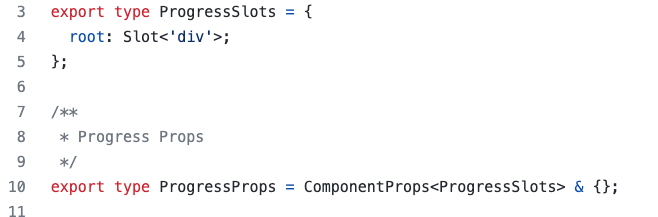
There was a problem hiding this comment. FYI: it's currently empty:
It would be great to include currently implemented props from #24023 to the spec.
Contributor
There was a problem hiding this comment. I wonder if we should make the props align with the HTML
|
||
|
|
||
| ## Structure | ||
|
|
||
| ```html | ||
| <div class="fui-Progress"> | ||
| <!-- Label for Progress --> | ||
| <span className="fui-Progress__label">Loading...</span> | ||
| <!-- Track for Progress --> | ||
| <div class="fui-Progress__track" /> | ||
| <!-- Bar for Progress --> | ||
| <div class="fui-Progess__bar" /> | ||
| <!-- Label for Progress description --> | ||
| <span className="fui-Progress__description">Loading Text</span> | ||
| </div> | ||
| ``` | ||
|
|
||
| ## Migration | ||
|
|
||
| See [MIGRATION.md](./MIGRATION.md). | ||
|
|
||
| ## Behaviors | ||
|
|
||
| ### States | ||
|
|
||
| - **Display** - The Progress will use the following priority: | ||
|
|
||
| - Specifying the `percentComplete` from `0` to `1` will alter the Progress from indeterminate to determinate. | ||
| - The component also has `rtl` support and will animate the progress bar from right to left if set. | ||
|
|
||
| ### Interaction | ||
|
|
||
| The Progress is non-interactive. | ||
|
|
||
| - **Keyboard** - Not keyboard focusable. | ||
| - **Mouse** | ||
|
|
||
| - Click: No action | ||
|
|
||
| - **Touch** - Nothing | ||
|
|
||
| ## Accessibility | ||


There was a problem hiding this comment.
Choose a reason for hiding this comment
The reason will be displayed to describe this comment to others. Learn more.
I don't see a reference there to OpenUI, is the title correct?
There was a problem hiding this comment.
Choose a reason for hiding this comment
The reason will be displayed to describe this comment to others. Learn more.
@tomi-msft you can add a link to Open UI if there is a page about
Progressthere. If a page for progress does not exist feel free to rename this section to something like "Comparison between other libraries".