Linkerd CLI Chocolatey Package#4205
Conversation


This PR partially fixes linkerd#3063 by building a chocolatey package for Linkerd2's Windows CLI
It adds the build scripts for the Linkerd chocolatey package and based on discussions in
linkerd#3921

The package currently exists in the `bin/win` folder
The `.nuspec` script has been modified for easy integration with the workflow
done by @ihcsim here: https://github.com/ihcsim/linkerd-chocolatey

To build outside of workflow environment (on windows system):
   - Modify `linkerd.nuspec` version tag to an available stable version of Linkerd2's cli
     eg: stable-2.7.0
   - Install chocolatey
   - cd into `bin/win/`
   - Run `choco pack`
   - Run `choco install linkerd -s .`  (make sure cmd/ powershell is running as administrator)
   - Run refreshenv to add `linkerd.exe` path to system
   - To unistall run `choco uninstall linkerd`

Tackling requirements discussed in linkerd#3921
(specifically: linkerd#3921 (comment))

- Followed folder structure as described here: https://github.com/ihcsim/linkerd-chocolatey
- Modified package to accept version through the metadata available in `.nuspec` file
- Modified package to override install path with command line arg/ env variable
    To run with command line argument:
    - Run `choco install linkerd -s . --params="/path:<YOUR_PATH_HERE>"`
    To run with environment variable:
    - Run `$env:linkerdPath = "<YOUR_PATH_HERE>"` in powershell
    Uses default chocolatey install path if none of the above provided.
- Modified package to accept command line args/ env variable for checksum
    To run with command line argument:
    - Run `choco install linkerd -s . --params="/checksum:<VERSION_CHECKSUM>"`
    (Keep params space seperated when specifying multiple)
    To run with environment variable:
    - Run `$env:linkerdCheckSum = "<VERSION_CHECKSUM>"`
    If no checksum provided, default null value assigned and package ignores verification step
- This package is compatible in a non-administrative environment but one must install chocolatey
in a non-administrative path.
(Steps explained here: https://chocolatey.org/docs/installation#non-administrative-install)

Further plans:
This PR is part of a set of planned PRs based on the discussions in
linkerd#3921
(specifically: linkerd#3921 (comment))

Signed-off-by: Animesh Narayan Dangwal <animesh.leo@gmail.com>

bin/win/tools/chocolateyinstall.ps1
Outdated
| $version = $env:chocolateyPackageVersion | ||
| $pp = Get-PackageParameters | ||
|
|
||
| if ($pp['path'] -ne $null){ |

There was a problem hiding this comment.
@drholmie thanks for this PR. There were a couple of failures in the tests:
Looks like we need a then statement here: https://github.com/koalaman/shellcheck/wiki/SC1050
There was a problem hiding this comment.
Hi there! Thanks for reviewing the PR :) So since this is a PowerShell script, shellcheck isn't actually meant for linting this. Although thanks for catching this. I completely missed linting the code. For PowerShell scripts PSScriptAnalyzer can be used, doing so (for default values) I got the following output:
RuleName                            Severity     ScriptName Line  Message
--------                            --------     ---------- ----  -------
PSAvoidTrailingWhitespace           Information  chocolatey 33    Line has trailing whitespace
                                                 install.ps
                                                 1
PSPossibleIncorrectComparisonWithNu Warning      chocolatey 7     $null should be on the left side of equality
ll                                               install.ps       comparisons.
                                                 1
PSPossibleIncorrectComparisonWithNu Warning      chocolatey 18    $null should be on the left side of equality
ll                                               install.ps       comparisons.
I'll make those changes however before adding to the PR, how should we go about adding PSScriptAnalyzer to the static checks of Linkerd? (if it is required to be added that is) or is it alright for now to just add ! -name win \ in the static_check.yml ?
There was a problem hiding this comment.
this is a good question. I found a PSScriptAnalyzer GitHub Actions integration.
@kleimkuhler @alpeb Is this something that we want to integrate into github actions? The option is to ignore the .ps1 script, per the latest commit.

There was a problem hiding this comment.
@cpretzer Definitely 👍 @drholmie can you take care of adding that as part of this PR? If you're not familiar with Github actions, I can take care of it as a followup PR.
Mind thought that'd be a separate effort from adding the chocolatey package into the Linkerd release assets, which I think should be tackled in yet another separate PR.
There was a problem hiding this comment.
Thank you all for reviewing this! As mentioned in the draft PR comment (#3921 (comment)). It would be better to handle this in a separate PR. Considering the scope of this PR is meant to add the required files for building the choco package in the bin folder.
Regarding adding this to the release process, @ihcsim has already done some work on this as seen here.
| @@ -0,0 +1,32 @@ | |||
| <?xml version="1.0" encoding="utf-8"?> | |||
There was a problem hiding this comment.
shellcheck is parsing this file as a script, and we should add it to the list of ignored files in static_check.yml.
! -name *.nuspec \
There was a problem hiding this comment.
Thanks for pointing this out! Will add it or ! -name win \ after resolving the previous comments.
There was a problem hiding this comment.
Sounds good! Looking forward to getting this committed and merged.
Modified `chocolateyinstall.ps1` to follow the default rules in linter `PSScriptAnalyzer`
Modified `static_checks.yml` to ignore `win` folder during shellcheck

Signed-off-by: Animesh Narayan Dangwal <animesh.leo@gmail.com>

|
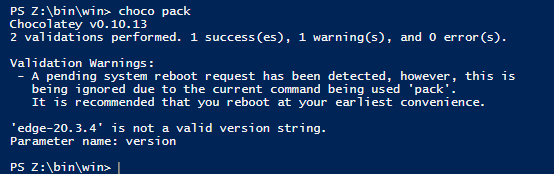
@drholmie I was testing this and stumbled against this problem: |

 kleimkuhler
left a comment
kleimkuhler
left a comment
kleimkuhler
left a comment
There was a problem hiding this comment.
Could some further instructions be provided on how users would build the CLI? Right now (as a non-native windows user) I had to follow along with the PR instructions. I would not have known what to do without that.
Also, I think I am following the directions correctly, I still get the following error:
❯ choco pack
Chocolatey v0.10.15
'stable-2.7.1' is not a valid version string.
Parameter name: version
This was after replacing ${LINKERD_VERSION} version field in linkerd.nuspec.
Modified `chocolateyinstall.ps1` to accept version string correctly

Signed-off-by: Animesh Narayan Dangwal <animesh.leo@gmail.com>
|
Thank you @alpeb @kleimkuhler for catching that! My apologies, I overlooked the acceptable formats for the Also @alpeb this is meant only for stable packages. The version tag, works based off what is provided in the @kleimkuhler this package isn't meant to be built by the user. The intended workflow is that the user can download the choco package from the releases page and then run |

|
@drholmie Oh okay I see the comment you referenced explaining this PR should just focus on adding the scripts, and follow-up should add it to CI (sorry for the lack of context here I had not seen the whole conversation on the original issue thread). So with this merged, a manual step will still need to take place for updating the version, but then users can download the CLI with chocolatey? |
|
No worries @kleimkuhler :) At the moment, yes users would have to manually update the version, however as mentioned this is meant to be used with the work done by @ihcsim here. Where the end goal is to have the choco package in the releases page, from where windows users can download it and install it using chocolatey. |
|
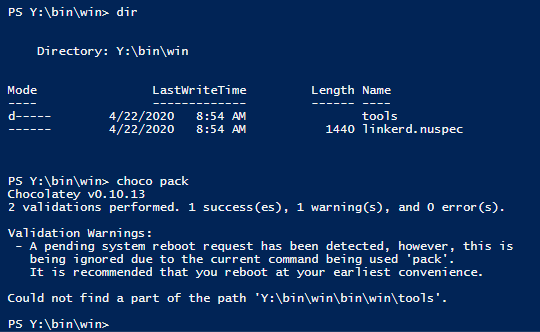
Thanks for clearing things out @drholmie. Now I'm having this problem: Any ideas what could be going on? |
|
Thanks @alpeb for catching that! My apologies, it looks like I missed a step in my original PR message. Two things are to be changed to make the package work on a regular system. First is specifying the version in |
|
@drholmie Can you please explain why we need to make that path change on-the-fly, instead of changing it for good? |
|
Thanks @alpeb for reminding! (apologies I forgot to mention it in the previous comment). The files in this PR are meant to suit the work done by @ihcsim here: https://github.com/ihcsim/linkerd-chocolatey. The |

|
Thanks for all the help! And the approval :) |


Followup to #4205

This adds:
- A new job `psscript-analyzer` into the `statics_checks.yml`
workflow for linting the Chocolatey Powershell script.
- A series of new steps into the `gh_release` job of the `release.yml`
workflow for updating the Chocolate spec file and generating the
package. This is only triggered for stable releases.
- The `Create release` step was updated to upload the generated package,
if present.
Followup to #4205, supersedes #4205

This adds:

- A new job psscript-analyzer into the `statics_checks.yml`
workflow for linting the Chocolatey Powershell script.
- A new `choco_pack` job in the `release.yml` workflow for
updating the Chocolatey spec file and generating the
package. This is only triggered for stable releases. It requires
a windows runner in order to run the choco tooling (in theory
it should have worked on a linux runner but in practice it
didn't).
- The `Create release` step was updated to upload the generated package,
if present.
- The source file path in `bin/win/linkerd.nuspec` was updated
to make this work.
* CI steps for Chocolatey package - take 2

Followup to #4205, supersedes #4205

This adds:

- A new job psscript-analyzer into the `statics_checks.yml`
workflow for linting the Chocolatey Powershell script.
- A new `choco_pack` job in the `release.yml` workflow for
updating the Chocolatey spec file and generating the
package. This is only triggered for stable releases. It requires
a windows runner in order to run the choco tooling (in theory
it should have worked on a linux runner but in practice it
didn't).
- The `Create release` step was updated to upload the generated package,
if present.
- The source file path in `bin/win/linkerd.nuspec` was updated
to make this work.

* Name nupkg file accordingly to the other release assets
4 participants


This PR partially fixes #3063 by building a chocolatey package for Linkerd2's Windows CLI
It adds the build scripts for the Linkerd chocolatey package and based on discussions in
#3921
The package currently exists in the
bin/winfolderThe
.nuspecscript has been modified for easy integration with the workflowdone by @ihcsim here: https://github.com/ihcsim/linkerd-chocolatey
To build outside of workflow environment (on windows system):
linkerd.nuspecversion tag to an available stable version of Linkerd2's clieg: 2.7.0 and file tag's
srctotools\**bin/win/choco packchoco install linkerd -s .(make sure cmd/ powershell is running as administrator)linkerd.exepath to systemchoco uninstall linkerdTackling requirements discussed in #3921
(specifically: #3921 (comment))
.nuspecfileTo run with command line argument:
choco install linkerd -s . --params="/path:<YOUR_PATH_HERE>"To run with environment variable:
$env:linkerdPath = "<YOUR_PATH_HERE>"in powershellUses default chocolatey install path if none of the above provided.
To run with command line argument:
choco install linkerd -s . --params="/checksum:<VERSION_CHECKSUM>"(Keep params space seperated when specifying multiple)
To run with environment variable:
$env:linkerdCheckSum = "<VERSION_CHECKSUM>"If no checksum provided, default null value assigned and package ignores verification step
in a non-administrative path.
(Steps explained here: https://chocolatey.org/docs/installation#non-administrative-install)
Further plans:
This PR is part of a set of planned PRs based on the discussions in
#3921
(specifically: #3921 (comment))
Signed-off-by: Animesh Narayan Dangwal animesh.leo@gmail.com