[4.0] Fix toolbar collapse in mobile view#30131
Conversation


 joomla-cms-bot
added
NPM Resource Changed
joomla-cms-bot
added
NPM Resource Changed

|
I have tested this item ✅ successfully on 91ff85b But there is another issue with the toolbar collapse not related to this PR, i.e. it is there with and without this PR. When resizing the browser window, the toolbar collapsing and the gears button display doesn't happen at the same time. Especially when enlarging the window, first the gears button disappears, but for making the tool bar appear it needs to further enlarge the window, i.e. there is a small diplay width range in with neither the gears button to expand or collapse the toolbar nor the expanded toolbar are shown. @Quy I guess that's a css problem. Do you think you can fix that, too? And do you know if there is an issue for that? This comment was created with the J!Tracker Application at issues.joomla.org/tracker/joomla-cms/30131. |
|
I am not at computer to test, but #30132 should have fixed the issue with the collapsed toolbar. |
|
Ahh, so both PRs together should do the job. |
|
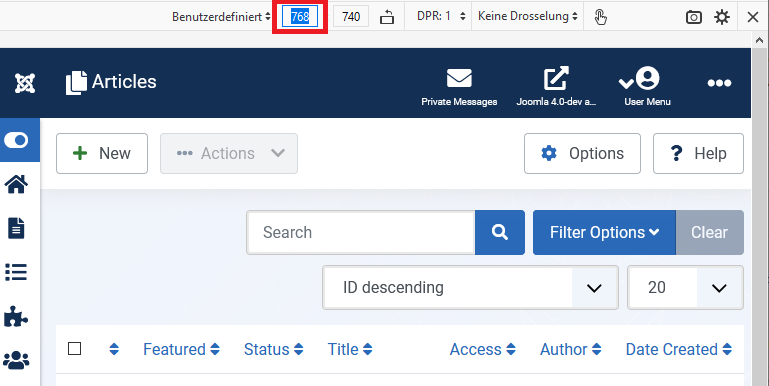
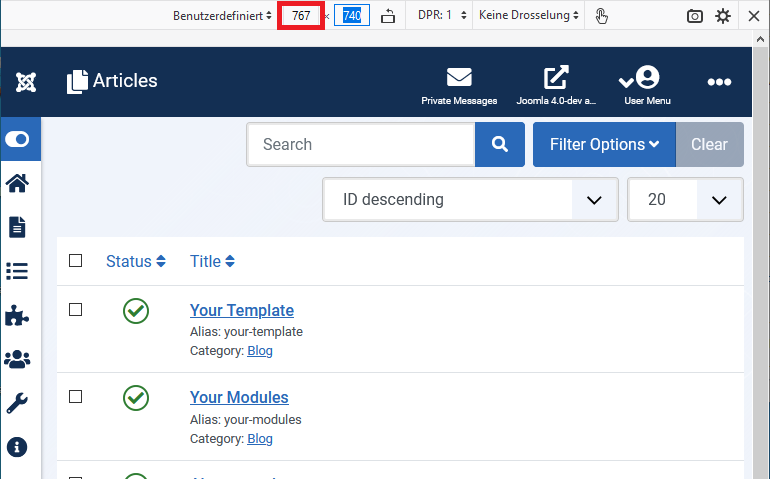
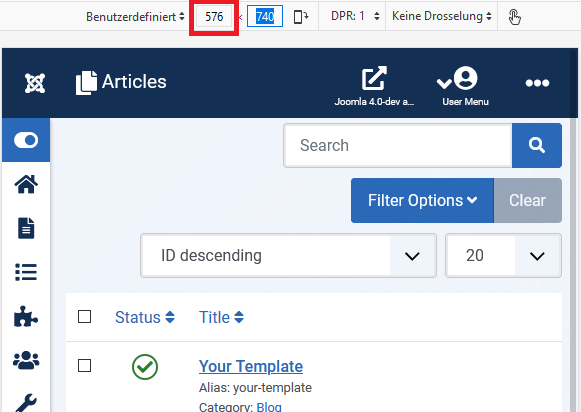
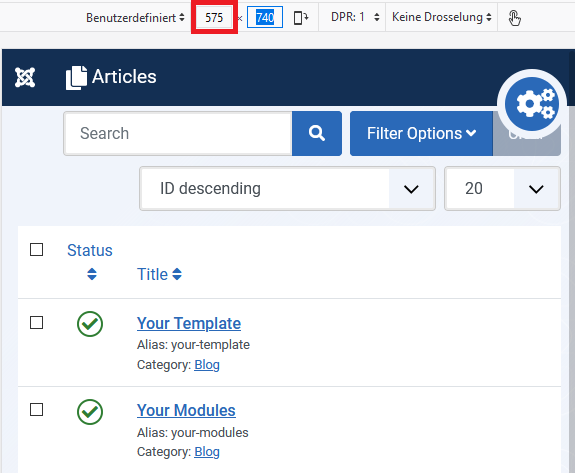
@Quy No, the issue persists when I apply the changes of both PRs (this one here and #30132 ). For display widths of 768 px or larger, the tool bar is shown, all fine. For display widths between 576 and 767 px, the toolbar is not shown, but also not the button for it. Width 767 px: Width 576 px: For display widths of 757 px or smaller, the button is shown: |

| @@ -211,11 +211,11 @@ | |||
| } | |||
|
|
|||
| if (smallLandscape.matches) { | |||
There was a problem hiding this comment.
Can you see if changing to if (small.matches) { fixes the issue?

There was a problem hiding this comment.
@Quy This fixes the problem which I've mentioned with the toolbar and its gears button, but it creates the same problem with the left side menu and its burger button, i.e. when resizing from small to a bit larger, the burger button disappears, but the (collapsed) menu doesn't appear. I think this was ok before the changes. It seems to me the 2 buttons are handled with the same css class but the toolbar and the menu have different sizes when they get collapsed or hidden.


|
Went to test this but the link to the PR files: https://ci.joomla.org/artifacts/joomla/joomla-cms/4.0-dev/30131/downloads/34008/ Gives File not found on all the downloads :( Also when I went to apply the PR there was nothing able to be applied. Modified per BFH discussion to indicate the failed test was not an actual test. |
@particthistle Both is not fault of this PR. The first one is caused by an erroneout cleanup script having cleaned up the wrong stuff, the 2nd thing is a patchtester thing. So please change your test result back to "not tested" (can be done in the issue tracker by using the "Test this" button again). It can never be the fault of a PR when something is wrong with inbfrastructure or test tools. |

|
@Quy I've just tested again and my comment above is still valid:
|
|
@Quy P.S.: But it seems to happen only after the first reducing and enlarging again the width. Ehen on the same page and again reducing and then enlarging width, it works. |
|
@Quy P.P.S.: If then going to another page and doing the same, it also happens only for the first time when reducing and then enlarging again the width. After that and a page reload, it works well on that page, until you have been on another page again. |
|
@Quy It seems the issue I've found is not related to this PR. Will continue to investigate and if necessary make new issue or PR. Could you fix the javascript cs error reported here https://ci.joomla.org/joomla/joomla-cms/35436/1/23 ? After that I can give this PR a good test. |
|
I have tested this item ✅ successfully on 22f88f0 This comment was created with the J!Tracker Application at issues.joomla.org/tracker/joomla-cms/30131. |

|
I have tested this item ✅ successfully on 22f88f0 This comment was created with the J!Tracker Application at issues.joomla.org/tracker/joomla-cms/30131. |
|
RTC This comment was created with the J!Tracker Application at issues.joomla.org/tracker/joomla-cms/30131. |


|
Tks |

* Fix toolbar collapse in mobile view

* Match toolbar collapse with cog icon

* Removed unused constant
6 participants


Fixes #27958.
Summary of Changes
Use the correct class to fix toolbar collapse in mobile view.
Testing Instructions
Apply PR.
Run npm i or install the package installer: https://ci.joomla.org/artifacts/joomla/joomla-cms/4.0-dev/30131/downloads/35475/
Resize browser's viewport.
Go to Global Configuration.
Go to any list views.
Actual result BEFORE applying this Pull Request
The toolbar toggle button requires 2 clicks to close. The first click attempts to open the already open toolbar.
Expected result AFTER applying this Pull Request
Toolbar collapsed by default.