Home Connect add WasherDryer support#90673
Conversation


 home-assistant
Bot
added
cla-signed
integration: home_connect
new-feature
small-pr
home-assistant
Bot
added
cla-signed
integration: home_connect
new-feature
small-pr

|
Hey there @DavidMStraub, mind taking a look at this pull request as it has been labeled with an integration ( Code owner commandsCode owners of
|


|
This change probably has the same issue as DavidMStraub/homeassistant-homeconnect#119 |

|
@BraveChicken1 Thanks for pointing that out. Yes, I guess you are right. I need to see how to change the PR so it will only affect the WasherDryer. |
|
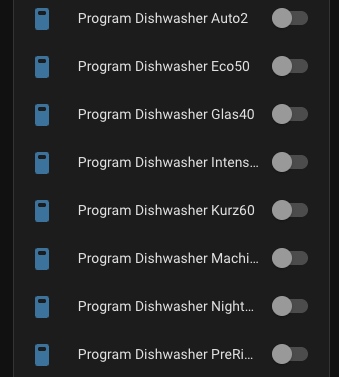
@BraveChicken1, I think I have a solution. For appliance types like WasherDryer programs will be displayed with a program type and program name. As I don't have WasherDryer I did POC with my Dishwasher. For example: if the full program name is Here is the result in Home Assistant: I will submit the PR in a few minutes. |
|
@BraveChicken1 submitted the fix. Thanks for pointing this out once again! :) |

|
What about #89113? |
|
@DavidMStraub it's outdated. I already commented there. |
|
I think this should work. Thank you! |

 BraveChicken1
left a comment
BraveChicken1
left a comment
BraveChicken1
left a comment
There was a problem hiding this comment.
Not tested but looks good to me

|
Can't test right now, but I'm one of the persons that own a |
|
Hi @DennisGaida, Yes, it will be great if you can test it with a real appliance. Thanks a lot! :) |

|
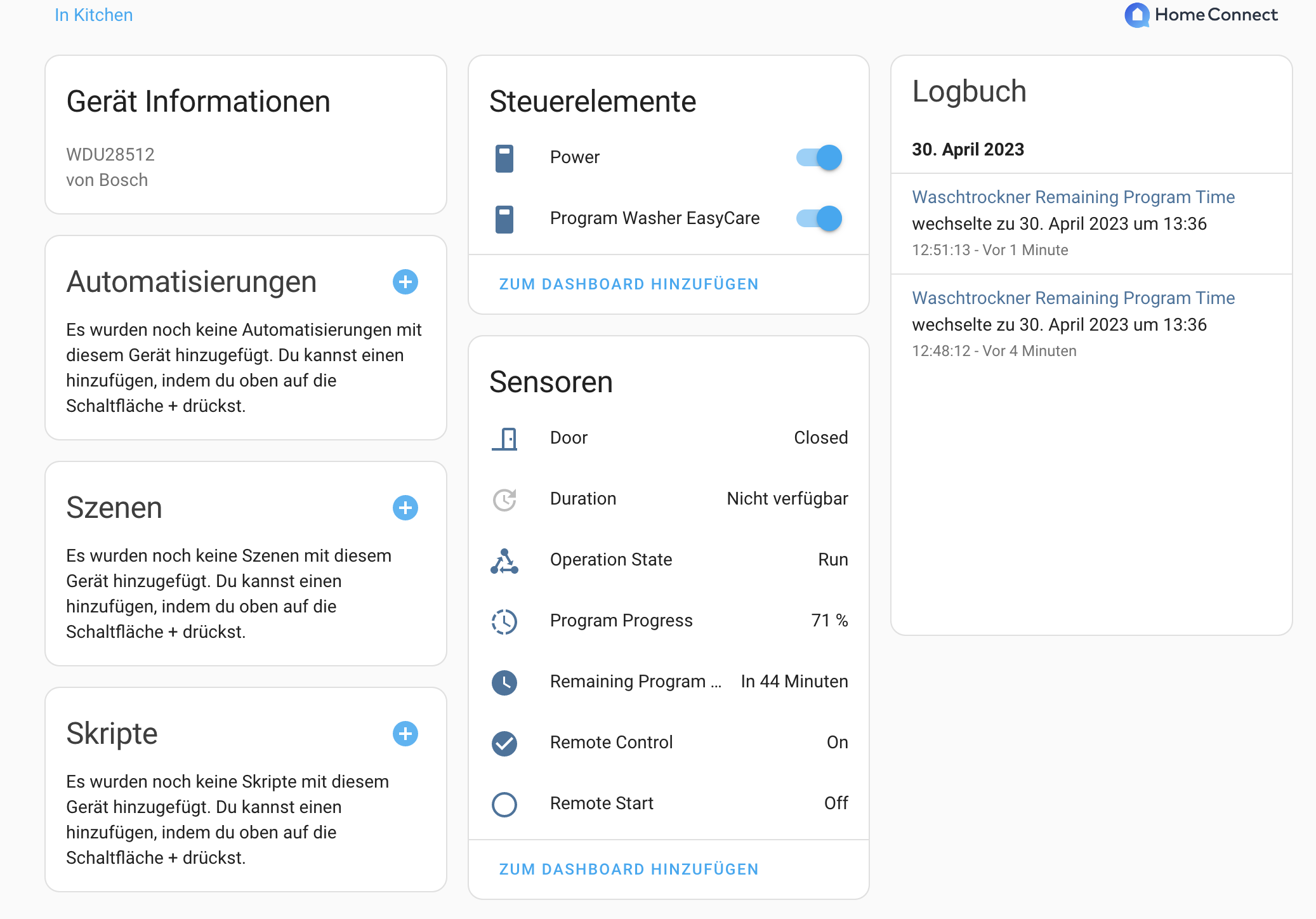
Hi @stickpin, I only started to use HomeAssistant today and landed quite quickly on this PR because my WashDryer was not found. I now also have finally managed to get your branch running and validated that the WashDryer shows up. As I do not know to much about HomeAssistant yet, I don't know if what I see is what one would expect, so please find attached a screenshot of the device overview. Should I test something else? Is it normal that "duration" is not available?
If I were to toggle the Power or Program switch, is the program that actually aborted? I do not dare to try that right now. |


* dev: (581 commits)
  Only store and pass around coordinator in Rituals Perfume Genie (home-assistant#92298)
  Avoid returning statistics columns that the metadata knows are impossible (home-assistant#92095)
  Add `date` platform (home-assistant#81948)
  Prevent pysnmp from being installed as it does not work with newer python (home-assistant#92292)
  Use SnapshotAssertion in Renault tests (home-assistant#90778)
  Home Connect add WasherDryer support (home-assistant#90673)
  Move lastfm constants to separate file (home-assistant#92289)
  Fix august lock state when API reports locking and locked with the same timestamp (home-assistant#92276)
  Ensure onvif webhook can be registered (home-assistant#92295)
  Bump beacontools to fix conflict with construct<2.10 and >=2.8.16 (home-assistant#92293)
  Bump pynina to 0.3.0 (home-assistant#92286)
  Fix mqtt not available when starting snips (home-assistant#92296)
  Extract Rituals Perfume Genie DataUpdateCoordinator into module (home-assistant#92284)
  Bump bleak to 0.20.2 (home-assistant#92294)
  Add missing fstrings in Local Calendar (home-assistant#92288)
  Remove myself from switcher_kis codeowners (home-assistant#92277)
  Handle AttributeError from wrong port in ONVIF config flow (home-assistant#92272)
  Auto repair incorrect collation on MySQL schema (home-assistant#92270)
  Update orjson to 3.8.11 (home-assistant#92228)
  Update coverage to 7.2.4 (home-assistant#92229)
  ...
|
@frenck thanks! :) Hi @MoeweX, Thanks a lot for reporting back! Regarding the behavior. I don't have WasherDryer to test it with but in general, If you switch off the program, the current running operation will be aborted. If you power off the device, it will turn off and the program will be resumed once you turn it on. At least that's what's happening with my Dishwasher. |
|
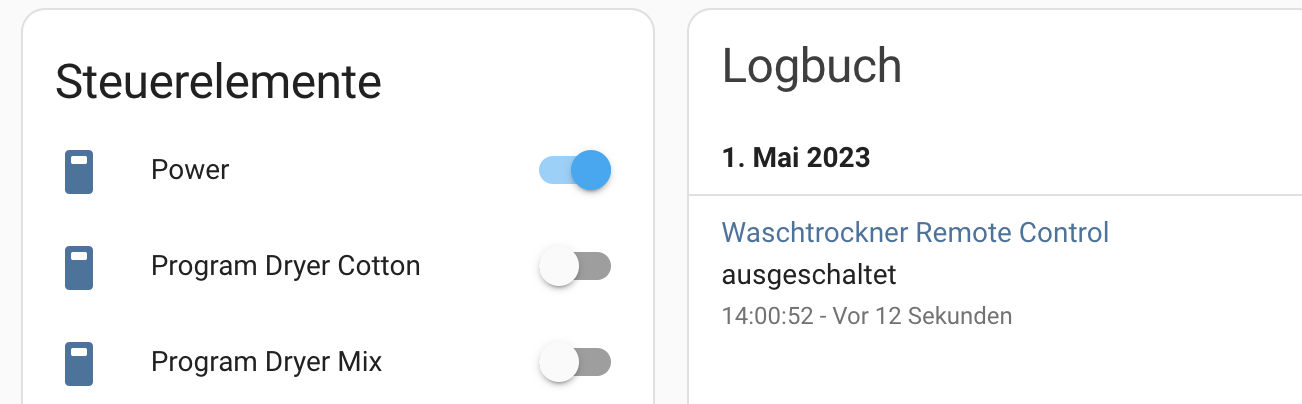
Hi @stickpin , yes I initially onboarded it while running a program, now I tried again and many more programs showed up :). While playing around with the controls, I noticed the power button is not working: Once I switch of the machine via physical controls, interestingly the log indicates the real state while the button still shows that it is turned on
|
|
Hi @MoeweX, It seems like you disabled a Remote control. At least this is what Log is reporting on your screenshot. In this case, your actual appliance status will not be reflected in Home Assistant. As well as you wouldn't be able to control your appliance remotely. Try to re-enable the Remote control on the appliance again and after that try to turn on/off your appliance, the actual status should be reflected in the Home Assistant as well. P.S. Just out of my curiosity, can you please post the full Programs list screenshot? Thanks a lot! :) |
|
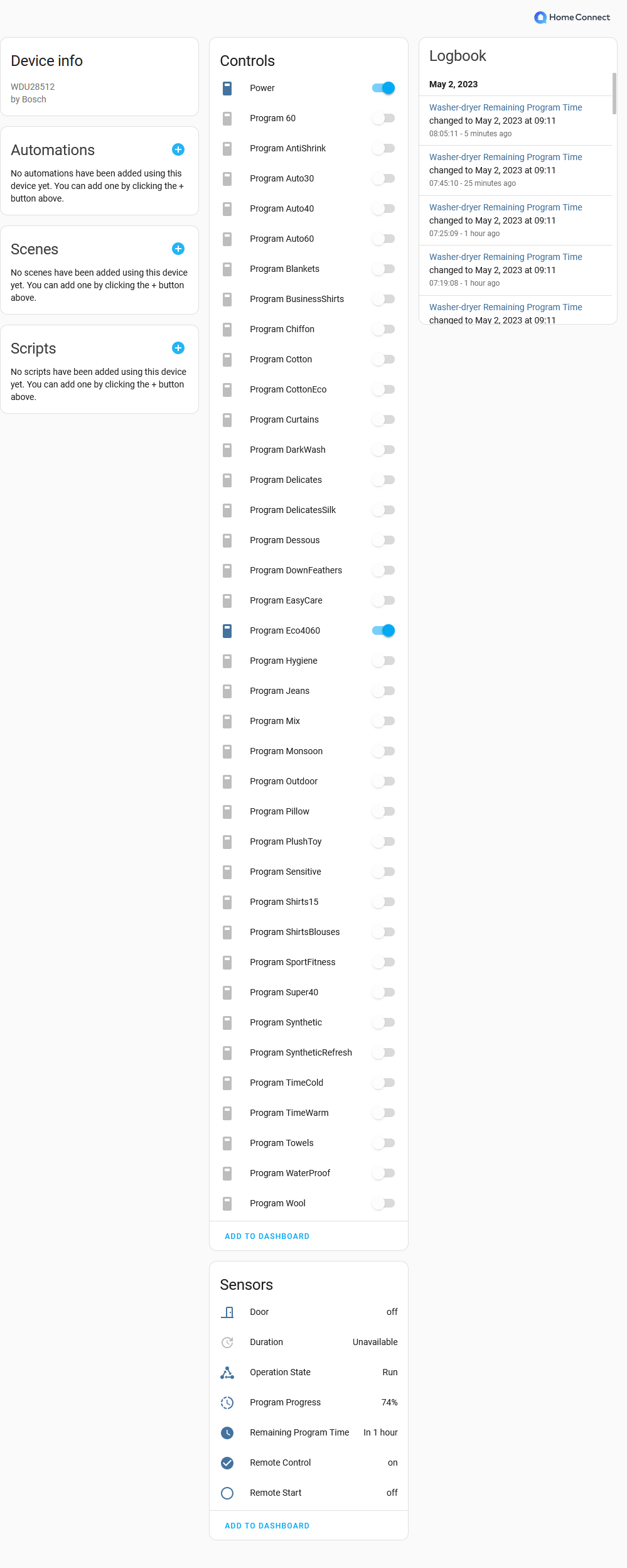
I promised I would test, only now got the time for it. Works for me - Duration also seems empty, though remaining program time is filled. A full screenshot here: Checking the API response, I also don't see any duration, the relevant API response is: As far as I can tell duration is not used with the |
|
Thanks for reporting back @DennisGaida! |
|
Could very well be - I previously implemented this myself: #89113. Didn't care about device creation now anyways, just wanted to see if it works (which it does since you can see the live updates of the times / current program etc). |

 frenck
added
the
noteworthy
frenck
added
the
noteworthy
6 participants


Proposed change
Add WasherDryer support. #90520
This PR also handles multi-type programs issues discussed in this thread: DavidMStraub/homeassistant-homeconnect#119
I cannot fully test it myself as I don't have a WasherDryer appliance.
Type of change
Additional information
Checklist
black --fast homeassistant tests)If user exposed functionality or configuration variables are added/changed:
If the code communicates with devices, web services, or third-party tools:
Updated and included derived files by running:
python3 -m script.hassfest.requirements_all.txt.Updated by running
python3 -m script.gen_requirements_all..coveragerc.To help with the load of incoming pull requests: