Skip to content

Add additional LineStyles#2533

Merged
tig merged 14 commits into
gui-cs:v2_developfrom
Nutzzz:new-borderstyles
Apr 17, 2023
Merged

Add additional LineStyles#2533
tig merged 14 commits into
gui-cs:v2_developfrom
Nutzzz:new-borderstyles

Conversation

@Nutzzz
Copy link
Copy Markdown
Contributor

@Nutzzz Nutzzz commented Apr 12, 2023

Added dashed, dotted, and thick line styles and combinations where available.

Pull Request checklist:

  • I've named my PR in the form of "Fixes #issue. Terse description."
  • My code follows the style guidelines of Terminal.Gui - if you use Visual Studio, hit CTRL-K-D to automatically reformat your files before committing.
  • My code follows the Terminal.Gui library design guidelines
  • I ran dotnet test before commit
  • I have made corresponding changes to the API documentation (using /// style comments)
  • My changes generate no new warnings
  • I have checked my code and corrected any poor grammar or misspellings
  • I conducted basic QA to assure all features are working

@Nutzzz
Copy link
Copy Markdown
Contributor Author

Nutzzz commented Apr 12, 2023

I added a few Unit Tests dealing with thick and thin combinations, but I'll make more for the dashed and dotted variations.

@tig
Copy link
Copy Markdown
Member

tig commented Apr 12, 2023

This is fantastic!

Note that I'm knees deep in a massive refactoring of related border LineCanvas stuff right now that will greatly benefit from your work.

However, this also means I'm going to hold off reviewing and merging this pr until I'm done.

If you want, you can retarget this pr to be a pr to my pr (#2527) which may streamline things.

Copy link
Copy Markdown
Member

@tig tig left a comment

Choose a reason for hiding this comment

The reason will be displayed to describe this comment to others. Learn more.

Looking great. Big add.

See the bugs I think I found in my comments.

Comment thread Terminal.Gui/Drawing/LineCanvas.cs
@BDisp
Copy link
Copy Markdown
Collaborator

BDisp commented Apr 14, 2023

Same as #2542 (comment). The LineCanvas is bad clipped.

@tig
Copy link
Copy Markdown
Member

tig commented Apr 14, 2023

here's the fix:

		var borderBounds = new Rect (
				screenBounds.X + Math.Max (0, Thickness.Left - 1),
				screenBounds.Y + Math.Max (0, Thickness.Top - 1),
				screenBounds.Width - (Math.Max (0, Math.Max (0, Thickness.Left - 1) + Math.Max (0, Thickness.Right - 1))),
				screenBounds.Height - (Math.Max (0, Math.Max (0, Thickness.Top - 1) + Math.Max (0, Thickness.Bottom - 1))));

@BDisp
Copy link
Copy Markdown
Collaborator

BDisp commented Apr 14, 2023

here's the fix:

		var borderBounds = new Rect (
				screenBounds.X + Math.Max (0, Thickness.Left - 1),
				screenBounds.Y + Math.Max (0, Thickness.Top - 1),
				screenBounds.Width - (Math.Max (0, Math.Max (0, Thickness.Left - 1) + Math.Max (0, Thickness.Right - 1))),
				screenBounds.Height - (Math.Max (0, Math.Max (0, Thickness.Top - 1) + Math.Max (0, Thickness.Bottom - 1))));

Thanks @tig. That throws exceptions if dimensions are negative. This is more accurate:

			var borderBounds = new Rect (
				screenBounds.X + Math.Max (0, Thickness.Left - 1),
				screenBounds.Y + Math.Max (0, Thickness.Top - 1),
				Math.Max (0, screenBounds.Width - Math.Max (0, Math.Max (0, Thickness.Left - 1) + Math.Max (0, Thickness.Right - 1))),
				Math.Max (0, screenBounds.Height - Math.Max (0, Math.Max (0, Thickness.Top - 1) + Math.Max (0, Thickness.Bottom - 1))));

@Nutzzz
Copy link
Copy Markdown
Contributor Author

Nutzzz commented Apr 14, 2023

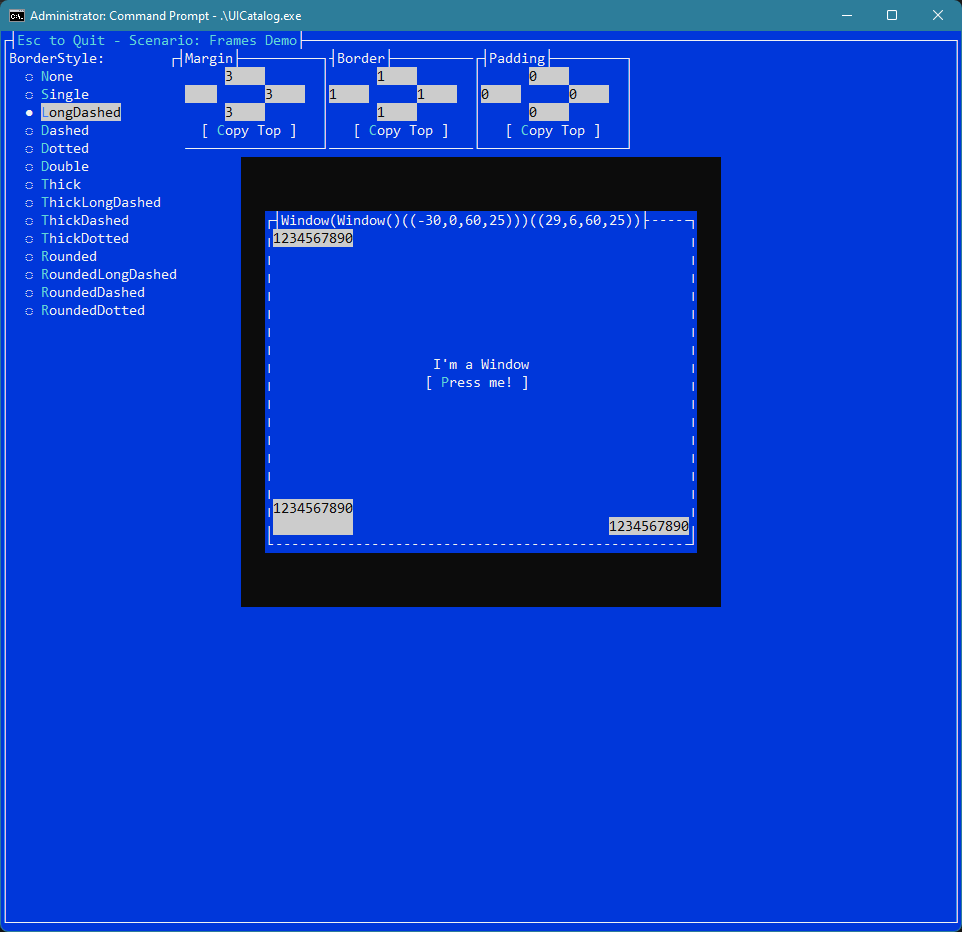
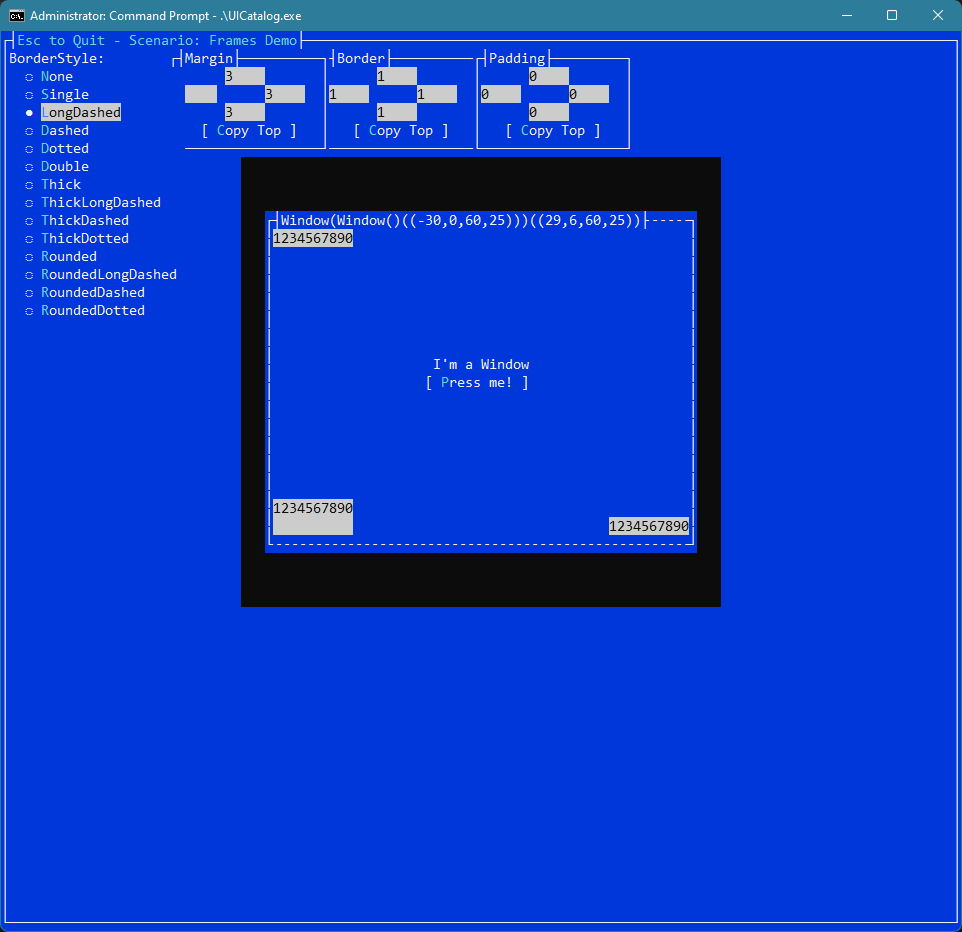
FWIW, here were some experiments with one more dash type. Unfortunately, the trick I used to keep horizontal and vertical looking somewhat similar won't work without mixing two different glyphs for the horizontal line.
image
image

@Nutzzz

This comment was marked as resolved.

@tig
Copy link
Copy Markdown
Member

tig commented Apr 14, 2023

here's the fix:

	var borderBounds = new Rect (
			screenBounds.X + Math.Max (0, Thickness.Left - 1),
			screenBounds.Y + Math.Max (0, Thickness.Top - 1),
			screenBounds.Width - (Math.Max (0, Math.Max (0, Thickness.Left - 1) + Math.Max (0, Thickness.Right - 1))),
			screenBounds.Height - (Math.Max (0, Math.Max (0, Thickness.Top - 1) + Math.Max (0, Thickness.Bottom - 1))));

Thanks @tig. That throws exceptions if dimensions are negative. This is more accurate:

			var borderBounds = new Rect (

				screenBounds.X + Math.Max (0, Thickness.Left - 1),

				screenBounds.Y + Math.Max (0, Thickness.Top - 1),

				Math.Max (0, screenBounds.Width - Math.Max (0, Math.Max (0, Thickness.Left - 1) + Math.Max (0, Thickness.Right - 1))),

				Math.Max (0, screenBounds.Height - Math.Max (0, Math.Max (0, Thickness.Top - 1) + Math.Max (0, Thickness.Bottom - 1))));

Thanks.

Reminder: all this is temporary. My dream is all these border/title things are eventually done via subviews of the Frame.

@tig
Copy link
Copy Markdown
Member

tig commented Apr 16, 2023

@Nutzzz in case you didn't see this has merge conflicts.

@tig tig merged commit 1bc2590 into gui-cs:v2_develop Apr 17, 2023
@Nutzzz Nutzzz deleted the new-borderstyles branch April 17, 2023 16:34
Sign up for free to join this conversation on GitHub. Already have an account? Sign in to comment

Labels

None yet

Projects

None yet

Development

Successfully merging this pull request may close these issues.

3 participants