Implementation of new Spatial Camera type: Oblique#64876
Conversation


|
the two images are the same... |

|
Yeah, I think someone made a mistake when uploading pictures |

|
I am correcting these errors. mostly just name changes that slipped past me |
 qaptoR
force-pushed
the
master_oblique_camera
branch
2 times, most recently
from
qaptoR
force-pushed
the
master_oblique_camera
branch
2 times, most recently
from
5e67bd5 to
7d8b6f5
Compare

This comment was marked as outdated.
This comment was marked as outdated.
|
There are some documentation errors.
$ git diff
diff --git a/doc/classes/Camera3D.xml b/doc/classes/Camera3D.xml
index 0a6c658f0e..211c0972ff 100644
--- a/doc/classes/Camera3D.xml
+++ b/doc/classes/Camera3D.xml
@@ -133,7 +133,7 @@
                </method>
                <method name="set_oblique_plane_from_transform">
                        <return type="void" />
-                       <param index="0" name="_unnamed_arg0" type="Transform3D" />
+                       <param index="0" name="oblique_transform" type="Transform3D" />
                        <description>
                                Sets the Oblique_normal and oblique_position values of an oblique projection camera using a transform origin and forward vector.
</description> |
If there is a reason this would be helpful then I am sure it would not be difficult. This is a talk given at Harvard by members of the valve team. This timestamp is where they describe 'banana juice'. That is, based on my experience with creating portals, creating a mirror vs a portal would be dependent upon:
|
|
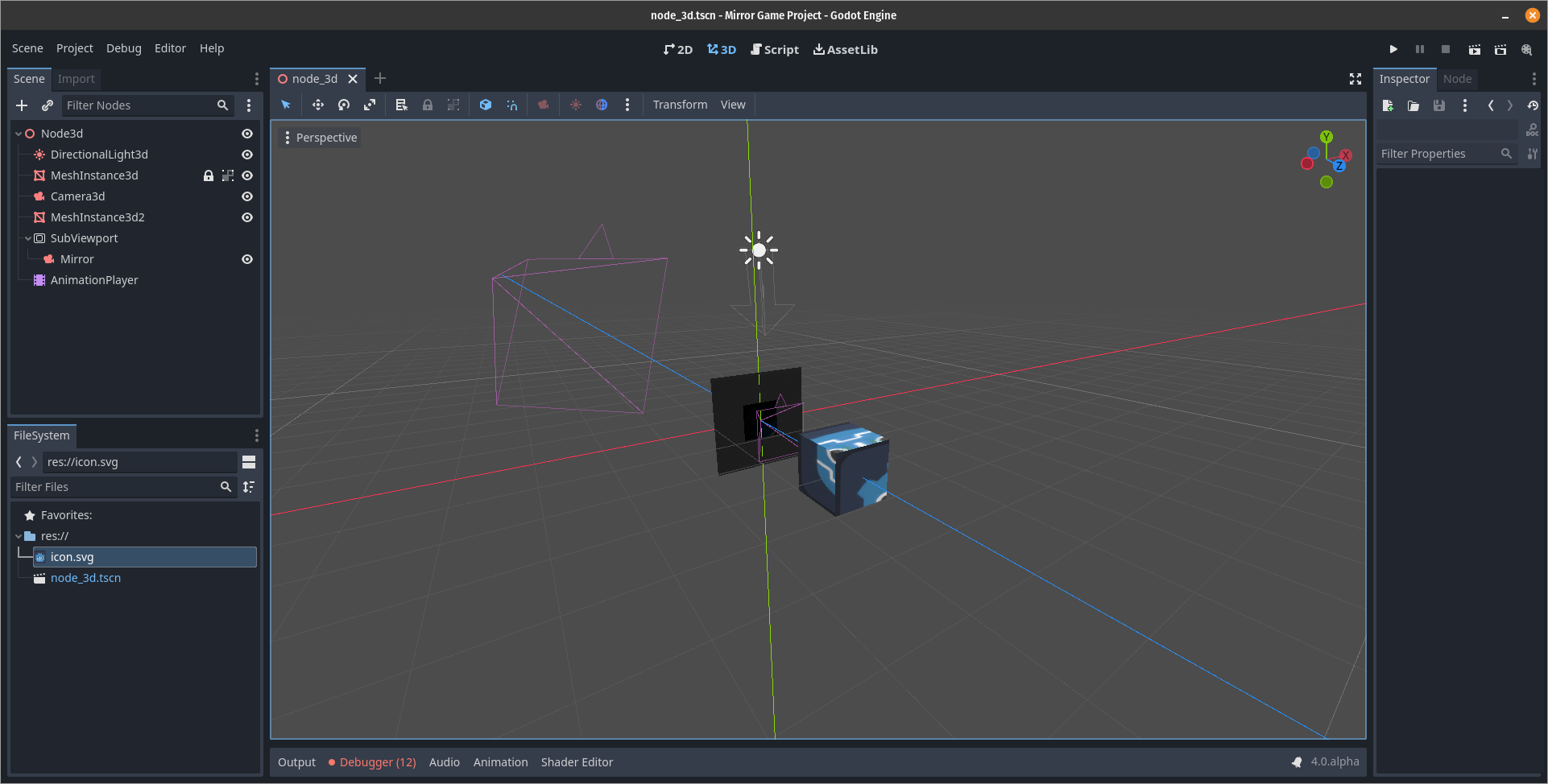
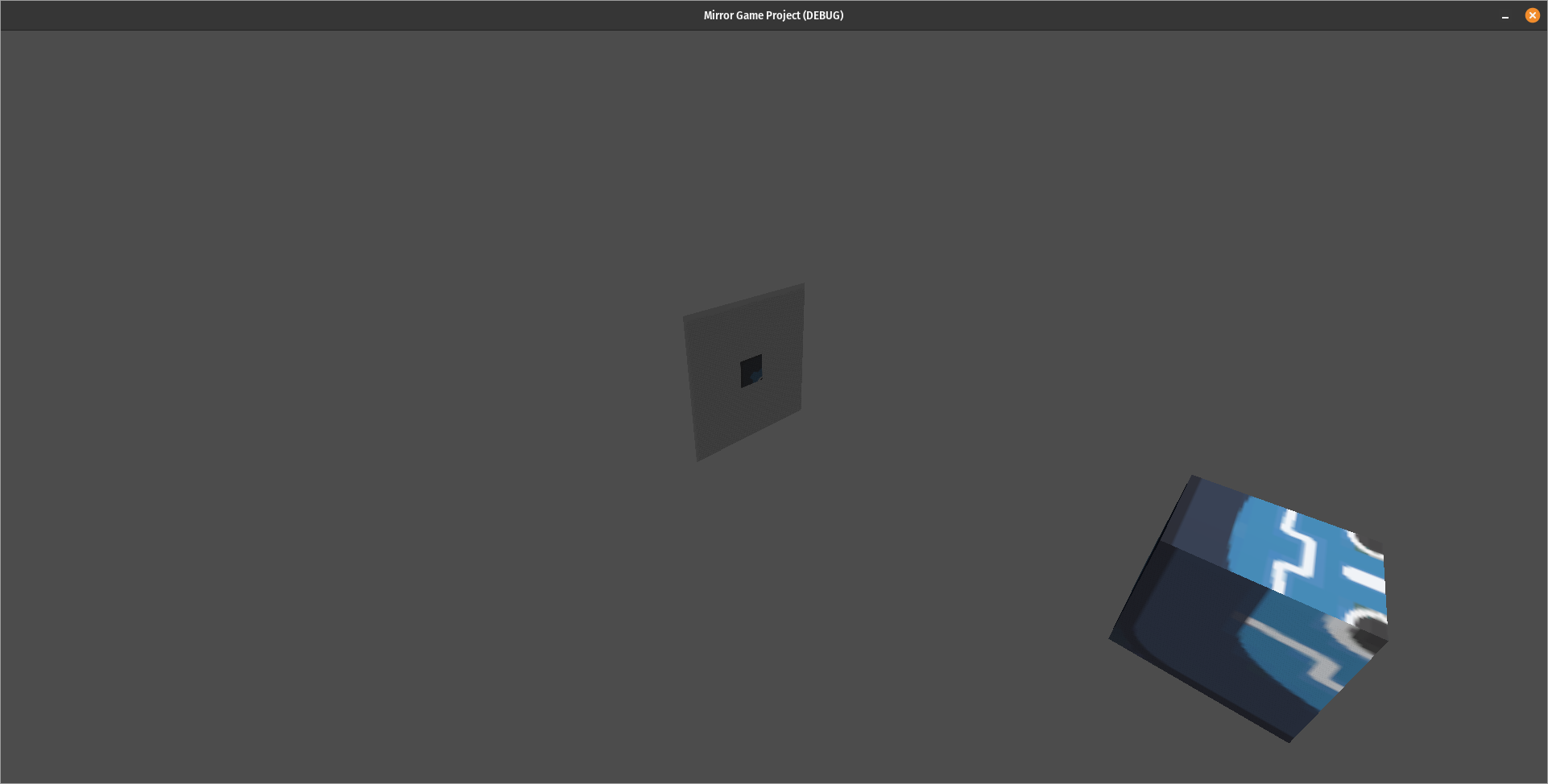
I am having trouble making a mirror. The mirror shows on the editor, but not the played game. Technical notes:
|
 qaptoR
force-pushed
the
master_oblique_camera
branch
from
qaptoR
force-pushed
the
master_oblique_camera
branch
from
7d8b6f5 to
2fcae8b
Compare
|
I think it's something to do with the oblique normal defaulting to Vector3(0,0,0) which isn't a valid normal. Edited: Trying |


There was a problem hiding this comment.
✔
Thanks. Wasn't sure if that function call was necessary anymore in 4.0
There was a problem hiding this comment.
Initialize to Vector3(0, 0, -1) (forward) and don't initialize twice in the initializer and the constructor. ( Godot initializes in the class definition. )
|
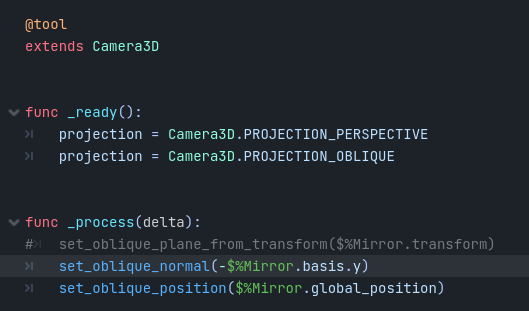
Swapping between camera projection perspective and oblique fixes the load state, and I wonder how it's related to the not playing oblique camera bug. Hacky workaround on the camera node: extends Camera3D
# Called when the node enters the scene tree for the first time.
func _ready():
projection = PROJECTION_PERSPECTIVE
projection = PROJECTION_OBLIQUE
|
This comment was marked as resolved.
This comment was marked as resolved.
|
I extracted mirror nodes to a scene and made a smoother video. Edited: Any ideas on how to fix the force set projection bug? 2022-08-26.12-29-56_vsekai_mirrors.mp4Can someone help me test performance? Use this branch of godot 4. #64876 and my demo https://github.com/fire/openxr-demo Made for #godotvr and V-Sekai |
|
@fire I've been playing with your XR demo, trying to get things working as intended, and there are a few notes I need to make:
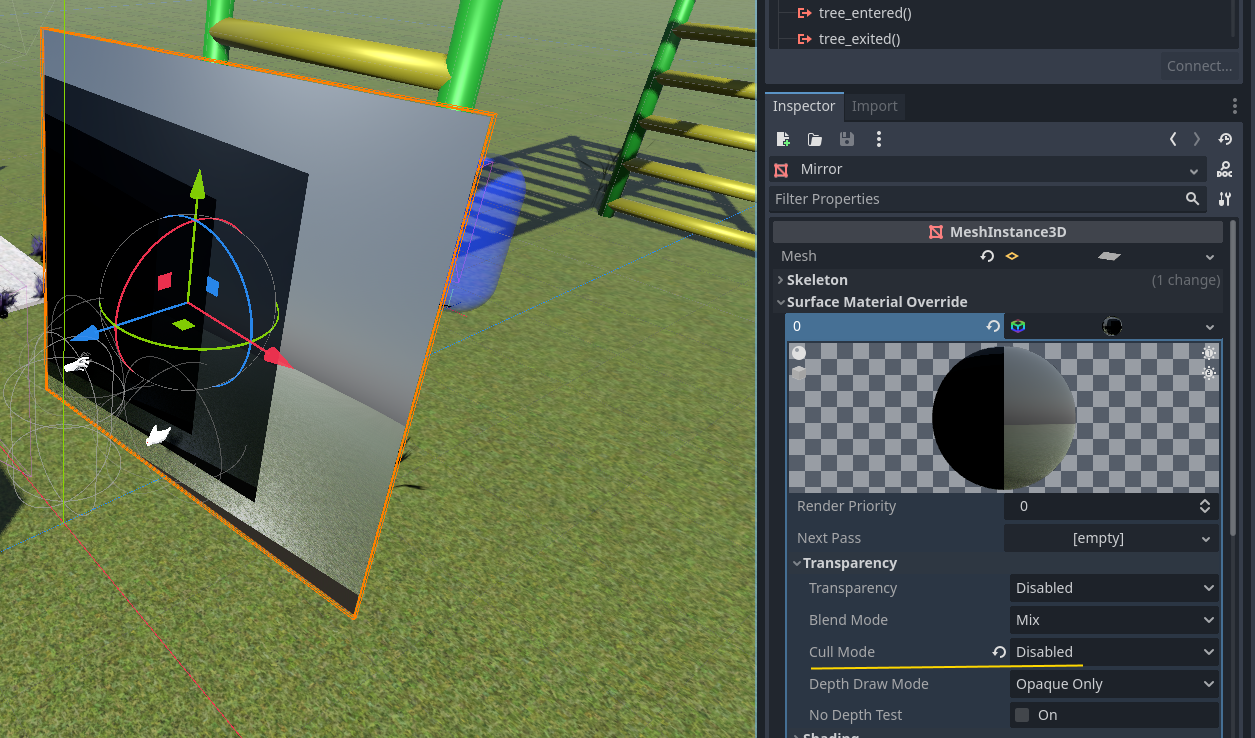
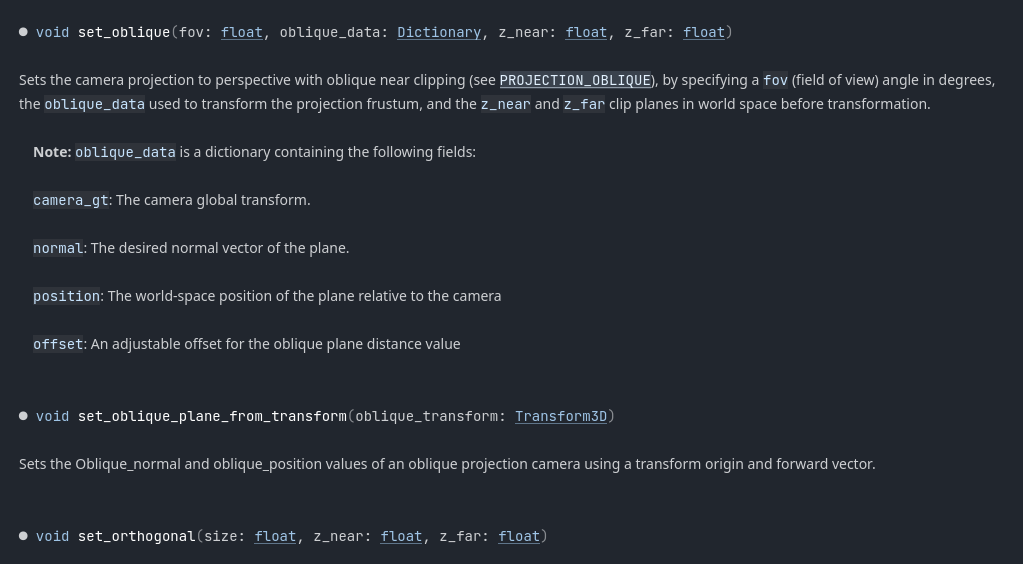
I've had to use the two separate calls, rather than the 'from transform', as based on the rotation of the mesh, the forward normal is actually pointing downwards. Thus, it may be that the function needs to be reworked. It was meant to be the 'most general use-case' for applying the oblique data, as opposed to separate calls. Thus, the interface for this feature definitely needs work. and lastly... I do need to update the docs for this feature as well. There are no entries for set_oblique_*, for position, offset, or normal, which should be visible in roughly this part of the reference: |
 qaptoR
force-pushed
the
master_oblique_camera
branch
2 times, most recently
from
qaptoR
force-pushed
the
master_oblique_camera
branch
2 times, most recently
from
d27b531 to
dc6d0a9
Compare
qaptoR
force-pushed
the
master_oblique_camera
branch
2 times, most recently
from
139a858 to
7062a28
Compare

|
@qaptoR Any update? This would be a really nice feature to have so that we can implement portals. |

|
Hello, I pulled master today and implemented the changes from this PR to test it out because I wanted to try to get this working for my project. Here's the symptom. I noticed that it appears this is present in the screenshots on the original post for this PR. Here's how it looks using perspective projection. Does anyone with a better understanding know what could be causing this? |
|
@aaronfranke It has been a few weeks since I have looked at this project. I have adhd, so I find it difficult to focus on one project for very long. What are you asking for an update in reference to? @tk3615175 I have some theories as to what is happening in your first video, but I cannot be sure. Would you be able to zip up your project and post it so that I may take a closer look? |
qaptoR
force-pushed
the
master_oblique_camera
branch
from
5ef26f6 to
d83361b
Compare
allows the specification of a world plane for near clipping;
applies matrix manipulation to generate oblique near plane.
qaptoR
force-pushed
the
master_oblique_camera
branch
from
d83361b to
1e90ee8
Compare

|
@tk3615175 The fix for shadows will soon be pushed. It Is in the process of being tested. Please take note however that while this PR represents at least a working prototype (as in can be used effectively as is, minus any other unforseen renderer pipeline hiccups), while coming up with a solution for the shadows, it became apparent that instead of adding a fourth camera type to the mix, oblique near plane clipping could instead be implemented as a separate calculation for all camera types: perspective, orthogonal, frustum. This is because, according to the paper which outlines the mathematics behind this oblique camera, the math works irrespective of what the prior projection was, so long as it is invertible. Thus, the editor implementation may change slightly in the final release (eg. selecting a checkbox for 'use oblique plane', instead of the current choosing Oblique camera type), but the code used to interface with the camera should remain the same, since the data being passed in at present is essential. |
Actually. Something has drastically broken since the last time I worked with this PR. My apologies, but this is going to have to be tabled on my todo list. |
@qaptoR That's fair! Is your untested shadow fix available somewhere? I'll see if I can make it play nice with master |
|
I'm going to close this PR, work on a better implementation that can be applied more seamlessly to the camera (that will perhaps work with orthogonal cameras as well, based on the paper my current solution is sourced from). I already have an idea how to do this, but my local repo is too messy that I need to do housekeeping to get a clear mind about what I'm doing moving forward. This project was the first open source contribution I attempted to make and I'm very proud that I had a rough working solution at the time but it was still not a good enough solution IMO for final acceptance. Moving forward, for my own sanity I will only be targeting the Master branch since at some point 4.0 and master will begin to diverge and I do not intend to keep track of multiple versions since that was one of the major downfalls of this current solution, I felt overwhelmed by having to jump back and forth between master and 3.x. |

7 participants


allows the specification of a world plane for near clipping;
applies matrix manipulation to generate oblique near plane.
A partial solution to this proposal: godotengine/godot-proposals#2713
**Note: It is by no means a complete solution and should not necessarily be taken as a reason to close the proposal. This PR is merely a straightforward solution for implementing the need for oblique clipping planes to implement a portal mechanic.
Not exactly what is requested, but this implementation covers essentially the most common case the exposed camera matrix would be used for according to the community. At least until more common uses of an exposed matrix are determined to push for a more broad solution.
Thus, this feature is necessary for implementing a 'portal' effect based on the most popular feature tutorials. For example, this often cited video by Sebastian Lague:
https://www.youtube.com/watch?v=cWpFZbjtSQg
Benefits of this solution...
Uses the function 'set_oblique_plane_from_transform' to convert the origin and forward vector into a camera-space Plane normal and distance-offset. Or alternatively, the position and normal can be provided independently of each other.
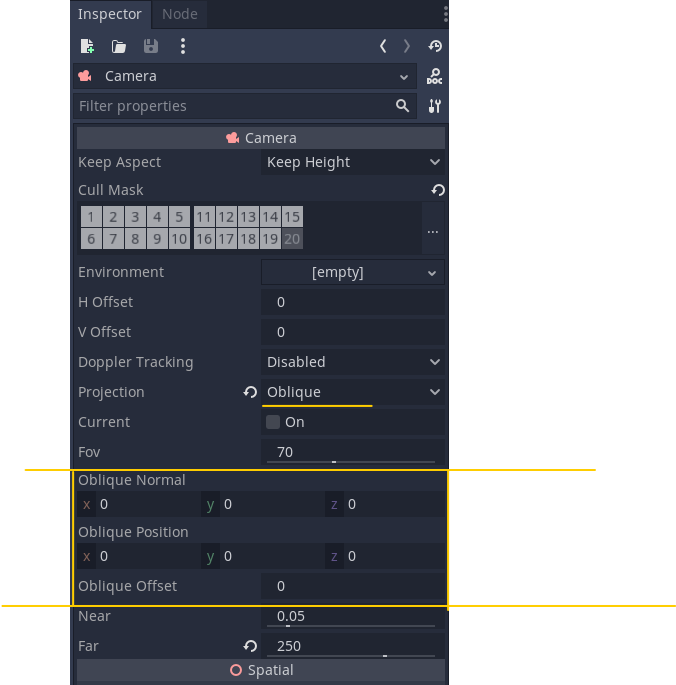
Exposes member variables in the editor for the plane normal, position, and offset data which supports editing of the plane in world space providing an easy way to visualize the clipping plane by making adjustments in the inspector.
Portal Effect using perspective camera...
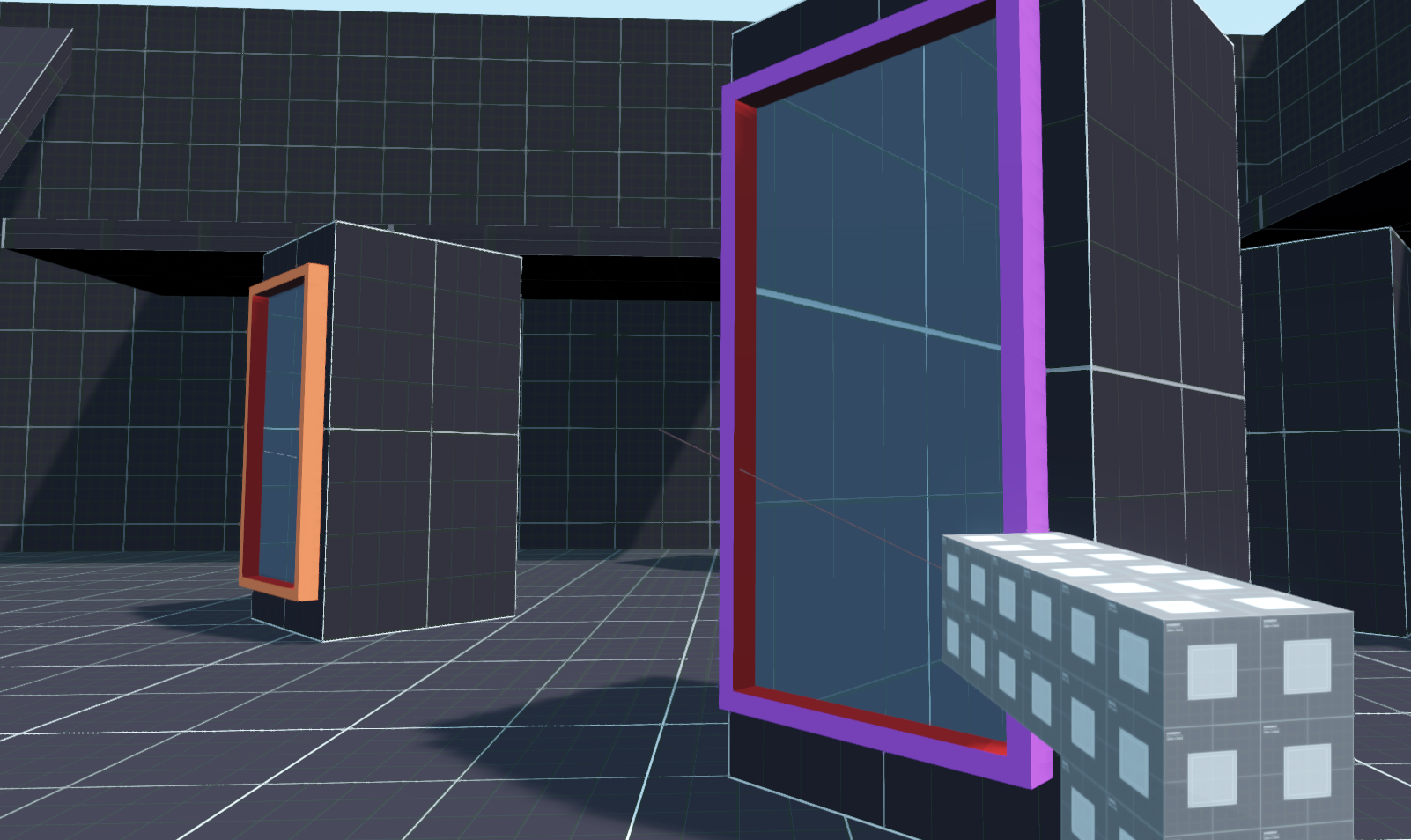
Each portal has a camera which displays on the alternate portal's display. The perspective camera can't see through the obstacle its parent portal is placed on (its position is relative to the player's position and the other portal).
Portal Effect using Oblique camera...
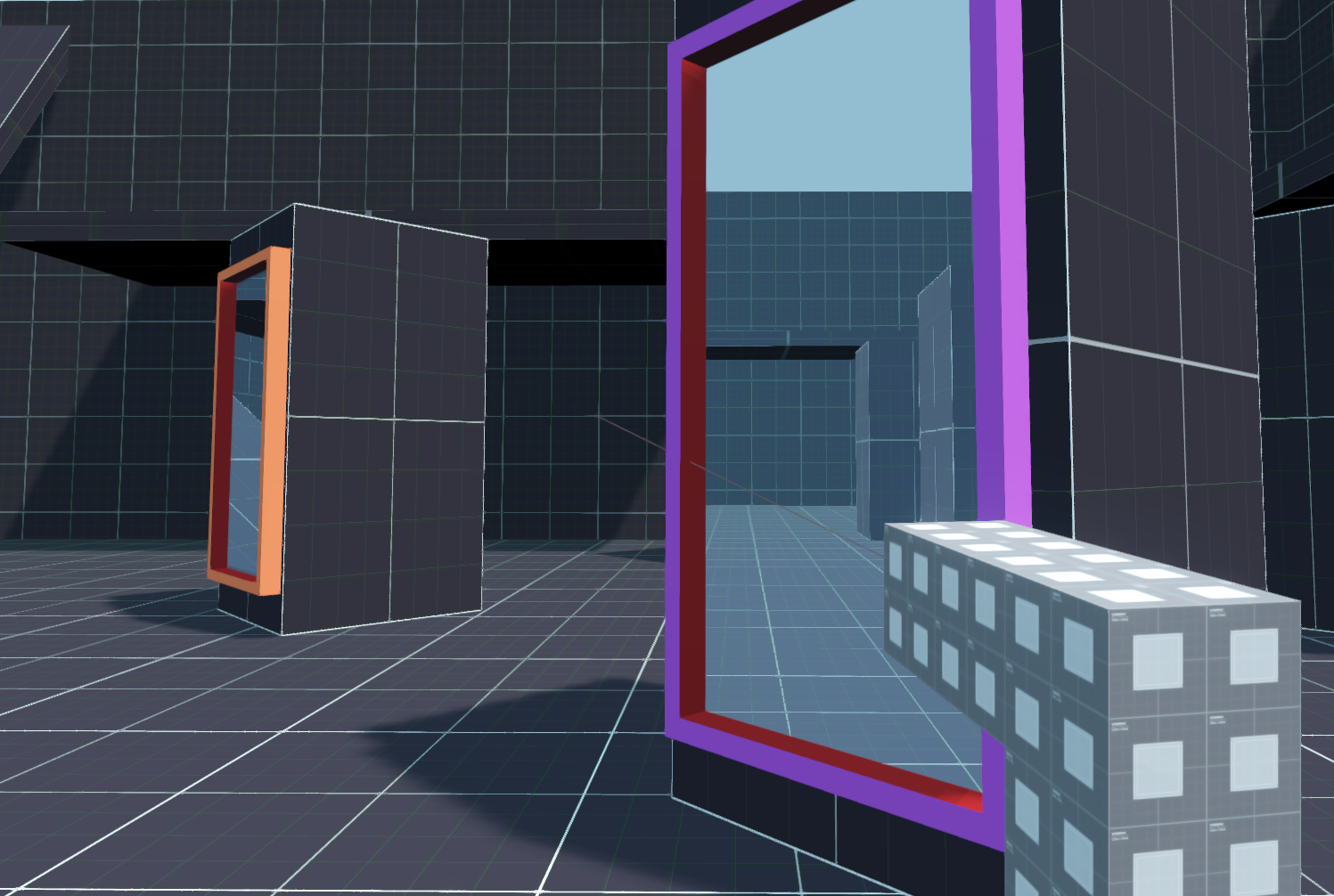
The oblique camera uses the portal's global transform to adjust the camera's near clipping plane to be parallel with the portals facing direction. Thus, obstacles between the camera and portal are no longer visible.
Oblique Camera Member Variables...
Simple Video Demonstration
**Note: If it is not clear using some metrics I'm not familiar with, this is the
masterbranch target for previously made3.xPR #56664