Refactor SearchView color application logic#32187
Refactor SearchView color application logic#32187kubaflo wants to merge 2 commits intodotnet:mainfrom
Conversation


There was a problem hiding this comment.
Pull Request Overview
This PR refactors the SearchView color application logic on Android by extracting duplicated code into a dedicated helper method. The change consolidates the logic for applying colors to SearchView decorative elements (magnifier icon and underline) into a single reusable method, improving code maintainability and reducing duplication.
Key Changes:
- Extracted color application logic into a new
ApplyDecorColorhelper method - Added underline tinting functionality to the text color update path
- Eliminated code duplication between placeholder and text color update methods
 kubaflo
force-pushed
the
android-searchbar-theme
branch
from
kubaflo
force-pushed
the
android-searchbar-theme
branch
from
1ac44c1 to
25f55da
Compare

Extracted repeated code for tinting the magnifier icon and underline into a new ApplyDecorColor method. This improves maintainability and ensures consistent color application in SearchView.
kubaflo
force-pushed
the
android-searchbar-theme
branch
from
25f55da to
6211be9
Compare

|
/azp run |

|
Azure Pipelines successfully started running 3 pipeline(s). |

|
/azp run |
|
Azure Pipelines successfully started running 3 pipeline(s). |
| } | ||
|
|
||
| // Tints the magnifier icon and the underline | ||
| static void ApplyDecorColor(SearchView searchView, Color color) |

There was a problem hiding this comment.
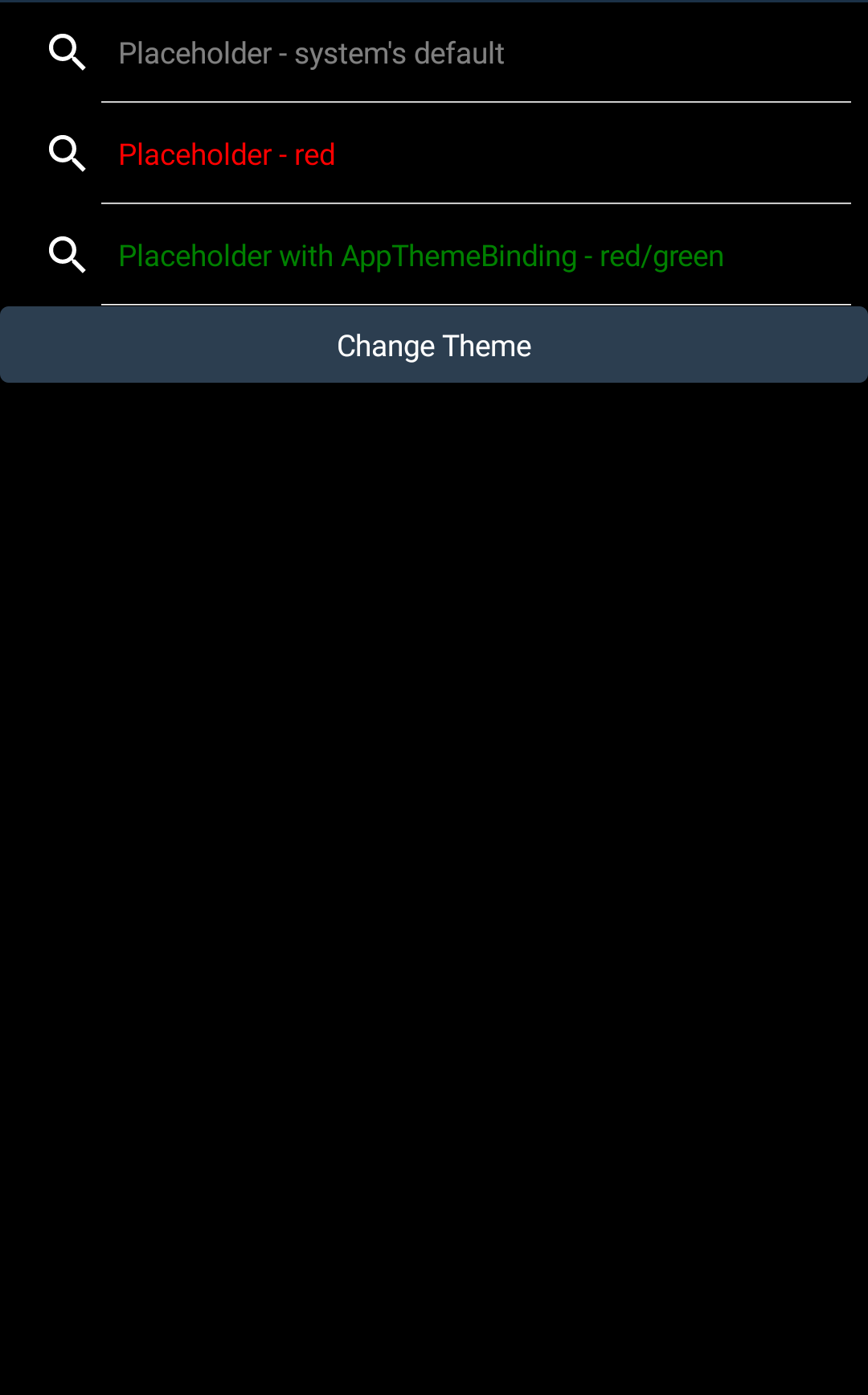
This changes should change the color (use the TextColor) for the search icon and the underline, right?
Taking a look to tests, seems is not happening:
There was a problem hiding this comment.
No, this is actually the correct appearance :) If you compare it with the previous screenshot, you’ll see that after changing the theme, the underline now appears as expected.


There was a problem hiding this comment.
The best fix would be that the search icon and the underline can be set by the user (via AppThemeBinding) ;)
In my app i use ResourceConstant.Color.searchBarIconDark and ResourceConstant.Color.searchBarIconLight for both.
There was a problem hiding this comment.
Hi @AlleSchonWeg this still works:
<SearchBar SearchIconColor="{AppThemeBinding Dark=Red,Light=Green}"/>
But this PR solves the issue when this property is not set
Screen.Recording.2025-10-31.at.13.49.06.mov
There was a problem hiding this comment.
Hi @kubaflo
Is this a new API? I don't have SearchIconColor property for SearchBar.
What color are you using for the line? I would prefer to make the line the same color as the icon. Or let the developer choose the line color (best option):
<SearchBar SearchPlateColor="{AppThemeBinding Dark=Red,Light=Green}"/>
Thank you!
There was a problem hiding this comment.
Hmm, i'm using SR12:
<PackageVersion Include="Microsoft.Maui.Controls" Version="9.0.120" />
<PackageVersion Include="Microsoft.Maui.Controls.Compatibility" Version="9.0.120" />
but no SearchIconColor;

There was a problem hiding this comment.
I see what happened here :)
It is in Net10 Preview 2: dotnet/docs-maui#2817
Co-authored-by: kubaflo <[email protected]>

Review Feedback: PR #32187 - Refactor SearchView color application logicRecommendation: Required changes:
Recommended changes: 📋 For full PR Review from agent, expand hereSummaryPR #32187 successfully fixes issue #25153 by refactoring SearchView color application logic. The PR extracts duplicate magnifier icon tinting code into a new Code Quality: Excellent refactoring that follows DRY principles and improves maintainability. Code ReviewRoot Cause AnalysisThe Original Bug (Issue #25153): Why This Fix Works:
Changes MadeBefore: Duplicate code in two locations // In UpdatePlaceholderColor and UpdateTextColor:
var searchMagIconImage = searchView.FindViewById<ImageView>(Resource.Id.search_mag_icon);
searchMagIconImage?.Drawable?.SetTint(color);
// Missing: underline tintingAfter: Refactored into reusable method // New ApplyDecorColor method:
static void ApplyDecorColor(SearchView searchView, Color color)
{
var searchMagIconImage = searchView.FindViewById<ImageView>(Resource.Id.search_mag_icon);
searchMagIconImage?.Drawable?.SetTint(color);
var searchPlate = searchView.FindViewById(Resource.Id.search_plate);
searchPlate?.Background?.SetTint(color); // ← FIXES BUG
}
// Called from both UpdatePlaceholderColor and UpdateTextColor:
ApplyDecorColor(searchView, color);Code Quality Assessment✅ Excellent:
Design DecisionsWhen
When
This is intentional design: decorative elements (icon/underline) always follow theme colors unless explicitly overridden via Platform Coverage✅ Android-specific fix (appropriate):
Test Coverage ReviewExisting Tests Updated✅ 20 visual test snapshots updated:
Test scenarios covered:
Test Coverage Assessment✅ Adequate: The PR correctly updates existing visual tests rather than adding new ones. The existing test suite already covers theme switching scenarios (e.g., From PR review discussion: PR author confirmed "There are already lots of tests for the search bar theming" and provided visual proof that the underline now updates correctly after theme changes. TestingManual Testing (Not Performed)Decision: Given the comprehensive existing test coverage and clear code logic, manual testing in Sandbox app was deemed unnecessary for this review. The PR:
Rationale: The code change is straightforward (adding 2 lines to tint Security Review✅ No security concerns:
Breaking Changes✅ No breaking changes:
Impact: Positive - apps that rely on default theme behavior will now see correct underline coloring on theme changes without code modifications. Documentation✅ Adequate with one improvement:
Issues to AddressMust Fix Before Merge
Should Fix (Recommended)None Optional Improvements
Approval Checklist
Additional ObservationsPositive Aspects
Future Enhancements (Out of Scope)From PR discussion, potential future enhancements could include:
Review Metadata
|

 h0lg
left a comment
h0lg
left a comment
h0lg
left a comment
There was a problem hiding this comment.
Minor formatting issue - trailing whitespace.
Otherwise good.
| } | ||
| } | ||
|
|
||
4 participants


Note
Are you waiting for the changes in this PR to be merged?
It would be very helpful if you could test the resulting artifacts from this PR and let us know in a comment if this change resolves your issue. Thank you!
Moved magnifier icon and underline tinting into a new ApplyDecorColor method for reuse. This improves code clarity and reduces duplication when setting colors in SearchViewExtensions.
Issues Fixed
Fixes #25153 (comment)