Fix toolbar icon and text color in white theme#3482
Fix toolbar icon and text color in white theme#3482IAmSSH wants to merge 14 commits intoTeamNewPipe:devfrom
Conversation


|
@Stypox |

 Stypox
left a comment
Stypox
left a comment
Stypox
left a comment
There was a problem hiding this comment.
What you did seems correct, I only pointed out one thing that could be improved. Thank you :-D
|
I know its not good practice, I tried doing that, but there's a problem. |

|
I changed the spinner items to always be of red colour, irrespective of the theme selected. |

|
I just realized one thing: maybe there is no need to create a new style in |

|
I think the hamburger icon's colour cannot be changed without using the |
|
Ok, then this is correct approach. I found some issues (tested on an emulator with Android 4.4 API 19):
|
|
Okay, I'll look into it |
|
Regarding the last comment:
You mean The menu to select stream quality is red but it should be like the colour of dot menu popup, i.e The dot menu popup is always of the colour as shoown in the image irrespective of the stream or the theme, so should I make it similar to that (gray background and white text), or you meant something else? |
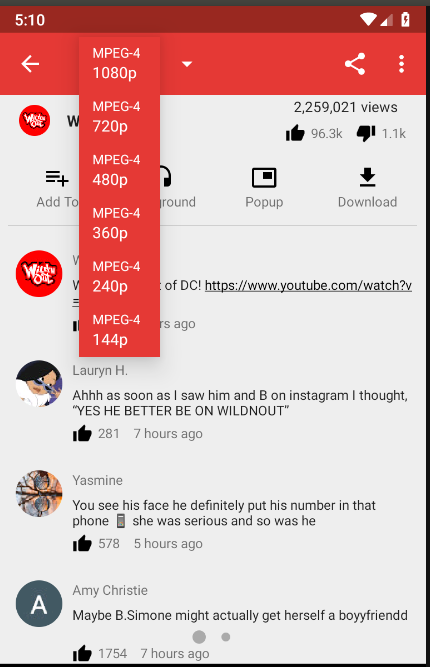
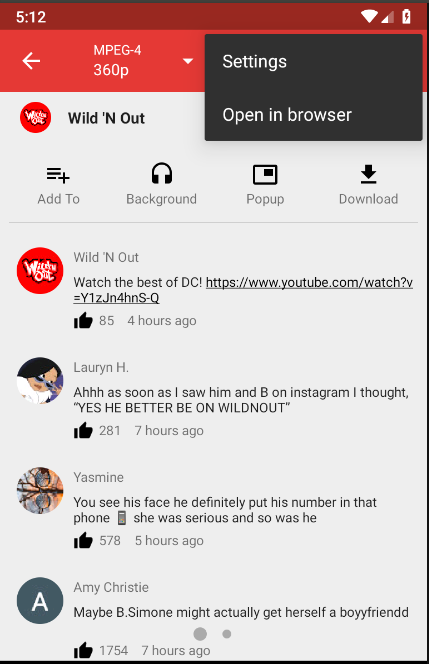
|
Oh, that's another issue. Both menus should have dark background with the dark theme and light background with the light theme. I guess you need to do something similar to what you did with |
|
The app is working fine now. All issues are resolved. |
|
Thank you for fixing the issues! I have found some more things to improve ;-)
These two issues you posted screenshots above are still not solved:
|
|
There were some problems with the current approach. Since the Toolbar had the DarkTheme as the parent, so the styles of DarkTheme were getting applied to it statically and they were not changing with the Themes or the Services and it created problems everywhere. So I had to revert back to the earlier approach that involved copying icons in the ToolbarTheme, it solved all the problems. |

|
Hey, |

|
The required changes are done. PS: @wb9688 Sorry about the IRC. I was really having a hard time figuring out how to work with it. I have set up Matrix now. |
Stypox
left a comment
Stypox
left a comment
There was a problem hiding this comment.
All of these problems refer to the app when the white theme is active.
- The subtitle in subscription groups "What's New" toolbar is dark grey, while it should be light gray.
- The search bar description/hint is dark grey, while it should be light gray. The flashing indicator is black instead of white.
Other than this, everything seems good. I tested on Android 4.4 API 19 and on Android 7.0
| } | ||
|
|
||
| setSupportActionBar(findViewById(R.id.toolbar)); | ||
| Toolbar toolbar = findViewById(R.id.toolbar); |
There was a problem hiding this comment.
Add final here, or revert this change
| boolean isLight = ThemeHelper.isLightThemeSelected(mContext); | ||
| int icon; | ||
|
|
||
| if (mLinear) | ||
| icon = R.drawable.ic_apps_white_24dp; | ||
| else | ||
| icon = R.drawable.ic_list_white_24dp; | ||
|
|
||
| mSwitch.setIcon(icon); |
There was a problem hiding this comment.
I prefer the ?: syntax, also I think isLight is a leftover from the merge, because it is not needed
| boolean isLight = ThemeHelper.isLightThemeSelected(mContext); | |
| int icon; | |
| if (mLinear) | |
| icon = R.drawable.ic_apps_white_24dp; | |
| else | |
| icon = R.drawable.ic_list_white_24dp; | |
| mSwitch.setIcon(icon); | |
| mSwitch.setIcon(mLinear ? R.drawable.ic_apps_white_24dp : R.drawable.ic_list_white_24dp); |
| android:textAlignment="center" | ||
| android:textAllCaps="true" | ||
| android:textAppearance="@style/TextAppearance.AppCompat.Body1" | ||
| android:background="?attr/colorPrimary" |
There was a problem hiding this comment.
Why was this added? Isn't the @style/ServiceColoredButton added by @B0pol enough?
| toolbar.setPopupTheme( | ||
| ThemeHelper.isLightThemeSelected(this) | ||
| ? R.style.PopupThemeLight | ||
| : R.style.PopupThemeDark | ||
| ); |
There was a problem hiding this comment.
Why not use R.style.ToolbarTheme here, too?
| RelativeLayout r = (RelativeLayout) parent.getChildAt(0); | ||
| ((TextView) r.getChildAt(1)).setTextColor(getResources().getColor(R.color.white)); | ||
| ((TextView) r.getChildAt(2)).setTextColor(getResources().getColor(R.color.white)); |
There was a problem hiding this comment.
Isn't there any other way to do this? It seems to be a workaround to me, though if there is no other way then ok, I guess the toolbar inflated layout is always the same.
There was a problem hiding this comment.
I couldn't find any direct way of styling just the first element of a spinner, so had to use this approach.
| playlistBookmarkButton.setIcon(iconAttr); | ||
| playlistBookmarkButton.setTitle(titleRes); |
There was a problem hiding this comment.
While you are at it, you could move the variables above directly here:
| playlistBookmarkButton.setIcon(iconAttr); | |
| playlistBookmarkButton.setTitle(titleRes); | |
| playlistBookmarkButton.setIcon(playlistEntity == null | |
| ? R.drawable.ic_playlist_add_white_24dp | |
| : R.drawable.ic_playlist_add_check_white_24dp); | |
| playlistBookmarkButton.setTitle(playlistEntity == null | |
| ? R.string.bookmark_playlist | |
| : R.string.unbookmark_playlist); |
| boolean isLight = ThemeHelper.isLightThemeSelected(mContext); | ||
| int icon; | ||
|
|
||
| if (mLinear) | ||
| icon = R.drawable.ic_grid_white_24dp; | ||
| else | ||
| icon = R.drawable.ic_list_white_24dp; | ||
|
|
||
| mSwitch.setIcon(icon); |
There was a problem hiding this comment.
Here, too. Also, isLight is unused.
| boolean isLight = ThemeHelper.isLightThemeSelected(mContext); | |
| int icon; | |
| if (mLinear) | |
| icon = R.drawable.ic_grid_white_24dp; | |
| else | |
| icon = R.drawable.ic_list_white_24dp; | |
| mSwitch.setIcon(icon); | |
| mSwitch.setIcon(mLinear | |
| ? R.drawable.ic_grid_white_24dp | |
| : R.drawable.ic_list_white_24dp); |
|
Done @Stypox |
Stypox
left a comment
Stypox
left a comment
There was a problem hiding this comment.
Code looks good! Thank you for the patience. I ran a thorough test this time, hopefully I haven't missed anything, so these are the problematic things I could find while using white theme:
- Black title of "Settings -> Download -> Video/Audio download folder"
- Black "Restore defaults" toolbar icon, item icons (also in the "Choose tab" dialog) and
+FAB of "Settings -> Content -> Content of main page" - Black "Restore defaults" toolbar icon and
+FAB of "Settings -> Content -> PeertTube instances" - Black title of "Settings -> Content -> Import/Export database"
- Black cursor pointer in the search bar (it appears when moving the cursor along the text, or when selecting something)
- Black selection in the search bar (dark grey instead of light grey)
- White unselected item circles in the three-dot menu to choose the search filters (they should be dark dark gray, like in e.g. the download dialog)
- The spinner arrow-down icon flashes black when the spinner is clicked on (then turns back to white in the flash of an eye). Even though the flashing behaviour apparently exists in old versions of android (4.4, but not on my 7.0 phone), I think it should just stay white even when clicked on, as this is also what happens when the dark theme is active.
- When the device is in landscape mode popup/background queue toolbars have black title and icons
- Black title of "Subscriptions -> Import from -> Previous export"
- Black title of "Subscriptions -> Export to -> File"
 TobiGr
force-pushed
the
dev
branch
2 times, most recently
from
TobiGr
force-pushed
the
dev
branch
2 times, most recently
from
679bc75 to
2aeccc0
Compare


|
Closing in favor of #5927. |

6 participants


What is it?
Description of the changes in your PR
ToolbarThemeinstyles.xmlto set it on the toolbar to get the desired color and icons.Tab.javaandKioskTranslator.javato always return icons having white color.Fixes the following issue(s)
Testing apk
NewPipe.zip
Agreement