[BUG] ShareClient.GetStatistics(); can't handle more bytes than can be stored in an Int. #9186

Description

Describe the bug
ShareClient.GetStatistics(); throws exception when ShareUsageBytes value coming back from the API is too large.
Exception or Stack Trace
System.OverflowException
HResult=0x80131516
Message=Value was either too large or too small for an Int32.
Source=System.Private.CoreLib
StackTrace:
at System.Number.ThrowOverflowOrFormatException(ParsingStatus status, TypeCode type) in /_/src/System.Private.CoreLib/shared/System/Number.Parsing.cs:line 1933
at System.Number.ThrowOverflowOrFormatException(ParsingStatus status, TypeCode type) at System.Int32.Parse(String s, IFormatProvider provider) at Azure.Storage.Files.Shares.Models.ShareStatistics.FromXml(XElement element) at Azure.Storage.Files.Shares.FileRestClient.Share.GetStatisticsAsync_CreateResponse(Response response) at Azure.Storage.Files.Shares.FileRestClient.Share.GetStatisticsAsync(ClientDiagnostics clientDiagnostics, HttpPipeline pipeline, Uri resourceUri, Nullable 1 timeout, Boolean async, String operationName, CancellationToken cancellationToken) at Azure.Storage.Files.Shares.ShareClient.GetStatisticsInternal(Boolean async, CancellationToken cancellationToken) at Azure.Storage.TaskExtensions.EnsureCompleted[T](Task 1 task) at Azure.Storage.Files.Shares.ShareClient.GetStatistics(CancellationToken cancellationToken) at UserQuery.Main() in C:\Users\xxxx\AppData\Local\Temp\LINQPad6\xxxxx\LINQPadQuery:line 6 at LINQPad.ExecutionModel.ClrQueryRunner.Run() at LINQPad.ExecutionModel.Server.RunQuery(QueryRunner runner)
To Reproduce
- Utilize more space (bytes) in your storage account file share than can be stored in an Int variable type.
- Call the
ShareClient.GetStatistics();Sdk. - Notice that the number returning from the Azure Storage API is larger than an Int can represent.
- See exception "Value was either too large or too small for an Int32"
Code Snippet
using System;
using Azure.Storage;
using Azure.Storage.Files.Shares;

namespace ConsoleApp5
{
    class Program
    {
        static void Main(string[] args)
        {
            var cs = @"your-connection-string-here";
            var shareName = @"your-file-share-name-here";

            ShareClient share = new ShareClient(cs, shareName);
            var stats = share.GetStatistics();
        }
    }
}
Expected behavior
You should get back a statistic data model that represents the number of bytes if you have more than the number that can be represented by an in. Consider using an UInt64 instead of Int in this class property: ShareStatistics.ShareUsageBytes
Screenshots
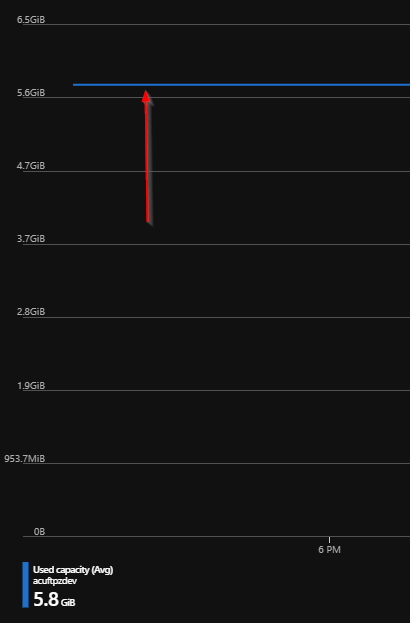
(=6068040432 Bytes - can't be represented as Int type)
Setup (please complete the following information):
- OS: any
- IDE : any (used both linqpad 6 and vs 2019 enterprise)
- Version of the Library used: Azure.Storage.Files.Shares 12.0.0
- If you need to capture the API call result, you can turn on Fiddler's reverse-proxy, and it will start showing the .net core API calls. See here: https://www.telerik.com/forums/traffic-not-capture-unless-net-core-sdk-installed
edit: updated suggested property type to UInt64 instead of Int64.