v10: Add HMAC image processing protection#12376
v10: Add HMAC image processing protection#12376ronaldbarendse wants to merge 44 commits intov10/devfrom
Conversation


… a correct HMAC token)

@nzdev There's no such thing as a safe crop setting. HMAC is designed to prevent all unauthorized activity not allow workarounds. |


|
I've updated this PR to remove the breaking changes (since v10 is now already released) and ensure the generated image URL token now only uses known commands (in case you add additional commands using |
Release notes/breaking changes
|

 Zeegaan
left a comment
Zeegaan
left a comment
Zeegaan
left a comment
There was a problem hiding this comment.
Found a small thing, the rest LGTM ! 💪
src/Umbraco.Web.Common/Media/ImageSharpImageUrlTokenGenerator.cs
Outdated
Show resolved
Hide resolved

| } | ||
|
|
||
| /// <inheritdoc /> | ||
| public string? GetImageUrlToken(string imageUrl, IEnumerable<KeyValuePair<string, string?>> commands) |

There was a problem hiding this comment.
This all seems very complicated. It should be as simple as using the relative URL as a string and pass it to the new Encode method on the url builder. I added that for convenience in the last release but the operations of that method would have been how I would have handled it without it.
There was a problem hiding this comment.
Thanks for letting me know about the new Encode() method, although it seems like that doesn't lowercase the query string/commands for relative URLs when using CaseHandling.None (and it doesn't remove unknown commands from the URL for you).
And although it might seem a bit complicated to abstract image URL token generation, this decouples it from ImageSharp (e.g. in case you want to use a cloud service), ensures both generation and validation uses the same logic and enables users to overwrite the default implementation.
There was a problem hiding this comment.
It’s not supposed to remove unknown commands. Your supposed provide both the token and the image url from the same source so that you maintain control.
There was a problem hiding this comment.
ImageSharp validates the HMAC token using using only known commands (as unknown commands are stripped before being passed to the OnComputeHMACAsync callback), so you also need to ensure you don't include unknown commands while generating the token.
Umbraco provides a way to add additional commands using furtherOptions and if you remove processors, those commands will become unknown and stripped, so Umbraco can't maintain control over this...
There was a problem hiding this comment.
Why are you telling me what my own library does? Umbraco should only ever allow adding known commands not require stripping of unknown. It should be trivial to determine what commands are available in url generation.
There was a problem hiding this comment.
Would something like this make life easier for you?
I'm tinkering with a singleton injected type that would unify everything so that you can simply pass a relative or absolute string/URI and it will generate a token based upon the options.
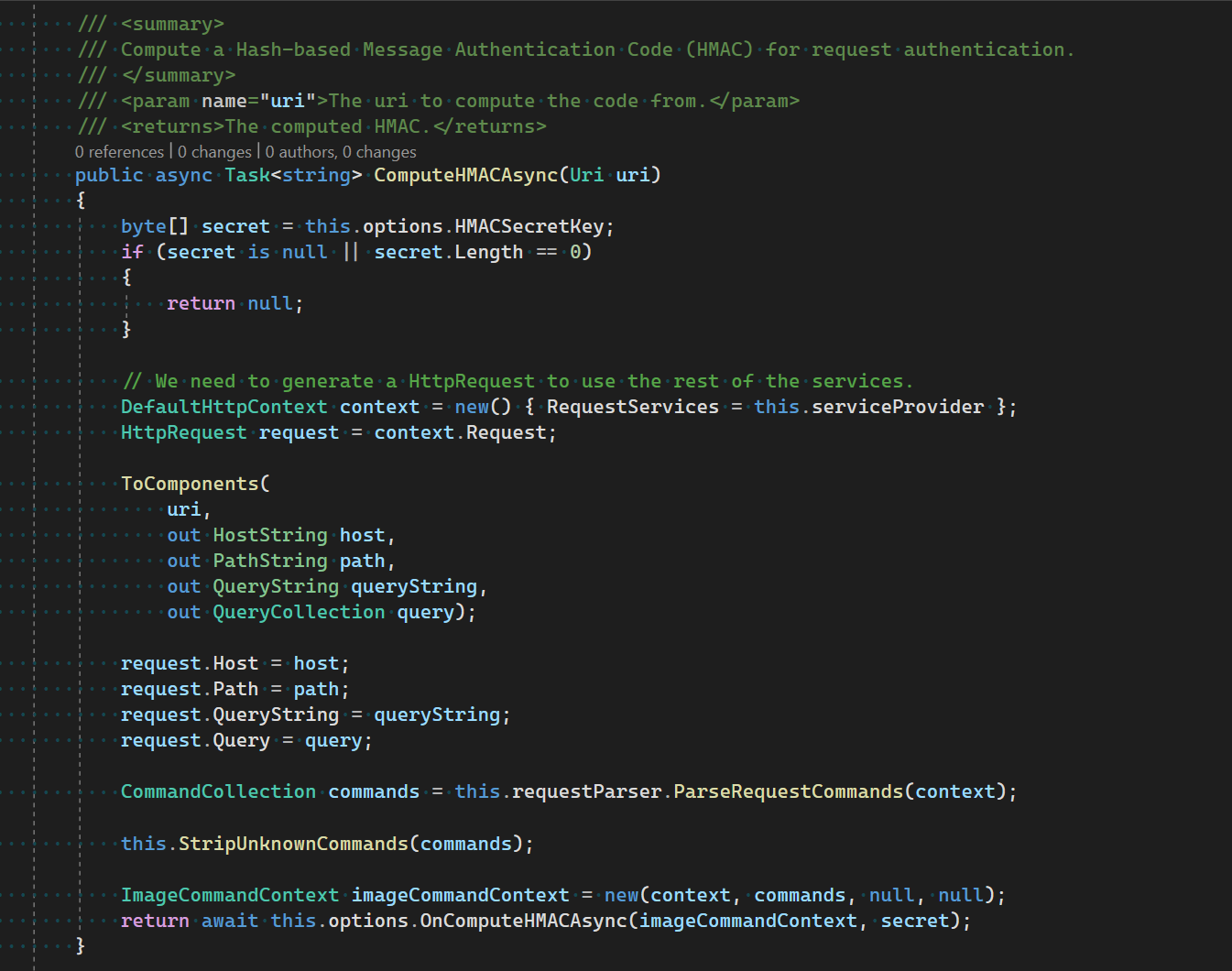
There was a problem hiding this comment.
Why are you telling me what my own library does? Umbraco should only ever allow adding known commands not require stripping of unknown. It should be trivial to determine what commands are available in url generation.
Because you're not the only one reading this and it's important context for knowing why Umbraco does require stripping unknown commands: users can add unknown commands to the generated image URL using the furtherOptions parameter (which is required to specify ImageSharp specific commands like rsampler, orient, compand, bgcolor or format - ones that aren't exposed on the ImageUrlGenerationOptions abstraction) or make certain commands unknown by removing the processor (although that might be considered unsupported)... This requires Umbraco to only include the known commands when generating the HMAC token, which is indeed trivial to do by getting all commands from the IImageWebProcessors, but not (yet) something that's provided by ImageSharp.
Would something like this make life easier for you?
I'm tinkering with a singleton injected type that would unify everything so that you can simply pass a relative or absolute string/URI and it will generate a token based upon the options.
Yes, if ImageSharp would have something similar to the IImageUrlTokenGenerator added in this PR or the IMediaTokenService in Orchard, that would certainly make it easier and ensure generation and validation use the same logic (although you might want to optimize both separately, as you already know unknown commands are stripped when validating the token).
There was a problem hiding this comment.
@JimBobSquarePants I just checked out your js/auth-utils branch on ImageSharp.Web and the ImageSharpRequestAuthorizationUtilities would certainly help make things easier! 🙌🏻
I know this is still a work-in-progress, but already wanted to give my early feedback:
- Update the constructor:
- Ensure the
requestParserandserviceProviderfields are set; - Possibly skip initializing the known commands when no secret is set;
- Nit-picking: change the order of parameters and field setters to
options,serviceProvider,requestParserandprocessors(the order in which they are used inComputeHMACAsync)
- Ensure the
- Add sync/async overloads accepting
HostString host, PathString path, QueryString queryStringandHostString host, PathString path, IQueryCollection query; - Possibly already register the
ImageSharpRequestAuthorizationUtilities, so it can be retrieved from the service container; - Nit-picking: use
pathinstead ofpathBaseinCaseHandlingUriBuilder.Encode().
There was a problem hiding this comment.
For context: the above mentioned branch is now converted into a PR: SixLabors/ImageSharp.Web#281.
There was a problem hiding this comment.
I've converted this PR back to draft, awaiting a new release of ImageSharp.Web that includes the beforementioned PR with authorization utilities...
|
I've added a fix to support absolute image URLs, which you can test by adding the following code to a Razor view (where <img src="@Model.Image.GetCropUrl(400, 400)" />
<img src="@Model.Image.GetCropUrl(400, 400, urlMode: UrlMode.Absolute)" /> |
|
Closing because this feature is implemented for v12 in #14181 and |
4 participants


Prerequisites
Description
One of the new features in
ImageSharp.Webv2 is the addition of HMAC Processing Protection, which allows your to add a HMAC token to all generated image URLs that gets validated before processing the image.This prevents bad actors from manipulating processing parameters and DOS your site by requesting a large amount of slightly different image URLs that all need to process the image (a potentially CPU and memory expensive process). These processed images are then also saved to the ImageSharp cache (stored in
umbraco\Data\TEMP\MediaCacheby default), which doesn't have a built-in way to clean up old/infrequently used files and could therefore fill up your disk.Umbraco already contains the
IImageUrlGeneratorabstraction to generate image URLs: this PR adds anIImageUrlTokenGeneratorabstraction to generate the HMAC token, which can be used for both generating and validating the URL.The default
ImageSharpImageUrlGeneratorwill automatically add thehmactoken generated by the defaultImageSharpImageUrlTokenGenerator(using a lowercased relative URL, all query strings/commands and hashing using the HMAC-SHA256 algorithm) if you set theUmbraco:CMS:Imaging:HMACSecretKeysetting to a non-empty value.Testing
Because the media overview in the backoffice generates thumbnails, you can easily test this out by adding the following composer and adding some media files. You'll see the backoffice first request the generated image URL using a protected API endpoint (e.g.
/umbraco/backoffice/umbracoapi/images/GetBigThumbnail?originalImagePath=%2Fmedia%2Finefcvn3%2F4730684907_8a7f8759cb_b.jpg), which redirects to the final URL that contains thehmactoken (e.g./media/inefcvn3/4730684907_8a7f8759cb_b.jpg?rmode=max&width=500&hmac=24f8c0e1b2df28d107e87df1a6252704fa6c1f7c16e15f872f856f5ecae4e7ea&v=1d8613e39d3c794).Because this composer regenerates a random HMAC secret key on each boot, restarting the site will cause all existing URLs to return a 400 response code and all new URLs to contain a new valid token.
On a real-life site, you'd set a static HMAC secret key in the configuration. Because ASP.NET Core supports setting byte arrays using a Base64 string, you can set this value in your
appsettings.json(we might want to automate this in the project template or installer screen). You can copy the value logged by the aboveHMACSecretKeyComposerand save this as:{ "Umbraco": { "CMS": { "Imaging": { "HMACSecretKey": "zJvn5pdgAJpGAVXWWsbECWfH7zQ8xM5Gg2hZ0y3esoVmu7M+YFv3L/wFvEd7j/Uaj+4J9atF/ONo6BDdTM9KxA==" } } } }