Add supports HiDPI for winforms examples #1597
Conversation


|
Thanks for your contribution!
Thanks! |
|
Ok so having now had a closer look at this, I realized that our WinForms-Renderer does not quite support any DPI other than 96 (it uses a fixed 1:1 ratio between 1/96th inch device-independent units and pixels). This is not a problem with this PR per se, but a limitation of the I think we could still merge this just to have a showcase of what is not supported at the moment and maybe at some point we'll want to update the What do you think @VisualMelon? |

|
High DPI on WinForms is not something I've ever needed, so my input is limit to what I can find on SO and the msdn. I think you are right that this would be worth including: the example browser is in some senses a separate concern, and it will be useful for testing the I'd be happy to work on adding DPI support to |

|
Fix TreeView for HiDPI when full framework |
Support in core looks better. And it looks like it will continue to improve dotnet/winforms#3202 (comment) |
|
I don't have enough experience with WinForms to really comment on this. I can confirm that this works on my machine in the sense that the WinForms ExampleBrowser is displayed in a non-blurry way on all DPI settings I tested. So if you don't see any problems @VisualMelon I think we could merge this. |
|
I'm afraid that though I use winforms every day, I've never had to deal with variable DPI, so I'm guessing at everything really. Testing with the Scaling option in Windows 10 (I don't have a high DPI screen), the .NET Framework text is much larger than the .NET Core text. Disabling the .NET Framework specific stuff seems to reduce (but not remove) the difference. Is this how it behaves for other people? (The .NET Framework stuff looks OK for me with the "Let Windows try to fix apps so they're not blurry" option; Core looks good). The Framework specific stuff doesn't modify the checkboxes. If it is necessary to perform manual adjustments (which doesn't seem to be the case on my machine: @rstm-sf could you explain the idea?) it should ideally affect everything. The checkboxes can be made smart by setting |
Sorry, I missed it. Yes, we need to add the definition that dpi is changed and only then increase the treeview
Winforms does not fully support hidpi, so we need to manually increase some controls. But it is possible that I missed some option ... |
|
Although, I remembered why I did not. At 100%, scaleFactor = 1 should turn out and this is exactly what happens for me. I don’t know why you have this behavior... I need to think about it, as I noticed that if I change the dpi, the winforms does not respond to this |
|
I should clarify that the text is only larger with scale factor > 100%: nothing seems to regress at the default DPI. Feel free to ping me if you want anything tested. |
|
I tried to set system aware, maybe this will help? |
|
Last change, so as not to fix with dpi == 96 |
|
I'll take another proper look at this sometime in the next few days, and I'll put together a fix for the checkboxes which we can either merge into this or I'll just push through as a separate PR. |
|
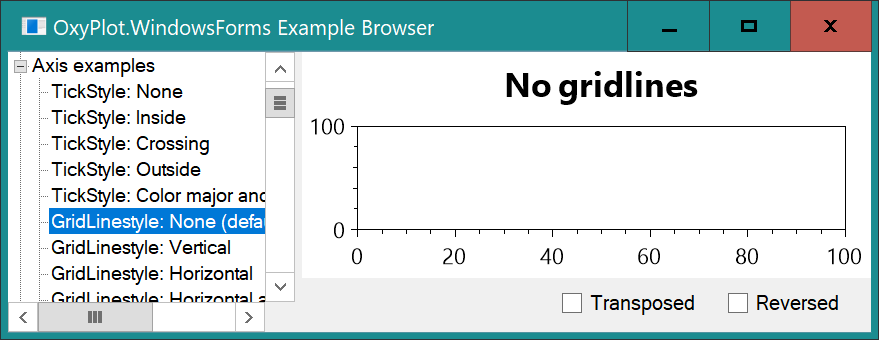
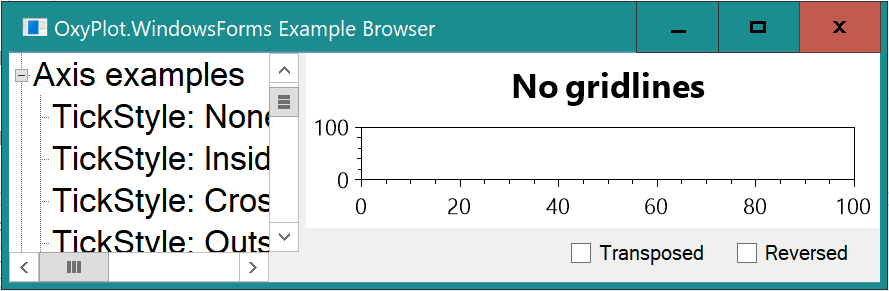
Taking a quick look just now (because I'm contemplating adding DPI support to GTK if it needs it), the tree view is still too big when using .NET Framework. If I disable
With it enabled, I get this:
Similar behaviour with NET Core when I remove the |
|
Thanks for the clarification! This problem also reproduces for me, but at 125 everything is fine |
|
@rstm-sf sorry I didn't get back to you before. I'm not sure what you previous comment means, or what that last commit does: do you suspect that the winforms behaviour changes between 100 and 125 and 150? |
|
I myself wonder why this is happening, but not enough to try to understand it at the moment... maybe later? Sorry :( |
This is true, for some reason I do not understand, I have to adjust at 125%. This is not observed in .net core |
|
I read that there will be a release soon. Will this PR wait a couple of weeks? |
|
@rstm-sf yeah, I'd hope we will put the preview out in a couple of weeks. It would be nice to slip this in, but there are no API changes, so if it's not perfect in the preview we will get over it. Ping me if you want anything tested again. |
|
Ok, thanks |
|
Oh, and it's an example, so it won't actually be released. Not sure how I missed that... It would none-the-less be nice to get this done, then we can sort out support in GDI itself. |
Yes, it can be better configured there. I decided that it would be enough to make it look more or less
I also :) |
# Conflicts:
#	CONTRIBUTORS
|
@Jonarw hello! I sync pr with develop. Is there anything else that needs to be done? |
|
Again, can't test properly, but all seems OK to me |

|
This is what it looks like on my screen that is running at 175% DPI scaling with the changes in this PR: And this is on the current develop branch: So with this PR everything is definitely sharper and not blurred by pixel scaling anymore. However, somehow the text in the TreeView becomes huge, do you know what is up with that @rstm-sf? |


Mistake with conditions |
|
At 175%: At 125%: At 100%: It seems to me that this PR is now doing what it's intended to do. The Winforms UI (and also the Plot) seem to be crisp at any DPI scaling. |


Wow, I thought I'd implemented that at some point, but evidently not. I'll try to look this over again later today. |
|
No other comments from my side. I'm happy for this to be merged. I'll implement DPI support in WinForms at some point. |


3 participants


Checklist
Changes proposed in this pull request:
@oxyplot/admins