Less intrusive sharp popup (reference suggestion/autocomplete) #1098
Conversation


 MarcelRobitaille
force-pushed
the
903-link-suggestions
branch
from
MarcelRobitaille
force-pushed
the
903-link-suggestions
branch
from
fc89df4 to
8d5df14
Compare
 MarcelRobitaille
force-pushed
the
903-link-suggestions
branch
2 times, most recently
from
MarcelRobitaille
force-pushed
the
903-link-suggestions
branch
2 times, most recently
from
2620fd7 to
2a708da
Compare

Signed-off-by: Marcel Robitaille <[email protected]>
Signed-off-by: Marcel Robitaille <[email protected]>
MarcelRobitaille
force-pushed
the
903-link-suggestions
branch
from
2a708da to
b398f55
Compare

|
I added scrolling, including keeping the focused element centered when using the arrow keys. Also made some visual improvements. Peek.2022-07-25.12-05.mp4 |
Signed-off-by: Marcel Robitaille <[email protected]>
Signed-off-by: Marcel Robitaille <[email protected]>
Signed-off-by: Marcel Robitaille <[email protected]>
Give it a maximum height and let it scroll with the mouse wheel or when
changing the focused element with up/down arrow keys.

Signed-off-by: Marcel Robitaille <[email protected]>
MarcelRobitaille
force-pushed
the
903-link-suggestions
branch
from
b398f55 to
88e6aa4
Compare
Signed-off-by: Marcel Robitaille <[email protected]>
Previously, the caret position was used for the popup offset. Since the
\# was just typed, the caret was to the right of the hash. The result
was that the popup looked misaligned. It was left aligned to the text
coming after the #, but not to the left of the # itself.

Signed-off-by: Marcel Robitaille <[email protected]>
If the text coming after # becomes so long that the "word" is wrapped to
the next line, move the popup down and left accordingly.

Signed-off-by: Marcel Robitaille <[email protected]>
MarcelRobitaille
force-pushed
the
903-link-suggestions
branch
from
88e6aa4 to
be77c73
Compare
Signed-off-by: Marcel Robitaille <[email protected]>
Signed-off-by: Marcel Robitaille <[email protected]>
Signed-off-by: Marcel Robitaille <[email protected]>
Create a mixin to easily apply SuggestionsPopup logic to EditInputField
and EditInputGroup without duplicating logic

Signed-off-by: Marcel Robitaille <[email protected]>
Just check if the list of suggestions is nullish / empty

Signed-off-by: Marcel Robitaille <[email protected]>
Move some of the computed attributes and other logic to the component
itself. Reduces the data passed around

Signed-off-by: Marcel Robitaille <[email protected]>
I noticed sometimes it starts scrolled down. Maybe this happens if you
scroll down, close the popup, and open it again

Signed-off-by: Marcel Robitaille <[email protected]>
MarcelRobitaille
force-pushed
the
903-link-suggestions
branch
from
7d6e2d4 to
72af37b
Compare
|
I used a mixin to implement this in Peek.2022-07-25.15-31.mp4I should also mention that I fixed the popup overflowing to the right (it will be right-aligned and not aligned with the Peek.2022-07-25.15-52.mp4 |


|
I just wanted to test the extension and I am facing issues. When I want to select a recipe from the popup (both using enter as well as a mouse click), the popup is not closed and the console shows an error: Another thing that I have seen and that might be a bit suboptimal from UX perspective: When you want to enter a link and type Was it possible to extend the functionality such that if you type at the end of any word that started with a single |
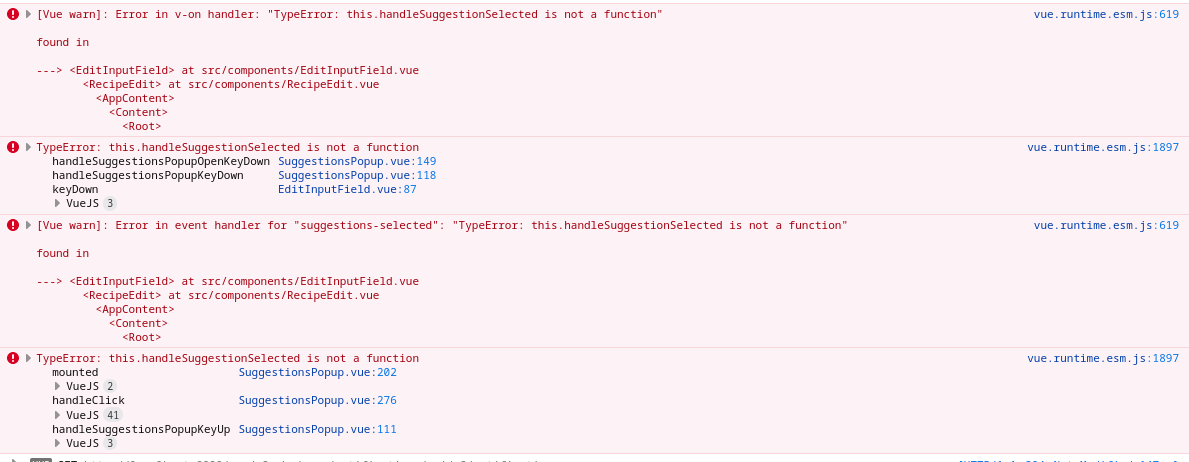

One word of caution: this should not lead to repeatedly opening the popup after the user has canceled the selection (with ESC, the arrow keys, or sth.) and continues typing otherwise this would be annoying :D It might make sense if the user has navigated to a completely unrelated part and returns back to the end of the string starting with a # |
|
That is true. However, as far as I understand the idea, the user "just" does not have to press enter to be allowed to type anything he/she likes. Only pressing enter or selecting with the pointer/mouse will replace the word with the link. Pressing |
|
Sorry about that. I did some major refactoring and didn't test everything well enough. I'll fix it. |
Signed-off-by: Marcel Robitaille <[email protected]>
MarcelRobitaille
force-pushed
the
903-link-suggestions
branch
from
49c7cc2 to
841e2fc
Compare
Signed-off-by: Marcel Robitaille <[email protected]>
MarcelRobitaille
force-pushed
the
903-link-suggestions
branch
from
841e2fc to
5e0b54d
Compare
|
I fixed the bug. I also implemented recovery of the popup when the focus comes back. This will not recover if the popup was dismissed with escape or arrow keys. Is this the desired behaviour? It's hard to see my clicks in the video. I click outside the textarea then I click back inside the textarea. Peek.2022-07-26.17-45.mp4 |
|
OK, I tested once more. The bug I reported is still present: You cannot insert any link to the description field. The other fields do work as these are Second, I think the fix for the hidden popup is not working on my machine: 903-no-links.mp4 |
|
Hi @christianlupus. Thanks for testing it. I think the first issue has to do with the markdown editor. I am getting an error related to The video is interesting. I will look into it. |
This is a leftover from an old implementation I removed for security reasons (high-risk npm audit warning). The old editor was a Vue component that declared itself as Markdown editor. It looked much like a plain textarea. As the component has not received any updates for over 2 years, I removed it as stale.
FYI: This is made on Linux with Firefox. |
When the suggestion is selected, the search text should be replaced by
the reference. The old version was just inserting the reference.

This also fixes `EditInputField` where `pasteString` is broken

Signed-off-by: Marcel Robitaille <[email protected]>
Signed-off-by: Marcel Robitaille <[email protected]>
|
I realized that just doing paste on submit was the wrong approach. We need to remove the search text and insert the reference. This must keep the text before and after intact. @christianlupus noticed this in the video where the search text was remaining. As a result, the issue of the discrepancy between This video shows that the search text is correctly replaced. In previous versions, the search text would remain after the inserted reference. Peek.2022-07-28.02-12.mp4I still do not know why the popup is not recovered properly in your video. Would you try the latest version? I added some logging that might help track down what's going on. I also realized it would be possible to implement that feature with css and a sibling selector. That could be a good option as well. It's fewer event listeners to set up every time the component is used at any rate. |
|
Now, it seems to work rock-solid. I like it! 💯 🚀 Do you want to clean up the debug logs or comment them out in some other way? Please let me know, when you are finished with the PR. |
|
Glad you like it! Actually I just noticed one other problem. You can confuse the system if you click inside the textarea to change the caret position. Peek.2022-07-29.15-29.mp4GitHub just closes the popup if the caret changes by click, even if the new position is between the |
The system gets confused if the caret position changes without it
realising. Arrow keys are handled, but clicking the mouse was not.

Signed-off-by: Marcel Robitaille <[email protected]>
|
I can remove the logs if you want, but I only added them to track down your recovery bug. I did not change anything about that besides adding the logs, so I expected the bug to still be there. Also, is there a good way to avoid all of this https://github.com/MarcelRobitaille/cookbook/blob/903-link-suggestions/src/components/EditInputField.vue#L12-L15? Right now, it's duplicated in 4 different places. Plus, you have to remember to call |

Signed-off-by: Christian Wolf <[email protected]>
Signed-off-by: Christian Wolf <[email protected]>
I have not been able to reproduce the problem. To prevent filling up the console of the production, I added a config flag to hide them by default. Only if the environment variable This will allow us to debug if the problem comes up again.
I am not aware of a way to shorten that. You will have to register with all components the appropriate event listeners. Are you only concerned that you want to write less code or because you fear breaking changes in the future if the code grows further?
Here am not sure if this can be simplified. I am thinking if this could work by adding another layer of components as an abstraction that will handle the majority of the event handling. Then the effect would be restricted to a hand full of files. But I have no overview of the current state of the components and I thus cannot provide well-educated feedback. |


|
I just approved. So, you can merge yourself. If you see fit, you can merge now and think about any code style enhancements later or try to enhance directly in this PR. This is up to you, @MarcelRobitaille. |
3 participants


Fixes #903
I'm creating a pull request so we can keep track of the remaining tasks for this issue in this first comment:
Generalization:
EditInputGroup. To prevent duplicating code, consider Vue mixin.Responsiveness:
#appears in the right of the input.width: 100%, left: 0for small screens.I'm not sure if you can edit this comment. If not, if there are any other to-do items, please leave a comment and I will update this list.