Skip to content

Add Hotcue Button colors to skins#2120

Merged
uklotzde merged 7 commits intomixxxdj:masterfrom
Holzhaus:deere-hotcue-button-colors
May 30, 2019
Merged

Add Hotcue Button colors to skins#2120
uklotzde merged 7 commits intomixxxdj:masterfrom
Holzhaus:deere-hotcue-button-colors

Conversation

@Holzhaus
Copy link
Copy Markdown
Member

@Holzhaus Holzhaus commented May 25, 2019

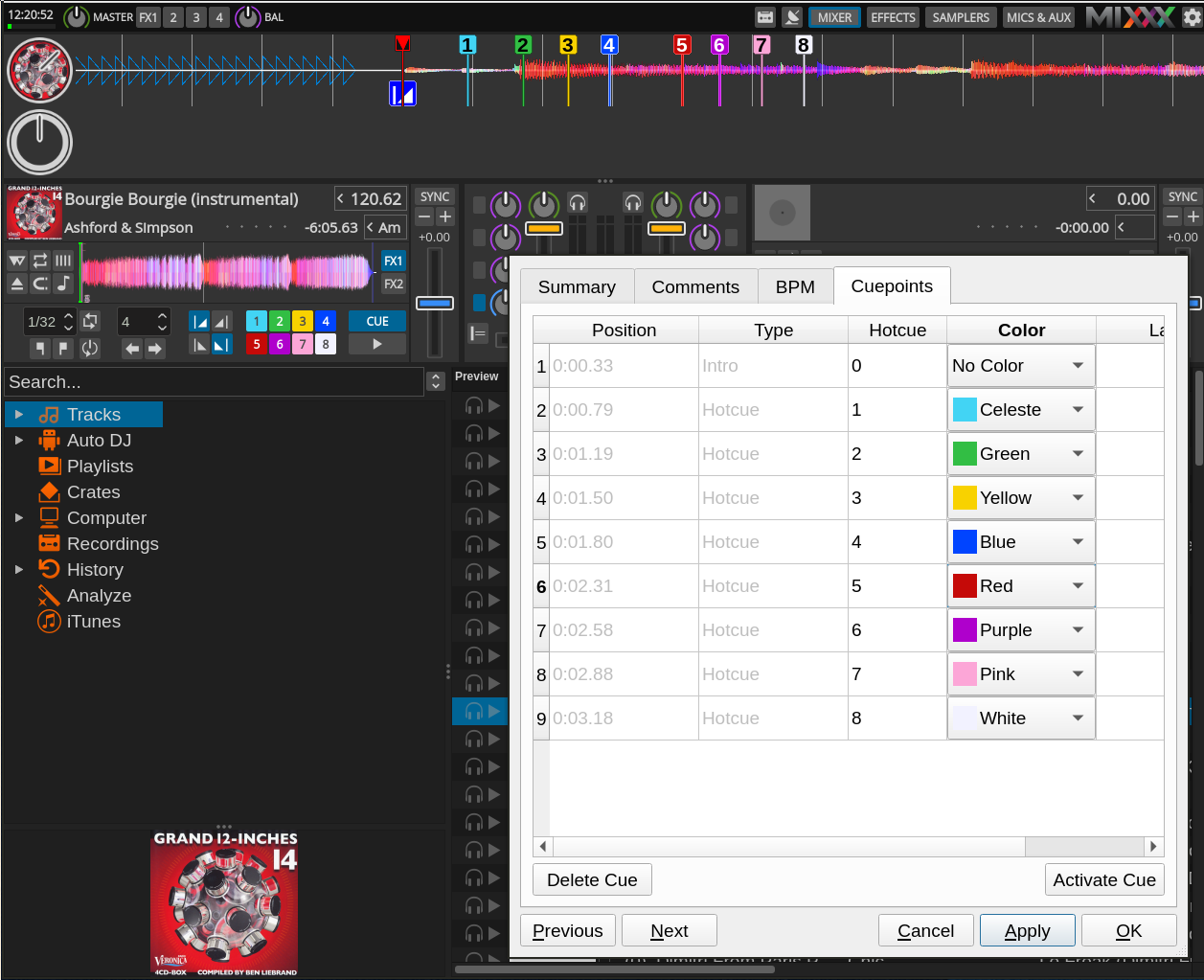
This gives skins the ability to show Hotcue Button colors and adds support for that feature to the Deere skin. I used to colors from PR #2031 (and just added 0x20 to the dominant RGB channels for hover colors).

This resolves Launchpad Bug lp1829884 (but only partially, since I only adapted the Deere skin).

Here's a screenshot:
Deere Hotcue Button colors

Comment thread src/widget/controlwidgetconnection.cpp
@Holzhaus Holzhaus force-pushed the deere-hotcue-button-colors branch from 81d4330 to d5b7ab7 Compare May 25, 2019 14:26
@Holzhaus Holzhaus changed the title Deere: Show Hotcue Button colors Add Hotcue Button colors to skins May 25, 2019
@Holzhaus Holzhaus force-pushed the deere-hotcue-button-colors branch 2 times, most recently from ced0abc to 87dbea2 Compare May 25, 2019 23:20
@Holzhaus
Copy link
Copy Markdown
Member Author

I also added support for colored buttons to the other skins (except LateNight).

@uklotzde uklotzde added this to the 2.3.0 milestone May 26, 2019
Holzhaus added a commit to Holzhaus/mixxx that referenced this pull request May 26, 2019
This depends on patches from PR mixxxdj#2120 to work.
@Holzhaus
Copy link
Copy Markdown
Member Author

Holzhaus commented May 27, 2019

@uklotzde IMHO this PR is ready. The only skin missing is the LateNight skin, but I have no idea how to add support to it, because it uses SVG files that contain gradients. In any case, colored hotcue support could be added to LateNight at a later date.

@ferranlala
Copy link
Copy Markdown
Contributor

Good job, this PR looks good and it's a long awaited feature!

Can you tweak the default hotcue mark color on Tango and Deere so it matches the default color of the hotcue button?

@Holzhaus
Copy link
Copy Markdown
Member Author

@ferranpujolcamins Done.

@ferranlala
Copy link
Copy Markdown
Contributor

LGTM

@uklotzde
Copy link
Copy Markdown
Contributor

LGTM. Very helpful, especially in conjunction with the auto-assignment of cue colors!

@uklotzde uklotzde merged commit 015b792 into mixxxdj:master May 30, 2019
@Holzhaus Holzhaus deleted the deere-hotcue-button-colors branch May 30, 2019 18:13
@ronso0
Copy link
Copy Markdown
Member

ronso0 commented Jul 17, 2019

LateNight is addressed in #2205

@ronso0
Copy link
Copy Markdown
Member

ronso0 commented Sep 28, 2019

@Holzhaus Could you explain which hotcue state [displayValue="2"] should address?
Different css colors for "1" and "2" don't yield any visible results, color from "1" is used for enabled and pressed buttons.
I'm trying to style both the hotcue_X_enabled and the _activate (set or play from hotcue) state.

@ronso0
Copy link
Copy Markdown
Member

ronso0 commented Dec 13, 2019

@Holzhaus
In Shade (and only there) hotcue button #1 (and only this) never get's painted with the assigned color. Do you have any idea why this happpens?
The qss is correct, it doesn't matter at which position the marker is set, it doesn't matter if button#1 is the first hoctue template that's loaded...it's just weird.

@Holzhaus
Copy link
Copy Markdown
Member Author

If the qss is okay, maybe the widget is not re-polished? But that shouldn't be skin-dependent...

Sign up for free to join this conversation on GitHub. Already have an account? Sign in to comment

Labels

None yet

Projects

None yet

Development

Successfully merging this pull request may close these issues.

4 participants