Skip to content

Tango skin :: update#1330

Merged
daschuer merged 105 commits intomixxxdj:masterfrom
ronso0:Tango-update
Nov 5, 2017
Merged

Tango skin :: update#1330
daschuer merged 105 commits intomixxxdj:masterfrom
ronso0:Tango-update

Conversation

@ronso0
Copy link
Copy Markdown
Member

@ronso0 ronso0 commented Aug 5, 2017

In this PR I fix some minor issues and clean up a bit.

  • 1) identical beatsize spinboxes for left and right decks
  • 2) identical EffecttSelector for left and right units
  • 3) identical Loop sections for left and right decks
  • 4) visualize flow within effect chains
  • 5) when FX lot is focused, FX focus button now can un-focus with left-click as well
  • 6) redesign FX focus button so that it's not mistaken for an On/Off button for the effect
  • 7) optional SuperKnob
  • 8) assign buttons for Master/Headphone in collapsed FX units
  • 9) simplify channel mixer, make Pfl button static
  • 10) indicate active passthrough while Vinyl Controls are hidden
  • 11) implement EffectPushButton
  • 12) hide headphone mixer when no headphone device is configured
  • 13) add booth volume control if booth output is configured
  • 14) make all skin settings fit on minimal screen
  • 15) grey out headphone controls if no respective device is set up
  • 16) Pfl & xfader assing buttons for Mic/Aux
  • 17) check Library colors
  • 18) make all mixerbar gain controls knobs
  • 19) add larger Master level meter

For booth gain tooltip, #1343 needs to be merged.

Please test if this makes sense. Also please check for glitches in Effect Selector drop-down and beat-jump/beat-loop size boxes, especially on Windows & OSX

@Be-ing
Copy link
Copy Markdown
Contributor

Be-ing commented Aug 5, 2017

Hmm, should the metaknobs for effect units on the right be moved to the left side of the comboboxes to mirror the other side?

  1. visualize flow within effect chains

I like this.

I made some changes to the EQ knobs and effect parameter knobs in #1315, so if you haven't already, merge the latest updates from master into this branch to make sure you don't make merge conflicts.

@ronso0
Copy link
Copy Markdown
Member Author

ronso0 commented Aug 6, 2017

Hmm, should the metaknobs for effect units on the right be moved to the left side of the comboboxes to mirror the other side?

In collapsed FX units I made toggles/meta/focus identical for both sides because IMO it resembles the left-to-right order in FX units on controllers, so I think symmetry is not necessary then.
However, when FX units expand layout changes completely, so I think it makes sense to have it symmetrical then.

@ronso0
Copy link
Copy Markdown
Member Author

ronso0 commented Aug 6, 2017

5) when FX lot is focused, FX focus button now can un-focus with left-click as well
It just felt strange to have a button that doesn't react to left-click in one state
6) redesigned FX focus button so that it's not mistaken for an On/Off button for the effect

@ronso0
Copy link
Copy Markdown
Member Author

ronso0 commented Oct 30, 2017

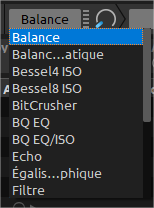
maybe you could make the drop-down menu a bit larger

Done, it's much wider now. A while ago I removed the tick mark to reclaim as much space as possible for the text to fit because there was an issue with the menu,.. can't recall. Seems to work now, at least on Linux.

Can anyone test this with OSX as well?
If it looks okay there, too, I'd say this ready to merge. Again :)

@sblaisot
Copy link
Copy Markdown
Member

Done, it's much wider now.

Much much better !
image

@ronso0
Copy link
Copy Markdown
Member Author

ronso0 commented Oct 31, 2017

'Effect name eliding' in French looks a bit strange..there's much space left but Effect names are abbreviated..and no tick marks

@foss-
Copy link
Copy Markdown
Contributor

foss- commented Nov 1, 2017

@ronso0 have you ever seen covers not being displayed correctly in tango? https://bugs.launchpad.net/mixxx/+bug/1729451

More OT talk, sry: I applaud all the efforts to improve the skins. I just wish, PRs would be of smaller scale. Fixes could be pushed to master quicker and then be tested and enjoyed by users sooner. I don't see the benefit of having these massive fix collections. There are areas where that makes sense, but for small fixes like the UI glitch above I'd rather see smaller prs being pushed to master more frequently. Guess that's a question of taste in the end.

@ronso0
Copy link
Copy Markdown
Member Author

ronso0 commented Nov 2, 2017

have you ever seen covers not being displayed correctly in tango?

Nope, never.
Does it happen with Covers (not Spinnies)?
Does it happen with small spinnies as well?
Which OS?
Can you reproduce it with a certain file?

I just wish, PRs would be of smaller scale. Fixes could be pushed to master quicker and then be tested and enjoyed by users sooner.

Yes, you're right.
I claimed this ready to merge quite early. But there was no dev review so far so I kept on fixing small issues and improved even further, other issues popped up during review. As I mentioned earlier this week, this can be merged if there are no issues

@ronso0
Copy link
Copy Markdown
Member Author

ronso0 commented Nov 2, 2017

@foss- For the screen cast you used Tango from master. In this PR I also optimized the svg files, maybe it's related and maybe this issue is already fixed. Could you test it please? If you need instructions on how to do this quick and easy, let me know.

@foss-
Copy link
Copy Markdown
Contributor

foss- commented Nov 2, 2017

I wonder what a good place would be to document steps for that. The forum > skins announcement section?
Or better the wiki skins > skin guidelines?

@ronso0
Copy link
Copy Markdown
Member Author

ronso0 commented Nov 2, 2017

I wonder what a good place would be to document steps for that. The forum > skins announcement section?

Yes, this is on my ToDo. IMO some links in the wiki need to be placed in a better way, sometimes I fail to find even the simplest stuff and need to resort to search function.
And a sticky thread in the forum is definitely a good place, too!

Edit It seems most of the info in skin_guidelines and creating_skins is outdated. Updating all this will be a hell of a lot work...

@InannaMoon
Copy link
Copy Markdown

So far, the update from 3 days ago is looking great. Thanks.

For what it's worth, the way I have been getting your updates:

  1. Click on your name (ronso0) at the top of one of your messages
  2. Click on your Mixxx repo
  3. Click on Branches
  4. Click on Tango update
  5. Download a zip file
  6. Open zip file
  7. Navigate to res/shins directory
  8. Open another file browser window
  9. Navigate to (Mixxx install location)/skins
  10. Rename Tango to TangoN (where is a number)
  11. Copy Tango directory from zip browser to skins directory in file browser

Is there an easier way to get to the Tango update branch in your repo?

@ronso0
Copy link
Copy Markdown
Member Author

ronso0 commented Nov 3, 2017

Cool, thanks. What about the cover art issue on the spinnies?

Is there an easier way to get to the Tango update branch in your repo?

For a one-time check this probably the easiest way.
If you want to pull this PR every once in a while after changes have been commited, or if you want to fork this PR and propose changes yourself, it's much easier with git.
I'm about to create a tutorial for the skin forum.

@nikmartin
Copy link
Copy Markdown
Contributor

@InannaMoon, yes, If you are a but sporty with git, PRs in github are just hidden branches in a repo, so you can do this: https://gist.github.com/piscisaureus/3342247 and view all PRs locally in git as branches. Otherwise, you can do a regular merge of a pr: https://help.github.com/articles/checking-out-pull-requests-locally/

@sblaisot
Copy link
Copy Markdown
Member

sblaisot commented Nov 3, 2017

Navigate to (Mixxx install location)/skins
Rename Tango to TangoN (where is a number)
Copy Tango directory from zip browser to skins directory in file browser

or under windows to be sure to not have the windows installer system overwrite the file you just dropped (autorepair function), copy the new skin under Tango.new ;)

@sblaisot
Copy link
Copy Markdown
Member

sblaisot commented Nov 4, 2017

yesterday I had a 4h set with master + this PR without any usability issue.

LGTM !

Good job @ronso0 and all 👍

@ronso0
Copy link
Copy Markdown
Member Author

ronso0 commented Nov 4, 2017

@sblaisot Great!
In case your screen is not 1366x768 could you post a screenshot of your ususal configuration?

@sblaisot
Copy link
Copy Markdown
Member

sblaisot commented Nov 4, 2017

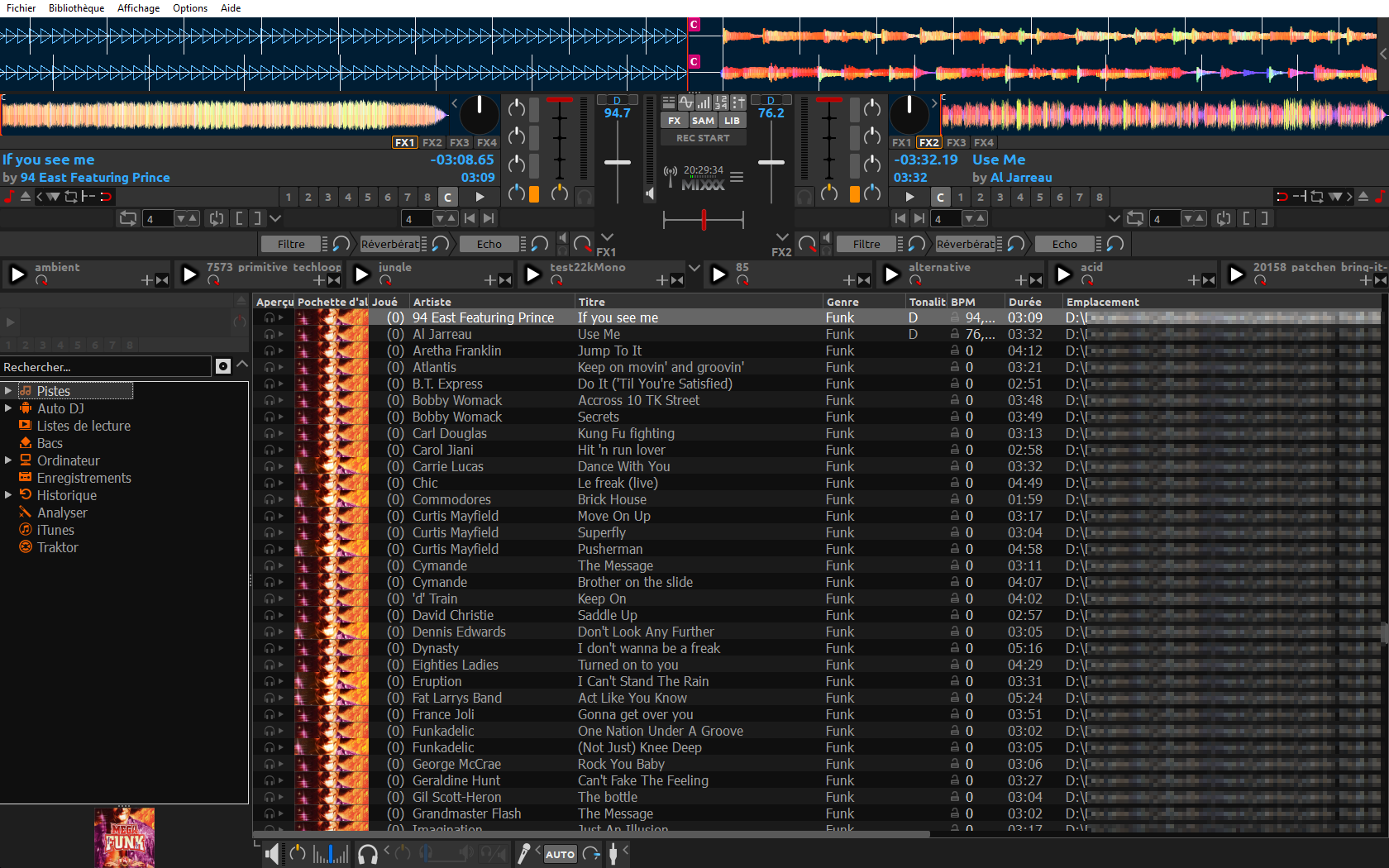
The PC I used was not mine this time. I used a PC with a native resolution of 1920x1080 (Full HD) on a 14" screen. That was ... SMALL. But usable. I had to raise library font size a bit.

Unfortunately, I don't have that PC by hand anymore, but here is a screenshot of my main computer with a 22" screen and a resolution of 1680x1050 with the tango skin disposition that best suite my use case.
image

@daschuer
Copy link
Copy Markdown
Member

daschuer commented Nov 4, 2017

@ronso0 Thank you for all your love putting to this skin. Should I merge it now?

@ronso0
Copy link
Copy Markdown
Member Author

ronso0 commented Nov 5, 2017

@daschuer Yes it can be merged!

I fixed two issues:

  1. FX unit expand button when an effect was focused before show_focus was set to 0
  2. distorted knob pointers
    Apparently outlines in svg files were screwed up because svgo "optimized" them too much (with default options). I fixed the graphics and saved them as "Optimized SVG" with Inkscape.
    If anyone plans to use svgo -maybe for a build script- this needs to be investigated.

@daschuer
Copy link
Copy Markdown
Member

daschuer commented Nov 5, 2017

Thanks again.

@daschuer daschuer merged commit b2ddd48 into mixxxdj:master Nov 5, 2017
@sblaisot
Copy link
Copy Markdown
Member

sblaisot commented Nov 5, 2017

Just an after-merge suggestion for the next tango skin update: add a visual indicator telling if the whole EffectUnit is enabled or disabled. Currently, some mapping allow to disable a whole EffectUnit but we have no visual feedback.

@Be-ing
Copy link
Copy Markdown
Contributor

Be-ing commented Nov 6, 2017

That was intentional. IMO adding an effect chain enable switch overcomplicates the UI. Users get confused with so many switches for different layers and I don't think that was is necessary or very helpful. Unfortunately as a side effect users who have old mappings that used the control will not have that on screen feedback. Refer to discussion in #1103

@sblaisot
Copy link
Copy Markdown
Member

sblaisot commented Nov 6, 2017

ok, so I have to update the Reloop beatmix 2/4 mapping to not use this function as without visual feedback, it is hazardous to disable the whole EffectUnit.

Sign up for free to join this conversation on GitHub. Already have an account? Sign in to comment

Labels

Projects

None yet

Development

Successfully merging this pull request may close these issues.

10 participants