SELECTMULTI ControlPushButtonBehavior#1160
Conversation


This is like radio buttons, but 0 (no selection) is a valid state. Clicking an unselected button selects it; clicking it again unselects it (sets the ControlPushButton's value to 0).
It was redundant with the "value" property.

|
LateNight uses displayValue: |
|
Nice work! My first thought when I heard SELECTMULTI was being able to select multiple in a group. (e.g. Hobbies in this photo). |
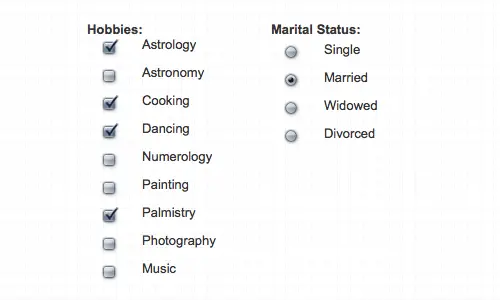
I think real radio buttons sometimes support a none-selected state :) but yea digital ones generally don't (sometimes they start off with none selected, but then don't allow you to unselect once you commit to one). |

|
Can't we just integrate the feature into a normal toggel button? The skin can define a setValue default to 1 and a resetvalue default to 0. |

Hm, not sure why git grep didn't find that when I searched before. Would you be okay with removing displayValue if this PR replaces it with "value" in LateNight?
Yeah, it's not the best name. Does anyone have better suggestions? |
I suppose that's possible, but I think it would be confusing. This behavior is different from a normal toggle button. |
|
Thinking about this again, I think we have a responsibility issue here: We already have a multi state toggle button, for example: It is IMHO out of scope of the the C++ domain to set how this should be controlled. The skin should be free to decide, if this control object is controlled by a single button, a set of radio buttons, a combobox or anything else fancy. If you think this is confusing, we should have introduced a new ControlPushButton::MULTISTATE. The thing is a bit more complicated if we consider learn-able midi buttons. But this is also not considered in this PR and probably never needed, right? A probable source of confusion is, that the skin just uses a WPushbutton. I do not think it is required, but we could use a WRadioButton to clarify this. But this might be also confusing, since Qt has an concept of QGroupBox with exclusive radio buttons. |
Ideally, the behavior introduced in this PR could be implemented in QML with JS, which would be trivially easy. But we don't have a QML skin system yet.
But the skin has no way of implementing the logic introduced here. And it shouldn't, because XML is not a scripting language.
I have not tested how the MIDI learning wizard works with this because it is meant to be used with the EffectUnit ControlContainer. That's not to say it shouldn't work with the learning wizard, but I don't think that should hold up this PR, which is also holding the completion of #1063. The other new effects ControlObjects don't work with the point and click wizard yet either, but that's not essential to start putting out beta builds.
I do not want to write a whole new widget right now considering this works well enough and a feature freeze is impending. I also don't think it's worth putting much more effort into the current skin system. It's already being pushed to the limits. We should move to QML soon. |
|
How about renaming this new behavior RADIOTOGGLE or TOGGLERADIO? |
|
It looks like you did not get my point. It is not about turning the Skin system into a scripting language. This PR adds a new option "SelectionIndex" for a PushButton. This can be done for any CO and does not require a new button mode. For example for "m_pControlLinkType" which is a toggle button. A new button mode might be required when we want to make it learn-able. But I am afraid this will require a dedicated CO fro each radio button. If you think it is required to have these buttons learn-able, we should hold this PR back until we have a clue how this could work. Otherwise we may go a route that has to be reverted later, what can be hard because of other assumptions based on it. When originally introduced the effect focus feature, we have not considered any toogle buttons for it in the GUI, though this can be a nice feature but not a requirement. Does a controller has such radio buttons? I thought that the controller has a mode switch and enable buttons, which implicit control the focussed effect. Right? |
We did consider that and decided against it. I think that was the right decision and we should stick with it.
Actually, the effect focus buttons are only shown if a controller mapping sets show_focus to 1 with JavaScript anyway, so I don't think it has to be learnable with the wizard.
The focus toggling is mapped to shift + the enable buttons when parameters are showing. They behave just like the skin does with this PR. |
The big difference is that this new ButtonMode has multiple WPushButton instances for one ControlObject. Each WPushButton toggles between 2 states, and one of those states needs to be identified by the SelectionIndex element. The TOGGLE behavior cycles through any number of states. |
|
This kind of button would require a new XML element for the controller XML format analogous to the SelectionIndex for the skin. I'm not willing to put any effort into extending the XML mapping system, especially considering the only use of this new ControlPushButtonBehavior isn't even shown on screen unless a JS mapping activates it. |
The behaviour classes are mainly designed to allow direct midi mappings. Since we have desided that this should be not learnable, we need to do nothing for to be learn-able. The current TOGGLE behavior is sufficient. In the skin, you can instantiate as may radion buttons you like, and connect them to a single toggle button. We only need to tell the skin which is the "Set Value" your "SelectionIndex" |
I'm open to suggestions for a better name for SelectionIndex. Yes, you are understanding the behavior correctly. |
|
I think intertwining the new behavior with the TOGGLE behavior would make future maintenance/modification of wpushbutton.cpp more confusing. The behaviors are distinct; I think they should have separate names. |
|
I think all button states should be learnable (even if the first use case this is used for is not going to make use of that since it implies script is being used). |
Yea, if the implementation was in the ControlBehavior then the same logic could apply for both MIDI sets of the button and skin.
Can you provide a working example? |
It's unfortunate we ended up with two (I think I added 'value' in 2013 but Owen added 'displayValue' in 2014 and I code reviewed and probably forgot about 'value' at the time) -- is there a strong reason you need to delete it? (As opposed to marking it deprecated and pointing people to 'value') |
No, there's not a strong reason to remove it. I realized after I opened this PR that the displayValue Q_PROPERTY could just have its READ function set to the same as the value Q_PROPERTY's READ function, so it won't be hard to maintain. |
Ok I think I misunderstood you. By "sufficient" you didn't mean it's possible to do what's done in this PR with the TOGGLE state (which I don't think is possible). You mean that we shouldn't offer per-effect focus radio buttons and instead should offer a "focus cycle" button that is a toggle button with num-states == num-effect-slots and moves the effect focus forward by one on click? |
We should not do this. Users shouldn't have to focus effect 2 to get from focusing effect 1 to focusing effect 3. |
We have done this "mistake" already in the past. Now that "focused_effect" is a ControlPushButton, you can already learn the effect focus button by a controller. This way you get a single button that toggles the focus thought the available effects. That is IMHO not too bad. If you like to "learn" n radio buttons on the controller to that single CO, it would require a mapping file refactoring. I do not support the idea since this will complicate some things, because it brakes the simple 1 - 1 relation. You are currently only looking for a skin solution. Here it makes perfectly sense to add a "SetValue" that allows to control a toggle button to between that value and 0 instead of toggling though all possible values. If a learn-able solution is desired, I see two options:
|
I have no working example by hand, but would be quite easy to set a TOGGLE control to any value, using a widget which knows this value by a "SetValue" widget parameter.
This can be one option to control a TOGGLE button, but that is not a solution for @Be-ing Deere skin. |
|
Okay, I understand what you are saying now. I do not like the idea of manually adding buttons for each EffectSlot, but creating a new ControlRadioButton subclass of ControlObject is an interesting idea. WDYT @rryan ? Regardless, I don't think this PR should hold up merging #1063. Whatever C++ changes are required for this can be merged together with the skin change if #1063 has already been merged. |

3 participants


Add a new ControlPushButtonBehavior for the new focused_effect CO. This is similar to radio buttons, but having no option selected (ControlPushButton value of 0) is a valid option. Clicking an unselected button selects that option for the ControlPushButton's value. Clicking a selected button again unselects (sets the ControlPushButton value back to 0).