Button: Focus in high contrast mode fix#4221
Conversation


 lynamemi
requested review from
betrue-final-final,
dzearing,
manishgarg1 and
micahgodbolt
lynamemi
requested review from
betrue-final-final,
dzearing,
manishgarg1 and
micahgodbolt


| inset: number = 0, | ||
| position: 'relative' | 'absolute' = 'relative' | ||
| position: 'relative' | 'absolute' = 'relative', | ||
| highContrastStyle: IRawStyle | undefined = undefined |

There was a problem hiding this comment.
Is there a difference between this and just "IRawStyle?"?
There was a problem hiding this comment.
Probably not different, but I am getting a tslint error if I don't have the extra bits when I rush rebuild:
missing-optional-annotation Argument following optional argument missing optional annotation: highContrastStyle: IRawStyle
There was a problem hiding this comment.
I can see why it needs to be IRawStyle or undefined, but do you need to set the default to undefined? isn't that what it'll be if it's not set?
There was a problem hiding this comment.
Alas, that's part of what triggers the error I noted above.

|
bump for this PR. we're getting more issues reported for this bug. |

 micahgodbolt
left a comment
micahgodbolt
left a comment
micahgodbolt
left a comment
There was a problem hiding this comment.
If ben is good with the high contrast, the I'm fine. If you can clean up that function just a bit great, but not stopping this PR.
| inset: number = 0, | ||
| position: 'relative' | 'absolute' = 'relative' | ||
| position: 'relative' | 'absolute' = 'relative', | ||
| highContrastStyle: IRawStyle | undefined = undefined |
There was a problem hiding this comment.
I can see why it needs to be IRawStyle or undefined, but do you need to set the default to undefined? isn't that what it'll be if it's not set?
|
@phkuo Any more feedback? |

|
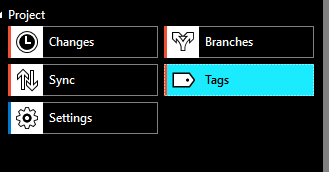
High contrast black theme the background of the selected button (which should be similar to focus) should be in "Cyan" and button text should be in "Black" colour. In white theme background colour should be in "Purple" and button text colour should be in "White". Are we doing that here? From description, it doesn't look like it. .......(edited): |
|
@yaananth, this PR is just for button focus in high contrast mode. I worked with our designer, @betrue-final-final. If it's another high contrast bug you're seeing, please file a separate issue. |
|
@lynamemi That's where the confusion is, how do we distinguish focus vs selection for a button in web world? Is there a defintitive guidance here? consider VS: focusing, adopts "select" styles. |

|
Focus is a border and there is no selected button state. It’s either rest or hover or pressed. |
|
Thanks @betrue-final-final as long as everyone across org is considering the same, sounds good! |

5 participants


Pull request checklist
$ npm run changeDescription of changes
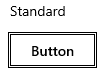
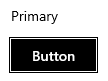
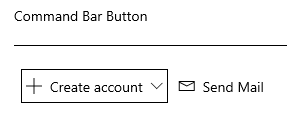
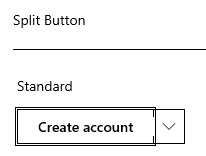
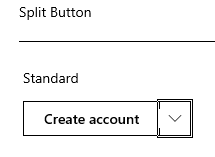
Button focus wasn't working in high contrast mode. To fix this, I refactored getFocusStyle to take a highContrastStyle object that defines focus style in high contrast mode. CommandBarButton has a different style than the rest.
I debated about putting more logic inside getFocusStyle, but landed on passing a generic IRawStyle object for more flexibility.
In High Contrast White:
Focus areas to test
I tested that focus still works in non high contrast.