Skip to content
This repository was archived by the owner on Jul 9, 2025. It is now read-only.

Conversation

@lei9444
Copy link
Contributor

@lei9444 lei9444 commented Sep 21, 2020

Description

This is a quick fix for TextField over rendering.

The first step is use class shouldComponentUpdate to trigger a render only when the value and error changed.

Task Item

refs #4171
closes #4102

Screenshots

@coveralls
Copy link

coveralls commented Sep 21, 2020

Coverage Status

Coverage increased (+0.03%) to 55.342% when pulling 652e59d on lei9444:memotext into 9ba5e84 on microsoft:main.

@boydc2014
Copy link
Contributor

Do you have a data than, how much over rendering is saved by this fix?

@lei9444
Copy link
Contributor Author

lei9444 commented Sep 21, 2020

Do you have a data than, how much over rendering is saved by this fix?

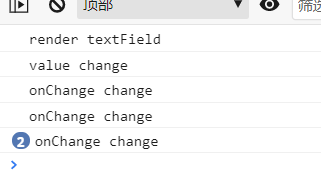
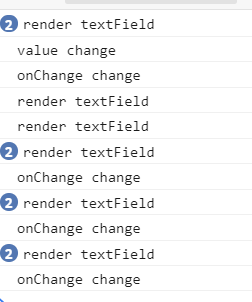
If I only type one character you can see that the the first one only render once(this PR), but the second one render 10 times
image
image

@boydc2014
Copy link
Contributor

Do you have a data than, how much over rendering is saved by this fix?

If I only type one character you can see that the the first one only render once(this PR), but the second one render 10 times
image
image

So, it's 1/10 render times comparison to previous version. Another question is what else props (other than value & error) would trigger this render, i mean, what you are guarding for?

@lei9444
Copy link
Contributor Author

lei9444 commented Sep 21, 2020

Do you have a data than, how much over rendering is saved by this fix?

If I only type one character you can see that the the first one only render once(this PR), but the second one render 10 times
image
image

So, it's 1/10 render times comparison to previous version. Another question is what else props (other than value & error) would trigger this render, i mean, what you are guarding for?

The default behavior is to re-render every prop change. we can check some props value and add them to the shouldComponentUpdate to avoid over rendering.

@boydc2014
Copy link
Contributor

This branch seems to have a bug that, the updates in one text field will appear in another textField.

Repro step

  • create a setProperty action
  • update property field
  • update value field
  • clean value field, then you will see property filed also gets cleared

@boydc2014 boydc2014 changed the title fix: Typing too fast in composer results in dropped characters. (over rendering) [Do not merge] fix: Typing too fast in composer results in dropped characters. (over rendering) Sep 21, 2020
@boydc2014 boydc2014 changed the title [Do not merge] fix: Typing too fast in composer results in dropped characters. (over rendering) [Do not merge] fix: Typing too fast in composer results in dropped characters. (by solving over rendering) Sep 21, 2020
@lei9444
Copy link
Contributor Author

lei9444 commented Sep 21, 2020

this is not a good approach to avoid re-render by detecting the value change. Because if we want to use some props' value in the onChange, we need to re-create the function by react or use ref

@lei9444 lei9444 closed this Sep 21, 2020
@lei9444 lei9444 deleted the memotext branch February 1, 2021 02:08
Sign up for free to subscribe to this conversation on GitHub. Already have an account? Sign in.

Labels

None yet

Projects

None yet

Development

Successfully merging this pull request may close these issues.

Typing too fast in composer results in dropped characters

3 participants