Skip to content

Allow users to select time format for UI rendering#9042

Merged
bramkragten merged 16 commits intohome-assistant:devfrom
spacegaier:time-format-selection
May 20, 2021
Merged

Allow users to select time format for UI rendering#9042
bramkragten merged 16 commits intohome-assistant:devfrom
spacegaier:time-format-selection

Conversation

@spacegaier
Copy link
Copy Markdown
Member

@spacegaier spacegaier commented Apr 29, 2021

Breaking change

Proposed change

Allow users to select the time format used by the frontend for rendering. Works quite similar to the newly introduced number formatting.

Possible selection:

  • Auto (use language setting)
  • Use system locale
  • 12 hours (AM/PM)
  • 24 hours

image

Type of change

  • Dependency upgrade
  • Bugfix (non-breaking change which fixes an issue)
  • New feature (thank you!)
  • Breaking change (fix/feature causing existing functionality to break)
  • Code quality improvements to existing code or addition of tests

Example configuration

Additional information

  • This PR fixes or closes issue: fixes #
  • This PR is related to issue or discussion:
  • Link to documentation pull request:

Checklist

  • The code change is tested and works locally.
  • There is no commented out code in this PR.
  • Tests have been added to verify that the new code works.

If user exposed functionality or configuration variables are added/changed:

const twoLine = value.slice(value.length - 2) !== "89"; // Display explicit number formats on one line
return html`
<paper-item .format=${format}>
<paper-item .format=${format} .label=${value}>
Copy link
Copy Markdown
Member Author

Choose a reason for hiding this comment

The reason will be displayed to describe this comment to others. Learn more.

Without it, the label was both the format name and the example value combined => once you selected a short format such as "None", the selected dropdown item actually also showed the formatted number example as well. Now only the format name itself is the label.

@bramkragten
Copy link
Copy Markdown
Member

bramkragten commented May 1, 2021

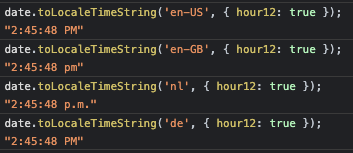
Side note:

This is weird... Is that correct and what we want?
image

Or do we want to do the same as we did for number formatting, setting the language based on the user settings?

@spacegaier
Copy link
Copy Markdown
Member Author

Side note:

This is weird... Is that correct and what we want?

Or do we want to do the same as we did for number formatting, setting the language based on the user settings?

That is really interesting. Google and MS style guides state to use AM and PM (as does Apple in their data picker) whereas many journalistic style guides say "a.m." and "p.m." (but they apply to written text, not to software, so I regard Google, MS, etc. higher here).
Also "AM" and "PM" looks cleaner to me plus is the shortest variant = good for mobile. That is also what most people are used to in software in terms of time pickers.
=> Using that globally for all languages once 12 hour format is selected makes sense to me.

fecha allows overwriting the spelling (but default is already "AM" and "PM").

Number format: There we can easily override, but for time format we do need the original language, e.g. for formatTimeWeekday() since that controls the weekday language, so we cannot just override that to "en-US". We might have to do some manual string manipulations after toLocaleTimeString()?

Also just noted: Not sure if our current logic with fecha would correctly translate the weekdays, since it does not get the language passed on.

@bramkragten
Copy link
Copy Markdown
Member

bramkragten commented May 3, 2021

We should check if we still need fecha, what browsers don't support toLocaleDateString with options nowadays?

@spacegaier
Copy link
Copy Markdown
Member Author

toLocaleDateString

According to MDN all browsers support options now: https://developer.mozilla.org/en-US/docs/Web/JavaScript/Reference/Global_Objects/Date/toLocaleDateString#browser_compatibility

@bramkragten
Copy link
Copy Markdown
Member

We should check what happens on iOS 9, if you get an error, or just a not so nicely formatted date. If the latter, we can drop it.

@spacegaier
Copy link
Copy Markdown
Member Author

We should check what happens on iOS 9, if you get an error, or just a not so nicely formatted date. If the latter, we can drop it.

Given that I do not own any iOS devices, someone else needs to execute that check :) .

@kukulich
Copy link
Copy Markdown
Contributor

kukulich commented May 8, 2021

iOS 9 is already almost dead, is it?

https://caniuse.com/date-tolocaledatestring

@bramkragten
Copy link
Copy Markdown
Member

iOS 9 is already almost dead, is it?

caniuse.com/date-tolocaledatestring

Yes, it is, but a lot of users use an old tablet I think as a dashboard. Not something we should care about too much, that's why I asked if it broke it completely or just didn't look so nice 😃

@bramkragten bramkragten merged commit 70a1edd into home-assistant:dev May 20, 2021
@github-actions github-actions bot locked and limited conversation to collaborators May 21, 2021
Sign up for free to subscribe to this conversation on GitHub. Already have an account? Sign in.

Projects

None yet

Development

Successfully merging this pull request may close these issues.

4 participants