Skip to content

Fix light card#4257

Merged
bramkragten merged 4 commits intodevfrom
fix-light-card
Nov 21, 2019
Merged

Fix light card#4257
bramkragten merged 4 commits intodevfrom
fix-light-card

Conversation

@bramkragten
Copy link
Copy Markdown
Member

@bramkragten bramkragten commented Nov 21, 2019

Fixes #4251
Fixes #4256

? html`
<round-slider
min="1"
min="0"
Copy link
Copy Markdown
Contributor

Choose a reason for hiding this comment

The reason will be displayed to describe this comment to others. Learn more.

This changes the function of the slider.
Now sliding to the bottom will turn the light off as opposed to setting it to minimum brightness.
This results in the handle disappearing, which might be confusing.

Copy link
Copy Markdown
Member Author

Choose a reason for hiding this comment

The reason will be displayed to describe this comment to others. Learn more.

This fixes the handle disappearing, but yeah it does turn the light off when sliding all the way down. I think I prefer it this way. Do we have more options? Old behaviour was not turning off but still showing the handle?

Copy link
Copy Markdown
Contributor

Choose a reason for hiding this comment

The reason will be displayed to describe this comment to others. Learn more.

Min was 1 with the old slider too. https://github.com/home-assistant/home-assistant-polymer/pull/3634/files#diff-f2231026bfc2c43209404df9b7bbb679L35

It's probably better this way. I just didn't want it to slide by without comment.

Copy link
Copy Markdown
Member Author

Choose a reason for hiding this comment

The reason will be displayed to describe this comment to others. Learn more.

But in the old version the handle did stay, is that something that was changed in round-slider?

Copy link
Copy Markdown
Contributor

Choose a reason for hiding this comment

The reason will be displayed to describe this comment to others. Learn more.

Probably. The slider is disabled if the value is outside of the range.
Maybe the old one drew it outside the bar, or just clamped it to the min-max range?

Copy link
Copy Markdown
Member

Choose a reason for hiding this comment

The reason will be displayed to describe this comment to others. Learn more.

I'm not a fan of slider turning off the light. Getting to 1% brightness is going to take skill now

Copy link
Copy Markdown
Member Author

Choose a reason for hiding this comment

The reason will be displayed to describe this comment to others. Learn more.

I suggest to make this change now, so we have the handle back when the light is off, and check if we can get the old behaviour of round slider back.

position: absolute;
width: 70%;
height: 70%;
max-height: calc(100% - 40px);
Copy link
Copy Markdown
Contributor

Choose a reason for hiding this comment

The reason will be displayed to describe this comment to others. Learn more.

Does this work with icons of different aspect ratios?

Copy link
Copy Markdown
Member Author

Choose a reason for hiding this comment

The reason will be displayed to describe this comment to others. Learn more.

Icons are always square

@thomasloven
Copy link
Copy Markdown
Contributor

thomasloven commented Nov 21, 2019

I'm not sure how it behaved before, but does the height of the card change between lights that support vs. don't support brightness?
I.e. will it look weird if you have two of them next to each other in a horizontal stack?

Edit: #4256 shows how it behaved before... whatever it does now is better.

@bramkragten
Copy link
Copy Markdown
Member Author

bramkragten commented Nov 21, 2019

I'm not sure how it behaved before, but does the height of the card change between lights that support vs. don't support brightness?
I.e. will it look weird if you have two of them next to each other in a horizontal stack?

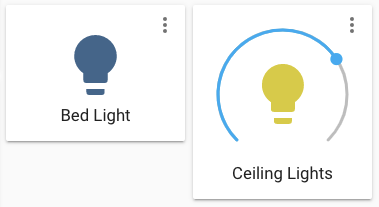
Mmm yeah, it now looks like an entity button card when it doesn't support brightness...

image

@bramkragten bramkragten mentioned this pull request Nov 21, 2019
2 tasks
@bramkragten bramkragten merged commit 85ca73d into dev Nov 21, 2019
@delete-merged-branch delete-merged-branch bot deleted the fix-light-card branch November 21, 2019 14:18
bramkragten added a commit that referenced this pull request Nov 21, 2019
* Fix light card

* Remove unused class

* Fix for when entity is not available

* Fix active state
@homeassistanthomegear
Copy link
Copy Markdown

homeassistanthomegear commented Dec 12, 2019

Are there any plans to bring back the look of pre 102 which renders all light cards the same size, even if they have dimming capabilities? Now it look quite ugly if one mixes Dimmable and non-dimmable lights in a horizontal stack.

I'm not sure how it behaved before, but does the height of the card change between lights that support vs. don't support brightness?
I.e. will it look weird if you have two of them next to each other in a horizontal stack?

Mmm yeah, it now looks like an entity button card when it doesn't support brightness...

image

@thomasloven
Copy link
Copy Markdown
Contributor

Please open an Issue and refer to this PR instead.

@spacegaier spacegaier mentioned this pull request Oct 19, 2020
9 tasks
@github-actions github-actions bot locked and limited conversation to collaborators Jul 6, 2022
Sign up for free to subscribe to this conversation on GitHub. Already have an account? Sign in.

Projects

None yet

Development

Successfully merging this pull request may close these issues.

Light card broken Light card icon and slider

5 participants