Skip to content

Allow user selection of text in Lovelace#3605

Merged
bramkragten merged 4 commits into
home-assistant:devfrom
iantrich:lovelace-copy-text
Oct 2, 2019
Merged

Allow user selection of text in Lovelace#3605
bramkragten merged 4 commits into
home-assistant:devfrom
iantrich:lovelace-copy-text

Conversation

@iantrich
Copy link
Copy Markdown
Member

@iantrich iantrich commented Sep 4, 2019

Closes #2110

@iantrich iantrich self-assigned this Sep 4, 2019
@balloob
Copy link
Copy Markdown
Member

balloob commented Sep 4, 2019

The reason we have this is because on mobile, tapping text will (would?) select it.

@iantrich
Copy link
Copy Markdown
Member Author

iantrich commented Sep 4, 2019

@balloob tap and hold selects text. Tapping is not causing any text to be selected, on iOS at least

@balloob
Copy link
Copy Markdown
Member

balloob commented Sep 4, 2019

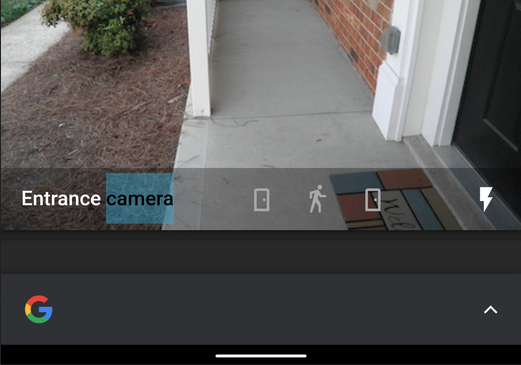
I can still reproduce this on Chrome on Android. Go to the third demo at https://deploy-preview-3605--home-assistant-demo.netlify.com/ (demo based off this PR), tap on the entrance camera label

image

Firefox on Android is fine.

@iantrich
Copy link
Copy Markdown
Member Author

iantrich commented Sep 4, 2019

Silk on Fire tablets is fine as well...well that's annoying, Chrome

@balloob
Copy link
Copy Markdown
Member

balloob commented Sep 4, 2019

It's like Chrome wants us to search the web, as if they have some way of making money with that.

@iantrich
Copy link
Copy Markdown
Member Author

iantrich commented Sep 4, 2019

@balloob if you turn off "Tap to Search" in Android Chrome, it stops this behavior.

There are a few other options to pursue it looks like: https://developers.google.com/web/updates/2015/10/tap-to-search

@balloob
Copy link
Copy Markdown
Member

balloob commented Sep 4, 2019

Well we can't expect users to make changes to their browser settings. We actually do use the solution 3 to make it non selectable.

@iantrich
Copy link
Copy Markdown
Member Author

iantrich commented Sep 4, 2019

I wasn't trying to imply that users should, I was just highlighting why it is happening. Solution 3 is too broad and has this negative effect. We'll see how others can be applied.

This appears to work locally, but pushing it up to try on the demo to be sure
Comment thread src/panels/lovelace/hui-root.ts Outdated
@balloob
Copy link
Copy Markdown
Member

balloob commented Sep 6, 2019

We could check if it's Chrome on Android and only apply it then?

https://developer.chrome.com/multidevice/user-agent#chrome_for_android_user_agent

@iantrich
Copy link
Copy Markdown
Member Author

iantrich commented Sep 6, 2019

It is only Androir Chrome, for now at least.

@iantrich
Copy link
Copy Markdown
Member Author

@balloob so in hui-root, in firstUpdated check the user agent and if it matches Android Chrome, apply the no-select styles to :host? I'm not quite sure how to apply a classmap to :host, however...?

@balloob
Copy link
Copy Markdown
Member

balloob commented Sep 25, 2019

Yeah, that could work. You can do this.classList.toggle("disable-text-select", true)

@iantrich
Copy link
Copy Markdown
Member Author

iantrich commented Oct 1, 2019

@balloob so I have it working to toggle the class for Android Chrome, but the user-select options are apparently not being applied. Not sure what I'm missing

Comment thread src/panels/lovelace/hui-root.ts Outdated
@bramkragten bramkragten merged commit 76d3218 into home-assistant:dev Oct 2, 2019
@bramkragten bramkragten mentioned this pull request Oct 2, 2019
@iantrich iantrich deleted the lovelace-copy-text branch October 30, 2019 03:19
@github-actions github-actions Bot locked and limited conversation to collaborators Jul 6, 2022
Sign up for free to subscribe to this conversation on GitHub. Already have an account? Sign in.

Projects

None yet

Development

Successfully merging this pull request may close these issues.

text content is not selectable for copy

4 participants