Skip to content

New Card: Shopping List#1970

Merged
balloob merged 7 commits intohome-assistant:devfrom
iantrich:shopping
Nov 6, 2018
Merged

New Card: Shopping List#1970
balloob merged 7 commits intohome-assistant:devfrom
iantrich:shopping

Conversation

@iantrich
Copy link
Copy Markdown
Member

@iantrich iantrich commented Nov 3, 2018

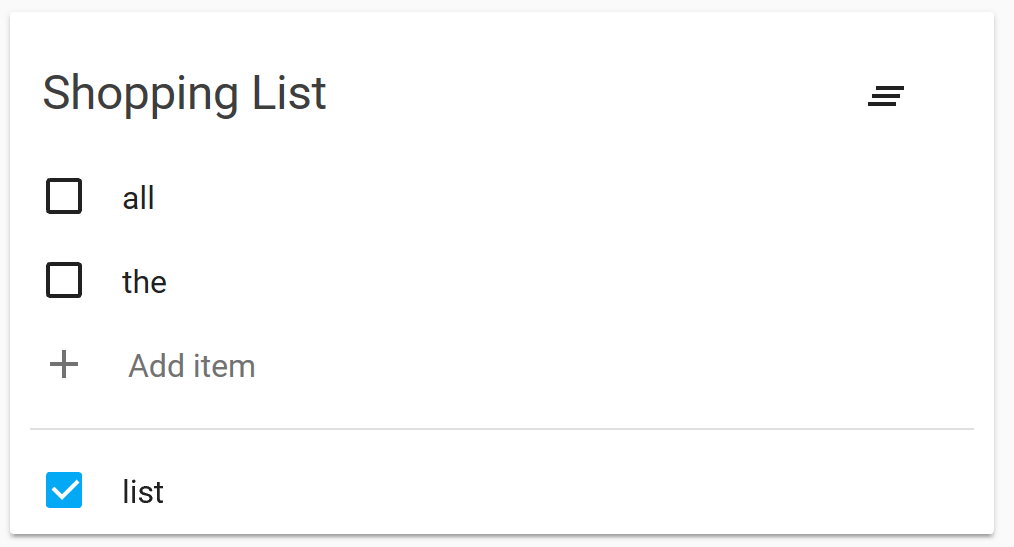
Following features:

  • Add item
  • Edit item
  • Complete item
  • Clear completed items

shopping-list

Following features:
- Add item
- Edit item
- Complete item
- Clear items
@zsarnett
Copy link
Copy Markdown
Contributor

zsarnett commented Nov 3, 2018

Not sure I like Clear completed I think Clear Checked would be a better phrasing. If its a shopping list or just a list and not actions to do then completed doesn't make sense.

I also think a notification-clear-all icon at the top for this action would be better personally.

class HuiShoppingListCard extends hassLocalizeLitMixin(LitElement)
implements LovelaceCard {
public hass?: HomeAssistant;
protected _config?: Config;
Copy link
Copy Markdown
Contributor

Choose a reason for hiding this comment

The reason will be displayed to describe this comment to others. Learn more.

Should be private,

@iantrich
Copy link
Copy Markdown
Member Author

iantrich commented Nov 4, 2018

Not sure I like Clear completed I think Clear Checked would be a better phrasing. If its a shopping list or just a list and not actions to do then completed doesn't make sense.

I also think a notification-clear-all icon at the top for this action would be better personally.

@zsarnett

  • Added an icon to top right to replace complete button at bottom
  • Updated tooltip text to 'Clear checked items'
  • Aligned checkboxes with title
  • 'Clear checked' icon on top right
    • Placement feels off. Currently lined up with bottom of title text. There is also the issue of how this should look if there is no title defined. Currently with how I'm placing it, it would be off the card, but even compoensated for, it could collide with a row unless I add more padding to the top when there is no title. Or should I just require a title for the list?

image

@zsarnett
Copy link
Copy Markdown
Contributor

zsarnett commented Nov 4, 2018

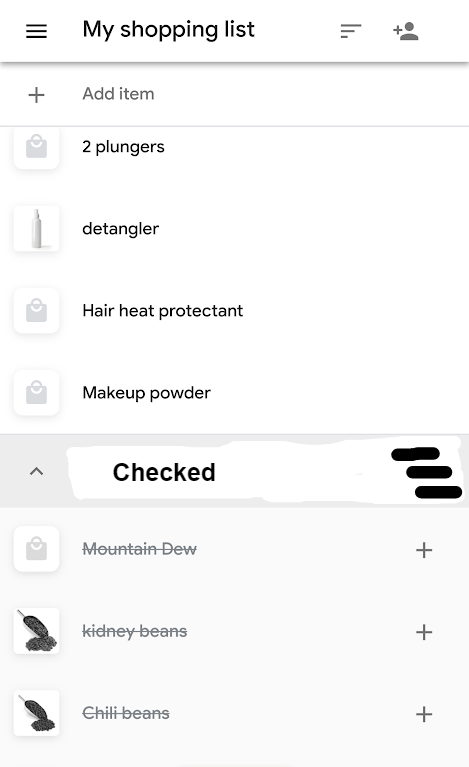
What about something like this
example

Adding the second headar (smaller) with the icon next to that

name,
});

export const clearItems = (hass: HomeAssistant): Promise<void> =>
Copy link
Copy Markdown
Member

@balloob balloob Nov 4, 2018

Choose a reason for hiding this comment

The reason will be displayed to describe this comment to others. Learn more.

clearItems -> clearCompletedItems

public connectedCallback(): void {
super.connectedCallback();

if (this.hass) {
Copy link
Copy Markdown
Member

Choose a reason for hiding this comment

The reason will be displayed to describe this comment to others. Learn more.

So since you have this check, it is important that in case we get connected to the DOM and then get hass, we recover from that?

super.connectedCallback();

if (this.hass) {
this.hass.connection
Copy link
Copy Markdown
Member

Choose a reason for hiding this comment

The reason will be displayed to describe this comment to others. Learn more.

Make this this._unsubEvents = this.hass.connection.subscribeEvents(…) and then in disconnected do this:

if (this._unsubEvents) {
  this._unsubEvents.then(unsub => unsub());
}

That way, if the shopping card disconnects before the subscription is in place, we still unsubscribe.

<ha-card .header="${this._config.title}">
<ha-icon
id="clear"
icon="hass:notification-clear-all"
Copy link
Copy Markdown
Member

Choose a reason for hiding this comment

The reason will be displayed to describe this comment to others. Learn more.

.icon ?

${repeat(
this._items!,
(item) =>
!item.complete
Copy link
Copy Markdown
Member

Choose a reason for hiding this comment

The reason will be displayed to describe this comment to others. Learn more.

Just filter before passing it to the render function: this._items.filter(item => !item.complete)

Also add an identification function to repeat as 2nd arg: item => item.id

${repeat(
this._items!,
(item) =>
item.complete
Copy link
Copy Markdown
Member

Choose a reason for hiding this comment

The reason will be displayed to describe this comment to others. Learn more.

use filter and add identify func.

}

private _addItem(ev): void {
if (this.shadowRoot!.querySelector("#addBox")) {
Copy link
Copy Markdown
Member

Choose a reason for hiding this comment

The reason will be displayed to describe this comment to others. Learn more.

Don't ever write IFs that span whole or most of a function. Convert those to a guard clause:

const addBox = this.shadowRoot!.querySelector("#addBox");

if (!addBox) { return; }

"script": {
"execute": "Execute"
},
"shopping-list": {
Copy link
Copy Markdown
Member

Choose a reason for hiding this comment

The reason will be displayed to describe this comment to others. Learn more.

We should have a Lovelace section in the translation files.

Addressed review comments and scaled this back to just get a simple shopping list card out there and we can discuss/debate how best to add the additional pieces with smaller PRs
@zsarnett
Copy link
Copy Markdown
Contributor

zsarnett commented Nov 5, 2018

I don't think we should limit this card to shopping List. I think List Card may be a better name for all around use

@iantrich
Copy link
Copy Markdown
Member Author

iantrich commented Nov 5, 2018

I don't think we should limit this card to shopping List. I think List Card may be a better name for all around use

The component is 'Shopping List'. And I already made a list-card :)
https://github.com/custom-cards/list-card

@zsarnett
Copy link
Copy Markdown
Contributor

zsarnett commented Nov 5, 2018

The component is 'Shopping List'. And I already made a list-card :)
https://github.com/custom-cards/list-card

Ahh Gotcha. Fair enough.

@iantrich
Copy link
Copy Markdown
Member Author

iantrich commented Nov 5, 2018

The component is 'Shopping List'. And I already made a list-card :)
https://github.com/custom-cards/list-card

Ahh Gotcha. Fair enough.

In the future I plan to update the shopping list component to support multiple lists and would probably propose a renaming, but for MVP, I think this fits

this._hass = hass;

if (!this._unsubEvents) {
this.connectedCallback();
Copy link
Copy Markdown
Member

Choose a reason for hiding this comment

The reason will be displayed to describe this comment to others. Learn more.

This is dangerous, this calls all the super connected callbacks too. Extract the subbing of events into a method and call that here.

@ghost ghost assigned balloob Nov 6, 2018
@balloob
Copy link
Copy Markdown
Member

balloob commented Nov 6, 2018

I've removed the calling of connectedCallback inside the hass setter as it had two unintended consequences:

  • we ended up calling connectedCallback of all super classes
  • we ended up subscribing before connected, and then when we got connected, we would subscribe a second time.

If I missed something or broke something, we can fix it in another PR. Yay for dev branch.

@balloob balloob merged commit 6432207 into home-assistant:dev Nov 6, 2018
@ghost ghost removed the in progress label Nov 6, 2018
@iantrich iantrich deleted the shopping branch November 16, 2018 19:17
@github-actions github-actions bot locked and limited conversation to collaborators Jul 7, 2022
Sign up for free to subscribe to this conversation on GitHub. Already have an account? Sign in.

Projects

None yet

Development

Successfully merging this pull request may close these issues.

4 participants