Conversation


 ghost
assigned
ghost
assigned


|
What happens if light supports no brightness? |

If it has no brightness its set to 0% or off. The only time it should have no brightness. If the entity they are using has no brightness use the button card :) |
|
Made the Brightness Percentage above Name so that a longer name can be added. |

|
Can you add a demo |
|
https://deploy-preview-1874--home-assistant-lovelace-gallery.netlify.com/#demo-hui-light-card When I click on the slider rail (not the slider knob), it toggles the light. That's not what I would expect. The toggle area of the icon should be limited to the icon only. The slider knob is not centered on the rail: I don't think that we should always show percentage. Maybe we can only show it when dragging as an overlay on the icon? |

|
I see the effect in the gallery |

|
The middle of the icon is not clickable because the brightness label still exists when not in use:
|
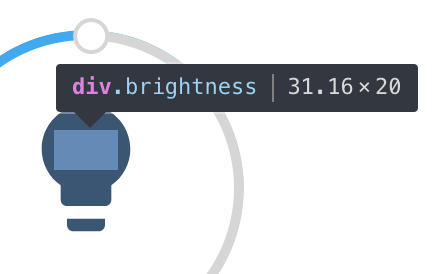
|
In demos, clicking on the rail works: http://roundsliderui.com/demos.html In this implementation, it doesn't. |
| } | ||
|
|
||
| private _hideBrightness() { | ||
| brightnessTimout = setTimeout(() => { |
There was a problem hiding this comment.
You think that it's a good idea to share a timeout between all instances of this element?
There was a problem hiding this comment.
Nope. Meant to make a comment on the best way to do this. This is how it's done for the notification drawer but there is one of those.
There was a problem hiding this comment.
what about an instance variable? this._brightnessTimeout
There was a problem hiding this comment.
I'm always so conflicted when creating properties in LitElement. I would need to set that as private _brightneesTimeout?: Any;
There was a problem hiding this comment.
Never use any. Hover with your mouse over setTimeout, what is the defined returned value?
With TS you have to define the type like you said, then just assign it wherever you want yes.
| return `brightness(${(brightness + 245) / 5}%)`; | ||
| } | ||
|
|
||
| private _computeColor(stateObj) { |
There was a problem hiding this comment.
Can you add a type for light state objects like we have for climate?
There was a problem hiding this comment.
marked as resolved but this state object does not have a type yet. Add types to all functions you define in your class.
| padding-top: 40px; | ||
| font-size: 1.2rem; | ||
| } | ||
| .brightness { |
There was a problem hiding this comment.
The text is not always very visible as the icon color, which is the background of brightness, changes.
There was a problem hiding this comment.
Added a stroke to it but not sure how material design esque this is
There was a problem hiding this comment.
it's a good start, we can iterate on it.
|
@balloob clicking the slider rail works in the demo of round slider because they aren't using a custom overlay for the tool tip. Because we are the overlay is above the rail and can't make it a higher z index with out overlaying a white background on our tool tip. At least when I try to change the zindex of the rail that's what I get |

|
Just a small note: Could not find a related PR on the documentation repository. |

| @@ -0,0 +1,52 @@ | |||
| #!/usr/bin/env node | |||
| implements LovelaceCard { | ||
| public hass?: HomeAssistant; | ||
| private _config?: Config; | ||
| private brightnessTimout?: any; |
There was a problem hiding this comment.
let's prefix names of private vars with _. I know it's "double", but we're also interacting with JS and they don't know the concept of private.
There was a problem hiding this comment.
If you don't know the type, you can hover with your mouse on the function (if it's a built-in), otherwise use unknown. With unknown, you are not allowed to do any operation besides passing it on or comparing it, until you know the type. With any, anything goes and we're back to caveman untyped world.
There was a problem hiding this comment.
Gotcha. I started to do that that but it was a NodeJS Type so I left it off. I added it in because it was accepted with no errors
| private _setBrightness(e) { | ||
| this.hass!.callService("light", "turn_on", { | ||
| entity_id: this._config!.entity, | ||
| brightness_pct: e.value, |
There was a problem hiding this comment.
Now I know why the gallery is flaky. We don't have support for brightness_pct in our demo hass for the gallery.
There was a problem hiding this comment.
How can I add that?
There was a problem hiding this comment.
You need to update the logic here https://github.com/home-assistant/home-assistant-polymer/blob/dev/gallery/src/data/entity.js#L56-L65

| implements LovelaceCard { | ||
| public hass?: HomeAssistant; | ||
| private _config?: Config; | ||
| private _brightnessTimout?: NodeJS.Timer; |
There was a problem hiding this comment.
We're running in a browser, not under NodeJS. Also:

number
There was a problem hiding this comment.
When changing to number I am getting Type Time is not assignable to Type Number here: this._brightnessTimout = setTimeout(() => {
I think Node is messing with things or something.. Because researching setTimeout shows it returns a "unique" number that is used when clearing the timeout
There was a problem hiding this comment.
Fix this by using window.setTimeout so node doesnt overload
 balloob
left a comment
balloob
left a comment
balloob
left a comment
There was a problem hiding this comment.
ok to merge when fixing type of setTimeout.


5 participants


I put this together while not knowing what to do with a websocket call
Configuration Variables
lightlight.my_lightExample