Skip to content

Add rflink binary_sensor allon and alloff commands#32411

Merged
emontnemery merged 4 commits intohome-assistant:devfrom
tubalainen:patch-1
Apr 17, 2020
Merged

Add rflink binary_sensor allon and alloff commands#32411
emontnemery merged 4 commits intohome-assistant:devfrom
tubalainen:patch-1

Conversation

@tubalainen
Copy link
Copy Markdown
Contributor

@tubalainen tubalainen commented Mar 2, 2020

Breaking change

None

Proposed change

Added the rflink group command "allon" and "alloff" to the binary sensor component.
Some devices (like buttons) seems to send "allon" rather than just on and also never sends an "off".

Type of change

  • Dependency upgrade
  • Bugfix (non-breaking change which fixes an issue)
  • New integration (thank you!)
  • New feature (which adds functionality to an existing integration)
  • Breaking change (fix/feature causing existing functionality to break)
  • Code quality improvements to existing code or addition of tests

Example entry for configuration.yaml:

No changes to the config

# Example configuration.yaml
N/A

Additional information

N/A

Checklist

  • The code change is tested and works locally.
  • Local tests pass. Your PR cannot be merged unless tests pass
  • There is no commented out code in this PR.
  • I have followed the development checklist
  • The code has been formatted using Black (black --fast homeassistant tests)
  • Tests have been added to verify that the new code works.

If user exposed functionality or configuration variables are added/changed:

If the code communicates with devices, web services, or third-party tools:

  • The manifest file has all fields filled out correctly.
    Updated and included derived files by running: python3 -m script.hassfest.
  • New or updated dependencies have been added to requirements_all.txt.
    Updated by running python3 -m script.gen_requirements_all.
  • Untested files have been added to .coveragerc.

The integration reached or maintains the following Integration Quality Scale:

  • No score or internal
  • 🥈 Silver
  • 🥇 Gold
  • 🏆 Platinum

@homeassistant
Copy link
Copy Markdown
Contributor

Hi @tubalainen,

It seems you haven't yet signed a CLA. Please do so here.

Once you do that we will be able to review and accept this pull request.

Thanks!

@tubalainen
Copy link
Copy Markdown
Contributor Author

I have no idea what I messed up. Can someone please help me rectify my mistakes. The code works like a charm but the checks fails.... 😨

Comment thread homeassistant/components/rflink/binary_sensor.py Outdated
@MartinHjelmare MartinHjelmare changed the title rflink-binary_sensor - Added the "allon" and "alloff" commands (cmd) to the binary_sensor Add rflink binary_sensor allon and alloff commands Mar 3, 2020
@frenck
Copy link
Copy Markdown
Member

frenck commented Mar 4, 2020

We use Black to format our code.
Please run black --fast homeassistant tests on the root of the project.

@tubalainen
Copy link
Copy Markdown
Contributor Author

We use Black to format our code.
Please run black --fast homeassistant tests on the root of the project.

Sorry, I am a newbie at this. I am running the docker core container... Am I missing something?
Should I do a git clone and run it in that folder outside of the container?

root@docker:~# docker exec -it hass bash
bash-5.0# black --fast homeassistant tests
bash: black: command not found
bash-5.0# find / -name black
/config/tensorflow/models/research/gan/stargan_estimator/testdata/celeba/black
bash-5.0#

@frenck
Copy link
Copy Markdown
Member

frenck commented Mar 4, 2020

You need to set up a development environment in order to develop on the Home Assistant Core: https://developers.home-assistant.io/docs/development_environment

@tubalainen
Copy link
Copy Markdown
Contributor Author

You need to set up a development environment in order to develop on the Home Assistant Core: https://developers.home-assistant.io/docs/development_environment

Check!

I am running into problems straight away, they might be related to the name change (core)?
1.) The reference to the cloning and the .git´s should be referring to core.git and not home-assitant.git
2.) Then when running script/setup it also fails with the following errors (using python 3.7.6)

I can make a PR for the documentation reference to core instead of home-assistant.git (fix problem 1)... But I simply cannot wrestle down 2.). :/

Traceback (most recent call last):
  File "/root/core/venv/bin/pre-commit", line 6, in <module>
    from pre_commit.main import main
  File "/root/core/venv/lib/python3.7/site-packages/pre_commit/main.py", line 13, in <module>
    from pre_commit.commands.autoupdate import autoupdate
  File "/root/core/venv/lib/python3.7/site-packages/pre_commit/commands/autoupdate.py", line 14, in <module>
    from pre_commit.clientlib import InvalidManifestError
  File "/root/core/venv/lib/python3.7/site-packages/pre_commit/clientlib.py", line 15, in <module>
    from pre_commit.error_handler import FatalError
  File "/root/core/venv/lib/python3.7/site-packages/pre_commit/error_handler.py", line 10, in <module>
    from pre_commit.store import Store
  File "/root/core/venv/lib/python3.7/site-packages/pre_commit/store.py", line 4, in <module>
    import sqlite3
  File "/usr/local/lib/python3.7/sqlite3/__init__.py", line 23, in <module>
    from sqlite3.dbapi2 import *
  File "/usr/local/lib/python3.7/sqlite3/dbapi2.py", line 27, in <module>
    from _sqlite3 import *
ModuleNotFoundError: No module named '_sqlite3'

@springstan springstan added integration: rflink small-pr PRs with less than 30 lines. labels Mar 5, 2020
@stale
Copy link
Copy Markdown

stale Bot commented Apr 3, 2020

There hasn't been any activity on this pull request recently. This pull request has been automatically marked as stale because of that and will be closed if no further activity occurs within 7 days.
Thank you for your contributions.

@stale stale Bot added stale and removed stale labels Apr 3, 2020
@tubalainen
Copy link
Copy Markdown
Contributor Author

@fredrike please help a confused friend to get this one through its paces willya? :) Tack! <3

@MartinHjelmare
Copy link
Copy Markdown
Member

@emontnemery Can you review?

@emontnemery
Copy link
Copy Markdown
Contributor

It looks good, but a test should be added.
@tubalainen If you have trouble getting the environment up, I can take it from here if you don't mind?

@javicalle
Copy link
Copy Markdown
Contributor

javicalle commented Apr 16, 2020

I'm sorry to be the discordant voice, but in my opinion, this should not be the way to go.
Let me explain.

The binary_sensor device should model the behavior of 'binary sensors'.
It is not clear to me whether this change is intended to model a switch device as if it were a binary_sensor. If this is the case, I think that it should not be implemented.

If it is really a case where a binary_sensor is sending allon signals, I would agree to support it, but I think that is not the case.

I'm not saying that it can not be useful (I'm sure it is!!!), but will be open season for more similar cases. Why not for commands UP or DOWN?

At the time, I was thinking in a solution similar to light.switch. This would be a transversal solution to any platform that would allow to model 'any' switch as a binary sensor in a simple way.

I say this out of respect for the work done and from my personal opinion. I hope you do not take my discrepancy badly.

@emontnemery
Copy link
Copy Markdown
Contributor

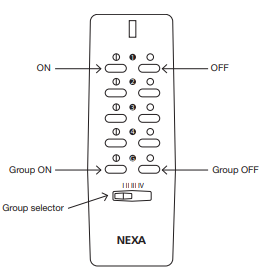
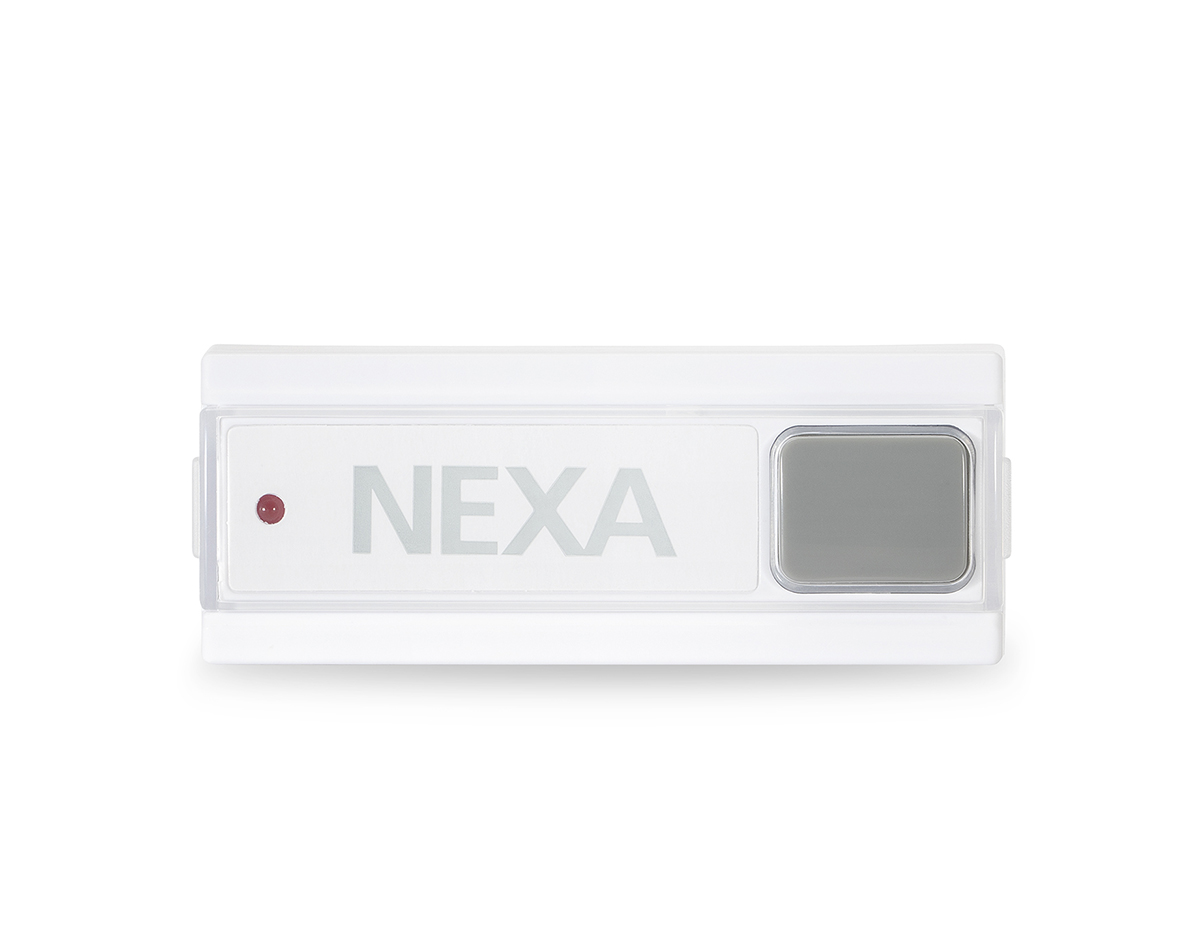
@javicalle I think this PR is OK, rflink binary_sensor already has to be added manually since all non sensor devices are assumed to be lights otherwise. If it's for something like in the below image, and there is no switch paired with the remote, binary_sensor is reasonable.
For binary_sensor.rfxtrx this seems to possible already by setting command_on / command_off.

image

@tubalainen maybe you can confirm what device you want to use this with?

@javicalle
Copy link
Copy Markdown
Contributor

Ok, if there are no objections, that's fine with me. Really.

Just to be clear (sorry English is not first language):
Binary sensors (the physical device) do not react to a remote control, so they do not receive commands. I'm not sure why a remote control (with group commands) is a valid example here, it is not about modeling a switch behavior, but a binary_sensor.

My impression is that here it's wanted to capture the events of a remote and create a binary_sensor that 'saves' the state in HA. In that case, the example of the light.switch seems to me a more elegant and transversal solution for any platform.

As I said at the beginning, for my part there is no problem with the PR, I just want to know another point of view on the subject.

Thank you very much for your comments, I appreciate it.

@tubalainen
Copy link
Copy Markdown
Contributor Author

tubalainen commented Apr 16, 2020

--- EDIT ---

@emontnemery yes please. Take over. <3 I have no idea what is causing the python dependencies in the dev env. to act up and I am also somewhat "out of my comfort zone" here. :) So pretty please with sugar on top, please help.

EDIT -- No, its not the Nexa WBT-912 that has the "allon/alloff" issue. I blame it on insomnia and the toddler years of my kids ;)

It is the Nexa LMLT-711 that sends the "allon/alloff" command for some reason. It is similar to the "group buttons" on the remote in the picture above.

Thanks for your help and also thanks to @javicalle for your point of view.

image

@javicalle
Copy link
Copy Markdown
Contributor

@tubalainen I have reread the issue that you had opened (#32399) and as I interpret, you really have a binary_sensor device (Ringklocka finentre) which RFLink detects as a NewKaku device sending an allon command:

event of type command: {'id' : 'newkaku_01715cde_0', 'command': 'allon'}

It may be that RFLink does not correctly identify it, but in any case my argument against the PR is no longer valid and I also agree with this PR.

Thank you all for the contributions.

@javicalle
Copy link
Copy Markdown
Contributor

It is the Nexa LMLT-711 that sends the "allon/alloff" command for some reason. It is similar to the "group buttons" on the remote in the picture above.

@tubalainen Is that a doorbell? If so, it is a switch, not a binary_sensor and you are trying to configure a device as something it is not.

I'm back to my initial opinion, the way forward should be to create a switch in HA and not change the behavior of binary_sensor integration.

But that is my personal opinion.

@tubalainen
Copy link
Copy Markdown
Contributor Author

It is the Nexa LMLT-711 that sends the "allon/alloff" command for some reason. It is similar to the "group buttons" on the remote in the picture above.

@tubalainen Is that a doorbell? If so, it is a switch, not a binary_sensor and you are trying to configure a device as something it is not.

I'm back to my initial opinion, the way forward should be to create a switch in HA and not change the behavior of binary_sensor integration.

But that is my personal opinion.

Its a bit of a definition related problem. Deconz, just to name another integration is strugging somewhat with this as well. There all the "remote controls" are named and called Switches. Any s
switches (relays) are lights... :)

A spring loaded switch is not a switch. but should rather send a momentary state such a binary_sensor. ...

Can we please make this PR and maybe start another issue or a thread in the community forum for the more philosophical discussion around what should be a switch, binary_sensor or a light.?

Just a friendly thought :).

Thanks.

@MartinHjelmare
Copy link
Copy Markdown
Member

This is how home assistant defines the categories, and how we want to integrate these devices:

  • A switch has two states and should be able to change state initiated both from home assistant side and device side.
  • A binary sensor has two states and should only be able to change state initiated from the device side.
  • A custom Event is fired for a stateless device like a push button.

@emontnemery
Copy link
Copy Markdown
Contributor

@tubalainen Is that a doorbell? If so, it is a switch, not a binary_sensor.

No, that's not right. A device such as doorbell is best represented as a custom event, i.e. no entity because it doesn't hold a state, but many integrations represent them as binary_sensor nevertheless.
The device in the picture is a 433MHz RF transmitter which is intended to be connected to a wall switch, and is a perfect example of a binary_sensor.

A switch is an actuator, i.e. something which can be controlled, and a less confusing name would have been relay. This is basically the same as a light, but it's ON/OFF only.

@MartinHjelmare Maybe the explanation here could be a little bit more elaborate: https://www.home-assistant.io/integrations/switch

@javicalle
Copy link
Copy Markdown
Contributor

A device such as doorbell is best represented as a custom event, i.e. no entity because it doesn't hold a state, but many integrations represent them as binary_sensor nevertheless.

I see the point.

Another switch can be created in HA to operate against the 'chime' device, but this will not be a representation from the doorbell device.
What it is intended here is to catch the doorbell event, just like the one that a door or presence sensor will trigger.

My apologies for the all the confusion and thank you very much for your patience.

@emontnemery emontnemery merged commit d672eed into home-assistant:dev Apr 17, 2020
@lock lock Bot locked and limited conversation to collaborators Apr 18, 2020
Sign up for free to subscribe to this conversation on GitHub. Already have an account? Sign in.

Labels

Projects

None yet

Development

Successfully merging this pull request may close these issues.

RFLINK binary_sensor - Nexa dingdong/doorbell remote entity not chancing state

7 participants