Skip to content

Feature zwave preset modes#25537

Merged
pvizeli merged 30 commits into
home-assistant:devfrom
Santobert:feature_zwave_preset_modes
Aug 2, 2019
Merged

Feature zwave preset modes#25537
pvizeli merged 30 commits into
home-assistant:devfrom
Santobert:feature_zwave_preset_modes

Conversation

@Santobert
Copy link
Copy Markdown
Member

@Santobert Santobert commented Jul 28, 2019

Breaking Change:

Nothing

Description:

Adds preset modes to the zwave climate integration.
There was an previous PR #25517 that had to be closed because of issues with the CI.

Related issue (if applicable): fixes #25322

Pull request with documentation for home-assistant.io (if applicable): home-assistant/home-assistant.io#<home-assistant.io PR number goes here>

The documentation can stay unchanged

Checklist:

  • The code change is tested and works locally.
  • Local tests pass with tox. Your PR cannot be merged unless tests pass
  • There is no commented out code in this PR.
  • I have followed the development checklist

If user exposed functionality or configuration variables are added/changed:

If the code does not interact with devices:

  • Tests have been added to verify that the new code works.

@ghost
Copy link
Copy Markdown

ghost commented Jul 28, 2019

Hey there @home-assistant/z-wave, mind taking a look at this pull request as its been labeled with a integration (zwave) you are listed as a codeowner for? Thanks!

This is a automatic comment generated by codeowners-mention to help ensure issues and pull requests are seen by the right people.

@Santobert
Copy link
Copy Markdown
Member Author

I'm afrait that there are many preset modes missing. I've added only the modes that are used by my eurotronic spirit z thermostats.

Comment thread homeassistant/components/zwave/climate.py Outdated
@DaveCo1701
Copy link
Copy Markdown

@Santobert , is the attribute hvac_action still functioning properly for you? I just tried out your new code, and everything seems to be working except that hvac_action keeps showing up as the default value of "None".

I've been using this template to see the state: {{ state_attr('climate.downstairs_thermostat_cooling', 'hvac_action') }}. It appeared to be working with the standard/constant hvac_modes in 0.96.5.

@Santobert
Copy link
Copy Markdown
Member Author

Santobert commented Jul 29, 2019

@DaveCo1701 Try it again. Should be working now. The tests should be passing now, too.

Do you miss any preset modes that should be added to the PRESET_MAPPINGS?

@DaveCo1701
Copy link
Copy Markdown

DaveCo1701 commented Jul 29, 2019

Thank you @Santobert, everything appears to be functioning properly with my setup using the updated code.

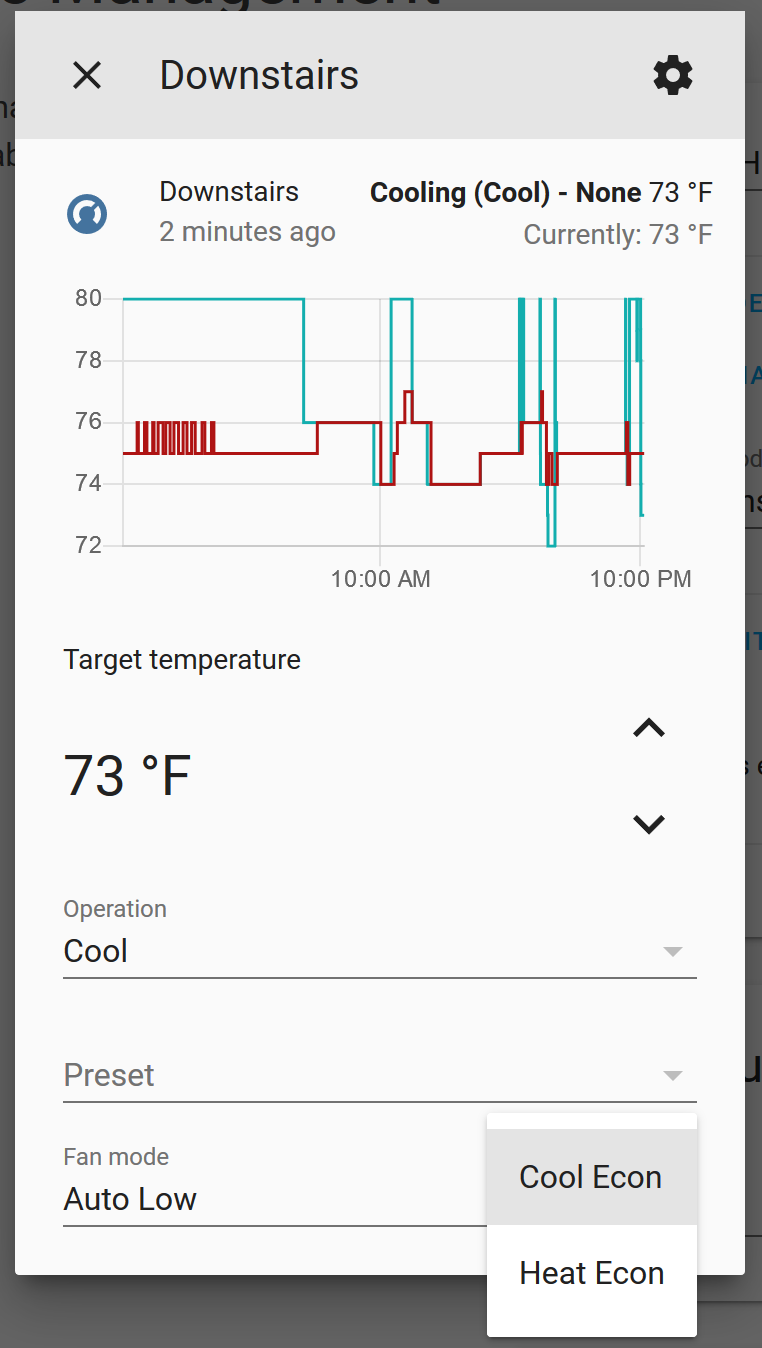
The only two manufacturer specific modes I am using are the "Cool Econ" and "Heat Econ". Both are now showing up automatically; I don't see a need to add them PRESET_MAPPINGS unless there is a benefit I'm unaware of.

image

@Santobert
Copy link
Copy Markdown
Member Author

@DaveCo1701 Awesome
@home-assistant/z-wave the PR is ready to be reviewed now.

Comment thread homeassistant/components/zwave/climate.py Outdated
Comment thread homeassistant/components/climate/const.py Outdated
@Santobert
Copy link
Copy Markdown
Member Author

Santobert commented Jul 31, 2019

The current solution should work. There is a default hvac mode that is generated out of a sorted list and the supported hvac modes. This is necessary because not all devices support HVAC_MODE_HEAT_COOL.

Furthermore you can unset a selected preset mode by setting preset to PRESET_NONE, which activates the default hvac mode.

Hope, I missed nothing :)

@DaveCo1701 can you please test the latest changes one last time?

@turbokongen
Copy link
Copy Markdown
Contributor

turbokongen commented Jul 31, 2019

Just to chime in on the Zwave part of it:
The ThermostatMode commandclass is the operating mode of the thermostat, aka the set operation.
It's defined here in OZW 1.6: https://github.com/OpenZWave/open-zwave/blob/master/cpp/src/command_classes/ThermostatMode.cpp#L94
and in 1.4: https://github.com/OpenZWave/open-zwave/blob/1.4/cpp/src/command_classes/ThermostatMode.cpp#L51-L68
All modes are enumerated.

For the actuall running state of the thermostat there is a seperate command class called ThermostatOperatingState.
These are enumerated here: in 1.6: https://github.com/OpenZWave/open-zwave/blob/master/cpp/src/command_classes/ThermostatOperatingState.cpp#L51-L53
and in 1.4: https://github.com/OpenZWave/open-zwave/blob/1.4/cpp/src/command_classes/ThermostatOperatingState.cpp#L46-L64

Many thermostats only provides the ThermostatMode commandclass and not the ThermostatOperatingState at the same time. This is what's causing the misunderstandings of this.
I have not clearly understood the definition of the hvac_*** states yet, but somebody might connect the lines between my info and the new hvac modes/presets.

@Santobert
Copy link
Copy Markdown
Member Author

Santobert commented Jul 31, 2019

@turbokongen Thank you for explanation. I try to explain my current understanding of all these states:

  • ThermostatMode: This is the current operating mode of the zwave device. Home Assistant splits this into:
    • hvac_mode: this is a small set of climate modes that are very basic and most of the devices support at least a subset of these modes
    • preset_mode: these modes are special operating modes that are more complex and specific over all devices
  • ThermostatOperatingState: These states are mapped to hvac_action in Home Assistant. From this point of view, they have nothing to do with the other modes, since they are read-only.

Am I right?

@DaveCo1701
Copy link
Copy Markdown

@turbokongen Thank you for explanation. I try to explain my current understanding of all these states:

  • ThermostatMode: This is the current operating mode of the zwave device. Home Assistant splits this into:

    • hvac_mode: this is a small set of climate modes that are very basic and most of the devices support at least a subset of these modes
    • preset_mode: these modes are special operating modes that are more complex and specific over all devices
  • ThermostatOperatingState: These states are mapped to hvac_action in Home Assistant. From this point of view, they have nothing to do with the other modes, since they are read-only.

Am I right?

This is my understanding as well.

@DaveCo1701
Copy link
Copy Markdown

The current solution should work. There is a default hvac mode that is generated out of a sorted list and the supported hvac modes. This is necessary because not all devices support HVAC_MODE_HEAT_COOL.

Furthermore you can unset a selected preset mode by setting preset to PRESET_NONE, which activates the default hvac mode.

Hope, I missed nothing :)

@DaveCo1701 can you please test the latest changes one last time?

@Santobert , I like the idea you've setup, but it doesn't seem to be switching modes as intended. When selecting an HVAC_MODE, everything works fine. When selecting a preset mode (Heat Econ or Cool Econ in my case), the corresponding HVAC_MODE (Heat or Cool in my case) isn't selected. The thermostat will move to the Heat Econ Mode or Cool Econ Mode, but when PRESET_NONE is selected, it doesn't do anything. The thermostat does not change state and eventually HA shows the previous setting. See attached screenshot videos for how my two thermostats are behaving (Upstairs doesn't have Heat/Cool Mode Enabled, Downstairs has Heat/Cool Mode Enabled).

Screenshot_Videos.zip

@Santobert
Copy link
Copy Markdown
Member Author

Santobert commented Aug 1, 2019

@Santobert , I like the idea you've setup, but it doesn't seem to be switching modes as intended. When selecting an HVAC_MODE, everything works fine. When selecting a preset mode (Heat Econ or Cool Econ in my case), the corresponding HVAC_MODE (Heat or Cool in my case) isn't selected. The thermostat will move to the Heat Econ Mode or Cool Econ Mode, but when PRESET_NONE is selected, it doesn't do anything. The thermostat does not change state and eventually HA shows the previous setting. See attached screenshot videos for how my two thermostats are behaving (Upstairs doesn't have Heat/Cool Mode Enabled, Downstairs has Heat/Cool Mode Enabled).

@DaveCo1701 Thank you. I've made a stupid mistake. Now it works

@DaveCo1701
Copy link
Copy Markdown

@Santobert , just tested again this morning. Selecting PRESET_NONE will change the thermostat over to the listed HVAC_MODE; looks like that is fixed.

When I go to COOL ECON on my thermostat that doesn't have HEAT/COOL, the HVAC_MODE goes to HEAT. When I change the PRESET from COOL ECON to NONE, it switches me into HVAC_MODE HEAT. Is this the expected behavior?

@Santobert
Copy link
Copy Markdown
Member Author

@DaveCo1701 I've assumed there are no devices that are able to cool and to heat but don't support HVAC_MODE_HEAT_COOL. So when Heat/Cool isn't supported I choose the first supported mode out of a sorted list. This list contains HEAT before COOL. I'll think about a solution...

@Santobert
Copy link
Copy Markdown
Member Author

Santobert commented Aug 1, 2019

@DaveCo1701 Should be fixed now. When selecting PRESET_NONE the device should jump to the currently show hvac mode. The currently shown hvac mode is either HVAC_MODE_HEAT if the device supports this and the substring heat is in the selected preset mode, or HVAC_MODE_COOL under the same circumstances. If neither Heat nor Cool matches, it shows the _default_hvac_mode that is selected from the list mentioned above.

@DaveCo1701
Copy link
Copy Markdown

@DaveCo1701 Should be fixed now. When selecting PRESET_NONE the device should jump to the currently show hvac mode. The currently shown hvac mode is either HVAC_MODE_HEAT if the device supports this and the substring heat is in the selected preset mode, or HVAC_MODE_COOL under the same circumstances. If neither Heat nor Cool matches, it shows the _default_hvac_mode that is selected from the list mentioned above.

@Santobert , just tried your updates, it's still functioning the same as it did last night (same as the videos I uploaded)

@Santobert
Copy link
Copy Markdown
Member Author

Santobert commented Aug 2, 2019

@Santobert , just tried your updates, it's still functioning the same as it did last night (same as the videos I uploaded)

Yeah, I should definitely be more awake when I fix bugs. 😒

@pvizeli pvizeli added this to the 0.97.0 milestone Aug 2, 2019
@pvizeli
Copy link
Copy Markdown
Member

pvizeli commented Aug 2, 2019

Let run that on beta 👍 good work

@pvizeli pvizeli merged commit 944cd70 into home-assistant:dev Aug 2, 2019
@Santobert
Copy link
Copy Markdown
Member Author

Santobert commented Aug 2, 2019

@DaveCo1701 Please test this one last time. It should (hopefully) work now. I've added some debugger logs, which should help us, finding possible errors.

@DaveCo1701
Copy link
Copy Markdown

Works great now! Thanks @Santobert

@lock lock Bot locked and limited conversation to collaborators Aug 3, 2019
@Santobert Santobert deleted the feature_zwave_preset_modes branch August 6, 2019 11:18
Sign up for free to subscribe to this conversation on GitHub. Already have an account? Sign in.

Projects

None yet

Development

Successfully merging this pull request may close these issues.

Device-specific hvac modes do not work anymore

6 participants