[Mappings editor] Core#47335
Conversation


 jloleysens
left a comment
jloleysens
left a comment
jloleysens
left a comment
There was a problem hiding this comment.
Overall, happy for this to be merged! Pending a fix of the one regression I ran into.
| const areAllFieldsValidated = fieldsArray.every(field => field.isValidated); | ||
|
|
||
| if (!areAllFieldsValidated) { | ||
| // If *not* all the fiels have been validated, the validity of the form is unknown, thus still "undefined" |
| * The max nested depth allowed for child fields. | ||
| * Above this thresold, the user has to use the JSON editor. | ||
| */ | ||
| export const MAX_DEPTH_DEFAULT_EDITOR = 4; |
There was a problem hiding this comment.
Just curious; how did we arrive at this number?
There was a problem hiding this comment.
This is currently a temporary number. Once we will have the finished UI, we will decide the max depth that is manageable.
| id: '_uniqueId456', | ||
| parentId: '_uniqueId123', | ||
| hasChildFields: false, | ||
| childFieldsName: 'fields', // "text" type have their child fields under "fields" |
There was a problem hiding this comment.
Ok, I think this answers my question about having fields under "text" types.
Is it it necessary to have both hasChildFields and childFieldsName? Could we not just have childFieldsName as an indication of whether a field can have a child?
There was a problem hiding this comment.
Yeah, I thought about it later, or also having the childFields array defined or not. I'll refactor in the next PR.
| const fieldsDefaultValue = defaultValue.properties || {}; | ||
|
|
||
| const renderJsonEditor = () => { | ||
| return <h2>JSON editor</h2>; |
There was a problem hiding this comment.
Should we add a TODO here?
| } | ||
|
|
||
| export const MappingsState = React.memo(({ children, onUpdate, defaultValue }: Props) => { | ||
| const { byId, rootLevelFields, maxNestedDepth } = normalize(defaultValue.fields); |
There was a problem hiding this comment.
This is a very creative solution to the problem of traversing a nested data structure and then putting it back together once it's needed for mappings creation.
An alternate approach could be to have a mechanism for building the components tree and then closing over "parent", "children" and "selector" (i.e., the path to where a field is in the state tree) inside of the DocumentFields structure we are deriving from this. Then each "Add", "Remove" or "Edit" button would "know" where it is in the tree structure because of the order in which the tree structure is built. Not sure if that's clear - just wanted to share the thought.
Great work though! 😄
There was a problem hiding this comment.
Yeah, that was my first version... the problem started when you edited a field name anywhere down the tree. All the paths had to be updated. Unique ids removed all the headaches 😊
| </div> | ||
| {status === 'idle' && canHaveChildFields && isAddFieldBtnDisabled && ( | ||
| <p style={{ fontSize: '12px', margin: '-10px 0 6px', color: '#777' }}> | ||
| You have reached the maximum depth for the mappings editor. Switch to the{' '} |
There was a problem hiding this comment.
I'm guessing i18n.translate is WiP for everything.
Personally, I like the current copy here :).

💔 Build Failed |
💔 Build Failed |
…editor-eui-design

 cjcenizal
added
Feature:Index Management
cjcenizal
added
Feature:Index Management

|
FYI I added the "Index Management" label, because this is where the Mappings Editor will be mostly consumed and I expect we'll be able to find this PR more easily in the future this way. |
💔 Build Failed |


There was a problem hiding this comment.
Woohoo! So great seeing this enter the review phase.
I ran out of time about a third of the way through code review, so I haven't looked at most of the mappings editor code. Don't feel like you need to wait on me for that though.
I reviewed the UX and found a few things which were strange / possibly buggy. I also had some comments around the UI (couldn't help myself) so please track these for when you get around to implementing the UI guidance the design team has provided us.
Possible bugs
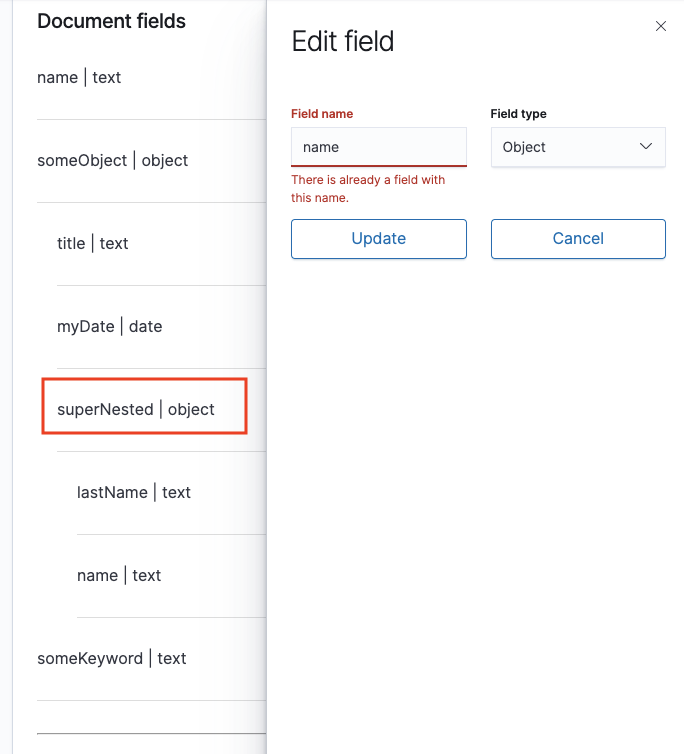
Name collision false positive
I got into a state where I edited a field and tried to change its name. The field complained that the name was already taken but the field in question had no siblings with that name. I think we need to check the logic that performances this validation and ensure it's only checking sibling fields, not all fields or fields from a different branch in the mappings object. In the screenshot below, I'm editing the superNested field.
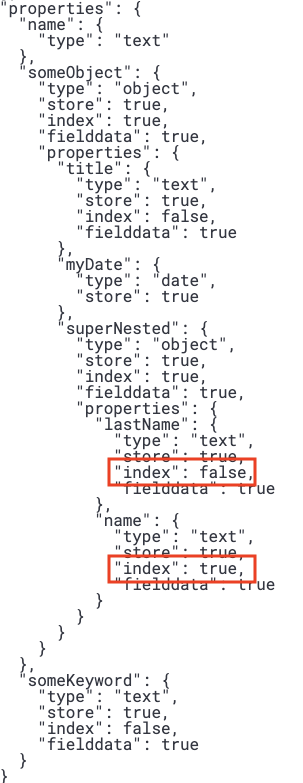
Variation between fields in non-editable properties
In the screenshot below, the index value is true for one field and false for another. What explains these different values?
UI/UX feedback
Some of this feedback can wait, but some you might want to consider implementing now since it can make review easier.
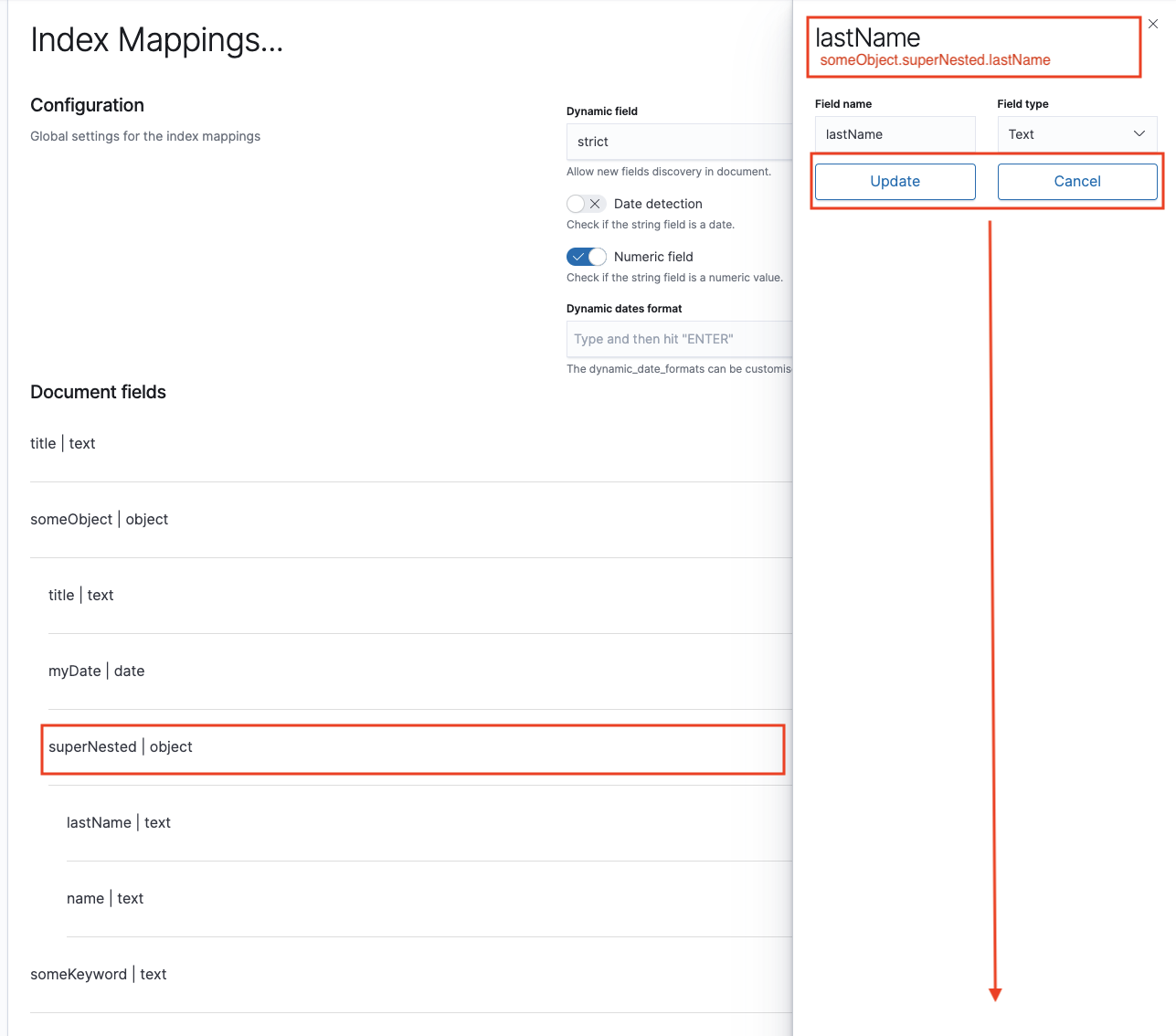
Editing UX
- It can be difficult to associate the field you're editing with its position in the tree. Can we add a marker or a highlight to the row that's being edited? The design team can give us a good design for this should ultimately look like but I think it's work adding a placeholder indicator now to make debugging and review easier.
- This can also be aided by rendering the full path of the field in the title. I also suggest changing the title from "Edit field" to just the name of the field. This will also make it easier for the user to see what the name was before compared to what they're changing it to if they're doing a rename.
- The "Update" and "Cancel" buttons should be in a flyout footer at the bottom.
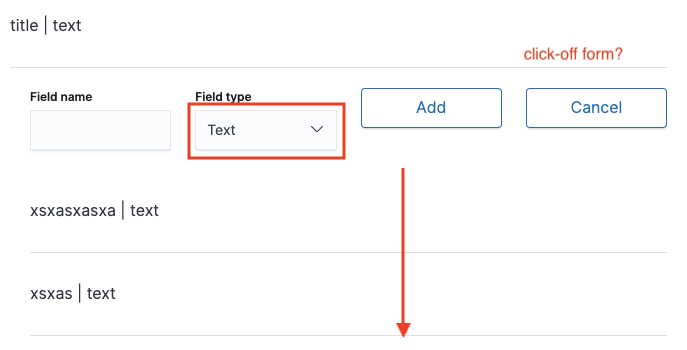
Adding UX
I suggest placing this mini-form at the bottom of the list of fields you're adding. This is more intuitive to me, and you'll get a nice visual effect when you hit enter, since the form you're looking at will immediately be replaced by the completed field.
Also, what do you think of adding click-off support to the mini-form? The UX I picture is you want to dismiss the mini-form quickly and get back to editing the mappings object so you click off it somewhere else to close it. If the mini-form has input then it attempts to add it and shows you the validation if it fails. If it doesn't have input then it just closes it. FYI EUI publishes a EuiOutsideClickDetector component that can help you do this.
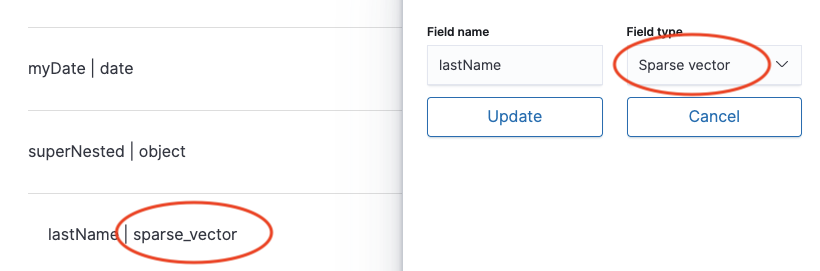
Casing consistency
I suggest we render types and other terms consistently, either always as snake case or always in human-readable form. This will remove a little of the cognitive overhead when you're scanning the UI. My personal preference would be for human-readable form.
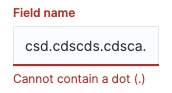
Validation copy
I'm sure Gail will guide us well here. Just wanted to point out that this could just refer to a "period" instead of a dot, and drop the (.) part which I feel is unnecessary.
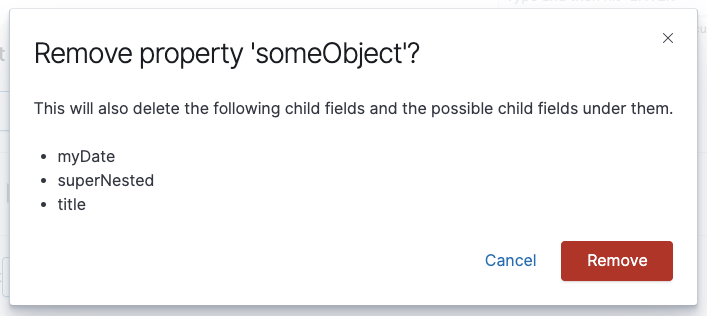
Full visibility in confirmation modal
These modals are so important! Thanks for adding them. Can we render the full paths to these fields so that users have full visibility into what they're deleting? In the future, it would be great to ask the design team for a component which can render a tree easily. Then we could switch over to just using that.
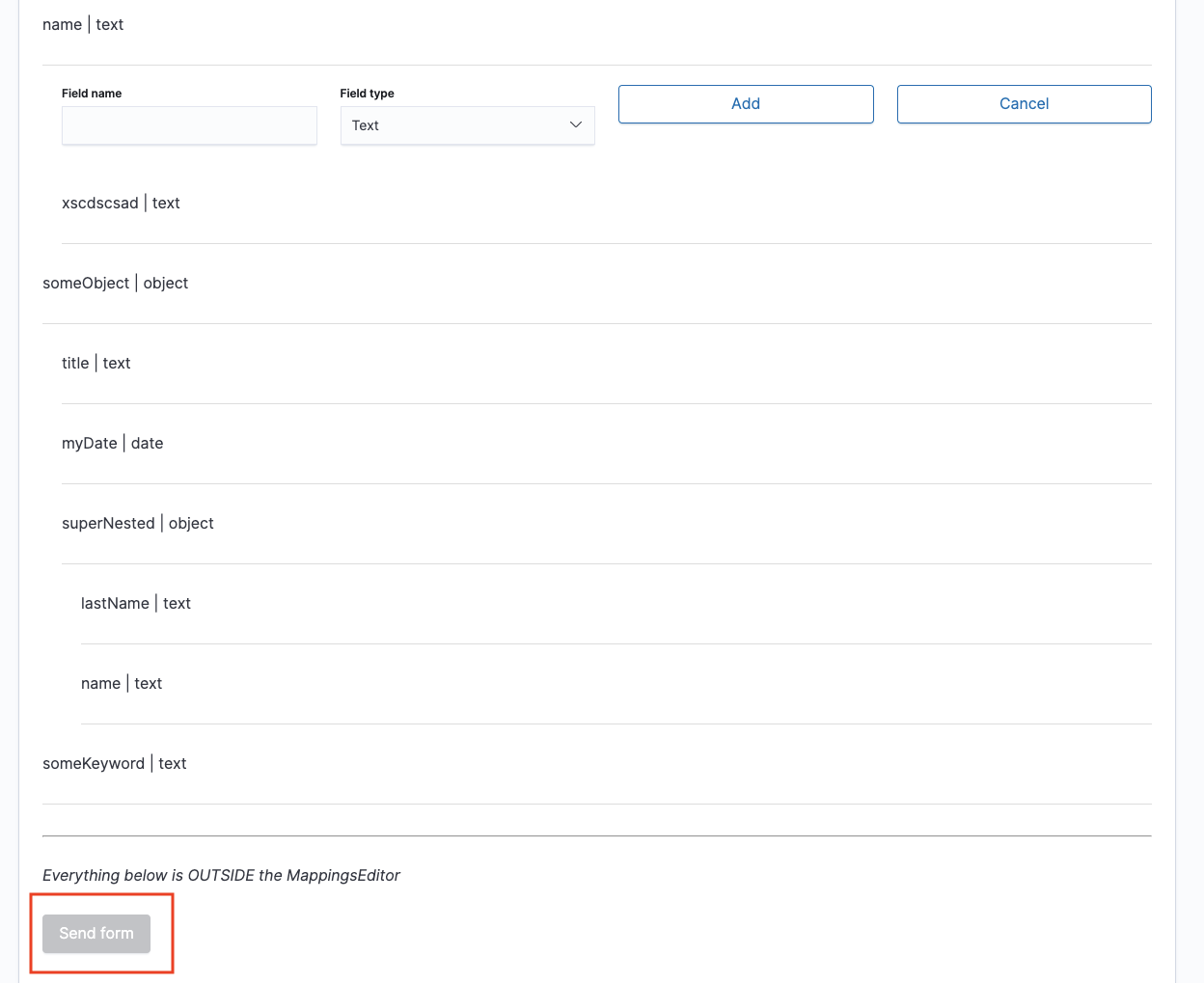
Allow for sending a form
Similar to my earlier comment about supporting "click-off" for the field mini-form, can we enable the "Send form" button when the mini-form is visible? The UX I picture is one where you've entered some content into the mini-form but you haven't submitted it yet. The user clicks "Send form" and if the mini-form is validate it's included in the mappings object. If it isn't valid, then the validation runs and blocks the submit action.
|
|
||
| await validateFields(fieldsToValidate.map(field => field.path)); | ||
|
|
||
| return updateFormValidity()!; |
There was a problem hiding this comment.
Thank you for adding the isValidated state to useField -- I find this logic much easier to follow now!
One thing looks strange to me here. validateAllFields calls validateFields. Both of these functions call updateFormValidity. Are these two identical calls redundant? Can we just keep the one in validateFields and remove the one in validateAllFields?
Then on line 142, validateFields also returns the value of this call:
fieldsToValidate.every(isFieldValid)This code looks suspiciously like it's checking that every field is valid. Yet updateFormValidity returns isFormValid. So in addition to making redundant function calls, are we also doing the same thing in two different ways?
Ideally, it seems like there should be a single place where the form validity state is set, and then any place we want to surface that state we just return isValid as set by the setIsValid state hook (we might need to use a ref to avoid returning a stale value). WDYT?
There was a problem hiding this comment.
Can we just keep the one in validateFields and remove the one in validateAllFields?
Good catch, I will remove the one in validateAllFields().
This code looks suspiciously like it's checking that every field is valid. Yet updateFormValidity returns isFormValid. So in addition to making redundant function calls, are we also doing the same thing in two different ways?
validateFields() requires fieldNames to be provided and it returns the validity of those fields. At the same time, it updates the form validity in case it has changed.
Ideally, it seems like there should be a single place where the form validity state is set
This is the case, the only place where the form validity is set is inside updateFormValidity(). It is also unset in the new reset() method.
we might need to use a ref to avoid returning a stale value
Not sure why we would prefer a ref than a state. This is probably the most important state of the form 😊
| export const schema: FormSchema<MappingsConfiguration> = { | ||
| dynamic: { | ||
| label: 'Dynamic field', | ||
| helpText: 'Allow new fields discovery in document.', |
There was a problem hiding this comment.
I'm sure you're already aware but all of this text will need to be internationalized.
There was a problem hiding this comment.
Yes this PR is only about UX. No UI, no i18n, no copy 😊
| }; | ||
|
|
||
| const renderAddFieldButton = () => { | ||
| if (status !== 'idle') { |
There was a problem hiding this comment.
Were you planning on extracting these values into constants or an enum?
There was a problem hiding this comment.
With Typescript, there is no need to declare constants for this purpose anymore. It is already defined in the status type. I prefer it this way.

|
Thanks for the review @cjcenizal ! I haven't been able to reproduce the bug you mention about siblings name collision. The validation is working fine on my side. Can you double-check? For the rest of your comments, I keep a note of them (click off, highlighting the current field being edited) but I would prefer to wait until we get the final design laid out to see if your concerns are still valid. I am not sure for example that showing the full tree in the modal would be a good idea, let's imagine a field at the leaf with 6 levels, we would have to show him a huge object to get there (the mappings can contain hundreds of fields). I think that for now, the important part of the modal is a nice copy indicating that this will also delete the children and their children. I always keep in mind that this is an infinite object, showing a field path means potentially many many characters to render on the screen (potentially wider than the flyout width). We could have a truncate path with dots to shorten, but I would have that as an improvement as the schedule is very tight. |
I like the idea, but it has its downside. If the object has already 7 fields, the mini form would appear below them an potentially out of the visible screen, forcing the user to scroll to see it. WDYT? |
|
I will go ahead and merge this PR to the feature branch as the failing CI is not related to this PR but to failing integration tests for the "ui/routes"
|

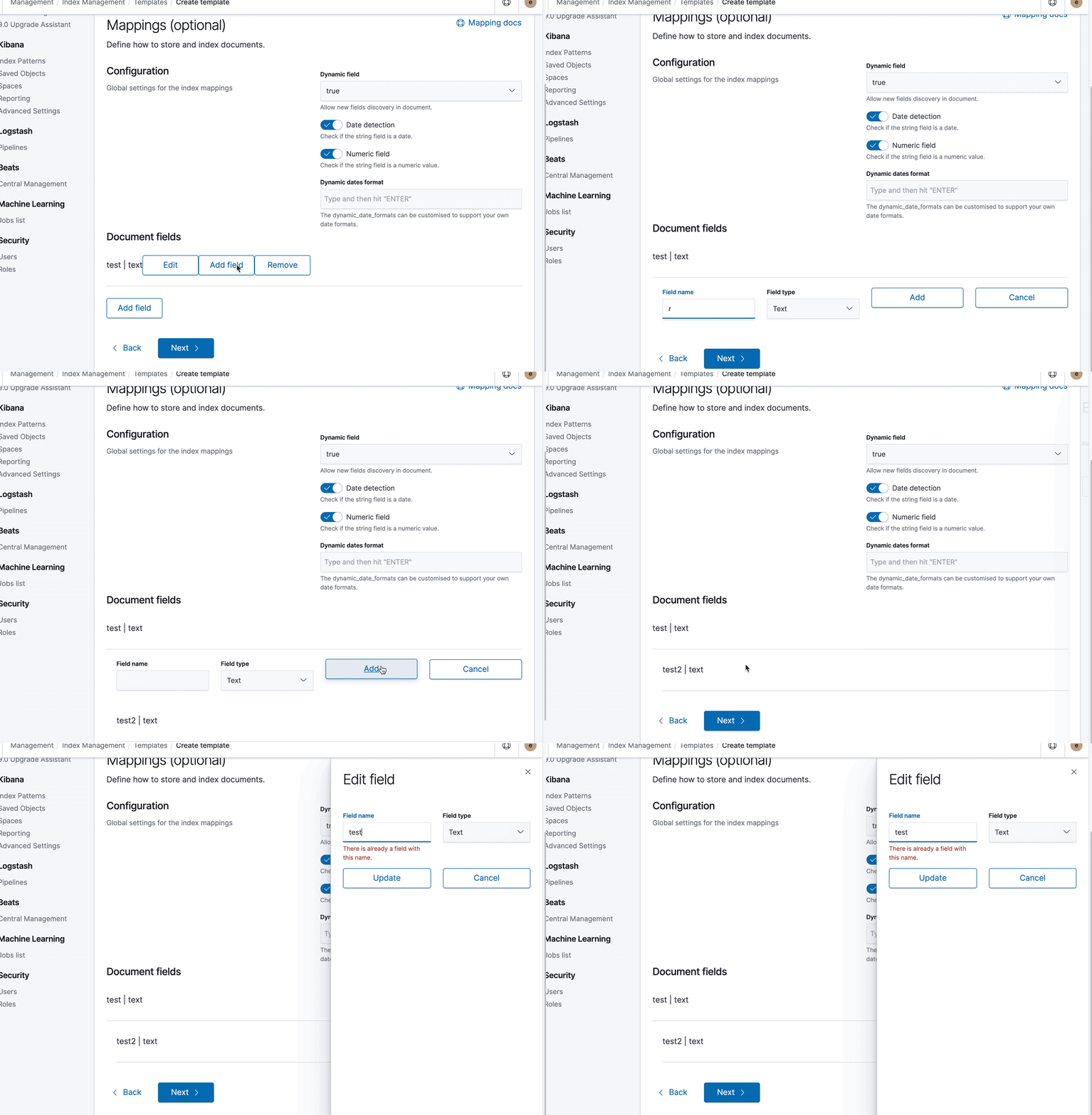
In the gif below I created a field named "test" and added a child named "test2". When I rename the child field to "test" it complains that there's already a field with that name.
I had the same thought and I don't think the scrolling is a problem. I think this change will be a net positive for the UX. |
|
Thanks for the gif @cjcenizal I will look into it.
We'll play with both positions and see what feels better. (especially with big mapping object). Having it on the bottom of all the existing child fields means an abrupt jump on the page (and we lose the visual reference of the parent field it is being added to). But let's try both positions and see. |
4 participants


This PR adds the Core functionality to the mappings editor.
How to test the PR
"create_index.tsx"inside the "sections" folder of theindex_managementapp with the following:<CreateIndex />component inside theapp.jsfile and add a route to access it:What should be tested
Validation
What should not be tested
Hook form lib
This PR also contains some improvement in the hook form lib. There is now a
reset()method to clean up a form. I also updated the logic tovalidateFields()in theuse_form.tshook to make the logic easier to follow. cc @cjcenizal