Save query form validation on blur#43726
Merged
Bargs merged 6 commits intoelastic:masterfrom Aug 22, 2019
Merged
Conversation


 Bargs
added
release_note:fix
Team:Visualizations
Bargs
added
release_note:fix
Team:Visualizations

Contributor
|
Pinging @elastic/kibana-app |
Contributor
💔 Build Failed |
Contributor
Author
|
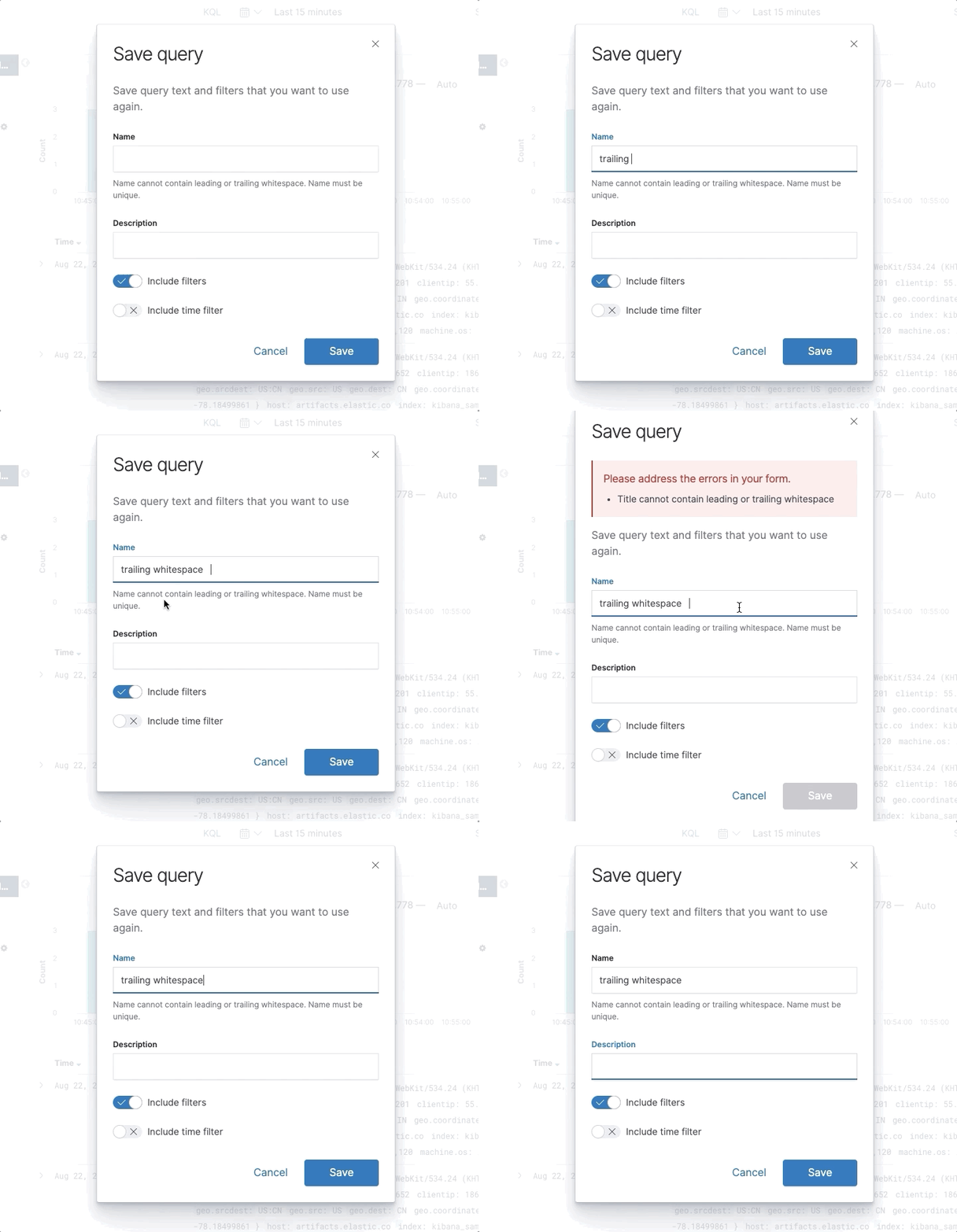
Realized I was missing an easy solution yesterday. I simply re-validate on every render if the form currently has errors. So errors will only appear on blur, but they will disappear as soon as the user has fixed them.
|

TinaHeiligers
requested changes
Aug 22, 2019
Contributor
 TinaHeiligers
left a comment
TinaHeiligers
left a comment
TinaHeiligers
left a comment
There was a problem hiding this comment.
I pulled in the code and tested it in Chrome, Firefox and Safari. The change works well and reduces the visual noise while filling in the saved query form.
The failed functional test is a result of form validation happening only after the name field is blurred and can be fixed as follows in test/functional/services/saved_query_management_component.js:
async saveNewQueryWithNameError(name) {
      await this.openSavedQueryManagementComponent();
      await testSubjects.click('saved-query-management-save-button');
      if (name) {
        await testSubjects.setValue('saveQueryFormTitle', name);
      }
      await testSubjects.setValue('saveQueryFormDescription', 'description'); // <--- add this
      const saveQueryFormSaveButtonStatus = await testSubjects.isEnabled('savedQueryFormSaveButton');
      expect(saveQueryFormSaveButtonStatus).to.not.eql(true);
      await testSubjects.click('savedQueryFormCancelButton');
    }
TinaHeiligers
approved these changes
Aug 22, 2019
| // Form input validation only happens onBlur. Clicking the save button should de-focus the | ||
| // input element and the validation should prevent a save from actually happening if there's | ||
| // an error. | ||
| await testSubjects.click('savedQueryFormSaveButton'); |
Contributor
There was a problem hiding this comment.
This should also work.
Contributor
💚 Build Succeeded |
Bargs
added a commit
to Bargs/kibana
that referenced
this pull request
Aug 22, 2019
This PR changes the save query form to only validate its inputs on blur. Previously we validated on every change. This could lead to the errors flashing in the user's face before they're done typing a valid input. For example, we allow spaces in the name field, but not at the beginning or end of the name. So if a user typed this is a long name with spaces they would see the error pop up every time they type a space, only to have it disappear when they type the next letter.
Bargs
added a commit
that referenced
this pull request
Aug 23, 2019
This PR changes the save query form to only validate its inputs on blur. Previously we validated on every change. This could lead to the errors flashing in the user's face before they're done typing a valid input. For example, we allow spaces in the name field, but not at the beginning or end of the name. So if a user typed this is a long name with spaces they would see the error pop up every time they type a space, only to have it disappear when they type the next letter.
This was referenced Apr 6, 2020
This file contains hidden or bidirectional Unicode text that may be interpreted or compiled differently than what appears below. To review, open the file in an editor that reveals hidden Unicode characters.
Learn more about bidirectional Unicode characters
Sign up for free
to join this conversation on GitHub.
Already have an account?
Sign in to comment
3 participants


Add this suggestion to a batch that can be applied as a single commit.This suggestion is invalid because no changes were made to the code.Suggestions cannot be applied while the pull request is closed.Suggestions cannot be applied while viewing a subset of changes.Only one suggestion per line can be applied in a batch.Add this suggestion to a batch that can be applied as a single commit.Applying suggestions on deleted lines is not supported.You must change the existing code in this line in order to create a valid suggestion.Outdated suggestions cannot be applied.This suggestion has been applied or marked resolved.Suggestions cannot be applied from pending reviews.Suggestions cannot be applied on multi-line comments.Suggestions cannot be applied while the pull request is queued to merge.Suggestion cannot be applied right now. Please check back later.
Summary
This PR changes the save query form to only validate its inputs on blur. Previously we validated on every change. This could lead to the errors flashing in the user's face before they're done typing a valid input. For example, we allow spaces in the name field, but not at the beginning or end of the name. So if a user typed
this is a long name with spacesthey would see the error pop up every time they type a space, only to have it disappear when they type the next letter.My only concern with the new implementation is that after fixing the error, the user must know to click or tab out of the input to re-run the validation and re-enable the save button. @elastic/kibana-design do we have any best practices for solving this in a better way?
Checklist
Use
strikethroughsto remove checklist items you don't feel are applicable to this PR.- [ ] This was checked for cross-browser compatibility, including a check against IE11- [ ] Any text added follows EUI's writing guidelines, uses sentence case text and includes i18n support- [ ] Documentation was added for features that require explanation or tutorials- [ ] This was checked for keyboard-only and screenreader accessibilityFor maintainers
- [ ] This was checked for breaking API changes and was labeled appropriately- [ ] This includes a feature addition or change that requires a release note and was labeled appropriately