[Security Solution] Use new expandable flyout in alert preview#167902
[Security Solution] Use new expandable flyout in alert preview#167902christineweng merged 9 commits intoelastic:mainfrom
Conversation


 christineweng
force-pushed
the
flyout-create-rule
branch
2 times, most recently
from
christineweng
force-pushed
the
flyout-create-rule
branch
2 times, most recently
from
18bd6ec to
5336e4c
Compare
christineweng
changed the title
christineweng
added
backport:skip
christineweng
force-pushed
the
flyout-create-rule
branch
5 times, most recently
from
4db2e3d to
f609e3d
Compare
 christineweng
force-pushed
the
flyout-create-rule
branch
from
christineweng
force-pushed
the
flyout-create-rule
branch
from
f609e3d to
40a01d1
Compare

|
Pinging @elastic/security-threat-hunting (Team:Threat Hunting) |
 PhilippeOberti
left a comment
PhilippeOberti
left a comment
PhilippeOberti
left a comment
There was a problem hiding this comment.
Left a few comments. The code looks good overall and the UI behaves how I'm expecting.
I think this would be a good candidate for some Cypress tests? I haven't checked if the rule page already has some, but it could be worth spending some time looking at this?
x-pack/plugins/security_solution/public/flyout/document_details/left/context.tsx
Show resolved
Hide resolved
x-pack/plugins/security_solution/public/common/utils/timeline/use_show_timeline.test.tsx
Show resolved
Hide resolved
...ins/security_solution/public/flyout/document_details/left/components/investigation_guide.tsx
Show resolved
Hide resolved
...lugins/security_solution/public/flyout/document_details/left/components/response_details.tsx
Outdated
Show resolved
Hide resolved
...rity_solution/public/flyout/document_details/right/components/analyzer_preview_container.tsx
Show resolved
Hide resolved
...k/plugins/security_solution/public/flyout/document_details/right/components/header_title.tsx
Show resolved
Hide resolved
...urity_solution/public/flyout/document_details/right/components/session_preview_container.tsx
Show resolved
Hide resolved
x-pack/plugins/security_solution/public/flyout/document_details/right/footer.tsx
Outdated
Show resolved
Hide resolved
.../security_solution/public/flyout/document_details/shared/utils/highlighted_fields_helpers.ts
Outdated
Show resolved
Hide resolved

 nikitaindik
left a comment
nikitaindik
left a comment
nikitaindik
left a comment
There was a problem hiding this comment.
Thanks @christineweng for adding this neat feature! I checked the code and tested it manually. Couple of things I noticed.
-
Would it make sense not to render sections and tabs unavailable in alert flyout? For example, the "Response" collapsible section or investigation guide in the Investigation section / left panel tab. This might make the flyout a little less complex visually.
-
Nit: The title of the flyout says "Preview Rule" which feels a bit technical. Kind of exposes the fact that we are creating a one-off rule under the hood to generate alerts (as I understand). Maybe we can hide the title or change it to something like "Alert Details" or "Alert Preview"? What do you think?
-
Minor: If you reload a page with the flyout open, the flyout will still be displayed after reloading. This might be a little confusing because index patterns and query are reset after reload. Does it happen because we store the flyout state in the URL? If yes, do we need to store it there for the preview flyout?
Also, if you navigate back to the rule management or rule details page with the flyout open, the flyout will still be displayed. The alert preview opened from the rule details page behaves the same, so must be a common issue.

|
Hey @nikitaindik thanks for these comments, let me answer them as Christine is on PTO this week
We had discussions back and forth with product and UIUX and we ended up deciding to keep the flyout identical but just with the sections disabled, instead of hiding things. The 2 reasons were:
I can see that using
Good point! This is a feature that we built in, but maybe it doesn't make sense for this preview alerts. Let us check on that!
Yeah this is probably also related to the point above, we'll check on that as well, thanks! |
|
@christineweng Now that the header redesign PR is merged, we're showing the rule link again, which I think in this creation rule case we should not. Clicking on the link navigates to a page for a rule that doesn't exist yet. I feel like we should have a UI similar to |


|
Thanks so much for all the work here, @christineweng ! Haven't looked at the code, but played around with it and just have a couple UX questions/comments. There seem to be a couple areas where the user can click and get taken away from the rule creation flow. I don't think we should include any links that would take the user away from this flow.


I am happy to hop on a zoom next week with @paulewing and others to sort out some of these questions! |

|
@yctercero thank you for the comments! I did some research and added some notes/observations below.
Great catch! I think session viewer (from the screenshot in your comments) and the new title (from @PhilippeOberti's comment) are the only two places I found a rule details link, let me know if I miss anything
The 404's are coming from
That is correct, the component in the screenshot is owned by a different team, to introduce the preview logic there is more involved and make sense to do it in a separate PR. I'll confirm with product & UIUX if that's something we should prioritize
|
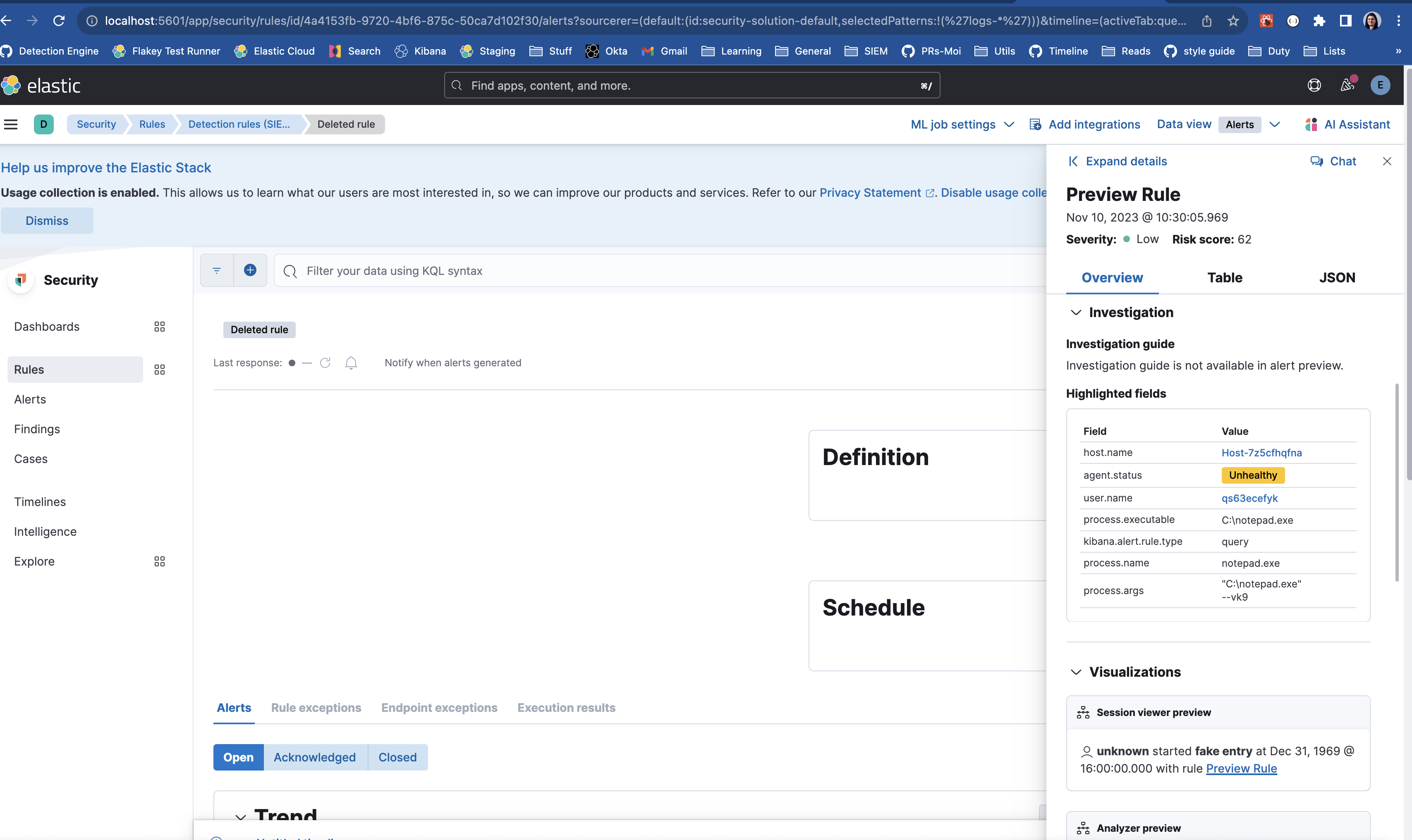



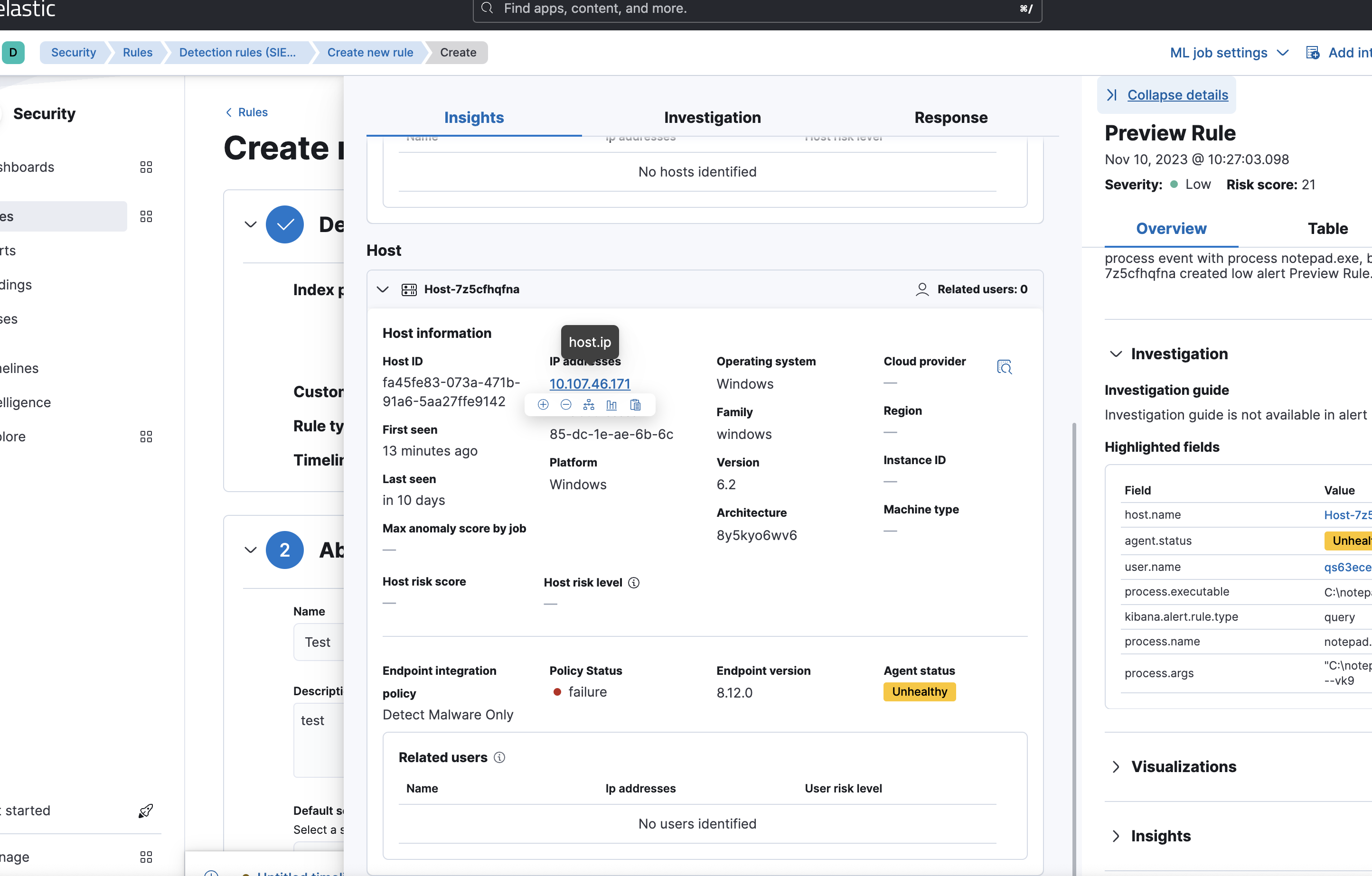
|
@nikitaindik Thank you for the review! There are some effort on the url sync in parallel, so I put this feature behind a feature flag until the other PR is merged. Please see answer to your feedback below.
See @PhilippeOberti's response here let me know if you have more questions/concerns
Great point, I talked to @paulewing and the guidance was to go with the existing
currently there is a PR in progress to revamp how we do url and store the flyout state in the url history. Having correct history should fix the second behavior (going back and flyout still shows up). Regarding the refresh, I added a to-do to check that it works properly before turning on the feature flag. |
|
@yctercero @nikitaindik @PhilippeOberti just to bring to your attention, while the new flyout in preview is behind a feature flag, making timeline visible is not behind a feature flag. but the old flyout does not have any timeline hover actions, so it won't interact with it. Some of your comments are not addressed in this PR either because there is on-going work from other team members, or makes more sense to do a separate PR. they are being tracked in the issue. If you have questions or concerns related to timeline in create rule, feel free to post here and I can add to the tracking :) |

PhilippeOberti
left a comment
PhilippeOberti
left a comment
There was a problem hiding this comment.
change LGTM, tested the feature flag, thanks for putting it in place!
x-pack/plugins/security_solution/public/flyout/document_details/right/footer.tsx
Outdated
Show resolved
Hide resolved

nikitaindik
left a comment
nikitaindik
left a comment
There was a problem hiding this comment.
Thanks for addressing the feedback. Approved!
Will refresh with main now to rerun the build.


 sphilipse
left a comment
sphilipse
left a comment
sphilipse
left a comment
There was a problem hiding this comment.
approving for CI auto-commit

💛 Build succeeded, but was flaky
Failed CI StepsMetrics [docs]Async chunks
Page load bundle
History
To update your PR or re-run it, just comment with: |
8 participants


Summary
This PR updates the alert preview in Create rule -> Rule preview to use the new expandable alert flyout:
With feature flag on:
Screen.Recording.2023-11-16.at.4.21.26.PM.mov
How to test
xpack.securitySolution.enableExperimental: ['expandableFlyoutInCreateRuleEnabled' ]tokibana.yml.devContinueRefresh, some alerts should appear in the tableChecklist