[Controls] [Dashboard] Use EuiSelectable for options list suggestions#148420
[Controls] [Dashboard] Use EuiSelectable for options list suggestions#148420Heenawter merged 17 commits intoelastic:mainfrom
EuiSelectable for options list suggestions#148420Conversation


 Heenawter
added
Feature:Dashboard
Heenawter
changed the title
Heenawter
added
Feature:Dashboard
Heenawter
changed the title
euiSelectable for options list suggestionsEuiSelectable for options list suggestions
Heenawter
force-pushed
the
refactor-options-list_2023-01-04
branch
11 times, most recently
from
8093760 to
9108c85
Compare
Heenawter
force-pushed
the
refactor-options-list_2023-01-04
branch
from
c940043 to
71ec8e3
Compare


| <span data-test-subj="optionsList-control-popover-loading"> | ||
| <EuiLoadingSpinner size="m" /> | ||
| <EuiSpacer size="xs" /> | ||
| {OptionsListStrings.popover.getLoadingMessage()} | ||
| </span> |
There was a problem hiding this comment.
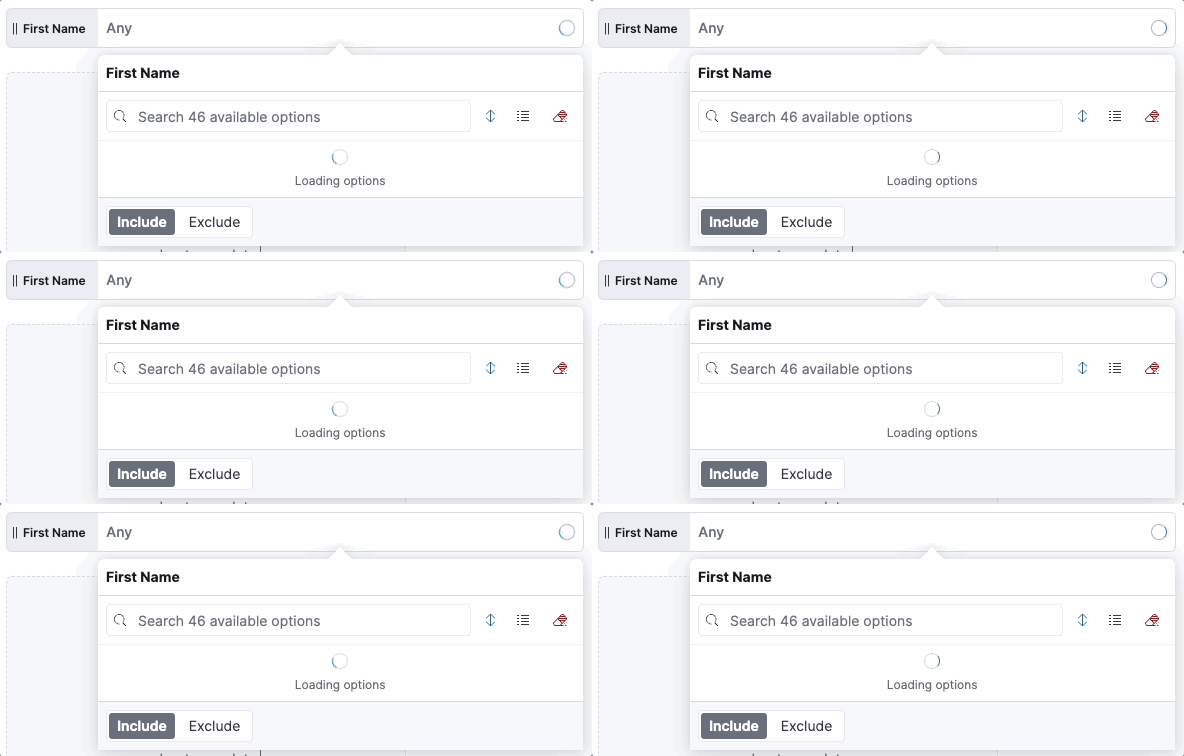
I had to re-create the default loading message for the sake of functional testing, so that I could give the component a data-test-subj. It looks like this:
src/plugins/controls/public/options_list/components/options_list_popover_suggestions.tsx
Outdated
Show resolved
Hide resolved
| if (rejected) { | ||
| // This prevents a rejected request (which can happen, for example, when a user types a search string too quickly) | ||
| // from prematurely setting loading to `false` and updating the suggestions to show "No results" | ||
| return; |
There was a problem hiding this comment.
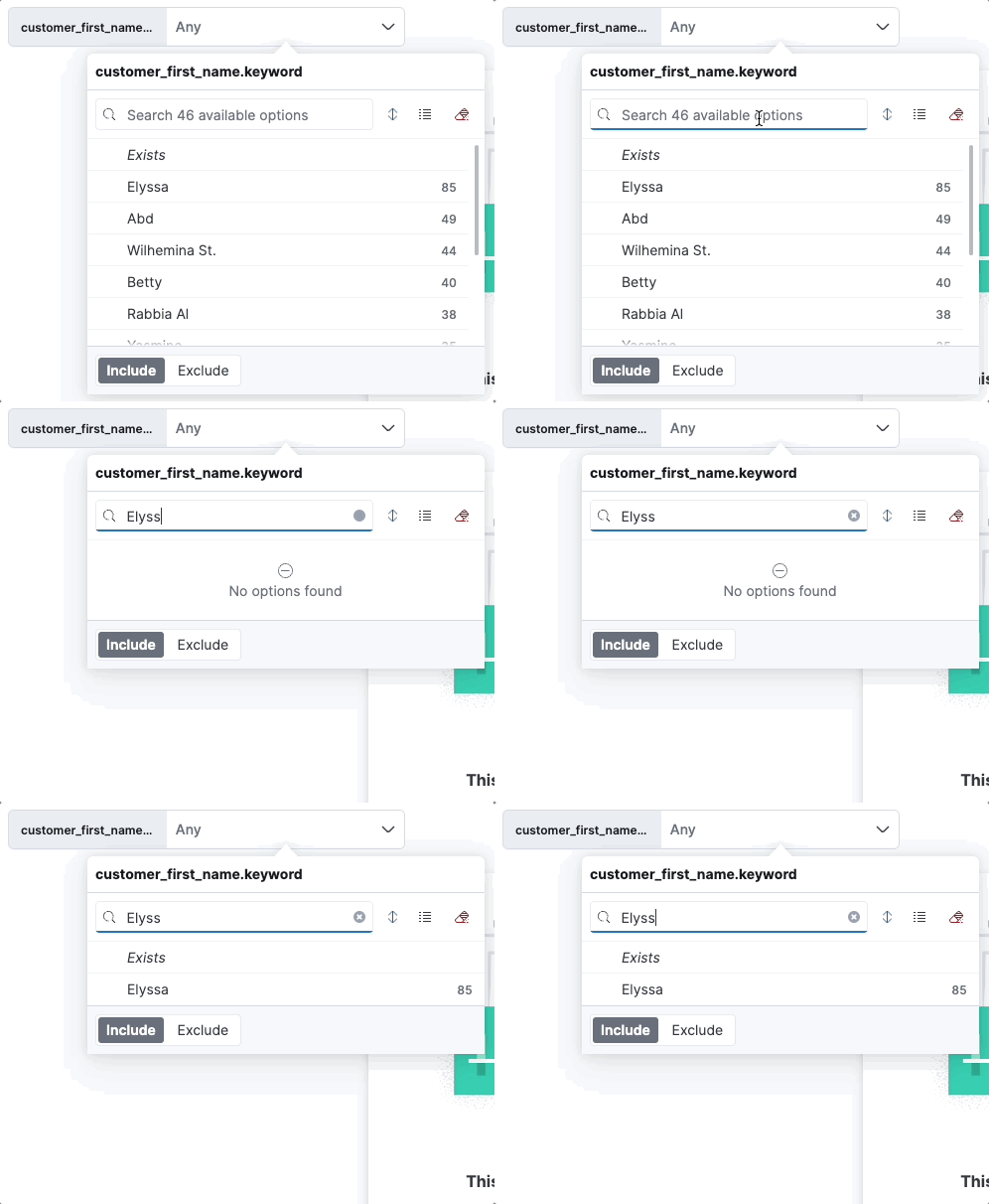
To test this, remove this early return, throttle your network, and type something quickly into the search bar - you'll notice that you'll see a flash of the loading state, then you'll see the "No results" message which will hang, before finally seeing your expected results like so:
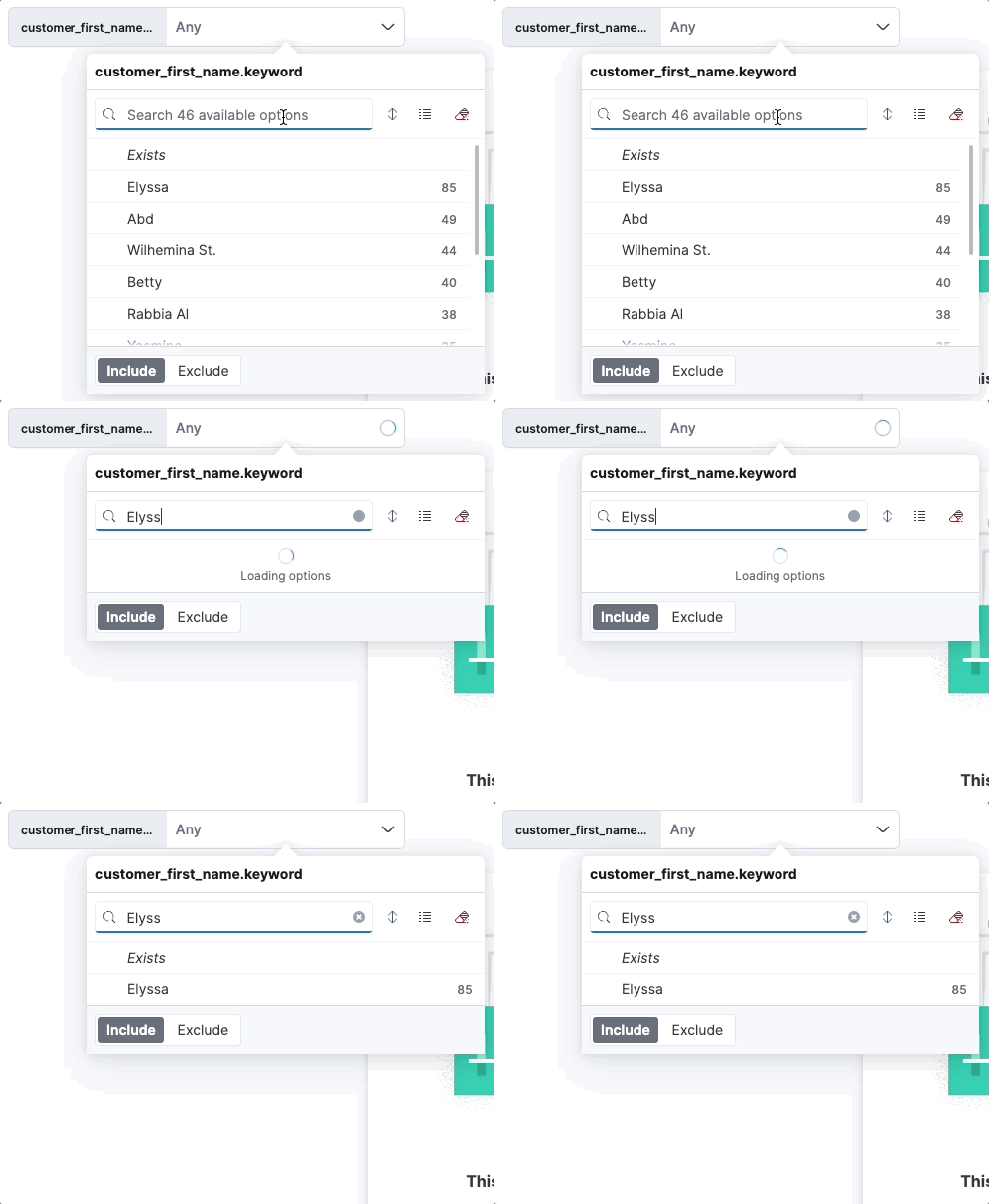
With this early return, the earlier rejected requests do not set loading to false until results are actually received. So, you get expected the following more expected behaviour:
From what I can tell, it seems like the requests are rejected due to the debounce on search string changes... Seems like we make a request for every character typed, but cancel previous requests if they haven't yet returned results in favour of the newer requests. Not entirely sure that this is what is happening, but it's my best guess after some deep debugging 👀
It might be possible to instead prevent these rejected results entirely by debouncing the request rather than the search string changes.... Figured I'd go with the easier solution (this early return) for now, and see if other concerns popup from this.
There was a problem hiding this comment.
What's happening here is that the search string changes are debounced, but if a new request is fired off before the last one is completed, the last one is cancelled. How many requests there are depend on how fast the user types compared to the debounce value. Too high a debounce value can make the search requests feel slower, while too low a debounce can fire off a lot of queries that all get canceled. The debounce is currently 100ms which may or may not be too short. 200ms is enough that when I type at a normal speed it only fires one request when I'm finished typing, but it very much depends on the user.
The reason that we debounce the typing only instead of debouncing the whole query is that we want the controls to be as responsive to each other as possible, and if we debounced the whole request the chaning would slow down by the debounce value for each control that is in the chain, and would wait for the debounce value to elapse before querying on filter, time range & query changes.
What you've done here is the right choice IMO, as it ensures that when a request is canceled, the result doesn't return an empty suggestions array - which I believe was what was happening earlier. Nice fix!
There was a problem hiding this comment.
@ThomThomson Thanks so much for the detailed explanation! That makes a lot of sense - especially the justification for why we are debouncing the typing rather than the requests. I'm happy the early return is a good fix 🎉
Heenawter
added
v8.7.0
loe:large

|
Pinging @elastic/kibana-accessibility (Project:Accessibility) |
|
Pinging @elastic/kibana-presentation (Team:Presentation) |

 andreadelrio
left a comment
andreadelrio
left a comment
andreadelrio
left a comment
There was a problem hiding this comment.
Fantastic work. Design changes LGTM. I'd add that the scrollbar will help users know they've reached the end of the (visible) list.

 ThomThomson
left a comment
ThomThomson
left a comment
ThomThomson
left a comment
There was a problem hiding this comment.
Changes LGTM! Looked through the code and ran locally, testing interactions, scrolling invalid options etc. Everything looks great.
Additionally, you've done a really good job cleaning and organizing the code in this PR. Great work!
| closePopover={() => setIsPopoverOpen(false)} | ||
| anchorClassName="optionsList__anchorOverride" | ||
| aria-labelledby={`control-popover-${id}`} | ||
| aria-label={OptionsListStrings.popover.getAriaLabel(fieldName)} |
There was a problem hiding this comment.
Nice, aria labels should definitely be i18nized!
src/plugins/controls/public/options_list/components/options_list_popover_invalid_selections.tsx
Outdated
Show resolved
Hide resolved
src/plugins/controls/public/options_list/components/options_list_popover_suggestions.tsx
Outdated
Show resolved
Hide resolved
| if (rejected) { | ||
| // This prevents a rejected request (which can happen, for example, when a user types a search string too quickly) | ||
| // from prematurely setting loading to `false` and updating the suggestions to show "No results" | ||
| return; |
There was a problem hiding this comment.
What's happening here is that the search string changes are debounced, but if a new request is fired off before the last one is completed, the last one is cancelled. How many requests there are depend on how fast the user types compared to the debounce value. Too high a debounce value can make the search requests feel slower, while too low a debounce can fire off a lot of queries that all get canceled. The debounce is currently 100ms which may or may not be too short. 200ms is enough that when I type at a normal speed it only fires one request when I'm finished typing, but it very much depends on the user.
The reason that we debounce the typing only instead of debouncing the whole query is that we want the controls to be as responsive to each other as possible, and if we debounced the whole request the chaning would slow down by the debounce value for each control that is in the chain, and would wait for the debounce value to elapse before querying on filter, time range & query changes.
What you've done here is the right choice IMO, as it ensures that when a request is canceled, the result doesn't return an empty suggestions array - which I believe was what was happening earlier. Nice fix!
src/plugins/controls/public/services/options_list/options_list_service.ts
Show resolved
Hide resolved


💚 Build Succeeded
Metrics [docs]Module Count
Async chunks
Page load bundle
History
To update your PR or re-run it, just comment with: cc @Heenawter |

…148331) Closes #140175 Closes #143580 ## Summary Oh, boy! Get ready for a doozy of a PR, folks! Let's talk about the three major things that were accomplished here: ### 1) Pagination Originally, this PR was meant to add traditional pagination to the options list control. However, after implementing a version of this, it became apparent that, not only was UI becoming uncomfortably messy, it also had some UX concerns because we were deviating from the usual pagination pattern by showing the cardinality rather than the number of pages: <p align="center"><img src="https://user-images.githubusercontent.com/8698078/214687041-f8950d3a-2b29-41d5-b656-c79d9575d744.gif"/></p> So, instead of traditional pagination, we decided to take a different approach (which was made possible by #148420) - **load more options when the user scrolls to the bottom!** Here it is in action: <p align="center"><img src="https://user-images.githubusercontent.com/8698078/214688854-06c7e8a9-7b8c-4dc0-9846-00ccf5e5f771.gif"/></p> It is important that the first query remains **fast** - that is why we still only request the top 10 options when the control first loads. So, having a "load more" is the best approach that allows users to see more suggestions while also ensuring that the performance of options lists (especially with respect to chaining) is not impacted. Note that it is **not possible** to grab every single value of a field - the limit is `10,000`. However, since it is impractical that a user would want to scroll through `10,000` suggestions (and potentially very slow to fetch), we have instead made the limit of this "show more" functionality `1,000`. To make this clear, if the field has more than `1,000` values and the user scrolls all the way to the bottom, they will get the following message: <p align="center"><img src="https://user-images.githubusercontent.com/8698078/214920302-1e3574dc-f2b6-4845-be69-f9ba04177e7f.png"/></p> ### 2) Cardinality Previously, the cardinality of the options list control was **only** shown as part of the control placeholder text - this meant that, once the user entered their search term, they could no longer see the cardinality of the returned options. This PR changes this functionality by placing the cardinality in a badge **beside** the search bar - this value now changes as the user types, so they can very clearly see how many options match their search: <p align="center"><img src="https://user-images.githubusercontent.com/8698078/214689739-9670719c-5878-4e8b-806c-0b5a6f6f907f.gif"/></p> > **Note** > After some initial feedback, we have removed both the cardinality and invalid selections badges in favour of displaying the cardinality below the search bar, like so: > > <p align="center"><img src="https://user-images.githubusercontent.com/8698078/216473930-e99366a3-86df-4777-a3d8-cf2d41e550fb.gif"/></p> > > So, please be aware that the screenshots above are outdated. ### 3) Changes to Queries This is where things get.... messy! Essentially, our previous queries were all built with the expectation that the Elasticsearch setting `search.allow_expensive_queries` was **off** - this meant that they worked regardless of the value of this setting. However, when trying to get the cardinality to update based on a search term, it became apparent that this was not possible if we kept the same assumptions - specifically, if `search.allow_expensive_queries` is off, there is absolutely no way for the cardinality of **keyword only fields** to respond to a search term. After a whole lot of discussion, we decided that the updating cardinality was a feature important enough to justify having **two separate versions** of the queries: 1. **Queries for when `search.allow_expensive_queries` is off**: These are essentially the same as our old queries - however, since we can safely assume that this setting is **usually** on (it defaults on, and there is no UI to easily change it), we opted to simplify them a bit. First of all, we used to create a special object for tracking the parent/child relationship of fields that are mapped as keyword+text - this was so that, if a user created a control on these fields, we could support case-insensitive search. We no longer do this - if `search.allow_expensive_queries` is off and you create a control on a text+keyword field, the search will be case sensitive. This helps clean up our code quite a bit. Second, we are no longer returning **any** cardinality. Since the cardinality is now displayed as a badge beside the search bar, users would expect that this value would change as they type - however, since it's impossible to make this happen for keyword-only fields and to keep behaviour consistent, we have opted to simply remove this badge when `search.allow_expensive_queries` is off **regardless** of the field type. So, there is no longer a need to include the `cardinality` query when grabbing the suggestions. Finally, we do not support "load more" when `search.allow_expensive_queries` is off. While this would theoretically be possible, because we are no longer grabbing the cardinality, we would have to always fetch `1,000` results when the user loads more, even if the true cardinality is much smaller. Again, we are pretty confident that **more often than not**, the `search.allow_expensive_queries` is on; therefore, we are choosing to favour developer experience in this instance because the impact should be quite small. 2. **Queries for when `search.allow_expensive_queries` is on**: When this setting is on, we now have access to the prefix query, which greatly simplifies how our queries are handled - now, rather than having separate queries for keyword-only, keyword+text, and nested fields, these have all been combined into a single query! And even better - :star: now **all** string-based fields support case-insensitive search! :star: Yup, that's right - even keyword-only fields 💃 There has been [discussion on the Elasticsearch side ](elastic/elasticsearch#90898) about whether or not this setting is even **practical**, and so it is possible that, in the near future, this distinction will no longer be necessary. With this in mind, I have made these two versions of our queries **completely separate** from each other - while this introduces some code duplication, it makes the cleanup that may follow much, much easier. Well, that was sure fun, hey? <p align="center"><img src="https://user-images.githubusercontent.com/8698078/214921985-49058ff0-42f2-4b01-8ae3-0a4d259d1075.gif"/></p> ## How to Test I've created a quick little Python program to ingest some good testing data for this PR: ```python import random import time import pandas as pd from faker import Faker from elasticsearch import Elasticsearch SIZE = 10000 ELASTIC_PASSWORD = "changeme" INDEX_NAME = 'test_large_index' Faker.seed(time.time()) faker = Faker() hundredRandomSentences = [faker.sentence(random.randint(5, 35)) for _ in range(100)] thousandRandomIps = [faker.ipv4() if random.randint(0, 99) < 50 else faker.ipv6() for _ in range(1000)] client = Elasticsearch( "http://localhost:9200", basic_auth=("elastic", ELASTIC_PASSWORD), ) if(client.indices.exists(index=INDEX_NAME)): client.indices.delete(index=INDEX_NAME) client.indices.create(index=INDEX_NAME, mappings={"properties":{"keyword_field":{"type":"keyword"},"id":{"type":"long"},"ip_field":{"type":"ip"},"boolean_field":{"type":"boolean"},"keyword_text_field":{"type":"text","fields":{"keyword":{"type":"keyword"}}},"nested_field":{"type":"nested","properties":{"first":{"type":"text","fields":{"keyword":{"type":"keyword"}}},"last":{"type":"text","fields":{"keyword":{"type":"keyword"}}}}},"long_keyword_text_field":{"type":"text","fields":{"keyword":{"type":"keyword"}}}}}) print('Generating data', end='') for i in range(SIZE): name1 = faker.name(); [first_name1, last_name1] = name1.split(' ', 1) name2 = faker.name(); [first_name2, last_name2] = name2.split(' ', 1) response = client.create(index=INDEX_NAME, id=i, document={ 'keyword_field': faker.country(), 'id': i, 'boolean_field': faker.boolean(), 'ip_field': thousandRandomIps[random.randint(0, 999)], 'keyword_text_field': faker.name(), 'nested_field': [ { 'first': first_name1, 'last': last_name1}, { 'first': first_name2, 'last': last_name2} ], 'long_keyword_text_field': hundredRandomSentences[random.randint(0, 99)] }) print('.', end='') print(' Done!') ``` However, if you don't have Python up and running, here's a CSV with a smaller version of this data: [testNewQueriesData.csv](https://github.com/elastic/kibana/files/10538537/testNewQueriesData.csv) > **Warning** > When uploading, make sure to update the mappings of the CSV data to the mappings included as part of the Python script above (which you can find as part of the `client.indices.create` call). You'll notice, however, that **none of the CSV documents have a nested field**. Unfortunately, there doesn't seem to be a way to able to ingest nested data through uploading a CSV, so the above data does not include one - in order to test the nested data type, you'd have to add some of your own documents > > Here's a sample nested field document, for your convenience: > ```json > { > "keyword_field": "Russian Federation", > "id": 0, > "boolean_field": true, > "ip_field": "121.149.70.251", > "keyword_text_field": "Michael Foster", > "nested_field": [ > { > "first": "Rachel", > "last": "Wright" > }, > { > "first": "Gary", > "last": "Reyes" > } > ], > "long_keyword_text_field": "Color hotel indicate appear since well sure right yet individual easy often test enough left a usually attention." > } > ``` > ### Testing Notes Because there are now two versions of the queries, thorough testing should be done for both when `search.allow_expensive_queries` is `true` and when it is `false` for every single field type that is currently supported. Use the following call to the cluster settings API to toggle this value back and forth: ```php PUT _cluster/settings { "transient": { "search.allow_expensive_queries": <value> // true or false } } ``` You should pay super special attention to the behaviour that happens when toggling this value from `true` to `false` - for example, consider the following: 1. Ensure `search.allow_expensive_queries` is either `true` or `undefined` 2. Create and save a dashboard with at least one options list control 3. Navigate to the console and set `search.allow_expensive_queries` to `false` - **DO NOT REFRESH** 4. Go back to the dashboard 5. Open up the options list control you created in step 2 6. Fetch a new, uncached request, either by scrolling to the bottom and fetching more (assuming these values aren't already in the cache) or by performing a search with a string you haven't tried before 7.⚠️ **The options list control _should_ have a fatal error**⚠️ <br>The Elasticsearch server knows that `search.allow_expensive_queries` is now `false` but, because we only fetch this value on the first load on the client side, it has not yet been updated - this means the options list service still tries to fetch the suggestions using the expensive version of the queries despite the fact that Elasticsearch will now reject this request. The most graceful way to handle this is to simply throw a fatal error. 8. Refreshing the browser will make things sync up again and you should now get the expected results when opening the options list control. ### Flaky Test Runner <a href="https://buildkite.com/elastic/kibana-flaky-test-suite-runner/builds/1845"><img src="https://user-images.githubusercontent.com/8698078/215894267-97f07e59-6660-4117-bda7-18f63cb19af6.png"/></a> ### Checklist - [x] Any text added follows [EUI's writing guidelines](https://elastic.github.io/eui/#/guidelines/writing), uses sentence case text and includes [i18n support](https://github.com/elastic/kibana/blob/main/packages/kbn-i18n/README.md) - [x] [Unit or functional tests](https://www.elastic.co/guide/en/kibana/master/development-tests.html) were updated or added to match the most common scenarios - [x] Any UI touched in this PR is usable by keyboard only (learn more about [keyboard accessibility](https://webaim.org/techniques/keyboard/)) - [x] Any UI touched in this PR does not create any new axe failures (run axe in browser: [FF](https://addons.mozilla.org/en-US/firefox/addon/axe-devtools/), [Chrome](https://chrome.google.com/webstore/detail/axe-web-accessibility-tes/lhdoppojpmngadmnindnejefpokejbdd?hl=en-US)) > **Note** > Technically, it actually does - however, it is due to an [EUI bug](elastic/eui#6565) from adding the group label to the bottom of the list. - [x] This renders correctly on smaller devices using a responsive layout. (You can test this [in your browser](https://www.browserstack.com/guide/responsive-testing-on-local-server)) - [x] This was checked for [cross-browser compatibility](https://www.elastic.co/support/matrix#matrix_browsers) ### For maintainers - [ ] This was checked for breaking API changes and was [labeled appropriately](https://www.elastic.co/guide/en/kibana/master/contributing.html#kibana-release-notes-process) --------- Co-authored-by: kibanamachine <42973632+kibanamachine@users.noreply.github.com>


6 participants


Closes #147624
Closes #135470
Summary
Previously, the suggestions/available options for the options list control were manually built via individual
EuiFilterSelectItemcomponents. While this worked well enough, it had a majora11ypitfall - suggestions could only be navigated usingtabrather than the up and down arrow keys as expected.This PR changes this behaviour to use
EuiSelectablefor managing and displaying the suggestions instead, which has the following benefits:a11yis significantly improved by allowing navigation using the keyboardexistsoption, the popover was getting... rather unrulyoptions_list_popover_suggestions.tsxcode is, in my opinion, a bit easier to followThis PR also fixes three small bugs:
falsefor rejected requests, which caused an early return ofNo resultswhen typing quickly into the search bar - see [Controls] [Dashboard] UseEuiSelectablefor options list suggestions #148420 (comment) for more details.singleSelectwastrue, selectingExistsfollowed by a different selection would not unselectExists.singleSelectwastrue, selections could not be undone unlessshowOnlySelectedwastrue.Video of Keyboard Controls
Screen.Recording.2023-01-09.at.9.49.05.AM.mov
Flaky Test Runners
test/functional/apps/dashboard_elements/controls/options_list/options_list_dashboard_integration.tsThis was the offending test suite that was causing all sorts of flakiness, so I wanted to test it both on its own and as part of the other controls tests - so, in combination with the below flaky test run, this test suite was run 200 times successfully. Should hopefully mean this thing is no longer flaky 🤞
test/functional/apps/dashboard_elements/controls/options_list/*test/functional/apps/dashboard_elements/controls/control_group_chaining.tsChecklist
For maintainers