Skip to content
Merged
Show file tree
Hide file tree
Changes from 11 commits
Commits
Show all changes
31 commits
Select commit Hold shift + click to select a range
6442b11
tests and rm real url
stephmilovic Jul 26, 2022
7054387
Rename incidentViewUrl to viewIncidentUrl
stephmilovic Jul 26, 2022
1c6168b
beta badge all over
stephmilovic Jul 26, 2022
63c4f32
fix big whoops
stephmilovic Jul 27, 2022
751615e
pr fixes
stephmilovic Jul 27, 2022
08722d6
Merge branch 'main' into cases_webhook_followups
kibanamachine Jul 27, 2022
816e553
Merge branch 'main' into cases_webhook_followups
stephmilovic Jul 28, 2022
8fdc154
better badge alignment
stephmilovic Jul 28, 2022
f05f6d9
docs for cases webhook
stephmilovic Aug 1, 2022
1040222
resolve merge
stephmilovic Aug 1, 2022
7ca1077
Revert whoops
stephmilovic Aug 1, 2022
76ee40b
pr changes
stephmilovic Aug 1, 2022
86f0ccf
adjustments
stephmilovic Aug 1, 2022
214745a
Add example
stephmilovic Aug 2, 2022
b4d6795
fix headings
stephmilovic Aug 2, 2022
c483188
fix headings maybe
stephmilovic Aug 2, 2022
4e3dcfc
reference actual jira connector
stephmilovic Aug 2, 2022
2bd8312
indent steps hopefully
stephmilovic Aug 2, 2022
55434a9
rename
stephmilovic Aug 2, 2022
97c09ef
trying to indent step headings....
stephmilovic Aug 2, 2022
d1bc1d7
Merge branch 'main' into cases_webhook_docs
stephmilovic Aug 3, 2022
0c11bf3
rm getIncidentResponseCreatedDateKey and getIncidentResponseUpdatedDa…
stephmilovic Aug 3, 2022
0211a8a
Merge branch 'main' into cases_webhook_docs
stephmilovic Aug 8, 2022
b5af9a2
pr review changes
stephmilovic Aug 8, 2022
c028fc7
pr review changes 2
stephmilovic Aug 8, 2022
41360f2
Fix nesting level
lcawl Aug 9, 2022
c7b6e61
[DOCS] Text edits
lcawl Aug 9, 2022
6a11a53
[DOCS] Add connector to list of case connectors
lcawl Aug 10, 2022
aa170dd
[DOCS] Use shared attributes for connector names
lcawl Aug 12, 2022
7b1011f
[DOCS] Comment out example
lcawl Aug 12, 2022
4523790
Merge branch 'main' into cases_webhook_docs
lcawl Aug 12, 2022
File filter

Filter by extension

Filter by extension

Conversations
Failed to load comments.
Loading
Jump to
Jump to file
Failed to load files.
Loading
Diff view
Diff view
4 changes: 4 additions & 0 deletions docs/management/action-types.asciidoc
Original file line number Diff line number Diff line change
Expand Up @@ -59,6 +59,10 @@ a| <<webhook-action-type, Webhook>>

| Send a request to a web service.

a| <<cases-webhook-action-type, Webhook - Case Management>>

| Send a request to a Case Management web service.

a| <<xmatters-action-type,xMatters>>

| Send actionable alerts to on-call xMatters resources.
Expand Down
179 changes: 179 additions & 0 deletions docs/management/connectors/action-types/cases-webhook.asciidoc
Original file line number Diff line number Diff line change
@@ -0,0 +1,179 @@
[role="xpack"]
[[cases-webhook-action-type]]
=== Webhook - Case Management connector and action
++++
<titleabbrev>Webhook - Case Management</titleabbrev>
++++

The Webhook - Case Management connector uses https://github.com/axios/axios[axios] to send POST, PUT, and GET requests to a Case Management RESTful API web service. The resulting connector can be used with Kibana Cases to create and update a case in the third party web service.

[float]
[[webhook-connector-configuration]]
==== Connector configuration

Webhook - Case Management connectors have the following configuration properties.

Name:: The name of the connector. The name is used to identify a connector in the management UI connector listing, or in the connector list when configuring an action.
Require authentication:: If true, a username and password for login type authentication must be provided.
Username:: Username for HTTP basic authentication.
Password:: Password for HTTP basic authentication.
Headers:: A set of key-value pairs sent as headers with the request
Create Case Method:: REST API HTTP request method to create case in third party system, either `post`(default), `put`, or `patch`.
Create Case URL:: Rest API URL to create case in third party system. If you are using the <<action-settings, `xpack.actions.allowedHosts`>> setting, make sure the hostname is added to the allowed hosts.
Copy link
Contributor

Choose a reason for hiding this comment

The reason will be displayed to describe this comment to others. Learn more.

Suggested change
Create Case URL:: Rest API URL to create case in third party system. If you are using the <<action-settings, `xpack.actions.allowedHosts`>> setting, make sure the hostname is added to the allowed hosts.
Create Case URL:: Rest API URL to create case in third-party system. If you are using the <<action-settings, `xpack.actions.allowedHosts`>> setting, make sure the `host.name` is added to the allowed hosts.

Copy link
Contributor

Choose a reason for hiding this comment

The reason will be displayed to describe this comment to others. Learn more.

@lcawl tagging you in this in case it should be host name, host name, or hostname.

Copy link
Contributor Author

Choose a reason for hiding this comment

The reason will be displayed to describe this comment to others. Learn more.

i dont think this should be host.name, since we're not talking about ECS but instead a website domain name

Create Case Object:: A JSON payload sent to the create case URL to create case. Use the variable selector to add Kibana Cases data to the payload. Required variables are `case.title` and `case.description`. For example:
+
[source,text]
--
{
"fields": {
"summary": {{{case.title}}},
"description": {{{case.description}}},
"labels": {{{case.tags}}}
}
}
--
Note: Due to Mustache template variables (the text enclosed in triple braces, for example, `{{{case.title}}}`), the JSON is not validated in this step. The JSON is validated once the mustache variables have been placed when REST method is executed. Manually ensure that the JSON is valid besides the mustache variables so the later validation will pass.

Create Case Response - Case ID Key:: JSON key in create case response that contains the external case id
Get Case URL:: Rest API URL to GET case by id from third party system. Use the variable selector to add external system id to the url. If you are using the <<action-settings, `xpack.actions.allowedHosts`>> setting, make sure the hostname is added to the allowed hosts. For example:
+
[source,text]
--
https://test.host/rest/api/2/issue/{{{external.system.id}}}
--
Note: Due to Mustache template variables (the text enclosed in triple braces, for example, `{{{case.title}}}`), the JSON is not validated in this step. The JSON is validated once the mustache variables have been placed when REST method is executed. Manually ensure that the JSON is valid besides the mustache variables so the later validation will pass.

Get Case Response - Title Key:: JSON key in get case response that contains the external case title
Get Case Response - Created Date Key:: JSON key in get case response that contains the external case created date
Get Case Response - Updated Date Key:: JSON key in get case response that contains the external case updated date
External Case View URL:: URL to view case in external system. Use the variable selector to add external system id or external system title to the url. For example:
+
[source,text]
--
https://test.host/browse/{{{external.system.title}}}
--
Update Case Method:: REST API HTTP request method to update case in third party system, either `post`, `put`(default), or `patch`.
Update Case URL:: Rest API URL to update case by id in third party system. Use the variable selector to add external system id to the url. If you are using the <<action-settings, `xpack.actions.allowedHosts`>> setting, make sure the hostname is added to the allowed hosts. For example:
+
[source,text]
--
https://test.host/rest/api/2/issue/{{{external.system.id}}}
--
Update Case Object:: A JSON payload sent to the update case URL to update case. Use the variable selector to add Kibana Cases data to the payload. Required variables are `case.title` and `case.description`. For example:
+
[source,text]
--
{
"fields": {
"summary": {{{case.title}}},
"description": {{{case.description}}},
"labels": {{{case.tags}}}
}
}
--
Note: Due to Mustache template variables (the text enclosed in triple braces, for example, `{{{case.title}}}`), the JSON is not validated in this step. The JSON is validated once the mustache variables have been placed when REST method is executed. Manually ensure that the JSON is valid besides the mustache variables so the later validation will pass.
Create Comment Method:: (optional) REST API HTTP request method to create a case comment in third party system, either `post`, `put`(default), or `patch`.
Create Comment URL:: (optional) Rest API URL to create a case comment by id in third party system. Use the variable selector to add external system id to the url. If you are using the <<action-settings, `xpack.actions.allowedHosts`>> setting, make sure the hostname is added to the allowed hosts. For example:
+
[source,text]
--
https://test.host/rest/api/2/issue/{{{external.system.id}}}/comment
--
Create Comment Object:: (optional) A JSON payload sent to the create comment URL to create a case comment. Use the variable selector to add Kibana Cases data to the payload. The required variable is `case.comment`. For example:
+
[source,text]
--
{
"body": {{{case.comment}}}
}
--
Note: Due to Mustache template variables (the text enclosed in triple braces, for example, `{{{case.title}}}`), the JSON is not validated in this step. The JSON is validated once the mustache variables have been placed when REST method is executed. Manually ensure that the JSON is valid besides the mustache variables so the later validation will pass.

[float]
[[webhook-connector-networking-configuration]]
==== Connector networking configuration

Use the <<action-settings, Action configuration settings>> to customize connector networking configurations, such as proxies, certificates, or TLS settings. You can set configurations that apply to all your connectors or use `xpack.actions.customHostSettings` to set per-host configurations.

[float]
[[Preconfigured-webhook-configuration]]
==== Preconfigured connector type

[source,text]
--
my-case-management-webhook:
name: Case Management Webhook Connector
actionTypeId: .cases-webhook
config:
hasAuth: true
headers:
'content-type': 'application/json'
createIncidentUrl: 'https://test.host/rest/api/2/issue'
createIncidentMethod: 'post'
createIncidentJson: '{"fields":{"summary":{{{case.title}}},"description":{{{case.description}}},"labels":{{{case.tags}}}'
getIncidentUrl: 'https://test.host/rest/api/2/issue/{{{external.system.id}}}'
getIncidentResponseExternalTitleKey: 'key'
getIncidentResponseCreatedDateKey: 'fields.created'
getIncidentResponseUpdatedDateKey: 'fields.updated'
viewIncidentUrl: 'https://test.host/browse/{{{external.system.title}}}'
updateIncidentUrl: 'https://test.host/rest/api/2/issue/{{{external.system.id}}}'
updateIncidentMethod: 'put'
updateIncidentJson: '{"fields":{"summary":{{{case.title}}},"description":{{{case.description}}},"labels":{{{case.tags}}}'
createCommentMethod: 'post',
createCommentUrl: 'https://test.host/rest/api/2/issue/{{{external.system.id}}}/comment',
createCommentJson: '{"body": {{{case.comment}}}}',
secrets:
user: testuser
password: passwordkeystorevalue
--

Config defines information for the connector type.

`hasAuth`:: A boolean that corresponds to *Requires authentication*. If `true`, this connector will require values for `user` and `password` inside the secrets configuration. Defaults to `true`.
`headers`:: A record<string, string> that corresponds to *Headers*.
`createIncidentUrl`:: A URL string that corresponds to *Create Case URL*.
`createIncidentMethod`:: A string that corresponds to *Create Case Method*.
`createIncidentJson`:: A stringified JSON with mustache variables that corresponds to *Create Case JSON*.
`createIncidentResponseKey`:: A string from the response body of the create case method that corresponds to the *External Service Id*.
`getIncidentUrl`:: A URL string with External Service Id mustache variable that corresponds to *Get Case URL*.
`getIncidentResponseExternalTitleKey`:: A string from the response body of the get case method that corresponds to the *External Service Title*.
`getIncidentResponseCreatedDateKey`:: A string from the response body of the get case method that corresponds to the *External Service Case Created Date*.
`getIncidentResponseUpdatedDateKey`:: A string from the response body of the get case method that corresponds to the *External Service Case Updated Date*.
`viewIncidentUrl`:: A URL string with either the External Service Id or External Service Title mustache variable that corresponds to *View Case URL*.
`updateIncidentUrl`:: A URL string that corresponds to *Update Case URL*.
`updateIncidentMethod`:: A string that corresponds to *Update Case Method*.
`updateIncidentJson`:: A stringified JSON with mustache variables that corresponds to *Update Case JSON*.
`createCommentUrl`:: A URL string that corresponds to *Create Comment URL*.
`createCommentMethod`:: A string that corresponds to *Create Comment Method*.
`createCommentJson`:: A stringified JSON with mustache variables that corresponds to *Create Comment JSON*.


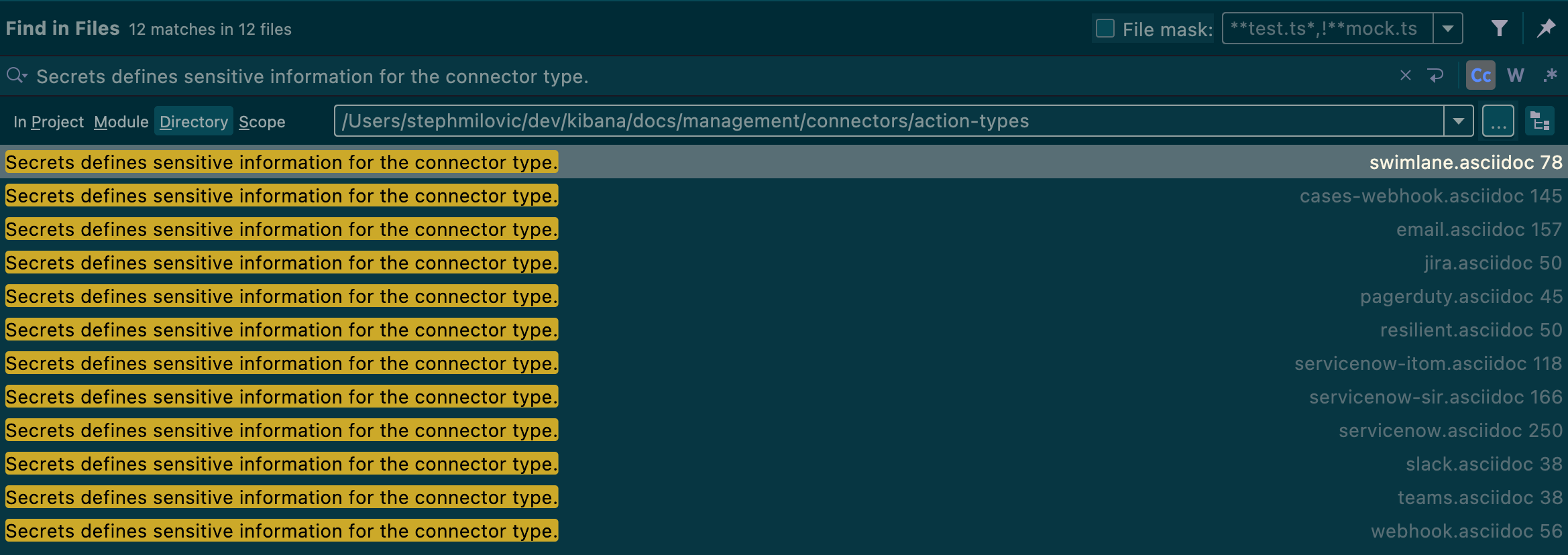
Secrets defines sensitive information for the connector type.
Copy link
Contributor

Choose a reason for hiding this comment

The reason will be displayed to describe this comment to others. Learn more.

Is this the definition of a certain field or attribute?

Copy link
Contributor Author

Choose a reason for hiding this comment

The reason will be displayed to describe this comment to others. Learn more.

this is in every connector doc, labeling the config and secrets fields
Screen Shot 2022-08-08 at 8 06 42 AM


`user`:: A string that corresponds to *User*. Required if `hasAuth` is set to `true`.
`password`:: A string that corresponds to *Password*. Required if `hasAuth` is set to `true`.

[float]
[[define-webhook-ui]]
==== Define connector in Stack Management

Define Webhook - Case Management connector properties.

[role="screenshot"]
image::management/connectors/images/cases-webhook-connector.gif[Webhook - Case Management connector]
Copy link
Contributor

Choose a reason for hiding this comment

The reason will be displayed to describe this comment to others. Learn more.

image::management/connectors/images/cases-webhook-connector.gif[Webhook - Case Management connector]

IMO this would be simpler to maintain as a static image, like in the other connector pages. Ideally the UI is intuitive enough that it doesn't require this animation.


Test Webhook - Case Management action parameters.
Copy link
Contributor

Choose a reason for hiding this comment

The reason will be displayed to describe this comment to others. Learn more.

It could be useful to describe a test or two that users can run. This is just a nice-to-have though!


[role="screenshot"]
image::management/connectors/images/cases-webhook-test.gif[Webhook - Case Management params test]
Copy link
Contributor

Choose a reason for hiding this comment

The reason will be displayed to describe this comment to others. Learn more.

image::management/connectors/images/cases-webhook-test.gif[Webhook - Case Management params test]

Ditto re preference for static image that we can then automatically update and maintain.


[float]
[[webhook-action-configuration]]
==== Action configuration

Webhook - Case Management actions have the following configuration properties.

Title:: A title for the issue, used for searching the contents of the knowledge base.
Description:: The details about the incident.
Labels:: The labels for the incident.
Additional comments:: Additional information for the client, such as how to troubleshoot the issue.
Loading
Sorry, something went wrong. Reload?
Sorry, we cannot display this file.
Sorry, this file is invalid so it cannot be displayed.
Loading
Sorry, something went wrong. Reload?
Sorry, we cannot display this file.
Sorry, this file is invalid so it cannot be displayed.
1 change: 1 addition & 0 deletions docs/management/connectors/index.asciidoc
Original file line number Diff line number Diff line change
Expand Up @@ -11,5 +11,6 @@ include::action-types/servicenow-itom.asciidoc[leveloffset=+1]
include::action-types/swimlane.asciidoc[]
include::action-types/slack.asciidoc[]
include::action-types/webhook.asciidoc[]
include::action-types/cases-webhook.asciidoc[]
include::action-types/xmatters.asciidoc[]
include::pre-configured-connectors.asciidoc[]