Allow users with read access to view Integrations app#113925
Allow users with read access to view Integrations app#113925joshdover merged 10 commits intoelastic:masterfrom
Conversation


 joshdover
added
the
Feature:Unified Integrations
joshdover
added
the
Feature:Unified Integrations

|
@joshdover Thanks for thinking through this scenario. We didn't define it in our doc but its important to consider because self-managed clusters do not have security enabled by default. I want to make sure I understand your proposal. Today when a user starts a self-managed cluster, security is disabled by default. When they visit the integrations page, they see the list of elastic agent integrations but get an error if they lack superuser or security is not enabled. In this PR, you are proposing that when this user visits the integrations page they do not see any elastic agent integrations nor any notice that they are missing integrations? If so, that seems like a regression since they lose visibility to both the integrations and the requirements to enable them. I'm worried that a large percentage of users in new self-managed clusters will be unaware that they are losing visibility. One option is consistent with our design for when the user lacks privileges to add agent integrations. We show a read-only mode, disable the add integration button and potentially add hovertext to explain that they need to enable security. The advantage is that users get visibility to the full set of integrations and a message explaining how to enable them. If they are not interested in using Elastic Agent integrations they can use the filter on the browse tab or clear the EPR URL. A second option is to show a info box similar to when EPR is not accessible. This tells the user they need to enable security to see the full set of integrations. In this case, users get defaulted to Beats automatically. However, I'm not sure that users with security disabled necessarily prefer Beats over Elastic Agent. It could just be they didn't around to enabling security yet, but they intend to do so eventually. I prefer the first option since it offers more visibility to agent integrations, but curious what you and @alexfrancoeur think too. |
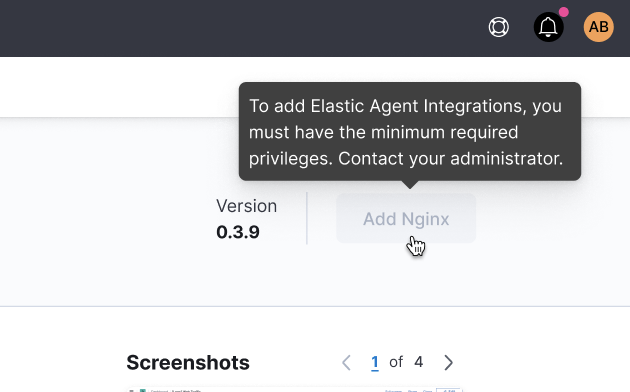
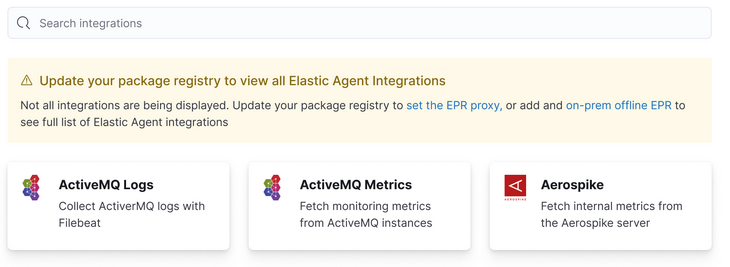

Good point on losing discoverability of integrations here. My thinking was that it wasn't a regression since they already couldn't access them, but you are right that we would be removing one key way to discover that Elastic Agent integrations exist. Poking around a bit more in the code, I'm not too worried about the scope required to support either of the experiences you suggest above. If anything, option (1) is easier. I do wonder if we'd be making things confusing with option (1) since most of the tiles shown to the user in this case wouldn't be actionable for them unless they enable security. Could that reduce ingestion rates for on-prem clusters in 7.16?
|
|
Thinking through this again, I'd love to provide users a link to documentation so they can discover how to enable security. Its not an easy or intuitive process. We have a full page banner in Fleet with links to docs, but not in the Integrations app. @dborodyansky |
|
Just had talk with Dmitry and he's going to take this on. Also, it looks like the security check in Fleet is only partially enabled since its implemented in the wrong order #83001. We also need to add an API key check. |
joshdover
force-pushed
the
int-read-access
branch
from
19db3ba to
ed6bd26
Compare
Great, makes sense. I'll update this PR to support the following in both scenarios (where security is disabled in ES only and where security is disabled in Kibana and ES):
We can then leverage the fix for #83001 and add any additional UX improvements for this scenario in a separate PR. Does that make sense to you, @mostlyjason? |
joshdover
force-pushed
the
int-read-access
branch
from
ed6bd26 to
39ed9a9
Compare
|
I've pushed up changes to allow the same behavior regardless of how security is disabled (in ES, or ES and Kibana). @mostlyjason let me know if the plan I proposed above works and we can set this to ready for review. |
joshdover
force-pushed
the
int-read-access
branch
from
39ed9a9 to
ca47ad1
Compare

|
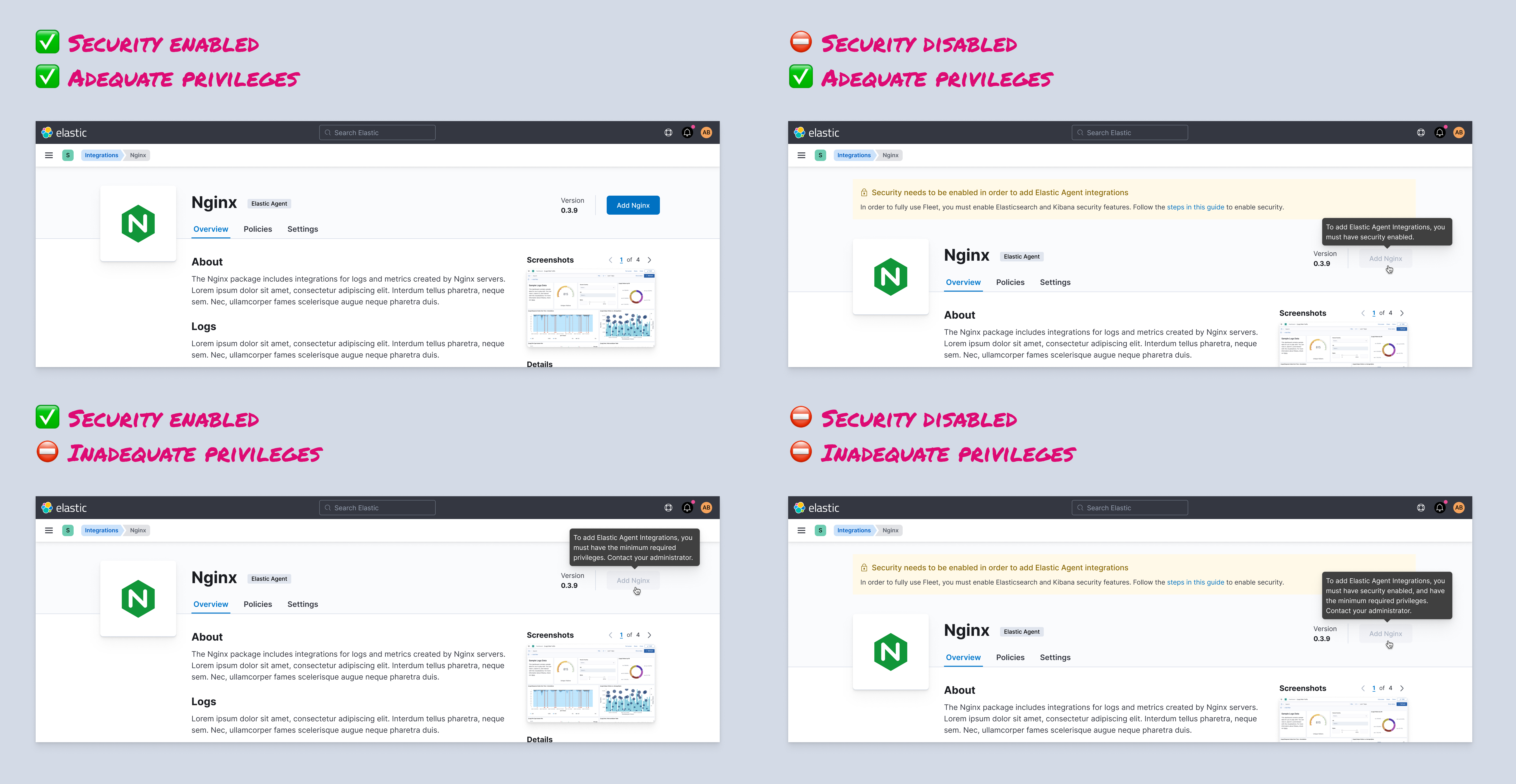
@mostlyjason @joshdover Please let me know if I understood this correctly. My assumptions are limitations result in inability to add an integration. Limitations include:
With this in mind, what do you think of the following proposal:
|
|
Thanks @dborodyansky! We should only show the tabs and actions appropriate for read-only mode of the UI. You can read up on those requirements in my google doc titled "Allow non-superusers to access the integrations app". Also, where does the "Steps in this guide" link to? Does it handle both security being disabled and the API key being disabled? @joshdover I'd modify your proposal for when security is disabled in this way
|
All of this is already covered in this PR for read-only users. The only difference here when security is disabled is that the Asset tab won't be present (since integrations can't be installed), so they'll only see the Overview tab.
👍 |
|
@dborodyansky @mostlyjason a few questions related to the designs:
|
|
@joshdover I think if security is disabled then they cannot log in as a superuser role, so the top right use case is not possible. The bottom left indicates the next step they need to take. I think it'd be fine to link to Fleet to show the dialog. We need to make sure the two checks align so the user doesn't get redirected and see nothing. |
|
Does the following look accurate? |
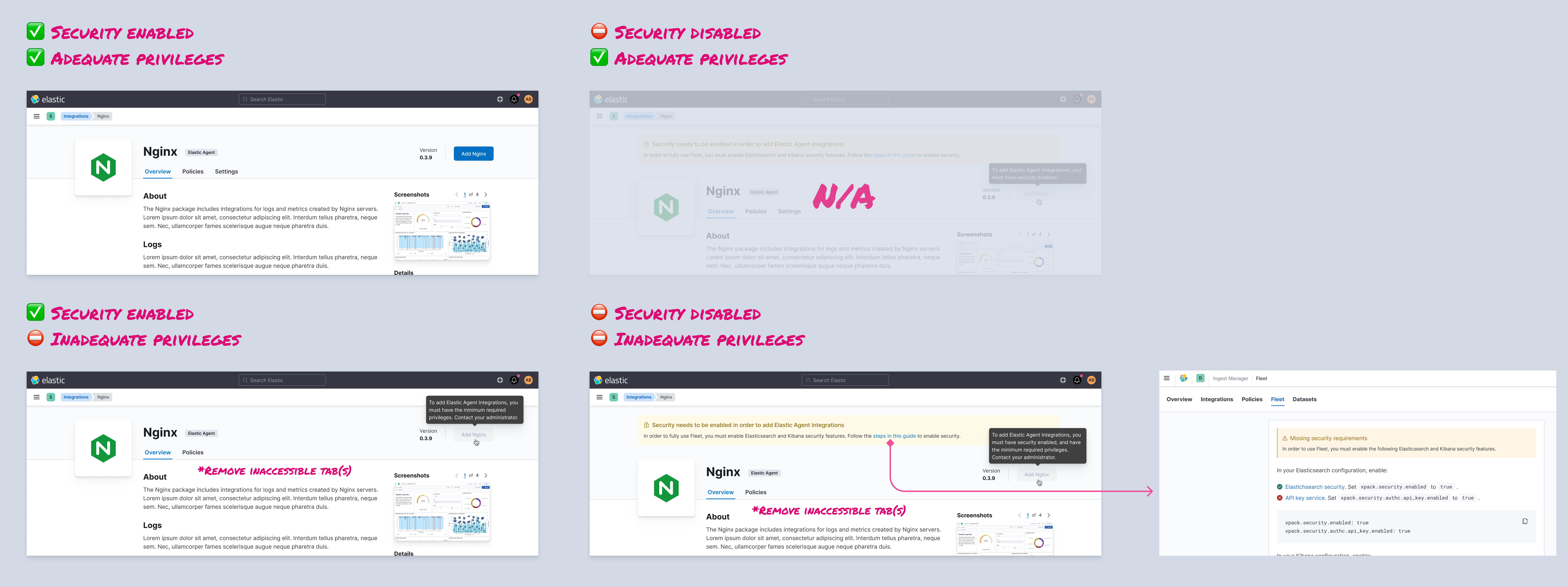
++ this is what I was trying to explain, but this was more clearly put 😅
Yes, thanks all. I'll have this in review tomorrow. |
joshdover
force-pushed
the
int-read-access
branch
from
ca47ad1 to
4c63d25
Compare
 joshdover
force-pushed
the
int-read-access
branch
from
joshdover
force-pushed
the
int-read-access
branch
from
4c63d25 to
018dc91
Compare
joshdover
added
auto-backport

|
Pinging @elastic/fleet (Team:Fleet) |
joshdover
added
release_note:enhancement
and removed
enhancement

 kpollich
left a comment
kpollich
left a comment
kpollich
left a comment
There was a problem hiding this comment.
LGTM 🚀 - Created a read-only user w/ the viewer role in Kibana and was able to view integrations on this branch.

 thomasneirynck
left a comment
thomasneirynck
left a comment
thomasneirynck
left a comment
There was a problem hiding this comment.
lgtm
can confirm:
- created user with viewer-role
- can access integration page
- cannot install an AWS package
- tooltip shows with extra info
- asset-tab is hidden (except when package is installed)
Wasn't sure how to verify the callout for missing security-enablement.

💚 Build Succeeded
Metrics [docs]Async chunks
Page load bundle
History
To update your PR or re-run it, just comment with: |
💔 Backport failed
To backport manually run: |


|
this backport is failing because we're backed up a little on backports of prereqs. Working through this as we speak. Will create new backport once we're through all the outstanding prereqs (this one likely #114432 (comment)) |
|
once #114910 merges, I'll backport this one |


7 participants


Summary
Fixes #94322
This makes the following changes:
Release Note
Users without the superuser role may view integrations and their assets in the Integrations app if they have "read" permissions for Fleet & Integrations.
Checklist
Delete any items that are not applicable to this PR.
For maintainers