Create a status component and use it in EUI Docs to announce page loads to screen readers #5991
Conversation


* Added the live region announcement for route changes.
* Adding new component for SR status, tests.
* Adding tests for pageTitle and focus management.
 1Copenut
added
documentation
1Copenut
added
documentation

 1Copenut
left a comment
1Copenut
left a comment
1Copenut
left a comment
There was a problem hiding this comment.
Left a few comments for use cases and testing done to this point.
| <> | ||
| {name} | ||
| <EuiScreenReaderOnly> | ||
| <span> - same page</span> |
There was a problem hiding this comment.
I added this SR-only span to cue that some links in the docs left nav won't load a new route or announce themselves past the "click" sound.
|
|
||
| return ( | ||
| <LinkWrapper> | ||
| <EuiScreenReaderStatus |
There was a problem hiding this comment.
Tested in Safari and Firefox with VoiceOver (MacOS Monterey). Request is out for more screen reader testing, but I have 💯 confidence this technique will work.

|
Preview documentation changes for this PR: https://eui.elastic.co/pr_5991/ |

|
I'm not seeing the point of the new |

|
I considered that, but felt extending the |
|
I don't agree - the double
In the case of announcing SPA navigation that is still 100% applicable. If for any reason the consuming application has the same page title on two different pages, we still want the screen reader to read out that they've navigated to the duplicated title, which the current component would not do. To bypass existing components instead of dogfooding negates research and testing done by multiple libraries. I strongly think we should be using the live region component we already have. |

 elizabetdev
left a comment
elizabetdev
left a comment
elizabetdev
left a comment
There was a problem hiding this comment.
LGTM! 🎉
Tested in Chrome, Safari, Edge, and Firefox. I also read the docs and have one small suggestion.
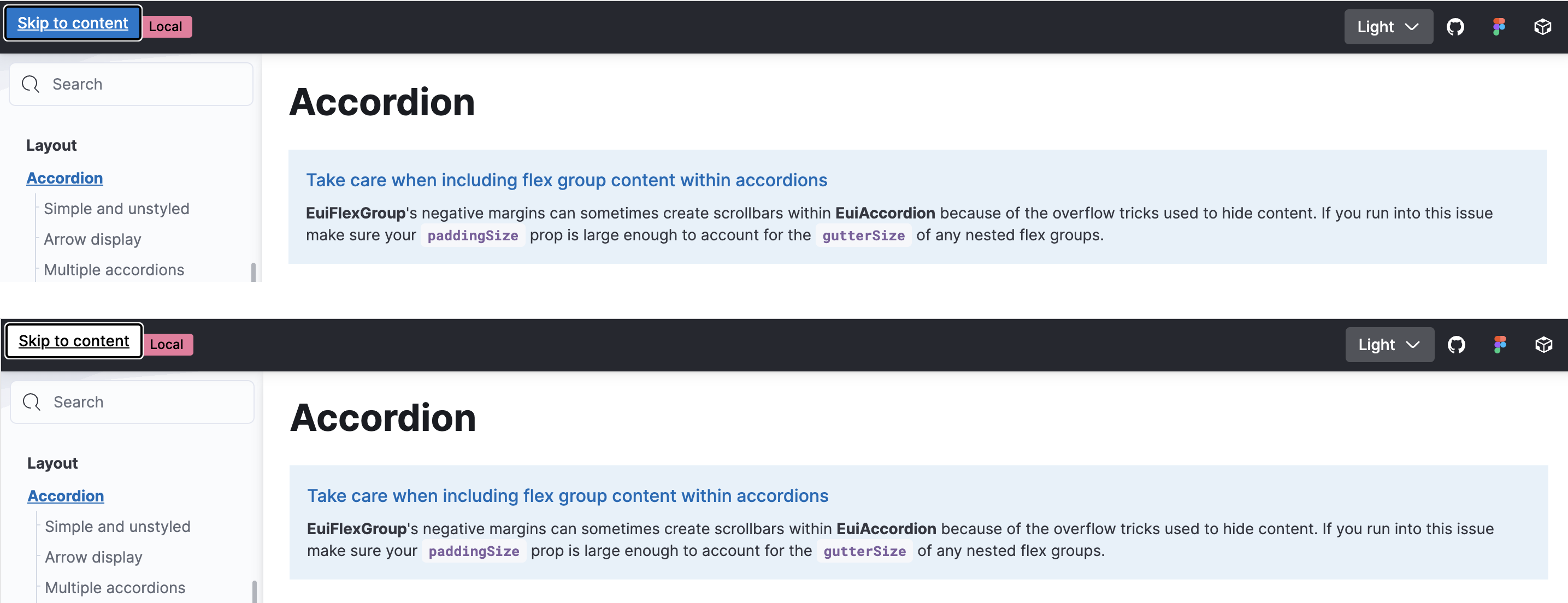
For the EuiSkipLink what do you think of changing the color to ghost? The skip link will always sit on top of a dark EuiHeader so the ghost button looks better IMO.
| <p> | ||
| <EuiLink | ||
| href="https://developer.mozilla.org/en-US/docs/Web/Accessibility/ARIA/Roles/status_role" | ||
| external | ||
| > | ||
| ARIA role status guidelines | ||
| </EuiLink> | ||
| </p> |
There was a problem hiding this comment.
Normally we don't have links in our documentation without any context. So we should tell why consumers should open the link, in this case, to learn more about the status role (I guess):
| <p> | |
| <EuiLink | |
| href="https://developer.mozilla.org/en-US/docs/Web/Accessibility/ARIA/Roles/status_role" | |
| external | |
| > | |
| ARIA role status guidelines | |
| </EuiLink> | |
| </p> | |
| <p> | |
| To learn more about the status role make sure to read the{' '} | |
| <EuiLink | |
| href="https://developer.mozilla.org/en-US/docs/Web/Accessibility/ARIA/Roles/status_role" | |
| external | |
| > | |
| ARIA guidelines | |
| </EuiLink>. | |
| </p> |
There was a problem hiding this comment.
Can do! Thank you @miukimiu. I'm also going to work up a second option in a separate PR to address @constancecchen comments above. I'll make the same requested style changes there so we get them regardless of which is merged.
|
Preview documentation changes for this PR: https://eui.elastic.co/pr_5991/ |
|
Closing this PR in favor of #5995. We found a better way to re-purpose the |
4 participants


Summary
Adding an
EuiScreenReaderStatuscomponent to announce changes to screen readers without requiring keyboard focus. The component allows focus to be controlled, so we can use it as a consistent announcement for SPA route changes.Tested for screen reader usability:
Checklist