Conversation


|
Can one of the admins verify this patch? |
6 similar comments
|
Can one of the admins verify this patch? |
|
Can one of the admins verify this patch? |
|
Can one of the admins verify this patch? |
|
Can one of the admins verify this patch? |
|
Can one of the admins verify this patch? |
|
Can one of the admins verify this patch? |

scripts/docs/generate_docc.sh
Outdated
|
|
||
| export DOCC_HTML_DIR=$docc_render_source_path/dist | ||
| # Accessing docc from toolchain | ||
| export TOOLCHAIN=/Library/Developer/Toolchains/swift-DEVELOPMENT-SNAPSHOT-2021-11-20-a.xctoolchain |

There was a problem hiding this comment.
I mean, no, we cannot hardcode the script to a specific path -- it should ask for the toolchain to be set instead for example -- require the TOOLCHAIN var exists.
There was a problem hiding this comment.
Something like this....
if [[ ! -d "$docc_source_path" ]]; then
cd /Library/Developer/Toolchains/swift-DEVELOPMENT-SNAPSHOT-2021-11-20-a.xctoolchain
else
echo "TOOLCHAIN var exists."

There was a problem hiding this comment.
@shilpeegupta14 - I suspect what you want to do is check to see if the environment variable TOOLCHAIN is already set, and if so - use it. For a linux platform with a nightly swift pre-installed and already added to the relevant paths (such as a docker build from a nightly swift toolchain release), then you won't need to prefix the commands with TOOLCHAIN, as they should be already on the path (I haven't double-checked that hypothesis though).
In either case, you'll want to likely set the DOCC_HTML_DIR environment variable so that docc, however you invoke it, knows where to find its HTML goodies it wants to combine/link with the output.
StackOverflow has a nice reference to this otherwise awkward problem of determining if an environment variable is already set, which amounts to doing something like:
if [ -z ${var+x} ]; then echo "var is unset"; else echo "var is set to '$var'"; fi
Translating that to "require an environment TOOLCHAIN to be set in order to proceed" might be:
if [ -z ${TOOLCHAIN+x} ]; then echo "TOOLCHAIN is unset"; exit(1); fi
Then from there, build up the DOCC_HTML_DIR:
export DOCC_HTML_DIR=${TOOLCHAIN}/usr/share/docc/render/
scripts/docs/generate_docc.sh
Outdated
| export DOCC_HTML_DIR=$docc_render_source_path/dist | ||
| # Accessing docc from toolchain | ||
| export TOOLCHAIN=/Library/Developer/Toolchains/swift-DEVELOPMENT-SNAPSHOT-2021-11-20-a.xctoolchain | ||
| cd $TOOLCHAIN/usr/bin/docc |
There was a problem hiding this comment.
this is a binary, we don't "cd" it.
There was a problem hiding this comment.
okay so only this much will help
$TOOLCHAIN/usr/bin/docc
There was a problem hiding this comment.
yep, invoke with $TOOLCHAIN/usr/bin/docc once you've verified that TOOLCHAIN is defined.

|
Adjusted the generate_docc.sh file to invoke docc from toolchains now. Motivation: Now that the DocC ships in toolchains, I adjusted the generate_docc.sh file to invoke docC directly from toolchains. I am making this change in order to learn contributing effectively. I am trying to update the DocC. Modifications:
|
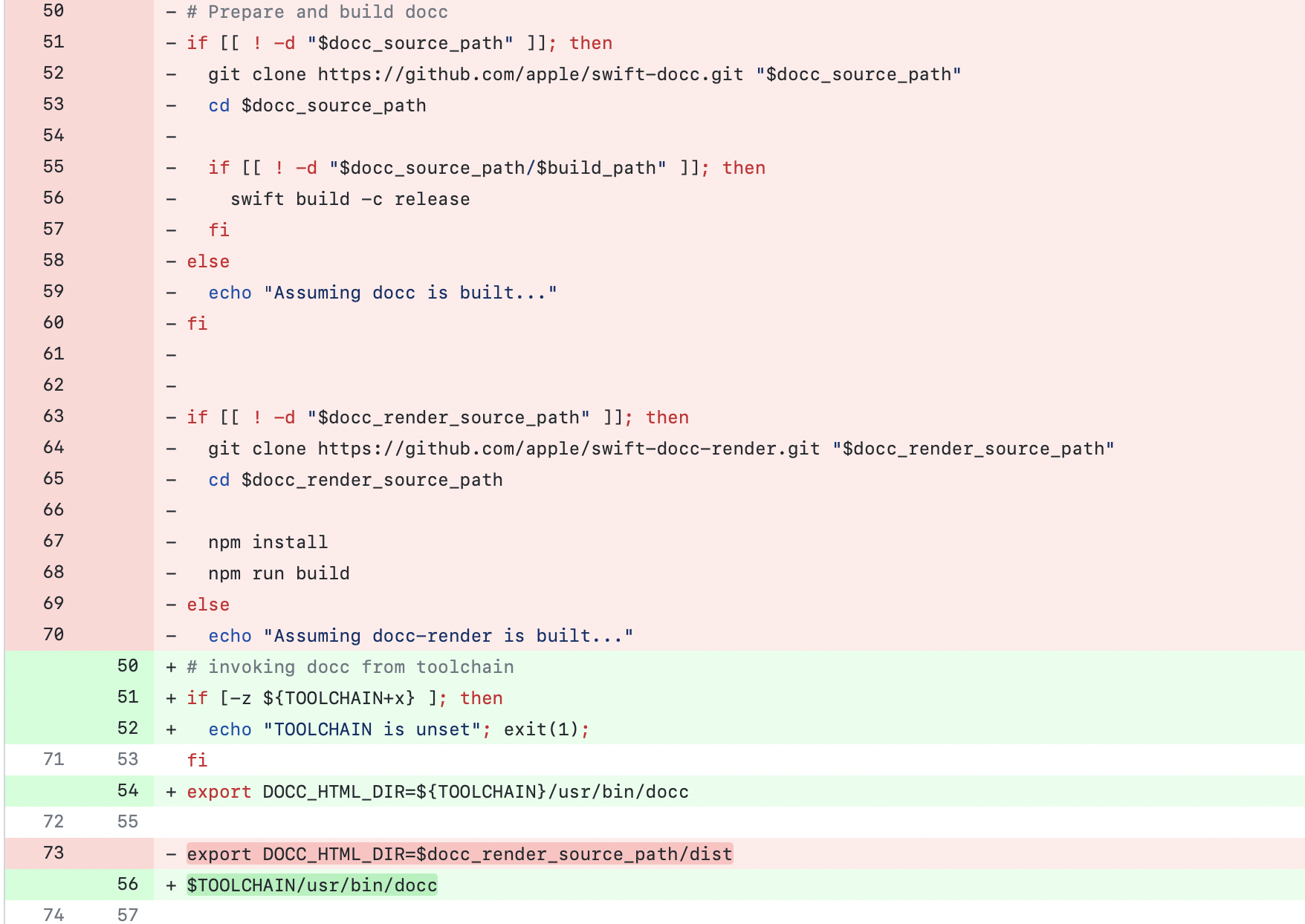


| echo "Assuming docc-render is built..." | ||
| # invoking docc from toolchain | ||
| if [-z ${TOOLCHAIN+x} ]; then | ||
| echo "TOOLCHAIN is unset"; exit(1); |

There was a problem hiding this comment.
This gives an error on my machine with zsh.
line 52: syntax error near unexpected token `1'
| export DOCC_HTML_DIR=${TOOLCHAIN}/usr/bin/docc | ||
|
|
||
| export DOCC_HTML_DIR=$docc_render_source_path/dist | ||
| $TOOLCHAIN/usr/bin/docc |
There was a problem hiding this comment.
Calling docc seems useless here for me.
What we want is to export the env DOCC_HTML_DIR so that we can use it later when call docc in preview_docc.sh
| if [-z ${TOOLCHAIN+x} ]; then | ||
| echo "TOOLCHAIN is unset"; exit(1); | ||
| fi | ||
| export DOCC_HTML_DIR=${TOOLCHAIN}/usr/bin/docc |
There was a problem hiding this comment.
DOCC_HTML_DIR should point to the docc-render dist dir or in the toolchain it is located at /usr/share/docc/render


|
Replaced by #865 Thanks for the effort @shilpeegupta14, maybe you'll find something else you can contribute; |
5 participants


Adjusted the generate_docc.sh file to invoke docc from toolchains now.
Motivation:
Now that the DocC ships in toolchains, I adjusted the generate_docc.sh file to invoke docC directly from toolchains. I am making this change in order to learn contributing effectively. I am trying to update the DocC.
Modifications:
export TOOLCHAIN=/Library/Developer/Toolchains/swift-DEVELOPMENT-SNAPSHOT-2021-11-20-a.xctoolchain.
cd $TOOLCHAIN/usr/bin/docc
Result: