Skip to content

feat: log scale and step size control for range filters [WIP]#18009

Closed
stevetracvc wants to merge 28 commits intoapache:masterfrom
stevetracvc:feat/range-filter-extras
Closed

feat: log scale and step size control for range filters [WIP]#18009
stevetracvc wants to merge 28 commits intoapache:masterfrom
stevetracvc:feat/range-filter-extras

Conversation

@stevetracvc
Copy link
Contributor

@stevetracvc stevetracvc commented Jan 12, 2022

SUMMARY

This is my PR for issue Extra features for Range Filters #16582 (sorry, I screwed up my original PR #16591)

Range filters are fantastic, but there is no simple way to adjust the step size or the scale of the range. Scale is useful for large ranges, eg a log scale, so that you can easily select small and large values

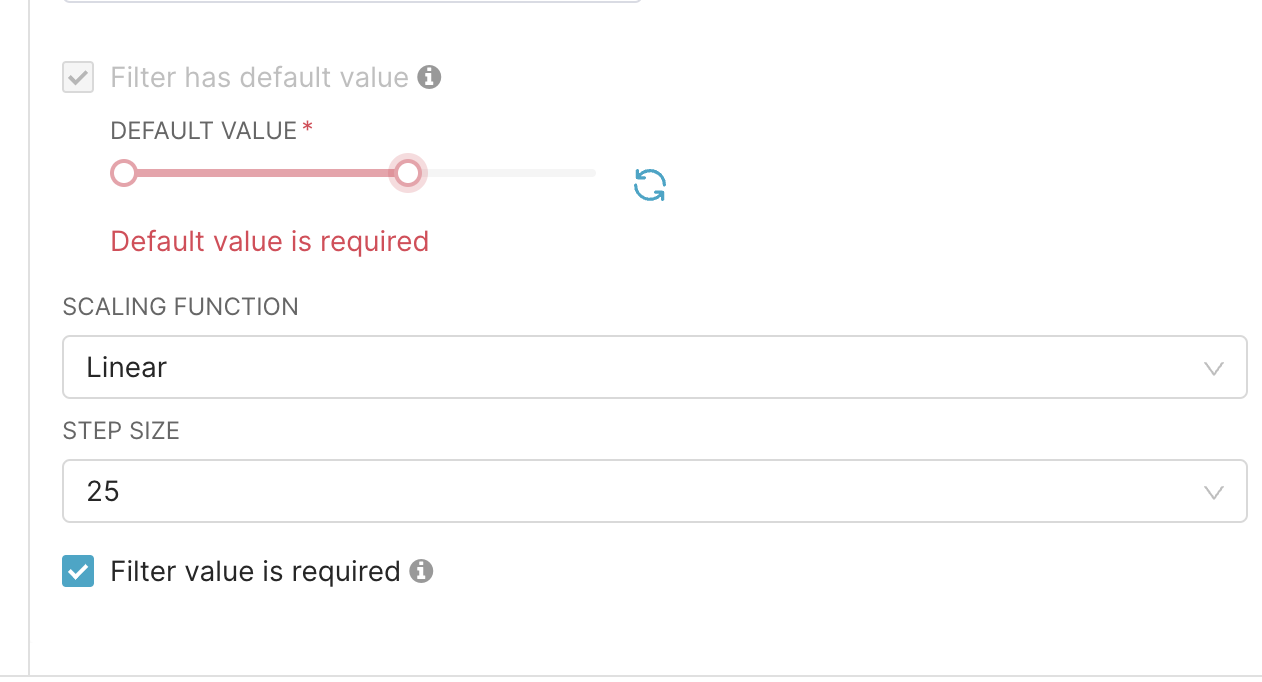
  • Step Size is just an additional Advanced Config dropdown box with several pre-populated choices, as well as a free form option. The tricky part was getting it to properly work in the Native Filter Config modal, since they're expecting all parameters to be checkboxes.
  • Scale is a little trickier, but it could possibly be set up as multiple options (eg log, power, etc). Currently I implemented a log scale option, which would make zeros hard. I'm currently ignoring that :)

BEFORE/AFTER SCREENSHOTS OR ANIMATED GIF

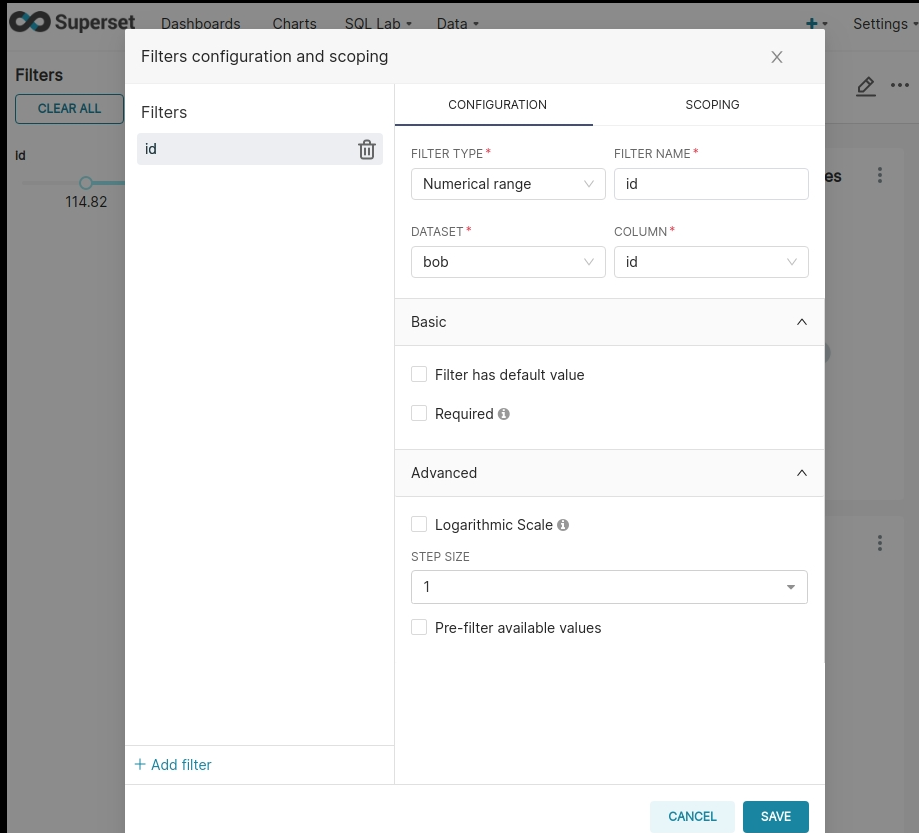
Config Screen Usage
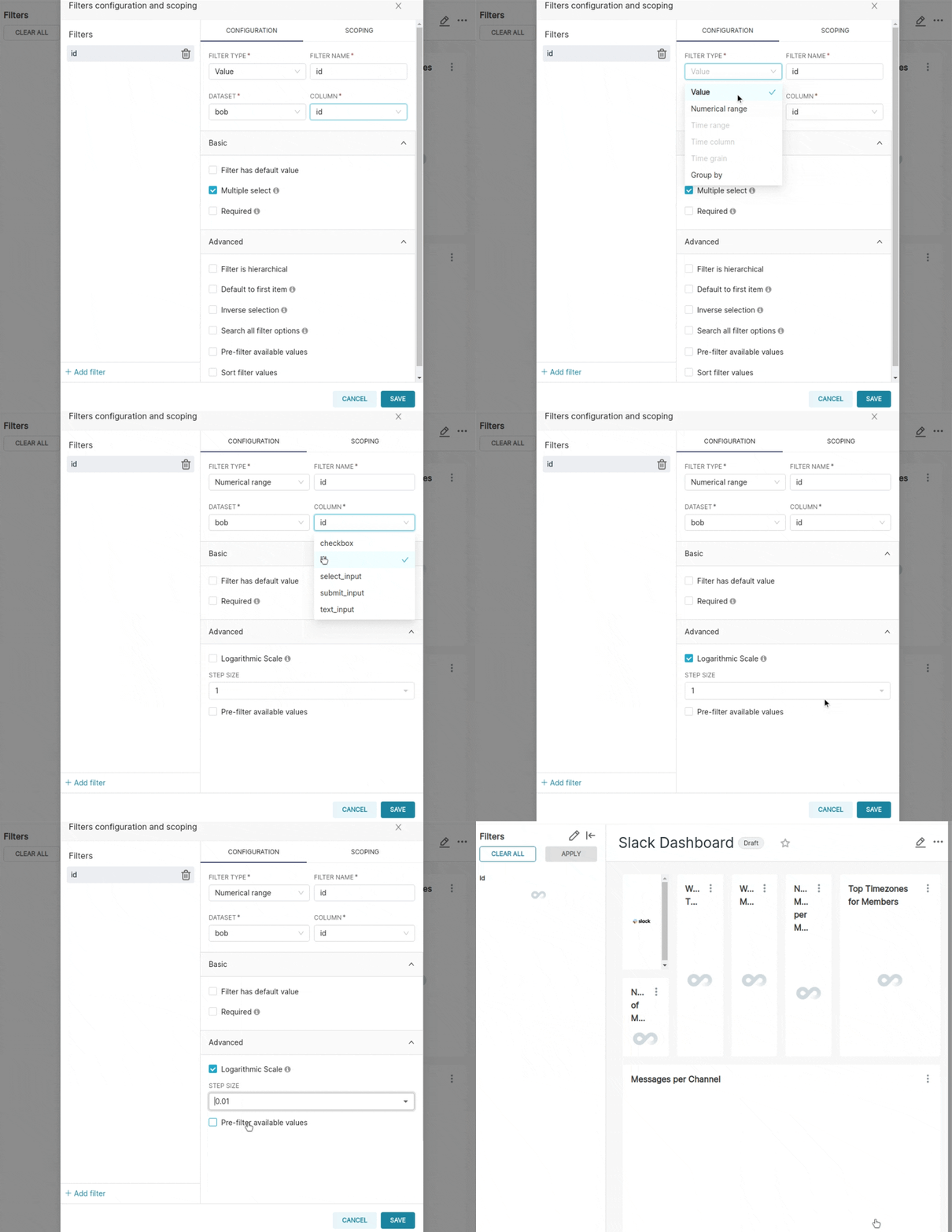
config screen use

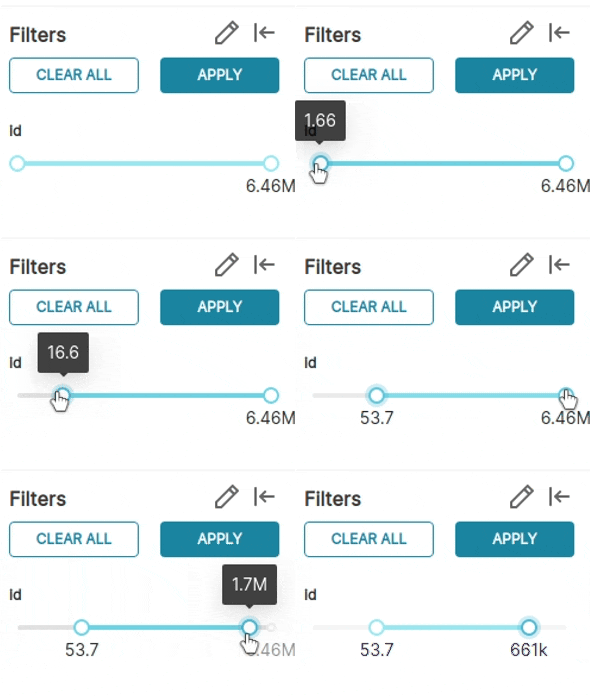
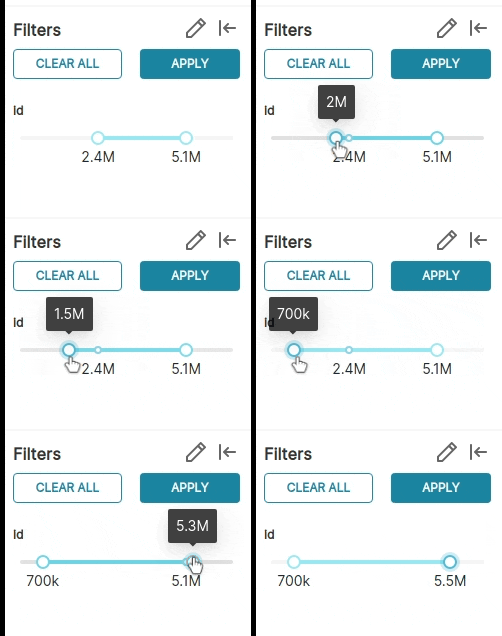
Log Scale with 0.01 step size
log-scale and 0 01 step

Linear Scale with 100k step size
linear-scale and 100k step

Config Screen Defaults
config screen defaults

TESTING INSTRUCTIONS

ADDITIONAL INFORMATION

  • Has associated issue: Fixes Extra features for Range Filters #16582
  • Required feature flags: DASHBOARD_NATIVE_FILTERS, DASHBOARD_CROSS_FILTERS
  • Changes UI
  • Includes DB Migration (follow approval process in SIP-59)
    • Migration is atomic, supports rollback & is backwards-compatible
    • Confirm DB migration upgrade and downgrade tested
    • Runtime estimates and downtime expectations provided
  • Introduces new feature or API
  • Removes existing feature or API

Known Issues

  • currently, I add 1 to the min and max values if it's supposed to be log scale. I probably need to check if (a) 0 is one of the min/max values, and (b) whether the range is negative

@stevetracvc stevetracvc changed the title feat: log scale and step size control for range filters feat: log scale and step size control for range filters [WIP] Jan 12, 2022
Copy link
Member

@geido geido left a comment

Choose a reason for hiding this comment

The reason will be displayed to describe this comment to others. Learn more.

Hey @stevetracvc I appreciate a lot the contributions that you are making! I am reviewing this PR which is still a WIP for some quick nits. Let me know when you are ready for a more in-depth review. Thank you!

@rusackas
Copy link
Member

Fixes #17043

@geido
Copy link
Member

geido commented Jan 21, 2022

@stevetracvc I see that some tests are requiring some love. Let me know how I can help to move this forward! Thank you

@codecov
Copy link

codecov bot commented Mar 24, 2022

Codecov Report

Merging #18009 (8edf2b8) into master (88029e2) will increase coverage by 0.10%.
The diff coverage is 54.29%.

❗ Current head 8edf2b8 differs from pull request most recent head f9f556b. Consider uploading reports for the commit f9f556b to get more accurate results

@@            Coverage Diff             @@
##           master   #18009      +/-   ##
==========================================
+ Coverage   66.57%   66.68%   +0.10%     
==========================================
  Files        1667     1682      +15     
  Lines       64421    64367      -54     
  Branches     6503     6593      +90     
==========================================
+ Hits        42886    42920      +34     
+ Misses      19850    19736     -114     
- Partials     1685     1711      +26     
Flag Coverage Δ
javascript 51.54% <54.29%> (+0.19%) ⬆️

Flags with carried forward coverage won't be shown. Click here to find out more.

Impacted Files Coverage Δ
...ntrols/src/components/CertifiedIconWithTooltip.tsx 80.00% <ø> (ø)
...erset-ui-chart-controls/src/components/Tooltip.tsx 80.00% <ø> (ø)
...d/packages/superset-ui-chart-controls/src/index.ts 100.00% <ø> (ø)
...-chart-controls/src/sections/advancedAnalytics.tsx 33.33% <ø> (ø)
...omponents/ColumnConfigControl/ColumnConfigItem.tsx 0.00% <ø> (ø)
...et-ui-chart-controls/src/shared-controls/index.tsx 36.19% <0.00%> (-0.35%) ⬇️
...perset-ui-chart-controls/src/utils/D3Formatting.ts 100.00% <ø> (ø)
...s/superset-ui-core/src/query/api/v1/handleError.ts 100.00% <ø> (ø)
...uperset-ui-core/src/query/types/AnnotationLayer.ts 100.00% <ø> (ø)
...superset-ui-core/src/query/types/PostProcessing.ts 100.00% <ø> (ø)
... and 348 more

Continue to review full report at Codecov.

Legend - Click here to learn more
Δ = absolute <relative> (impact), ø = not affected, ? = missing data
Powered by Codecov. Last update 88029e2...f9f556b. Read the comment docs.

--ran into an issue when pulling and pushing some of this older code,
now it should work when resetting the filter

--it's easy to add in extra transforms, so I added cube and quad root
fixed default scaling in controlPanel, and added default in
RangeFilterPlugin to handle importing old range filters to the
new scaling system
@geido
Copy link
Member

geido commented Mar 29, 2022

/testenv up

@github-actions
Copy link
Contributor

@geido Ephemeral environment spinning up at http://54.203.236.191:8080. Credentials are admin/admin. Please allow several minutes for bootstrapping and startup.

@kgabryje
Copy link
Member

Thanks for the improvement @stevetracvc!
1 issue that I spotted while testing - if the upper range value is smaller then current value + step, then we can't select it. For example, in the video my range is about [0, 41]. When I select step 25, then I can only select values 0 and 25. I think 41 should also be selectable, even if that would mean making smaller step. WDYT?

Screen.Recording.2022-03-31.at.11.29.09.mov

@ghost
Copy link

ghost commented Mar 31, 2022

I'd probably expect something like min(maxRangeValue, currentValue + step), so for example with linear scale, step 25 and values in range [0,41], possible selections would be 0, 25, 41. But to be honest, the current behaviour kinda makes sense too... @yousoph @jess-dillard what do you think?

@kgabryje I agree with you – I would also expect the possible selections to be 0, 25, and 41 in that scenario.

inverseScale(upper),
),
filterState: {
value: lower !== null || upper !== null ? value : null,
Copy link
Contributor Author

@stevetracvc stevetracvc Mar 31, 2022

Choose a reason for hiding this comment

The reason will be displayed to describe this comment to others. Learn more.

@michael-s-molina What does the filterState.value do? The variable "value" is transformed, meaning it could be the log of the actual desired value. So I'd expect that this would need to actually be
value.map(inverseScale)
like how it is below for the lower and upper vars. But the queries appear to run properly, and the text labels are correct.... 🤔 I don't see any difference when I inverse this value or leave it transformed.

@geido
Copy link
Member

geido commented Apr 1, 2022

We might want to rearrange the controls. Clicking on "Filter has default value" triggers displaying default value control above the step controls, while step controls affect how default value picker works - that probably means that step controls should be above default value. image
CC @kasiazjc

That's an interesting observation but I have no idea how to do that. The default value stuff code is handled somewhere else, and honestly I'm not sure how it decides on the location of controlPanel components. In the controlPanel code for the Range Filter, I have

    {
      label: t('UI Configuration'),
      expanded: true,
      controlSetRows: [
        [
          {
            name: 'enableEmptyFilter',
            config: {
              type: 'CheckboxControl',
              label: t('Filter value is required'),
              default: false,
              renderTrigger: true,
              description: t(
                'User must select a value before applying the filter',
              ),
            },
          },
          {
            name: 'enableSingleValue',
            config: {
              type: 'CheckboxControl',
              label: t('Single value'),
              default: SingleValueType.Exact,
              renderTrigger: true,
              description: t('Use only a single value.'),
            },
          },
        ],
        [
          {
            name: 'scaling',
            config: {
              type: 'SelectControl',
              label: t('Scaling Function'),
              default: PluginFilterRangeScalingFunctions.LINEAR,
              renderTrigger: true,
              freeForm: false,
              choices: Object.keys(
                SCALING_FUNCTION_ENUM_TO_SCALING_FUNCTION,
              ).map(key => [
                key,
                SCALING_FUNCTION_ENUM_TO_SCALING_FUNCTION[key].display,
              ]),
              description: t('Choose a scaling function for the slider.'),
            },
          },
          {
            name: 'stepSize',
            config: {
              type: 'SelectControl',
              label: t('Step Size'),
              default: 1,
              renderTrigger: true,
              freeForm: true,
              choices: [
                [0.001, 0.001],
                [0.01, 0.01],
                [0.1, 0.1],
                [1, 1],
                [2, 2],
                [10, 10],
                [25, 25],
                [100, 100],
              ],
              description: t('Set the slider step size.'),
            },
          },
        ],
      ],
    },

But you can clearly see that's not the order the modal decides to put stuff. enableEmptyFilter is the last control in the modal, yet the first in the controlSetRows array. I still don't get exactly how that controlSetRows should be structured, as I would have thought the enableEmptyFilter and enableSingleValue controls would be on the same row (since they're in the same controlSetRow) which is (I believe) how it works for visualization controlPanel configs.

@stevetracvc @kgabryje

We had a conversation with @michael-s-molina who has suggested the following:

  • The easiest solution is just to leave it in the current position if we can live with it (of course)
  • Another way is to move the code directly into FiltersConfigForm between the description and the default value

You are right this wasn't straightforward forward but we aim to improve the codebase of native filters in the upcoming phase 2.

Some other observations that came out from our conversation:

  • This functionality should be under a checkbox as it’s very specific, such as “Customise default step scaling function”
  • The inputs should not take the full width of the Modal. Please follow the same UI of existing inputs
  • If the step size is lower than two decimals, the exact number of decimals should also be visible in the left sidebar, otherwise it’s impossible to see those decimals changing.

Let me know if you have any questions. Thanks for the hard work!

@stevetracvc
Copy link
Contributor Author

Awesome! Questions inline:

We had a conversation with @michael-s-molina who has suggested the following:

  • The easiest solution is just to leave it in the current position if we can live with it (of course)
  • Another way is to move the code directly into FiltersConfigForm between the description and the default value

If we did that, then that moves more of the config out of the specific native filter component's controlPanel file and into the main one. I had tried to make this more general so that other filter types could also include select boxes for controls if needed. If you do want the FiltersConfigForm modified instead, it seems like it should go under the "single value" checkbox, as part of the configuration rather than the settings. What do you think?

You are right this wasn't straightforward forward but we aim to improve the codebase of native filters in the upcoming phase 2.

Since that's the plan, which route would be better? It seems like we'd want everything in the specific component's controlPanel rather than spread across the two files. And maybe revisit this when phase 2 is complete?

Some other observations that came out from our conversation:

  • This functionality should be under a checkbox as it’s very specific, such as “Customise default step scaling function”

Is it really that specific? Am I one of the few people using range filters for a large range of values? If you want it hidden like that, then the wording on that needs improvement, since step size and scaling can each be used independent of the other one. Eg, you can't currently use a range filter for floats since the step size is inherently 1 (especially on a range 0 to 1). I feel like each one is its own thing, and step size could be incorporated without bothering with the scaling.

  • The inputs should not take the full width of the Modal. Please follow the same UI of existing inputs

I finally found where it does its magic, so I made them half width now (I haven't pushed yet). I'm starting to understand how everything works here, but a lot of what I originally did was just get it to work because these were features I needed...so I copied and pasted code.

The issue is that FiltersControlModal calls getControlItemsMap, which calls getControlItems, which flattens the controlPanel config array. I think ideally, step size and scaling function would be in the same row, don't you think? But that would take a decent rework of the FiltersConfigModal code to make that work.

  • If the step size is lower than two decimals, the exact number of decimals should also be visible in the left sidebar, otherwise it’s impossible to see those decimals changing.

Not sure I follow on this one, though it also might be related to the issue of values not being in exact increments of the step size. When I have the step size at 0.001, linear scale, for something with values 0 to 1, each increment is actually 0.005, which I think is a limitation on the antd slider control.

Let me know if you have any questions. Thanks for the hard work!

@stevetracvc
Copy link
Contributor Author

Actually I think I get what @geido you meant about the decimals being displayed. SMART_NUMBER formatting was used, which didn't seem to give enough digits of precision. I just changed that to switch to ".nf" where n is the precision of the stepSize.

Also I added validators to the stepSize in the controlPanel, which also required some conversion between the controlPanel validators and the StyledFormItem rules. It seems kind of odd that there are two drastically different validation methods being used. Will visualizations move to the FormItem rules? This is more obvious in the RangeFilter case because it can be both a native filter component AND a dashboard visualization.

There were issues with odd combinations of stepSize, min, and max
values. This now pushes the maximum value for the slider up to the
next integer increment of stepSize. Unfortunately, the antd slider
won't allow steps such as (0, 25, 50, 60) so it has to get bumped
to (0, 25, 50, 75)
@pull-request-size pull-request-size bot added size/XL and removed size/L labels Apr 6, 2022
@stevetracvc
Copy link
Contributor Author

stevetracvc commented Apr 6, 2022

I'd probably expect something like min(maxRangeValue, currentValue + step), so for example with linear scale, step 25 and values in range [0,41], possible selections would be 0, 25, 41. But to be honest, the current behaviour kinda makes sense too... @yousoph @jess-dillard what do you think?

@kgabryje I agree with you – I would also expect the possible selections to be 0, 25, and 41 in that scenario.

Unfortunately it looks like this is a restriction on the antd slider. You can't have 0, 25, 41. They say (max - min) / stepSize must be a whole number (evenly divisible). Recent push tackles this by bumping the max up to the next possible increment of stepSize. Not ideal, I know, but 0, 25, 50 is better than just 0, 25, and an unselectable 41

@kgabryje
Copy link
Member

Unfortunately it looks like this is a restriction on the antd slider. You can't have 0, 25, 41. They say (max - min) / stepSize must be a whole number (evenly divisible). Recent push tackles this by bumping the max up to the next possible increment of stepSize. Not ideal, I know, but 0, 25, 50 is better than just 0, 25, and an unselectable 41

@stevetracvc Ah I see. @yousoph @lauderbaugh if you guys are fine with this then I am too 🙂

@kgabryje
Copy link
Member

/testenv up

@github-actions
Copy link
Contributor

@kgabryje Ephemeral environment spinning up at http://34.219.118.108:8080. Credentials are admin/admin. Please allow several minutes for bootstrapping and startup.

@stevetracvc
Copy link
Contributor Author

@kgabryje weird. It works for step sizes LESS than 1, but not greater than. Eg on the video game sales, global sales is 0 to 82. Step size of 0.001 on log scale takes it up to 82.560. But if step size is 1, it stops at 81. I'll investigate

@rusackas
Copy link
Member

@stevetracvc it looks like this was on the road to success, but things halted. Do you still have interest/bandwidth to get this through?

@stevetracvc
Copy link
Contributor Author

@rusackas I got stuck on something. It works well enough for my usage but not for release. I would probably have time in Feb to look at it again

@rusackas
Copy link
Member

Heya @stevetracvc I'll go ahead and close this since it's been a couple years since it saw action. Please re-open it (or let me know do to so) and we'll be excited to rekindle this when the day comes!

@rusackas rusackas closed this Feb 22, 2024
Sign up for free to join this conversation on GitHub. Already have an account? Sign in to comment

Labels

Projects

None yet

Development

Successfully merging this pull request may close these issues.

Extra features for Range Filters

5 participants