refactor: Query search into functional component #13102
Conversation


 AAfghahi
force-pushed
the
querySearch
branch
3 times, most recently
from
AAfghahi
force-pushed
the
querySearch
branch
3 times, most recently
from
492d934 to
c9efdd2
Compare
AAfghahi
force-pushed
the
querySearch
branch
from
8aea363 to
89d67fe
Compare


|
@AAfghahi just ping me when you need another look! |
There was a problem hiding this comment.
I see the issue here. You're saying that setDatabaseId and setUserId are called elsewhere and it would trigger the refreshQueries function as well. Yeah, looks like what you have is the best bet. good catch on that.
AAfghahi
force-pushed
the
querySearch
branch
5 times, most recently
from
28033e9 to
554f481
Compare

Codecov Report
@@            Coverage Diff             @@
##           master   #13102      +/-   ##
==========================================
- Coverage   77.05%   73.14%   -3.92%
==========================================
  Files         897      599     -298
  Lines       45710    21135   -24575
  Branches     5497     5406      -91
==========================================
- Hits        35224    15460   -19764
+ Misses      10362     5549    -4813
- Partials      124      126       +2
Flags with carried forward coverage won't be shown. Click here to find out more.
Continue to review full report at Codecov.
|
 AAfghahi
force-pushed
the
querySearch
branch
from
AAfghahi
force-pushed
the
querySearch
branch
from
0d0928e to
786f965
Compare
|
@AAfghahi you can remove the package-lock.json file since you don't have a package.json update. |
There was a problem hiding this comment.
prob don't need this async here/no await
There was a problem hiding this comment.
you don't need it for the test to pass, but without them the console throws a console warning and tells you to do it.
There was a problem hiding this comment.
we usually call name these in TS with the name of the component, i.e., QuerySearchProps
There was a problem hiding this comment.
can we be more specific on the type? string or number?
There was a problem hiding this comment.
So, this one is a bit wonky because the queriesArray is actually taking in a json object that it puts in is an object. I went through some iteration where i was parsing through the json object you receive and pushing it into the empty array, but it wasn't rendering the table.
My issue here was that I can create an object prop and then put it in there, but then that would need me to also create aa prop object for the useState (though I could potentially use null, now that I am thinking about it?).
There was a problem hiding this comment.
this looks great. I think you can remove the comment?
There was a problem hiding this comment.
you can name this response. It looks like it's returning an object rather than a promise.
There was a problem hiding this comment.
I think React.KeyboardEvent will work
There was a problem hiding this comment.
oh! Yeah this is totally because of the debouncer. Apparently when you have a debouncer in hooks the event.target.value gets lost, so you have to tell it to persist the value. Without this formatting you could type something into the search bar, and it would show up on the screen but it wouldn't actually search for it. Kind of wild.
There was a problem hiding this comment.
you can also put the debounce where you call onChange below, so
onChange={debounce(onChange, 200)}
There was a problem hiding this comment.
I tried this, but ran into the same problem as above.
There was a problem hiding this comment.
ok, we can loop back to this another time.
There was a problem hiding this comment.
let's try to define something here rather than any
There was a problem hiding this comment.
yeah this bothered me too, and I looked through it is, is there a way to set up an object type without having to go through and create all the props for the object? Looking through the typescript documentation it didn't seem that there was.
There was a problem hiding this comment.
nit, but you might as well destructure id and database_name in the arg list.
 eschutho
left a comment
eschutho
left a comment
eschutho
left a comment
There was a problem hiding this comment.
looking great. I just left some ts feedback!
AAfghahi
force-pushed
the
querySearch
branch
from
81ca321 to
c92d37f
Compare
|

|
🏷 ready-to-merge |


 mistercrunch
added
🏷️ bot
mistercrunch
added
🏷️ bot
5 participants


SUMMARY
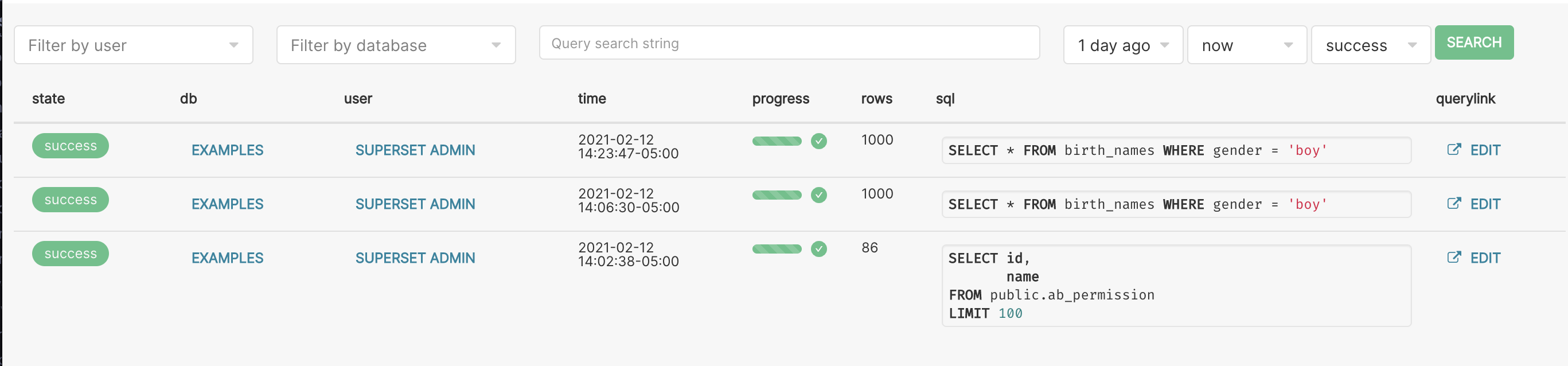
Made Query Search into a functional component from a class component.
Added to package.json because I added userEvent.
BEFORE/AFTER SCREENSHOTS OR ANIMATED GIF
Only refreshesQueries when you press enter in the QuerySearch or press the enter key:
TEST PLAN
I need to implement two more tests for checking when refreshQueries works.
ADDITIONAL INFORMATION